
Integration for Zoho CRM and Zoho Bigin – Contact Form 7, WPForms, Elementor, Gravity Forms and More
by Plugcrux
This plugin sends form submissions from Contact Form 7, WPForms, Elementor Forms, Gravity Forms, and Formidable Forms to Zoho CRM and Zoho Bigin.
When a user submits a form, the plugin can create or update records—such as leads, contacts, or deals—in your Zoho CRM or Zoho Bigin account. This helps reduce manual data entry and keeps your CRM data consistent with your website forms.
Why Use This Plugin?
- Stop copying form data manually into Zoho
- Instantly create Leads, Contacts, Deals, or Pipeline records from form submissions
- Works with the most popular WordPress form plugins
- Supports all major Zoho CRM modules and all Zoho Bigin modules including Pipelines
- No coding or API knowledge required
Supported WordPress Form Plugins
- Contact Form 7 — most popular free form plugin
- WPForms — beginner-friendly drag and drop forms
- Elementor Forms — forms built inside Elementor page builder
- Gravity Forms — advanced WordPress forms
- Formidable Forms — powerful form builder with calculations
Supported Zoho CRM Modules
Send form data to any Zoho CRM module:
- Leads — capture website leads directly into Zoho CRM
- Contacts — create or update contact records
- Accounts — sync company or organization data
- Deals/Pipelines — push deal information from forms
- Vendors, Campaigns, Price Books, Products
- Cases, Solutions
- Quotes, Sales Orders, Purchase Orders, Invoices
- Activities, Tasks, Events, Calls
- Projects, Notes, Attachments
- Custom Modules — sync data to any custom module you have created in Zoho CRM
Supported Zoho Bigin Modules
Send form data to any Zoho Bigin module:
- Pipelines — create new pipeline records (deals) in Zoho Bigin directly from form submissions
- Contacts — add or update contact records in Bigin
- Companies — sync company data from forms
- Products — push product information
- Activities, Tasks, Events, Calls, Notes
Zoho Bigin Pipelines: If you use Zoho Bigin to manage your sales pipeline, this plugin lets you automatically add new pipeline entries whenever a form is submitted — perfect for lead capture forms, quote request forms, or any form that starts a sales process.
How It Works
- A visitor submits a form on your WordPress site
- The plugin receives the submission instantly
- It maps each form field to the corresponding Zoho CRM or Bigin field
- It creates or updates the record in Zoho via the API
- The result is logged — success or failure — so you always know what happened
Key Features
- Real-time sync — form submissions are sent to Zoho immediately
- All major modules — Leads, Contacts, Deals, Pipelines, and more
- Flexible field mapping — map any form field to any Zoho field
- Custom values — send fixed text or dynamic values to Zoho fields
- System field mapping — automatically send page URL, submission time, and more
- Duplicate handling — choose to add, skip, or update existing records
- Primary key support — match records by email, phone, or any unique field
- Conditional logic (filter criteria) — only sync when specific conditions are met
- Picklist helper — see allowed values for Zoho picklist fields and copy them with one click
- Notes field (Pro) — attach a note to every record created in Zoho
- File attachments (Pro) — upload form file fields to Zoho record attachments
- Tag support (Pro) — add tags to Zoho records from form submissions
- Detailed logs — view every submission with status, request data, and Zoho response
- Resync — manually resync failed records from the Logs page (Pro)
- Email notifications — get notified when a record fails to sync
- Multiple accounts — connect more than one Zoho account
- Enable or disable integrations — pause any integration without deleting it
Picklist Allowed Values Helper
When mapping a Zoho picklist field (such as Lead Source, Salutation, Status, or any dropdown field), an info icon appears next to the field. Click or hover to see all allowed values. Click any value to copy it — then paste it as a custom value in your field mapping. This prevents errors caused by sending values that Zoho does not accept.
Duplicate Record Handling
Choose what happens when a matching record already exists in Zoho:
- Add (ignore if exists) — always create a new record
- Skip if exists — do not create if a matching record is found (Pro)
- Add or update — create if new, update if exists (Pro)
- Update only — only update existing records, never create (Pro)
Filter Criteria (Conditional Logic)
Control when form submissions are sent to Zoho. For example:
- Only sync if the user selects “Yes” to a question
- Only send to Zoho if the form includes a valid email
- Filter by dropdown selection, checkbox value, or any field
Authentication
To connect your Zoho account:
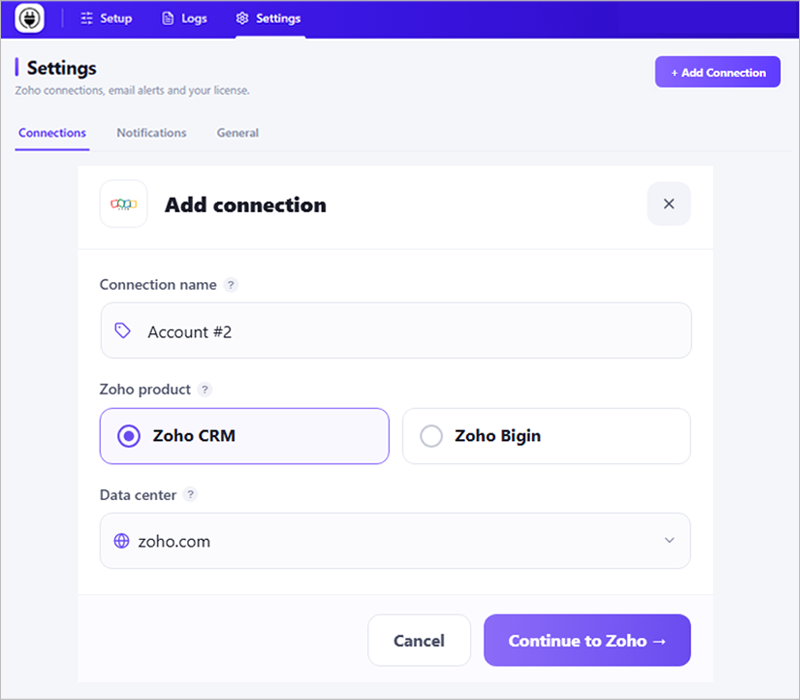
- Go to Settings Connections in the plugin (older links to the Accounts tab open this page).
- Click + Add Connection.
- Enter an identifiable account name (for example, “Main Zoho CRM Account”).
- Select the appropriate data center (for example,
zoho.com,zoho.eu,zoho.in). - Click Authenticate to open the Zoho authorization page.
- Log in to Zoho and approve the requested permissions.
- After approval, you will be redirected back to WordPress and the connection will appear under Settings Connections.
You can also connect or reconnect a Zoho account from the first step of the Add/Edit Integration screen.
Add Integration
To create a new integration:
- Go to the Setup page.
- Click Add Integration.
- Enter an integration name (for example, “Contact Form 7 to Zoho Leads”).
- Select the form plugin (Contact Form 7, WPForms, Elementor, Gravity Forms, or Formidable).
- Choose the connected Zoho account.
- Select the Zoho module (for example, Leads, Contacts, Pipelines, Deals).
- Map your form fields to the corresponding Zoho fields.
- Optionally set a duplicate handling rule and primary key field.
- Optionally add filter criteria to control when records are created.
- Click Save Mapping.
Logs
The plugin provides a Logs section to monitor every form submission:
- View all submissions with their status (SUCCESS, or the error code of a failed one)
- Filter by status (Success, Failed or Skipped) — Skipped means the entry was not sent because it did not match the integration’s filter
- See the full request sent to Zoho and the response received
- Search and filter logs by integration and message, and sort by newest, oldest or most retries
- Resync failed records individually or in bulk (Pro)
- Delete log entries one by one, in bulk, or all at once
- Press Refresh to load the newest logs on demand
Settings
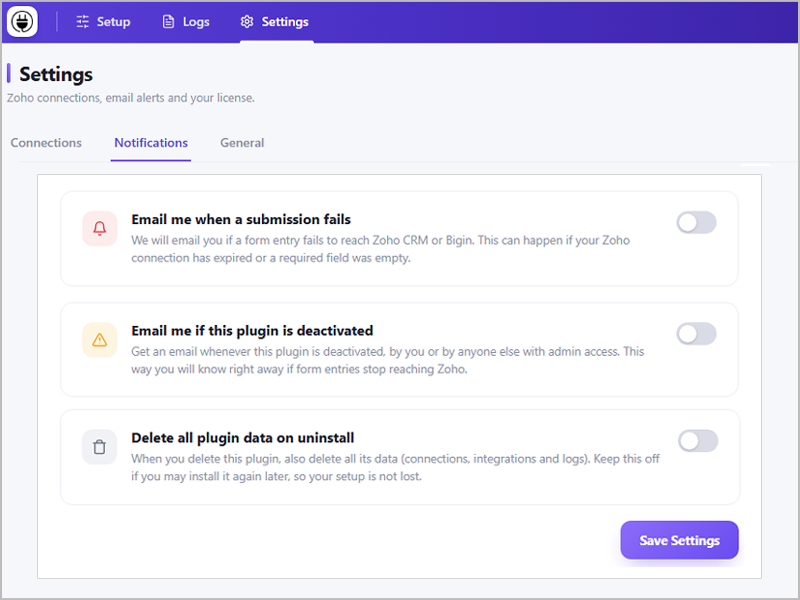
Global settings are on the Settings page, under the Connections, Notifications, General and License tabs. Saving settings does not reload the page:
- Delete data on uninstall — remove all plugin data when the plugin is deleted
- Error email notification — receive an email when a record fails to sync
- Notification emails — comma-separated list of email addresses for error alerts
- Email subject — customize the subject line for error notification emails
- Deactivation alert — send a notification email when the plugin is deactivated
Privacy and Data Handling
- Form submission data is sent from your WordPress site to Zoho CRM or Zoho Bigin via their official API.
- The plugin does not send form data to any service other than the Zoho account you connect. The only other services it contacts are listed under “External services” below.
- All communication with Zoho uses HTTPS.
- Zoho modules and fields are cached on your site for a few hours (as WordPress transients) to speed up the admin screens. Use Refresh from Zoho to reload them; “Delete data on uninstall” removes the cache.
- The admin screens keep a short-lived copy of the pages you have opened in your browser’s memory only; nothing is stored in cookies or browser storage.
External services
This plugin connects to the services below. Nothing is sent until you connect a Zoho account or activate a license key.
Zoho CRM and Zoho Bigin (accounts.zoho.* and www.zohoapis.*, depending on the data center you choose)
Used to authorize your Zoho account, read the modules and fields you can map, and create or update records from your form submissions. Sent: OAuth authorization/refresh requests and the form values you have mapped in an integration. Zoho terms: https://www.zoho.com/terms.html — privacy policy: https://www.zoho.com/privacy.html
Authorization redirect (https://integrazo.com/zoho_callback)
This address is registered as the redirect URL of the Zoho application. After you approve access, Zoho sends your browser there with the authorization code, and you are returned to your own site, which then completes the connection.
Integrazo license service (https://www.zohoapis.in/creator/custom/plugcrux/…)
Only used if you activate a Pro license key: when you activate or deactivate the key, and when the plugin is deactivated with an active license. Sent: the license key, your site URL, the plugin name and version, and your PHP and WordPress versions. More information: https://integrazo.com/
ip-api.com (http://ip-api.com/json/)
Only used when an integration maps a visitor’s city, state or country and no other geolocation data is provided (see the iafwzc_get_user_location_data filter). Sent: the visitor’s IP address. Terms and privacy: https://ip-api.com/docs/legal
Deactivation feedback form (creatorapp.zohopublic.in, a Zoho Creator form)
Shown inside the deactivation dialog on the Plugins screen. It loads only when you click Deactivate, and receives only what you type into the form.
Free and Paid Features
Free version includes:
- Connect as many Zoho accounts (connections) as you need
- Unlimited form integrations
- Standard field mapping (General Fields)
- Custom value support
- System field mapping (page URL, submission time, and more)
- Add record action (ignore duplicates)
- Error log view
- Email notifications for failed records
Pro version adds:
- Premium field mapping (Lead Source, Country, State, Phone, Industry, and more)
- Custom field mapping (map to any custom field in Zoho CRM)
- Custom module support (sync to custom modules in Zoho CRM)
- Advanced duplicate handling (skip, add or update, update only)
- Resync failed records from Logs, individually or in bulk
- Notes
- Tags
- File attachments
- Record image (profile photo)
Upgrade now: https://integrazo.com/products/integrate-any-form-with-zoho-crm
Support
If you need help or want to request a feature:
- https://integrazo.com/pages/contact
- https://integrazo.com/pages/request-feature
Website: https://integrazo.com/
Email: support@integrazo.com
Additional Notes
This plugin supports WordPress multisite installations and has been tested for compatibility with recent WordPress versions. It works with both Zoho CRM free and paid plans, and with all Zoho Bigin plans.
Screenshots
Setup list — all your form integrations at a glance
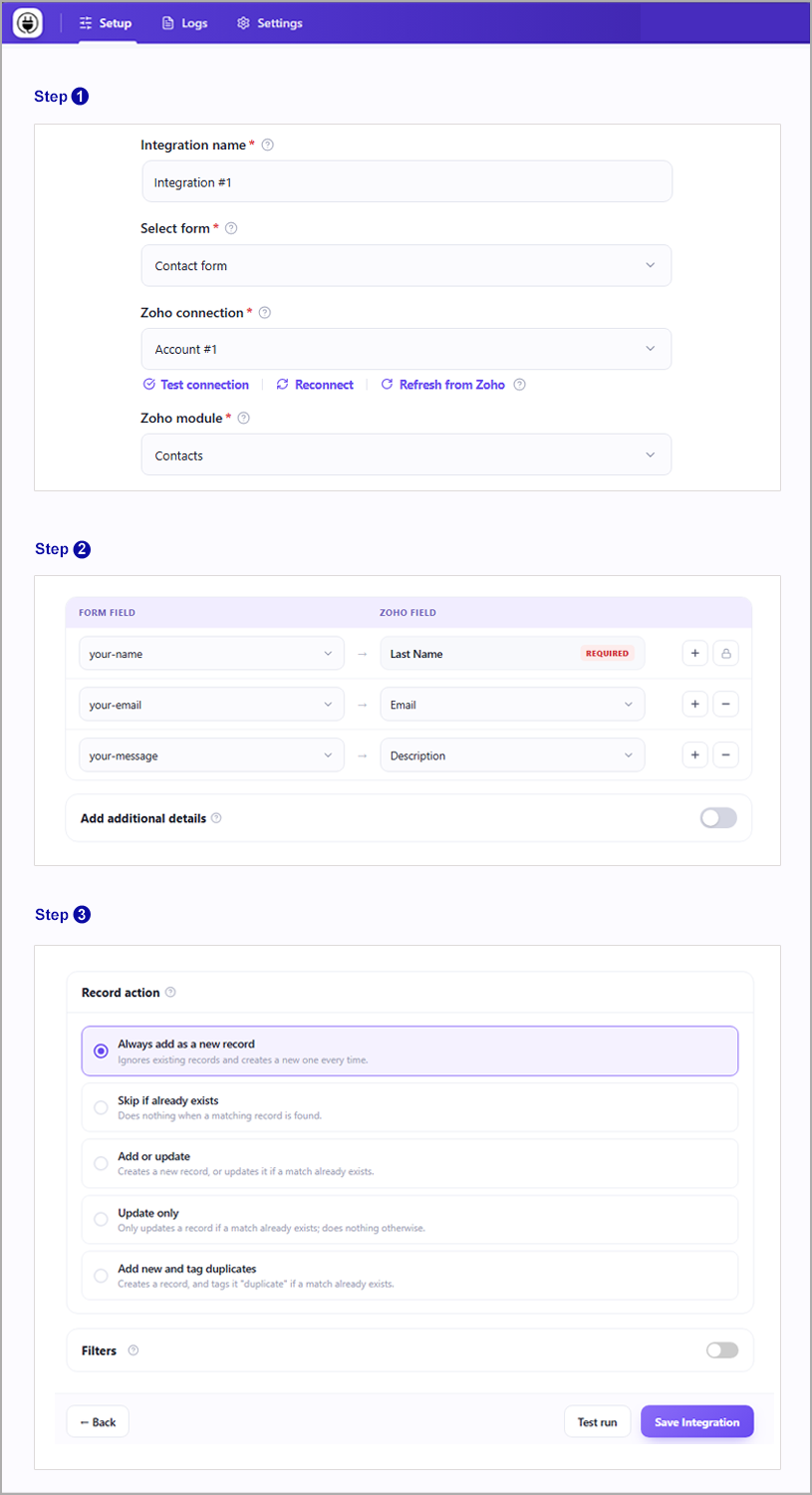
Add/Edit integration wizard — map form fields to Zoho module fields

Logs — every record sent to Zoho with status, request and response data
Settings → Connections — connect your Zoho CRM or Zoho Bigin accounts