
Most WooCommerce stores have products that quietly cost them sales: no meta description, a thin or copied supplier description, no alt text, no FAQ, no brand or GTIN for Google. Most owners never find out which ones.
All in One – AI Product Manager shows you exactly what is wrong, then helps you fix it inside the WooCommerce product editor.
- See it. Every product gets a free Product Health Score out of 100.
- Find it. The free All Products Scanner checks your whole catalog in one pass.
- Fix it. Generate the missing descriptions, SEO titles, meta descriptions, tags, features, benefits and images with AI.
No API key. No OpenAI account. No setup. Install, open a product, click Generate. On a new install, a short guide opens your first product with the AI panel highlighted.
Step 1: Product Health Score (free, unlimited)
Open any product, click Check Health Score and see a score out of 100, with each item marked done, weak or missing:
- Content: title, short description, long description length, benefits, FAQ
- SEO: SEO title, meta description length, focus keyword, keyword usage
- Images: featured image, alt text, image count
- Conversion: FAQ, clear benefits, title strength
The Health Score never uses a generation credit. In Pro, One-Click Regenerate All writes only the fields that are flagged, and you choose what to apply.
Step 2: All Products Scanner (free, unlimited)
Running a store with hundreds of products? Stop clicking through them one by one. One scan reports which products are:
- Missing titles, descriptions or short descriptions, or using very short ones
- Missing SEO titles (meta titles) or meta descriptions
- Missing images, using only one image, or missing image alt text
- Missing FAQs, tags, categories, attributes, SKUs or prices
- Missing a brand or a GTIN/MPN for Google
- Using duplicate or near-duplicate descriptions
Every product also gets a Health Score. Filter by product status, type and category, then jump straight to the products that need work. The scan runs in small batches and uses no AI credits.
Step 3: Generate content inside the product editor
The panel sits right in the WooCommerce product editor. Descriptions land in the editor and nothing is published until you click Update or Publish, so you can edit or discard anything.
- Product descriptions with tone, length and audience controls
- Short descriptions
- SEO titles and meta descriptions
- Tags (one-click apply)
- Feature and benefit lists
- Product name improvement ideas
- AI product images (ecommerce, lifestyle, luxury and minimal styles) from a text description, with an optional source photo. Saved to your Media Library as the featured image, with automatic alt text
Free regenerate: didn’t like a result? Click Generate again with the same prompt, tone, length and audience within 15 minutes for a fresh version. It doesn’t use a credit.
Product Schema Generator (free)
Help Google show your products as rich results. The plugin completes the Product structured data (JSON-LD) your store already prints with brand, GTIN, MPN and item condition, without adding a duplicate Product block.
- Works with WooCommerce, Rank Math and Yoast WooCommerce SEO, and never overwrites values they already set
- A Schema tab in the product editor with a rich result checklist, a preview and a Google Rich Results Test link
- Store-wide defaults under AI Product Manager > Product Schema
Your brand, your language
- Brand Voice: set your brand name, industry, target customer, personality and writing style once, and every generation follows it.
- Content Language: AI content follows your WordPress site language, or pick another language under AI Product Manager > Dashboard > Content Language (German, French, Spanish, Swedish, Arabic, Urdu and many more).
Works with your SEO plugin, or without one
- Writes SEO titles and meta descriptions into Yoast SEO, Rank Math, All in One SEO, SEOPress, The SEO Framework or SmartCrawl when one is active.
- If none is installed, the plugin provides its own SEO title and meta description fields, saves them with the product and prints them on the product page.
Free vs Pro
Free (forever, resets monthly)
- Product Health Score: unlimited
- All Products Scanner: unlimited
- Product Schema Generator: brand, GTIN, MPN and item condition
- Brand Voice (basic) and Content Language
- 10 generations per month for each content type: descriptions, short descriptions, images, SEO titles, meta descriptions, features, benefits, tags and name ideas
- Tones: Sales-Focused, SEO Optimized, Luxury, Casual
- Lengths: Short, Medium, Long
- Audiences: General, Men, Women, Kids, B2B
- Free regenerate within 15 minutes
Pro (unlimited, built for catalogs)
Speed and scale
- Unlimited generation for every content type, including images (fair use)
- One-Click Regenerate All: writes every weak or missing field in one pass; you tick what to apply
- AI Product Creator: turn a short brief into a complete WooCommerce draft (title, description, short description, tags, attributes, SEO, FAQ and SKU)
- AI Bulk Generator: descriptions, short descriptions, SEO titles, meta descriptions, tags, attributes and image alt text for selected products, a category or your whole catalog, with a 30-day backup of replaced content and CSV export
Runs on autopilot
- Scheduled AI Optimization: for example, every Sunday the AI finds the 50 products with the lowest Health Score and prepares better content. Review it side by side and apply, or let it apply automatically with Undo. Optional email summary
Sell more
- Cross-Sells & Upsells: AI picks upsells, cross-sells, related and “Frequently bought together” products from your catalog and real orders, writes them into WooCommerce’s own Linked Products fields, and can show a “Frequently bought together” section on product pages (plus a shortcode)
- Review Insights: see what customers love and complain about in their reviews, turn their questions into a visible FAQ with FAQ schema, and improve descriptions with their own words
Better SEO and more content
- Focus keyword and long-tail keyword suggestions, plus a product SEO audit
- FAQ generator with FAQPage schema for Google rich results
- Product Schema extras: color, material, pattern, size, audience, gallery images, shipping details and return policy, plus “Suggest details with AI”
- Attribute suggestions, specifications tables and comparison tables
- Rewrite existing content: improve SEO, humanize, expand, shorten or make it more persuasive
- Ad copy (Facebook, Instagram, Google, Pinterest), email copy and video scripts (TikTok, Reels, YouTube Shorts)
- Translate a block of product content into German, French, Spanish, Italian, Arabic, Urdu, Portuguese, Dutch, Polish, Turkish or Russian
- Advanced Brand Voice: words to use and avoid, extra rules, and Analyze My Existing Store to learn your writing style from your current products
Compare plans and upgrade to Pro (30-day refund guarantee)
Who is it for?
- Store owners who add products regularly and don’t want to write every listing by hand
- Dropshippers and importers who need unique content instead of copied supplier text
- Print-on-demand shops with hundreds of products that each need their own copy
- Agencies and freelancers managing client stores
- Anyone who wants better product SEO without hiring a copywriter
Why store owners choose it
- Diagnose first: it tells you what is missing before it writes anything.
- No API key: nothing to configure and no separate AI subscription.
- Native to WooCommerce: fills the real description, short description, tag and featured image fields.
- Monthly free allowance: not a one-time trial.
- Light on your storefront: AI runs only in wp-admin. The store front only gets optional SEO tags and schema data.
External Services
This plugin connects to the JCodex API (https://jcodex.com/wp-json/apg/v1). Generation is processed there, so you do not need your own OpenAI key.
Requests are sent when:
- A logged-in shop manager or editor clicks Generate (or another AI action) in wp-admin. The request contains the prompt built from product content you typed or already saved, plus your public site URL. With an active Pro license, the license key is sent so unlimited usage can be verified.
- On the free plan, the product editor or Dashboard loads (at most once every 6 hours): the plugin asks for your remaining monthly counts so the “X left” labels stay accurate. On first use this also registers the site (public site URL, a random install ID stored in your database, plugin version and a short-lived domain challenge).
- The JCodex API verifies your domain through a public REST route on your site,
GET /wp-json/jcodex-apg/v1/verify. It returns only a hash of a temporary random challenge and does not expose products, users or settings. - In Pro, a Scheduled AI Optimization schedule you created runs in the background and sends the same kind of product content without a click. Cross-Sells & Upsells sends product names, categories, prices and short summaries when you click Suggest. Review Insights sends review text and star ratings, without reviewer names or emails.
No customer personal data, order data or visitor analytics are collected or transmitted.
- JCodex Terms of Use: https://jcodex.com/terms/
- JCodex Privacy Policy: https://jcodex.com/privacy/
JCodex may use OpenAI on its backend. Their policies apply to prompt processing:
- OpenAI Terms: https://openai.com/policies/terms-of-use/
Third-party resources
DM Sans is bundled under the SIL Open Font License 1.1. The license text is in assets/fonts/OFL.txt.
Screenshots
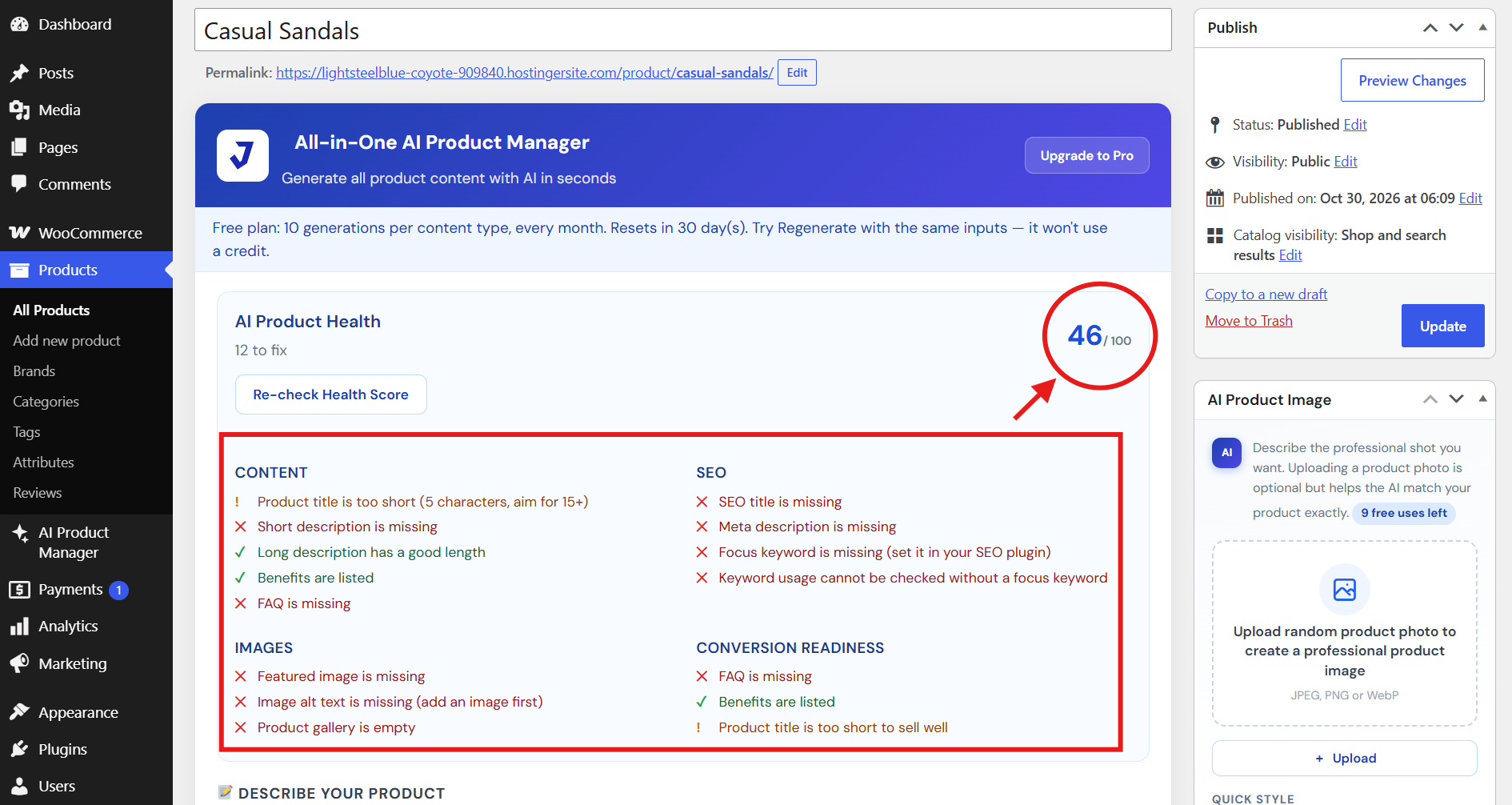
Product Health Score: see what is done, weak or missing on every product.
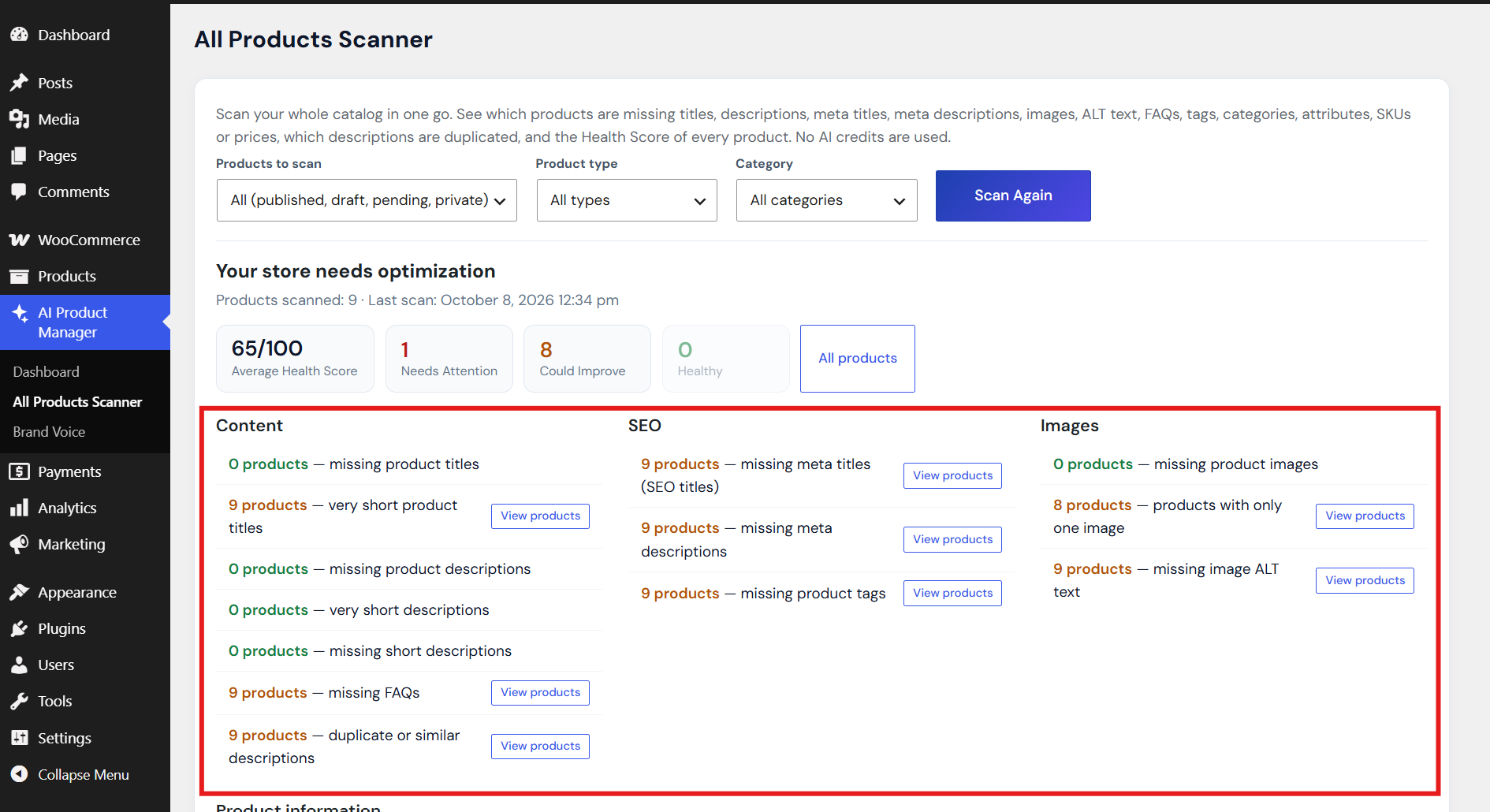
All Products Scanner: find incomplete products across your whole catalog.
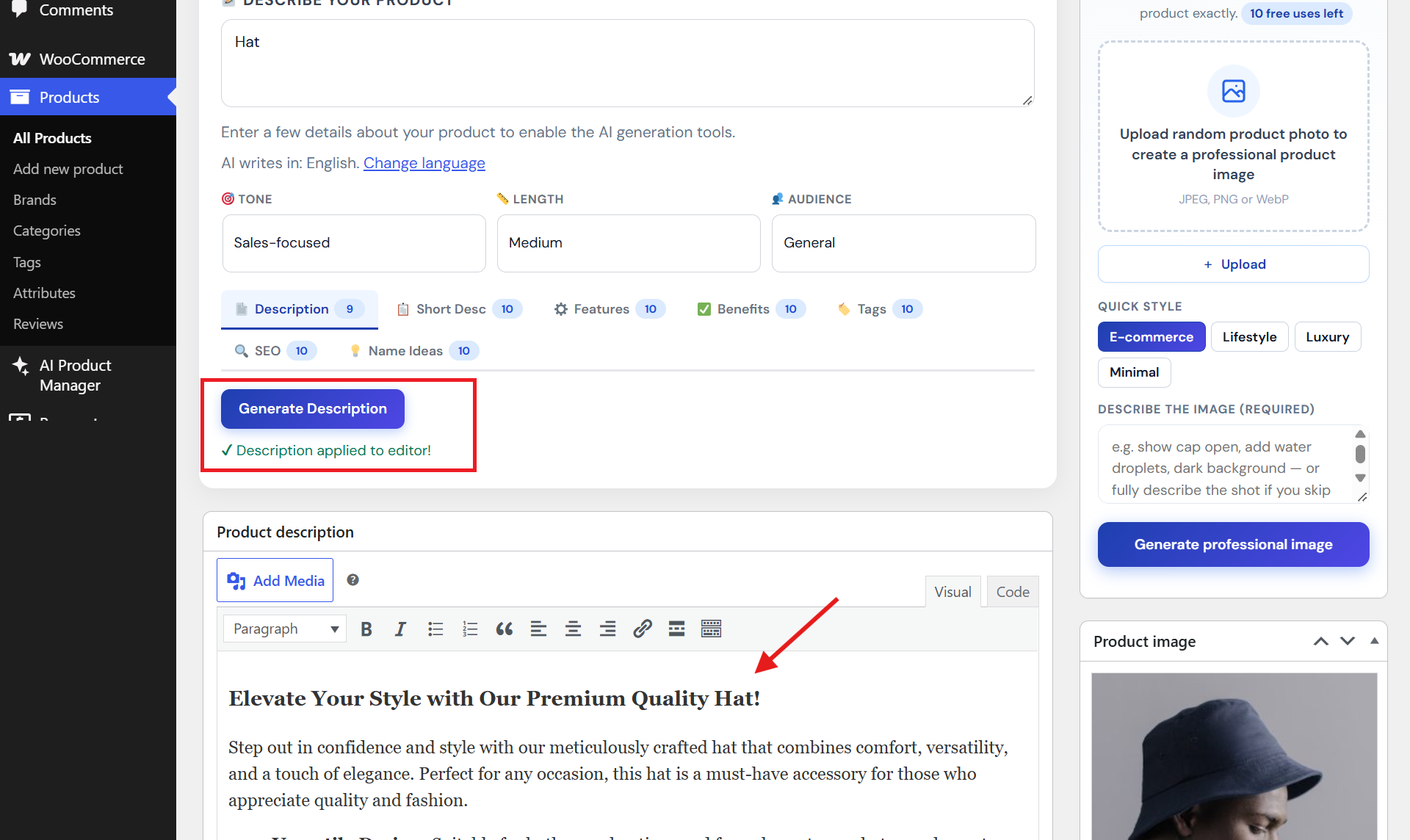
An AI-written product description, filled in with one click.
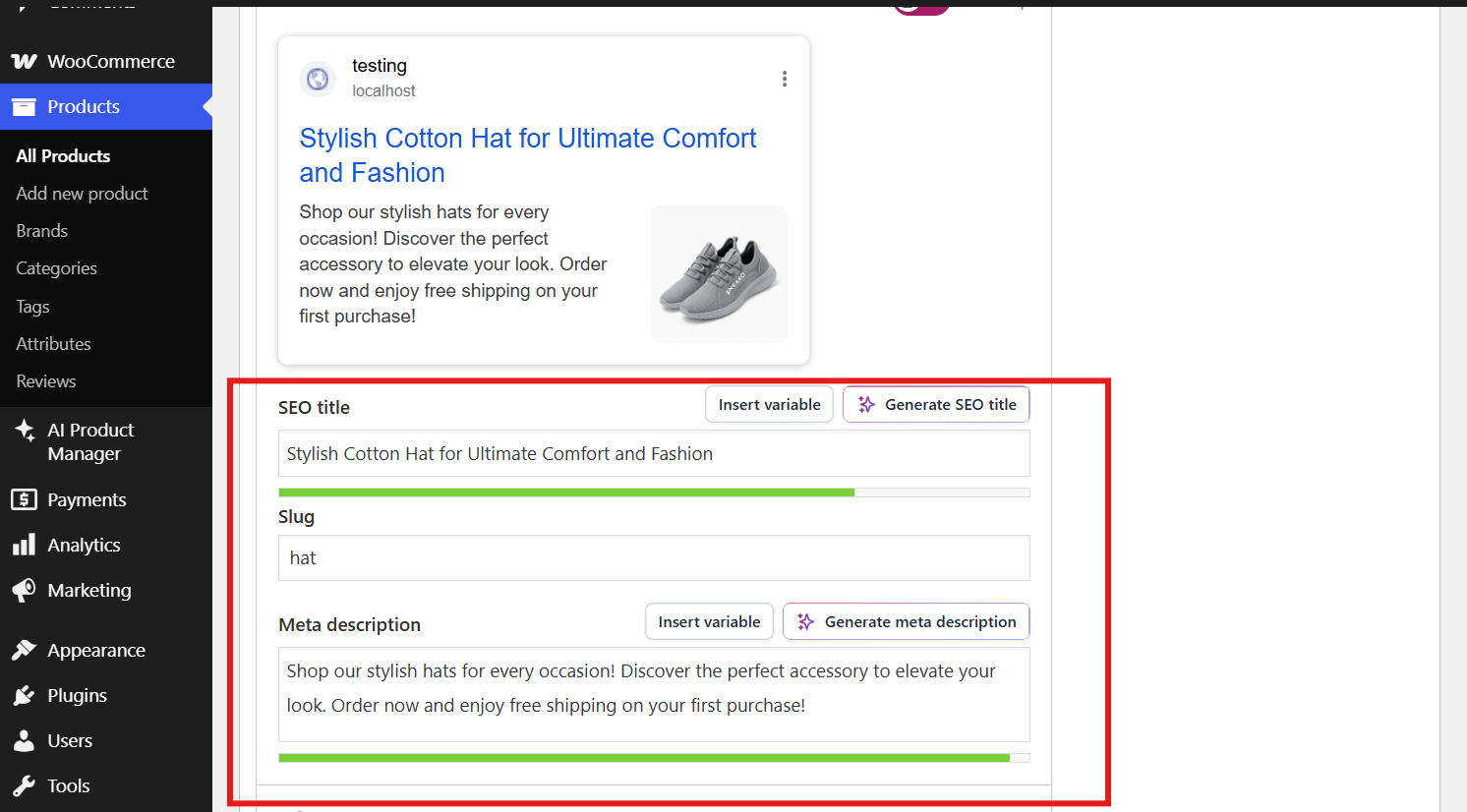
SEO title and meta description, written into your SEO plugin (Yoast SEO, Rank Math).
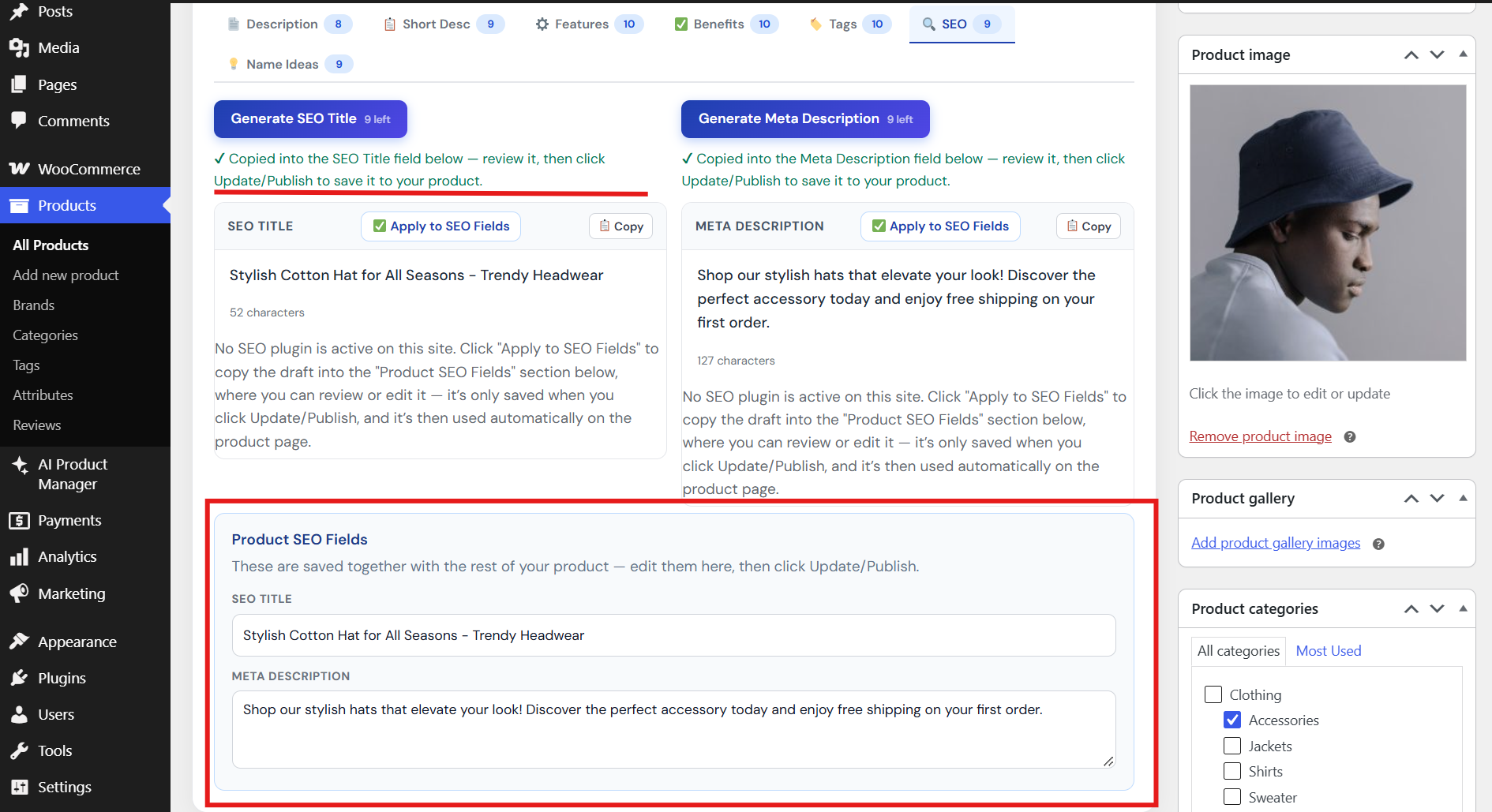
SEO title and meta description, written into the built-in SEO fields (no separate SEO plugin needed).
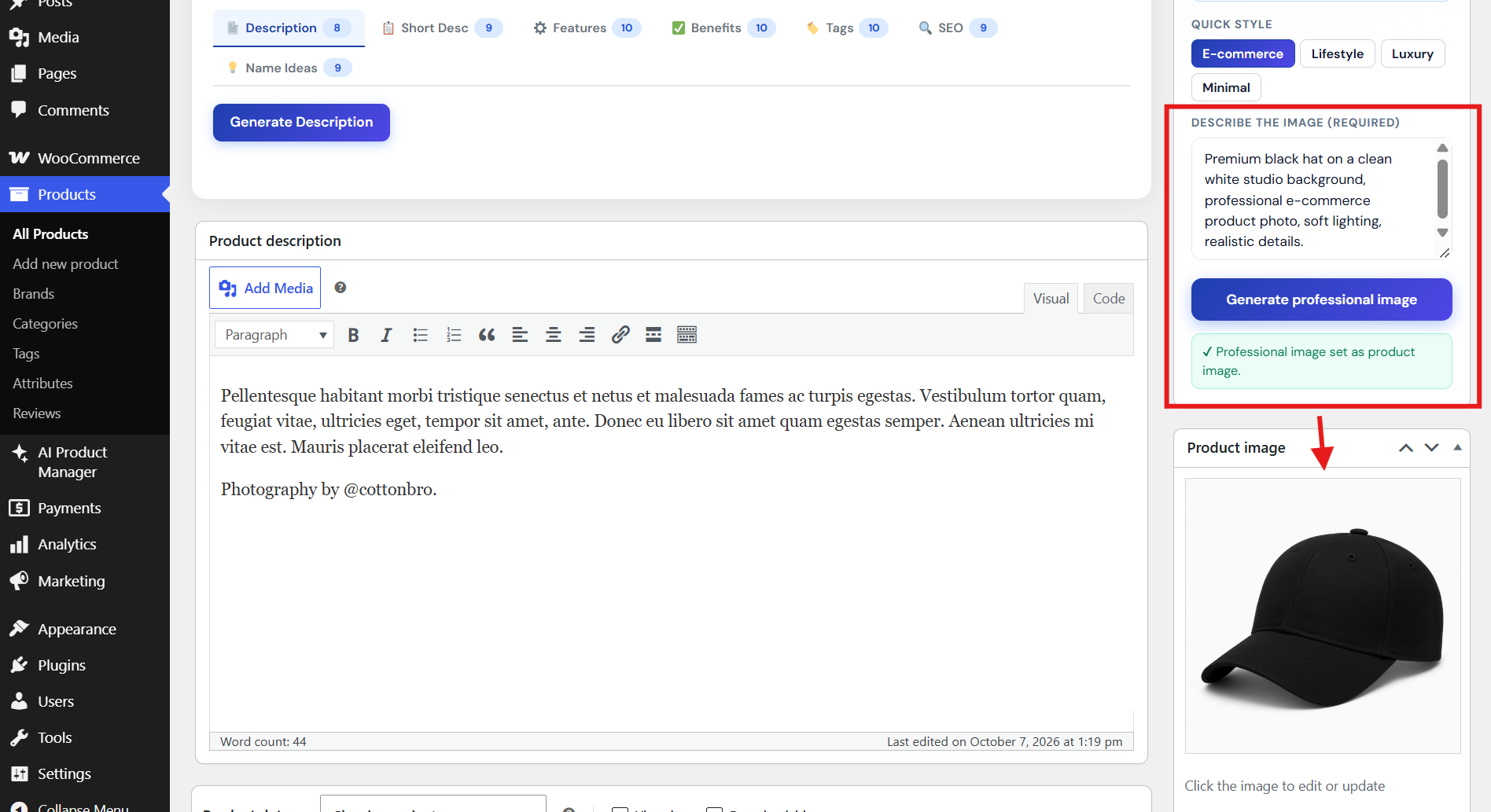
Turn a text description into a professional product image.
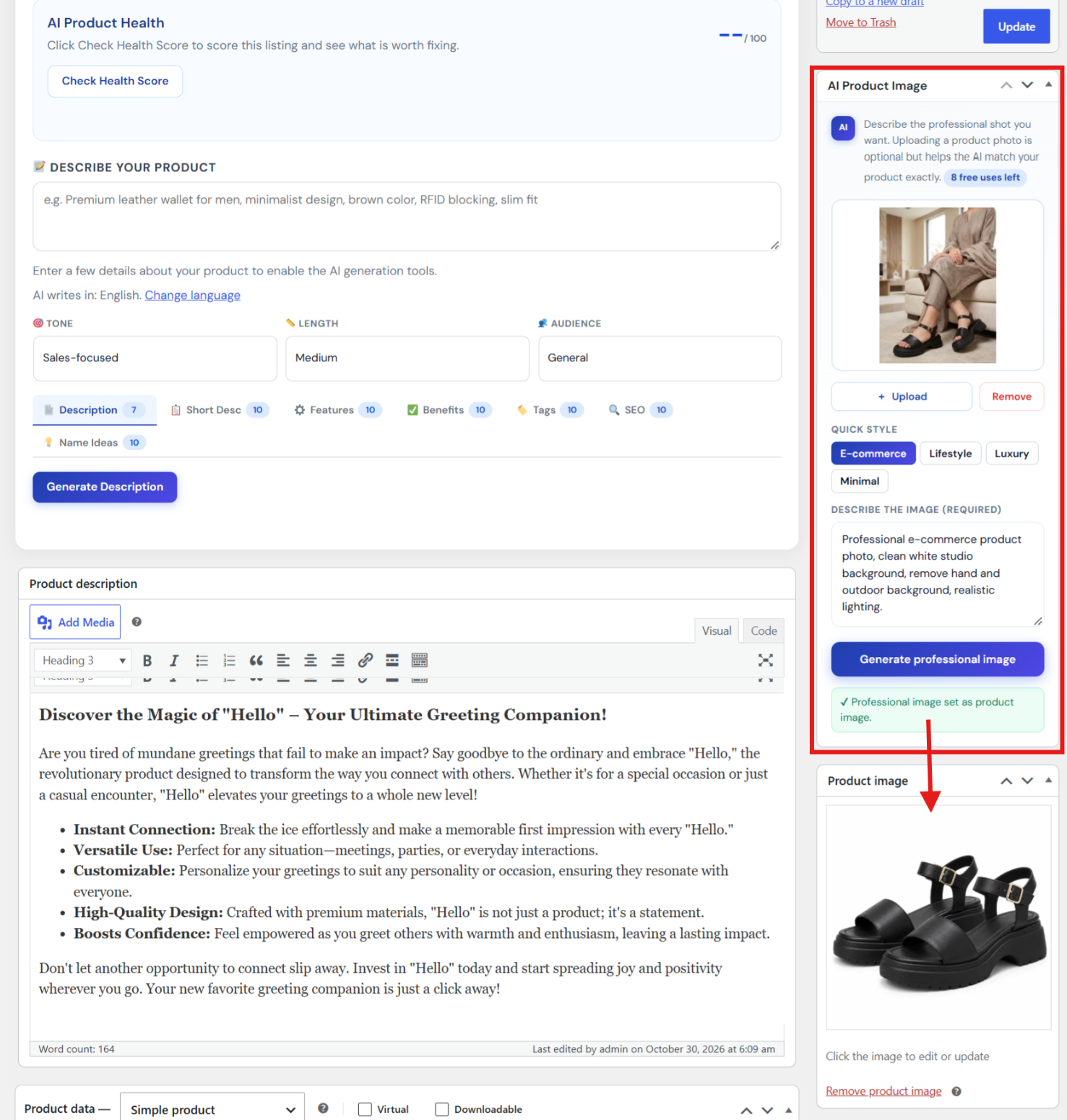
Turn a photo and a text description into a professional product image.
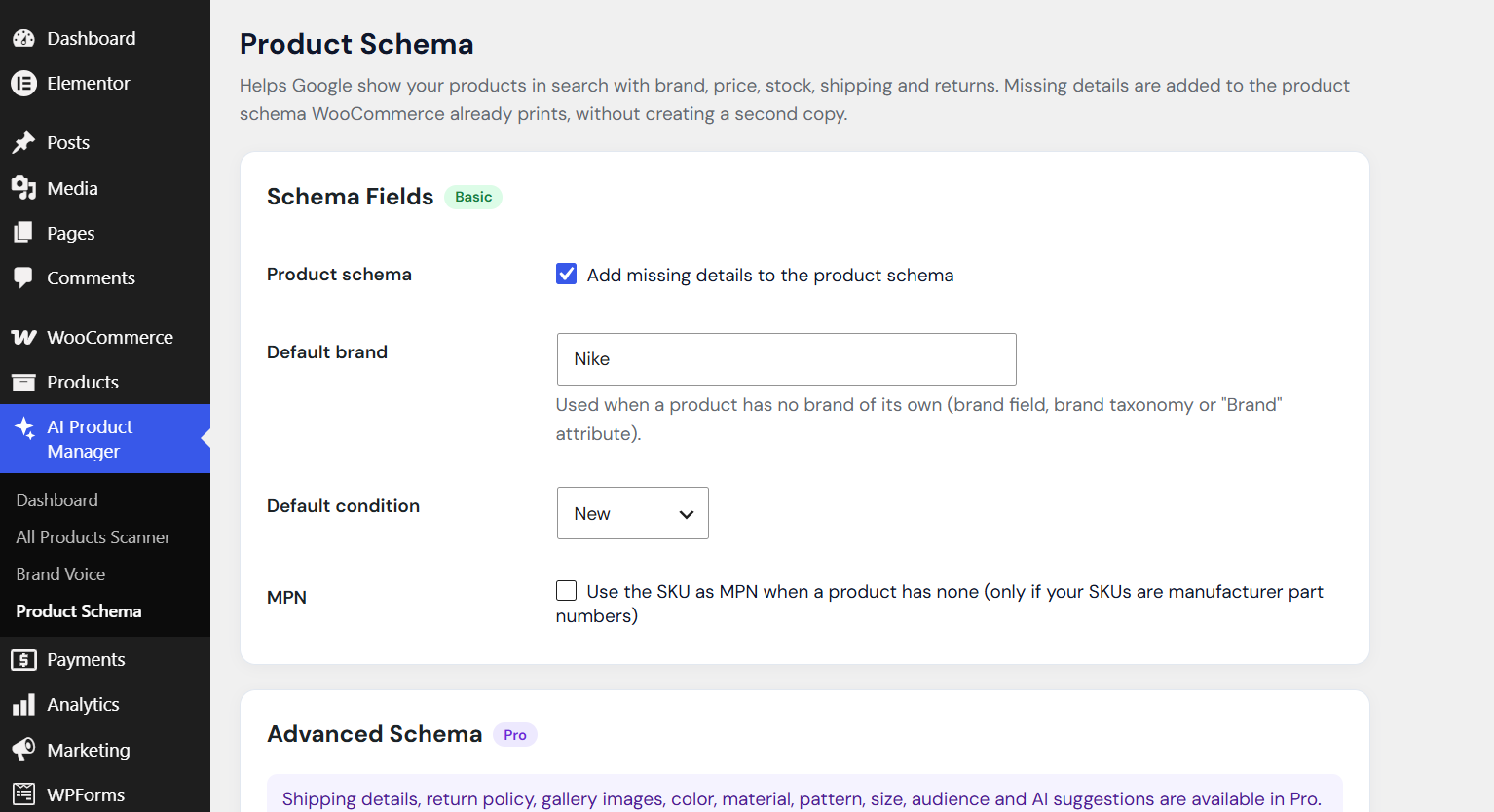
Product Schema: Enhance WooCommerce product schema by adding missing structured data fields for better SEO.
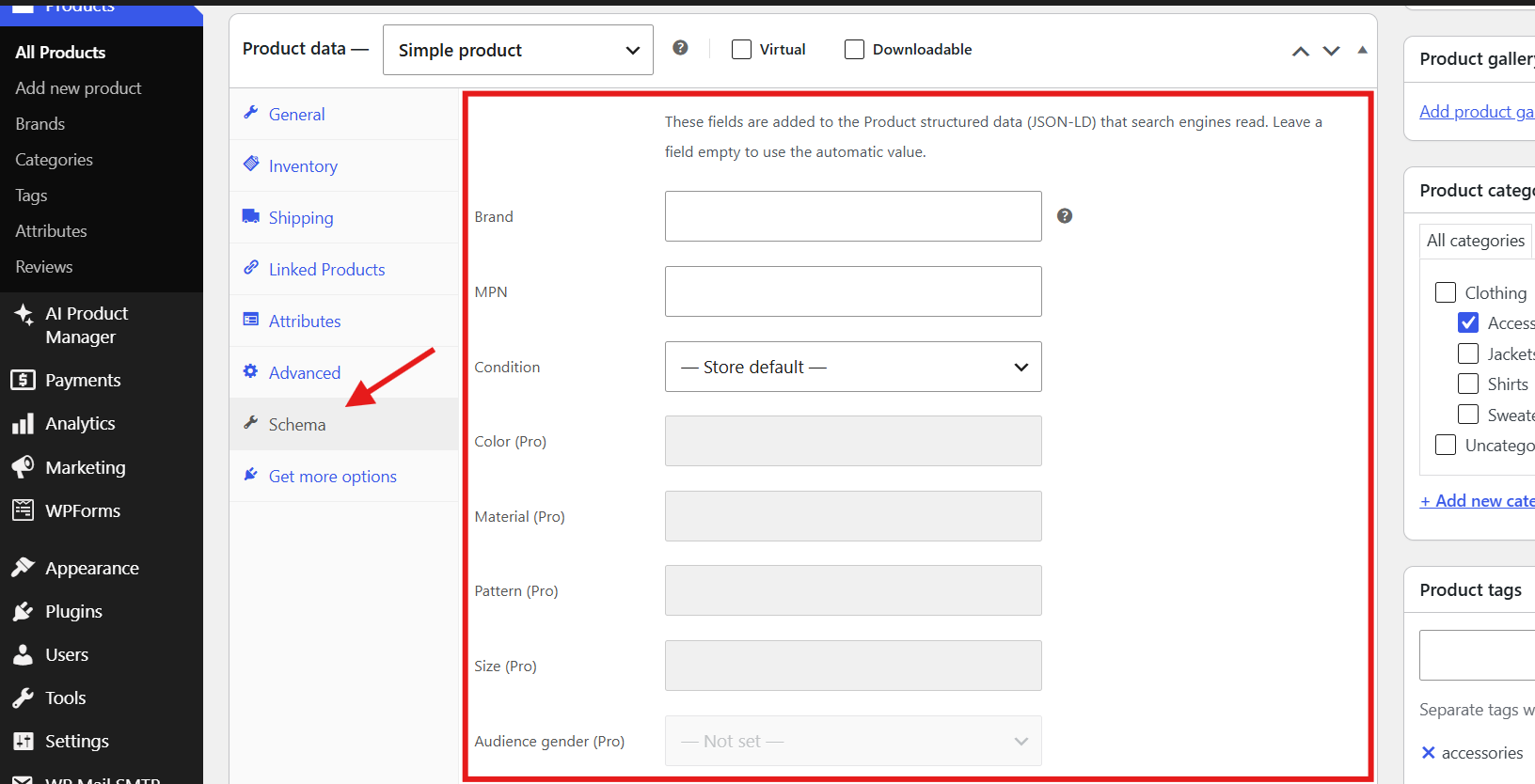
Individual Product Schema Settings in the WooCommerce Product Data Tab.