
See what your logged-in WordPress users are doing, without digging through complicated logs.
Joe’s Recent Users Activity turns recent member and administrator activity into an easy-to-read dashboard, right inside WordPress. Whether you manage a membership website, an online community or a client portal, you can quickly see which accounts have been active, the last pages they viewed and how activity changes over time.
Instead of a sprawling activity table, the plugin organises information into friendly, focused tabs with helpful visual summaries. It works on desktops, tablets and phones, with user cards that fit smaller screens without sideways scrolling.
Features
- At-a-glance overview: live users, unique tracked accounts, users seen today, and recent logged-in page views.
- Live users: see accounts active within the previous 150 seconds, including administrators. The live panel updates without reloading the entire page.
- Optional admin-bar counter: see the current live-user estimate from the WordPress toolbar. Switch it off at any time in Settings.
- Recent users: view usernames linked to their WordPress user-edit pages, account roles and IDs, recent pages, IP addresses, last login and elapsed time since login.
- Clear page insights: simple charts show the ten most viewed pages and ten estimated exit pages from recent logged-in sessions.
- Responsive by design: a structured desktop view becomes easy-to-scan user cards on mobile devices.
- Ten users per page: straightforward navigation keeps the Users screen tidy, even on larger websites.
- Privacy-aware tracking: records authenticated users only. URL query parameters are excluded, and configurable retention cleans up new session and event history.
- Preserved historical records: existing v2.x activity remains available in a read-only Legacy Archive when upgrading.
- Helpful settings and diagnostics: configure the toolbar counter, choose retention and check the status of the historical import.
How it works
The plugin observes front-end page views from logged-in users and recent presence from visible browser tabs. It does not record anonymous visitors, passwords, form content or URL query strings. The Live Users count reflects recent activity, not proof that a person is continuously watching their screen.
Since login shows the time between the last recorded login and most recent recorded activity. It does not imply continuous time on the website. Estimated exit pages identify the last observed front-end page for a session inactive for at least ten minutes; a server cannot confirm a browser was actually closed.
The original historical table is retained during upgrades. Older records are imported in small batches, so the tracked-user total may rise temporarily while existing user accounts are discovered; this is not a sudden rise in website traffic.
Translations
The dashboard includes initial translations for ten widely used languages: Spanish (Spain), French, German, Portuguese (Brazil), Italian, Dutch, Polish, Russian, Japanese and Simplified Chinese. WordPress uses your site’s chosen language for administrators, when available. You do not need to change the language from within this plugin.
The language files are editable .po files with compiled .mo files, plus a .pot source template in the plugin’s /languages folder. WordPress.org’s community translation service can also provide reviewed language packs and additional locales. Translators are welcome to help refine these first-release translations through Translate WordPress.
The Joe’s Recent Users Activity name is retained across all translations. Technical identifiers, database table names, usernames and URLs are not translated.
Who is it for?
Membership sites, educational websites, communities, private portals, subscription services and WordPress administrators who want a straightforward view of authenticated user activity.
Support and feedback
If you spot an issue or have an idea that would make the plugin more useful, please search the support forum and open a topic with the steps needed to reproduce it. You can also contact the developer.
Third Party Services
An optional PayPal Donate button is available in the plugin’s administrator dashboard to support continued development. Displaying the PayPal SDK button loads code from PayPal; a plain PayPal donation link is provided as a fallback. PayPal’s SDK documentation and privacy information explain its service.
The plugin itself does not send user activity to PayPal and does not require a third-party analytics account.
Screenshots

Overview dashboard with clear metrics, live-user cards and visual page insights (illustrative data).
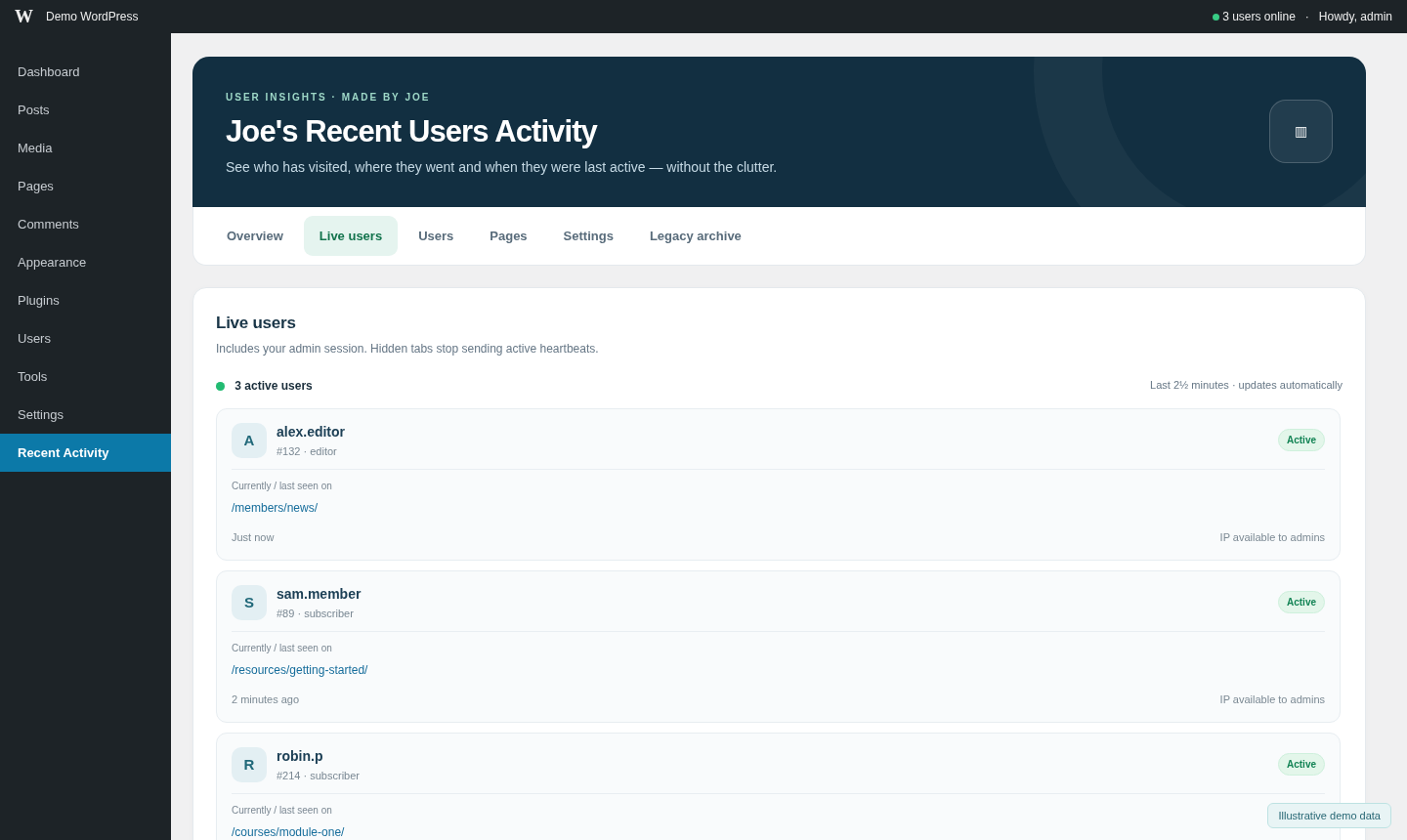
Live Users tab, showing recently active logged-in accounts and their latest pages (illustrative data).

Recent Users screen on mobile, with stacked cards that avoid sideways scrolling (illustrative data).
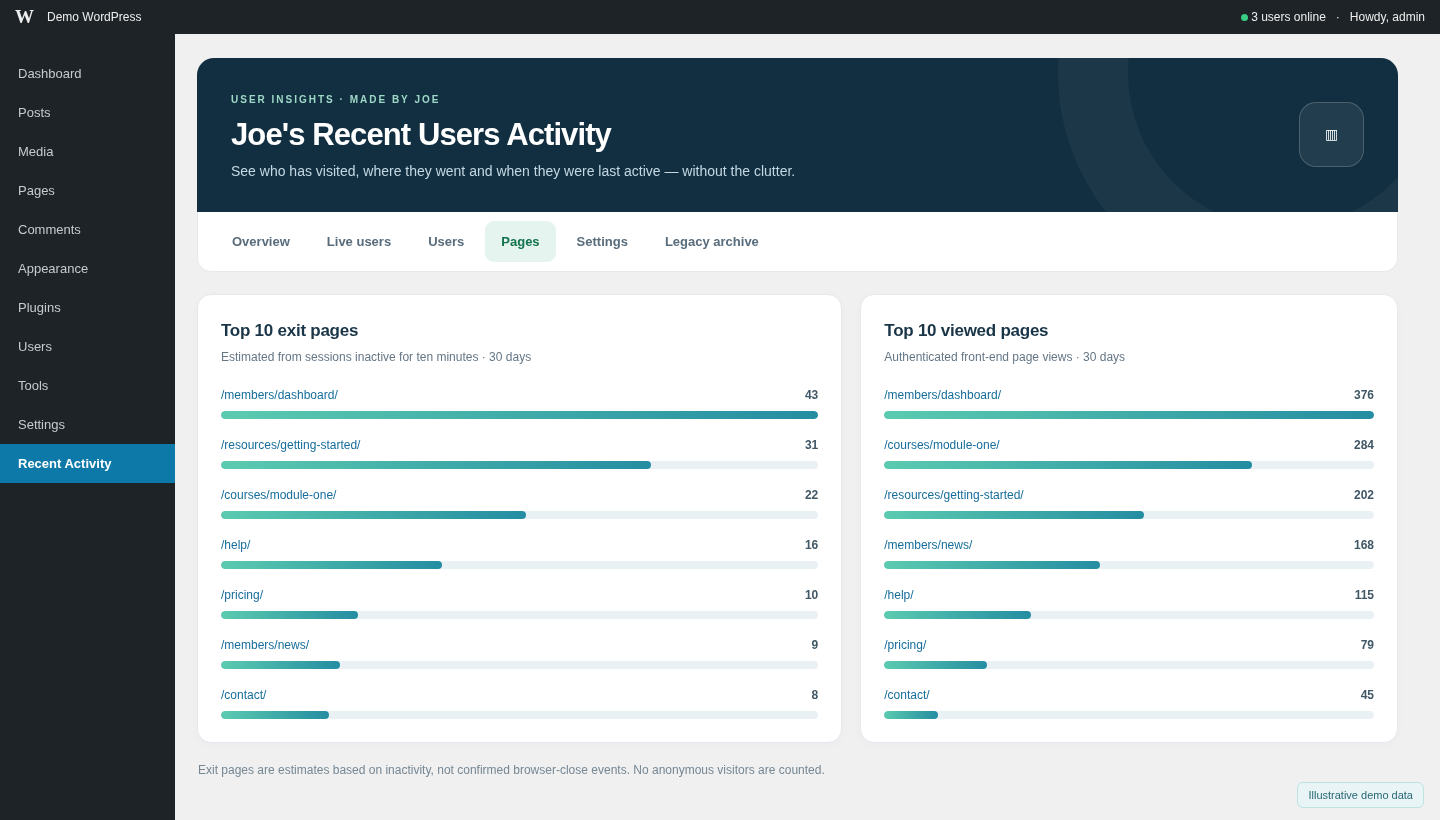
Pages tab showing the most viewed pages and inferred exit pages as easy-to-read charts (illustrative data).

Settings tab with admin-bar controls, privacy options and system-health information (illustrative data).