
A page cache serves ready-made HTML, so PHP never runs and a classic view counter records nothing. Full analytics suites solve that by loading a third-party script on every page, which is a lot of weight when all you wanted was one number next to a post or a product.
Lumo View Pulse takes the middle road. A tiny beacon fires after the page has loaded, a short-lived token proves the request belongs to that exact item, the request passes your bot, role, IP and session filters, and one row is written in your own database. Nothing leaves your server.
The number is then available everywhere you already work: a sortable Views column in wp-admin, a badge on the post or product itself, and orderby support so any loop can be sorted by what people actually open.
Counting that survives a page cache
- Beacon mode (default). Counts after load with
sendBeacon(), so cached pages are counted too. - REST fetch mode. Same REST endpoint, using
fetch()instead ofsendBeacon(). - Server mode. Classic PHP counting for sites with no page cache. If a known cache plugin is active while Server mode is on, Setup warns you instead of silently under-counting.
- Optional engagement gates: wait n seconds, or require a scroll percentage, before a view counts.
- Optional write buffering when a persistent object cache is in use, flushed on a schedule, so busy sites batch their writes.
Count one thing, show another
Every public post type gets two independent switches: Count records the view, Badge prints it on the front end. Count products without showing anything, or show a number on posts you barely track. Quick presets for Store, Blog and All public get you live in one click.
Beyond single items, you can optionally count term archives, author archives, the homepage, other archives, date archives, search results, 404s and account screens.
The badge on the item itself
- Before the content, after it, or manual only (shortcodes, blocks and widgets).
- All time, today, last 7 days or last 30 days.
- Eye icon, text label, locale number formatting — each one a switch.
- Refresh on cached pages pulls the live total after load, so stale HTML never shows a stale number.
- A legacy
post-viewsCSS class can be emitted for themes that were styled for an older counter.
Popular lists in the builder you already use
Views are a sort key, not just decoration. Any WP_Query (and the REST post collection) can order by 'orderby' => 'lumovipu_views':
- Gutenberg Query Loop
- Elementor Pro loops, via Query ID
lumovipu_views - JetEngine listings
- GenerateBlocks, Beaver Builder, and Kadence Blocks Pro query loops
- Lumo Pro Toolkit listing and loop grids
- WooCommerce product lists, with HPOS and cart/checkout blocks compatibility declared
- AMP pages, counted with a 1×1
amp-pixel
Shortcodes, blocks, widget
Three shortcodes cover almost everything:
[lumovipu_views id="" period="" force="0"]— the count for one item[lumovipu_top count="5" types="post,product" period="30d"]— a popular list[lumovipu_site period="total"]— the whole-site total
Five blocks ship with the plugin: View Count, Top Content, Author Views, Term Views and Site Total. There is also a Lumo View Pulse Top widget for classic sidebars and the block-based widget screen.
Accepted period tokens: total, today, week, month, year, 7d, 30d, plus an exact day (20260919) or year (2026).
A dashboard that reads like a pulse
Today, this week, this month and all time. Which items are on top and what share each one takes. A device split, and a referrer split (internal, direct, other). This is deliberately not a full analytics suite: it is the pulse of your content and your store.
Admin extras: a sortable Views column on list screens, an optional month-to-month trend on that column, a date-range export, a Views item in the toolbar on single pages, a WordPress dashboard widget, and an option that lets only administrators edit totals.
Exports and digest emails
On the Reports tab, export all time, 7 days, 30 days, a month or a year as CSV or XML. Schedule a summary daily, weekly or monthly through wp_mail(), with a minimum-views threshold, a top-N size, trend lines and spike signals. Send a test mail first to confirm it arrives before you turn the schedule on.
Privacy by design
- No external service, no account, no API key. Data stays in your own tables.
- Raw IP addresses are never stored.
- Default de-duplication is a session cookie, or cookieless browser storage, for a window you choose.
- Optional Strict unique window stores a one-way HMAC (site salt) instead of the IP.
- Storage is aggregated by day, week, month, year and total — there is no per-visitor log to leak or to bloat the database.
- Skip known bots and model-training crawlers, skip roles, skip IPs with wildcards or CIDR ranges, skip logged-in users or guests, and honour Do Not Track.
- CSV and XML exports contain neither IP addresses nor visit hashes.
- Daily rows are pruned on a retention schedule you set.
Moving from another counter
Your old numbers come with you. Tools can import from Post Views Counter, WP-PostViews, Statify, the Lumo CDN addon, or custom meta keys post_views_count / views.
Analyse first to see exactly what would change, then import with the strategy you want: Add to existing, Replace, Skip existing, Keep higher or Fill empty only.
If Post Views Counter is still active, Tools warns that two counters will double count. Compatibility helpers (pvc_get_post_views(), pvc_post_views(), pvc_most_viewed_posts(), pvc_get_most_viewed_posts(), pvc_update_post_views(), pvc_view_post() and the [post-views] shortcode) load only once the old plugin is gone — so a theme that calls them keeps working, and nothing collides while both are installed.
Health tools: flush the write buffer on demand, recalculate one item’s total from its daily rows, clear a single item, or clear every stored total.
About Boost, stated plainly
The Boost tab lets an administrator add to an all-time total so an item sits higher in popular lists and sorted queries. It changes list position. It does not invent traffic, it is not a visitor log, and it should not be presented as visits that happened. The plugin says so in its own interface.
For developers
Template tags: lumovipu_get_views(), lumovipu_render_views(), lumovipu_get_top(), lumovipu_render_top(), lumovipu_hit(), lumovipu_set_total().
REST routes: POST|GET /wp-json/lumo-view-pulse/v1/hit (token bound to the object, same-origin checked, rate limited) and GET /wp-json/lumo-view-pulse/v1/views (totals for publicly viewable objects only).
Hooks include lumovipu/count/before, lumovipu/count/after, lumovipu/ajax/before_hit, lumovipu/ajax/response, lumovipu/hits/query_args, lumovipu/integrations, lumovipu/capability, lumovipu_default_settings and lumovipu_settings_saved.
Tables: {prefix}lumovipu_hits, {prefix}lumovipu_dims, {prefix}lumovipu_uniques. Uninstall can remove everything, if you switch that on.
Free, GPL, no upsell wall
Every feature described above is in this plugin. No licence key, no signup, no “pro” tab that unlocks the useful half. Documentation lives at LumoWP.
Screenshots

Counting that survives a page cache — Beacon after load, REST, or Server mode.

Count and Badge are separate switches per content type, with Store, Blog and All public presets.
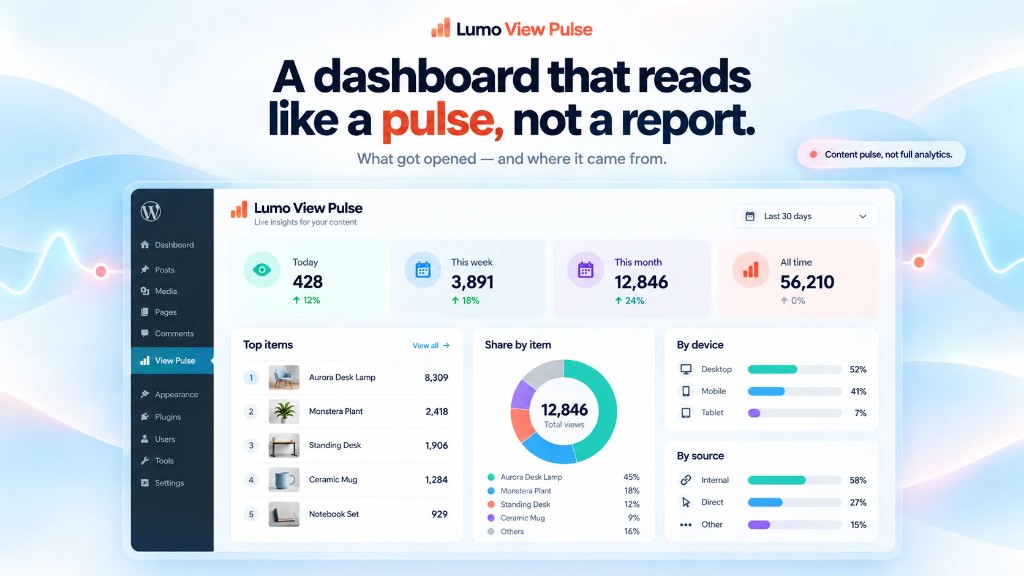
Pulse dashboard: today, week, month and all time, plus top items, devices and sources.

The view badge on the item itself, with placement, period, and refresh on cached pages.

Shortcodes, blocks, or manual placement for the same number.
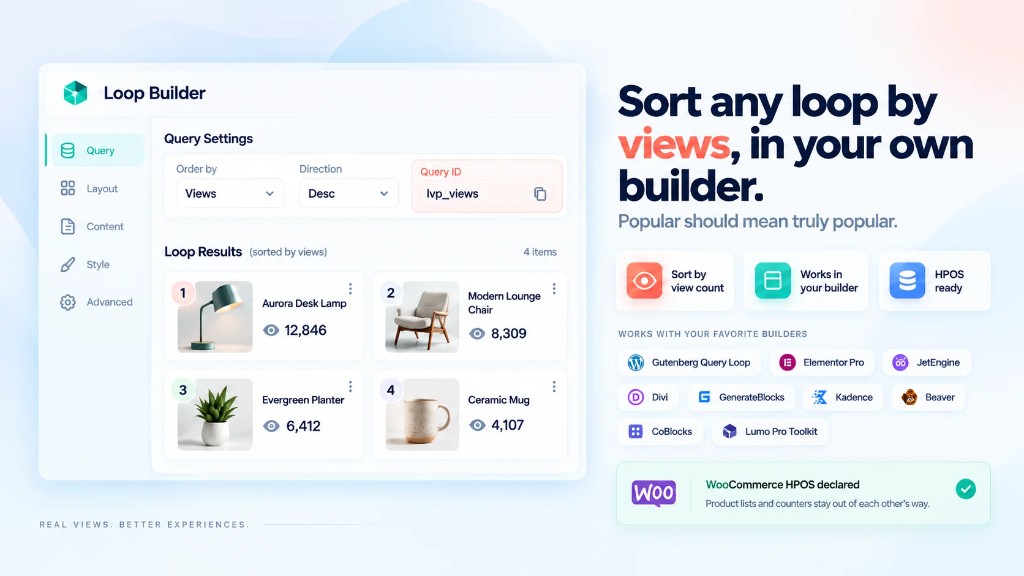
Sort any loop by views in Gutenberg, Elementor Pro, JetEngine and other builders.

Unique views with bot, role, IP and DNT filters. No raw IP addresses stored.
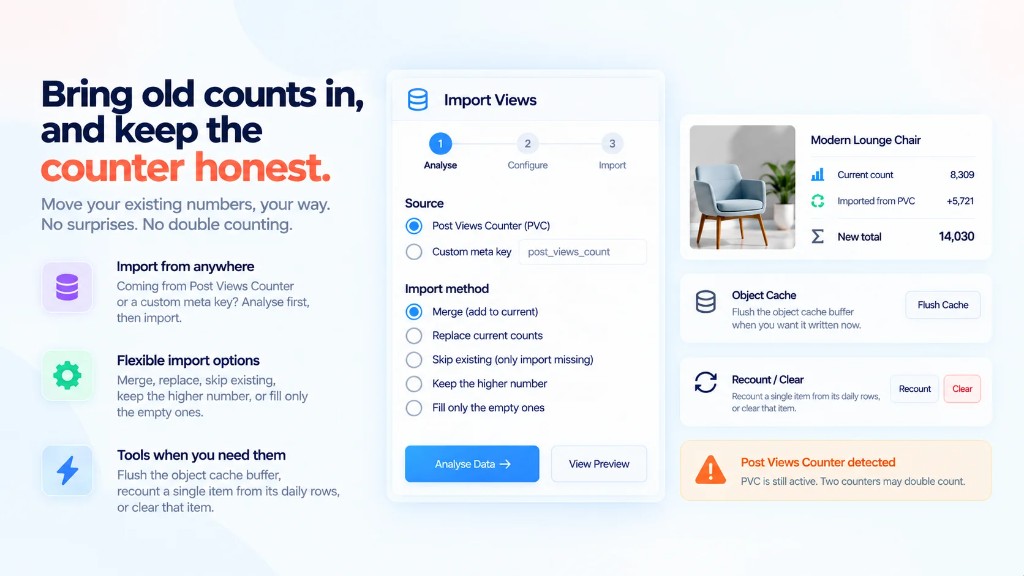
Import from Post Views Counter or custom meta — analyse first, then merge or replace.
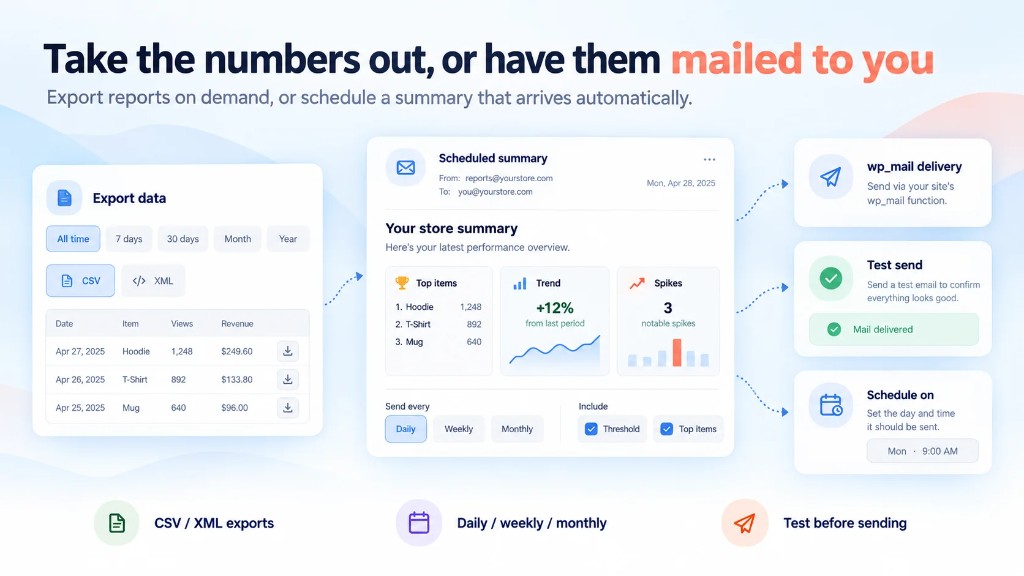
CSV/XML export and scheduled digest emails through wp_mail(), with a test send.
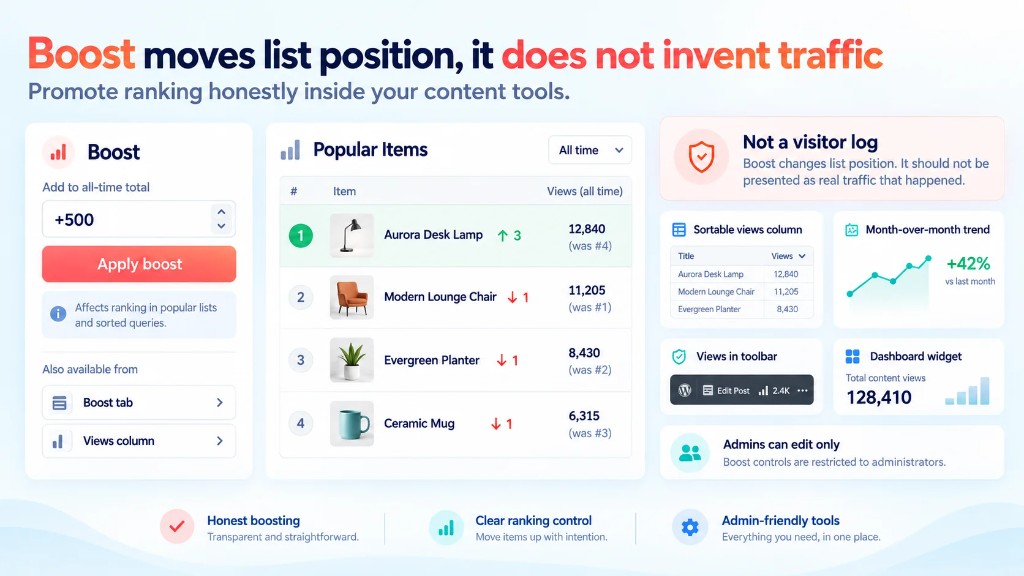
Boost raises list position. It does not invent traffic.