BACK TO DIRECTORY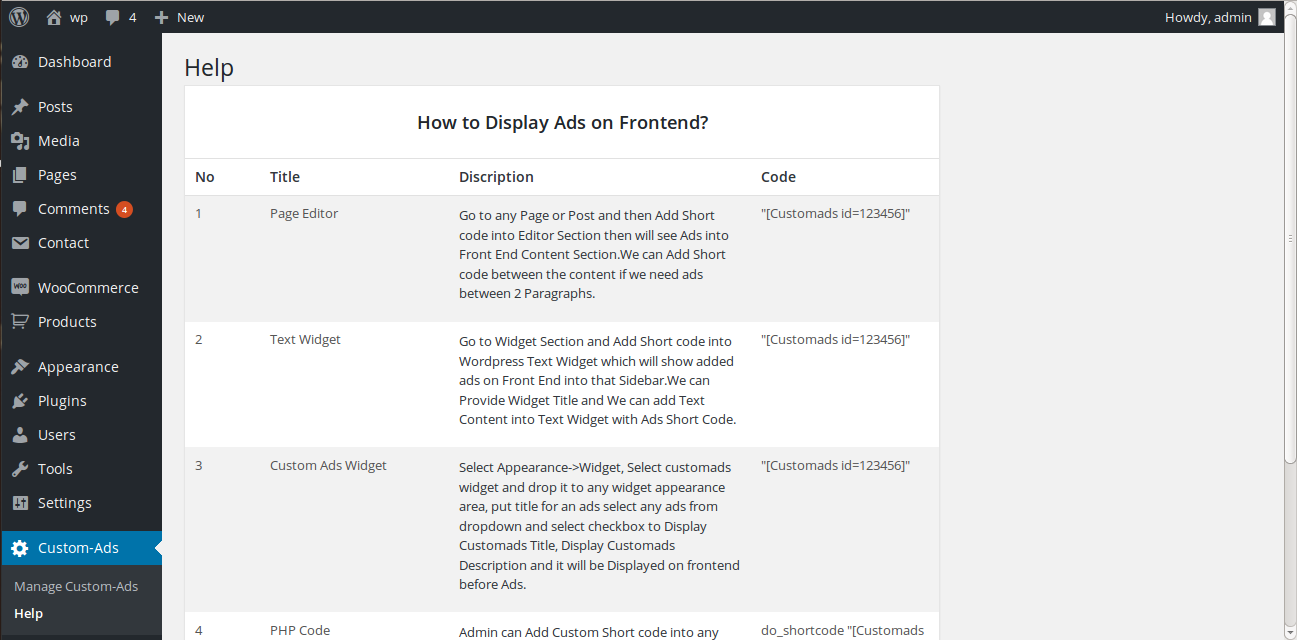


Features
Ads Management Plugin is an easy to use plugin to display custom advertising like google ads, banner ads on front-end side which includes any ads size ranging from 300×250, 160×600, 728×90 and etc..
Ads Management Plugin is used For Marketing Banners and logos of Affiliates and Marketing Purpose.
Ads Management Plugin will help you to Show Ads by Following way
- Create Ads from Admin Panel from Add New Ads Section.
- Create New Ads by Adding Title of the Ads, Short Description and Add Banner code with image tag or Google Adsense Code in to code box with status as “Available”.
- Admin will get Unique and Randomly Created Short Code which will be helpful to show custom ads on Front End.
- Copy Short Code example “[Customads id=123456]”.
- Admin can show Ads on Front End by Text Widget, Ads Widget, Short Code into Page / Post Text Editor and PHP Short code in any Theme File.
- Then go to Widget Section and add Short code into WordPress Text Widget which will show added ads on Front End into that Sidebar.
- Admin can go to Widget Section and then add Custom Ads Widget and Select Ads with Checkbox as Show Title and Description on Front End.
- Admin can go to any Page or Post and then Add Short code into Editor Section then will see Ads into Content Section.
- To add in PHP file, go to Theme Page and add “startphptag echo do_shortcode(‘[Customads id=123456];endphptag” code into any theme file with replacing our custom code to show Custom Ads on Front End.
Screenshots
Manage Ads Display
Ads_ManageAdsListing
Ads_CustomWidget_Backend
Ads_Customwidget_Frontend
Ads_Textwidget_Backend
Ads_textwidget_Frontend
Ads_Help
Plugin Details
Active Installs
10Total Downloads
1,812Version
1.0.0Requires WP
3.0.1Requires PHP
—Tested Up To
4.9.35Added
2017-12-24Last Updated
2018-07-03 6:03am GMTRatings
5
0
4
0
3
0
2
0
1
0