
Nurevo AEO prepares your WordPress site for AEO (Answer Engine Optimization): being found, read and quoted correctly by AI search services such as ChatGPT, Perplexity, Google AI Overviews, Gemini and Claude.
Those crawlers usually read raw HTML without running JavaScript. Anything meant for them therefore has to be rendered server-side. Nurevo AEO does that rendering, and tells you what is still missing.
Free, and genuinely complete
Everything below runs on the free plan. No license key, no trial period, no feature timer.
- AEO score — a 0 to 100 score with traffic-light alerts and a concrete checklist of what to fix.
- One-click fixes — basic schema.org structured data, llms.txt and AI crawler access are fixed from the admin screen.
- Server-rendered schema.org JSON-LD — emitted into the page HTML, so crawlers that never run JavaScript still read it.
- llms.txt — served at
/llms.txt. Generated inside the plugin from your WordPress content, so it works with no site key and no network access. - AI crawler rules — robots.txt entries that allow the crawlers AI search uses to read and cite your pages: OAI-SearchBot and ChatGPT-User (ChatGPT), Claude-SearchBot and Claude-User (Claude), PerplexityBot and Perplexity-User (Perplexity). Your existing robots.txt rules, such as /wp-admin/, keep applying to them.
- Your choice on AI training — crawlers that collect content to train AI models (GPTBot, ClaudeBot, Google-Extended, Applebot-Extended, CCBot) are left to your robots.txt by default. You can allow or block them in one click. Blocking them does not affect AI search or your AEO score.
- Business data extraction — reads your existing SEO plugin settings, WordPress options and clearly labelled public content to fill in blank fields only. Values you have typed are never overwritten. The WordPress administrator email is never used as your business email.
Works alongside Yoast SEO and Rank Math
Keep your SEO plugin. The two jobs are different: Yoast SEO or Rank Math handle search ranking, Nurevo AEO handles whether an AI can read your facts.
Nurevo AEO does not publish a second set of structured data next to your SEO plugin’s. It adds the missing facts to the one your SEO plugin already publishes.
With Yoast SEO, Rank Math or All in One SEO, Nurevo AEO hooks the filter each of them uses to build its JSON-LD graph (wpseo_schema_graph, rank_math/schema/validated_data, aioseo_schema_output) and adds only what is missing:
- Your business node gets the address, telephone, opening hours, description and email it lacks, and a more specific type such as HairSalon or Dentist. Values your SEO plugin already sets are never overwritten.
- FAQ questions you entered in Nurevo are added to the page’s existing FAQPage, skipping any question it already answers – on the page where you placed the Nurevo FAQ block or the
[nurevo_faq]shortcode. - Services you entered are added, linked to your business node.
- WebSite, WebPage, Article and breadcrumbs stay exactly as your SEO plugin publishes them.
The page ends up with one graph, from your SEO plugin, describing one business.
That matters because the free tiers of these plugins publish an Organization with a name, a URL and a logo, but no address, telephone or opening hours – those belong to their paid local-SEO add-ons. Those are exactly the facts an AI needs to describe a local business.
With any other setup – SEOPress, The SEO Framework, a theme’s own schema, or no SEO plugin – Nurevo AEO prints its own graph at the end of <head>. It leaves out what your other plugins already publish and puts the business facts under their business @id, so the two describe one business rather than two.
Plans
- Free — 0 JPY. Everything listed above, in full.
- Standard — 3,000 JPY/month. “Always current”. AEO criteria keep changing. Licensed sites receive the current central ruleset from the Nurevo service and get a notice in wp-admin when the criteria change. Free sites keep running on the ruleset bundled with the plugin.
- Pro — from 14,800 JPY/month. AI visibility measurement: how often your business appears in AI answers, with competitor comparison and history. This is a beta feature and the numbers should be read as indicative.
No paid PHP is bundled in this plugin and nothing in the download is locked. The only difference a license makes is which ruleset the Nurevo service returns and whether the measurement screen is enabled. Paid plans require an account at https://nurevo.jp/ and are billed there, not through WordPress.
External services
This plugin relies on the Nurevo service, operated by Bestie. LLC. It is not required for the free output described above.
Nothing is sent from your public pages by default. Installing and enabling the plugin adds no third-party script to your site and transmits no visitor data. The structured data, llms.txt and AI crawler rules are all produced by the plugin itself, on your own server.
The browser tag is opt-in and off by default. Settings has an optional “Load the Nurevo browser tag on public pages” checkbox, unchecked unless you tick it. While it is off, no script is enqueued and nothing about your visitors reaches the service. If you turn it on, a script is loaded from the configured service URL (by default https://nurevo.jp/tag.js) on every public page view, carrying your public site key. It reports public form structure — field names, types, labels, selectors and option counts — and privacy-safe submission outcomes. It is designed not to transmit values a visitor typed: no names, email addresses, phone numbers, message bodies or payment details. Unticking the box stops it immediately. You do not need it for AEO.
Nothing is sent until you agree. Activating the plugin makes no request at all. The first time you open the AEO screen it explains what the diagnosis sends and asks you to tick a consent box and press “Run diagnosis”. Until you do, or until you pair the site with a pairing code (which is itself an explicit request to connect), the plugin does not contact the Nurevo service. Your consent is stored as a WordPress option and removed when the plugin is uninstalled.
Requests the plugin makes, and when. All of them go to the Nurevo service URL in Settings (by default https://nurevo.jp). None of them carries visitor data.
After you agree (Run diagnosis), without a key:
- AEO diagnosis — when you press “Run diagnosis”, and afterwards when you open the AEO screen, press “Check again” or apply a one-click fix. Sends your home URL and your WordPress language. The service then fetches your public front page,
/robots.txtand/llms.txt. Endpoint:/api/aeo/score.
When you connect the site (pairing code or licence key) — connecting counts as consent:
- Pairing — sends the pairing code you entered and your home URL. Endpoint:
/api/pair. - Licence — sends the licence key you entered and your home URL. Endpoint:
/api/license/bind. - Site key management — sends your home URL and the owner email from Settings. Endpoints:
/api/site-key,/api/site-key/regenerate,/api/site-key/disable.
Once the site is connected (site key or site ID present), in wp-admin and from WP-Cron twice a day:
- Diagnosis history — sends the site key, site ID and language. Endpoint:
/api/sites/{id}/aeo-score. - Business profile — reads and updates the profile the service holds. Sends the business details from Settings: name, description, address, telephone, opening hours, business type, website URL and business email. Endpoint:
/api/sites/{id}/profile(GET and PUT). - Catalogue — sends what the site offers so the service can publish the same facts: WooCommerce product names, URLs, SKUs, prices, currency, stock status and categories; the services, FAQ questions and answers entered in Settings; and the titles and URLs of your 30 most recently updated published posts and pages. Endpoint:
/api/sites/{id}/catalog(PUT). - Ruleset — sends the site key and receives the current output criteria and plan. When the service suggests changes (for example turning on llms.txt), they are shown in wp-admin and applied only when an administrator clicks Apply. Endpoint:
/api/tag/config. - Site insights — sends the site key and host. Endpoint:
/api/site-insights. - AI visibility measurement (Pro, beta) — sends the site key and site ID. Endpoint:
/api/sites/{id}/sov.
The plugin also requests your own front page once a day (a loopback request to your own server, not to Nurevo) to see which structured data your other plugins already publish.
The site key is a public identifier. It appears in markup served to browsers, so never put a server secret in it. The license key is separate and is never printed into public pages.
The plugin suggests matching text for your site’s privacy policy under Settings > Privacy (Policy Guide).
By using these features you agree to the service’s terms. Please read them before entering a key:
- Privacy Policy: https://nurevo.jp/privacy
- Terms of Service: https://nurevo.jp/terms
Screenshots
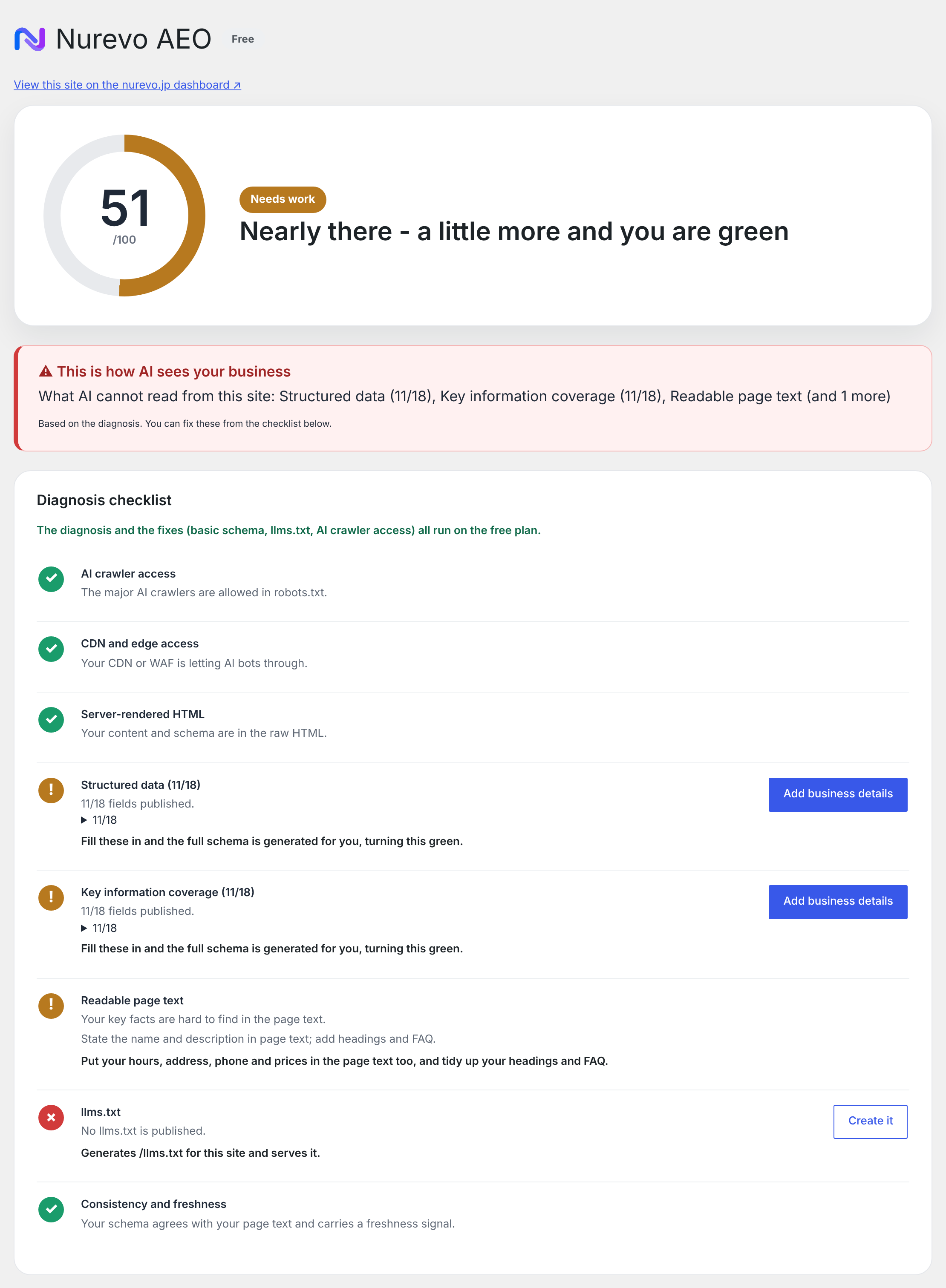
The AEO Score screen: a 0-100 score with a traffic-light badge, a summary of what AI cannot read from the site, and the diagnosis checklist.
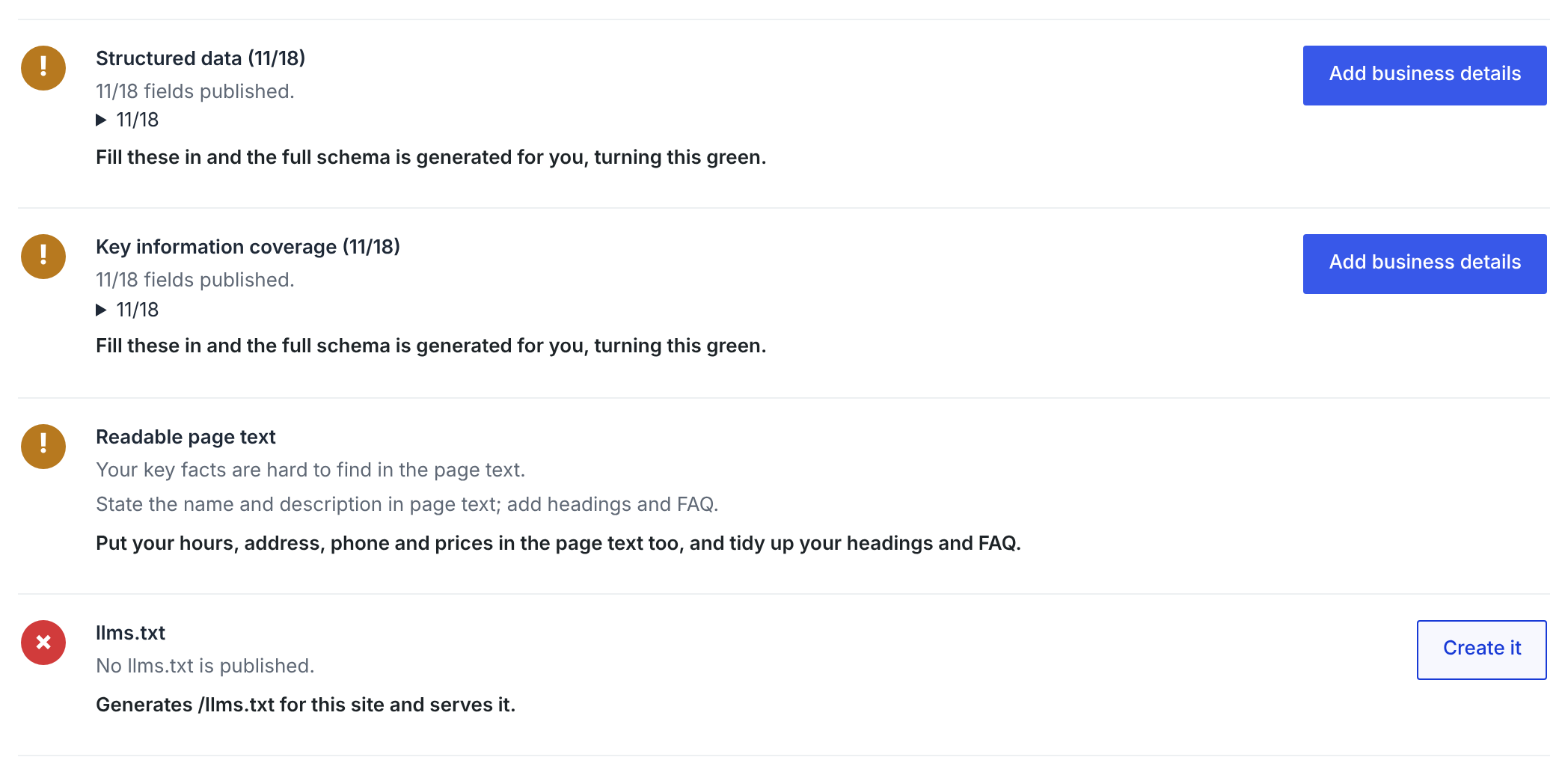
Fix suggestions in the checklist: one-click "Create it" for llms.txt, "Add business details" for missing structured data, and how-to hints for editorial items.
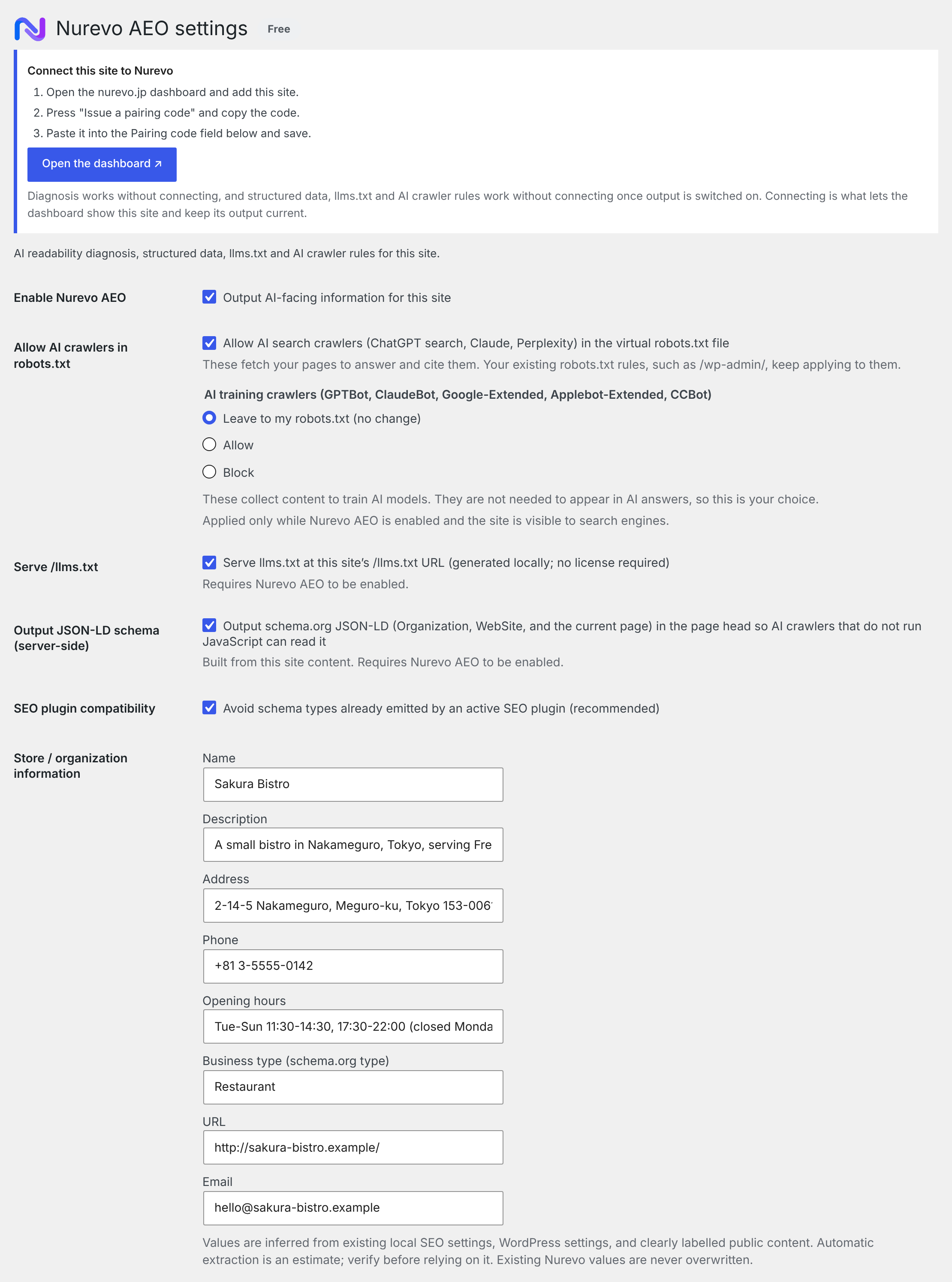
Settings: the output switch, AI crawler rules, llms.txt and JSON-LD output, SEO plugin compatibility, and the store information used to build the schema.

The generated /llms.txt, built locally from the store information, pages and services.

The Nurevo FAQ block in the block editor, showing the questions and answers entered in the plugin settings.
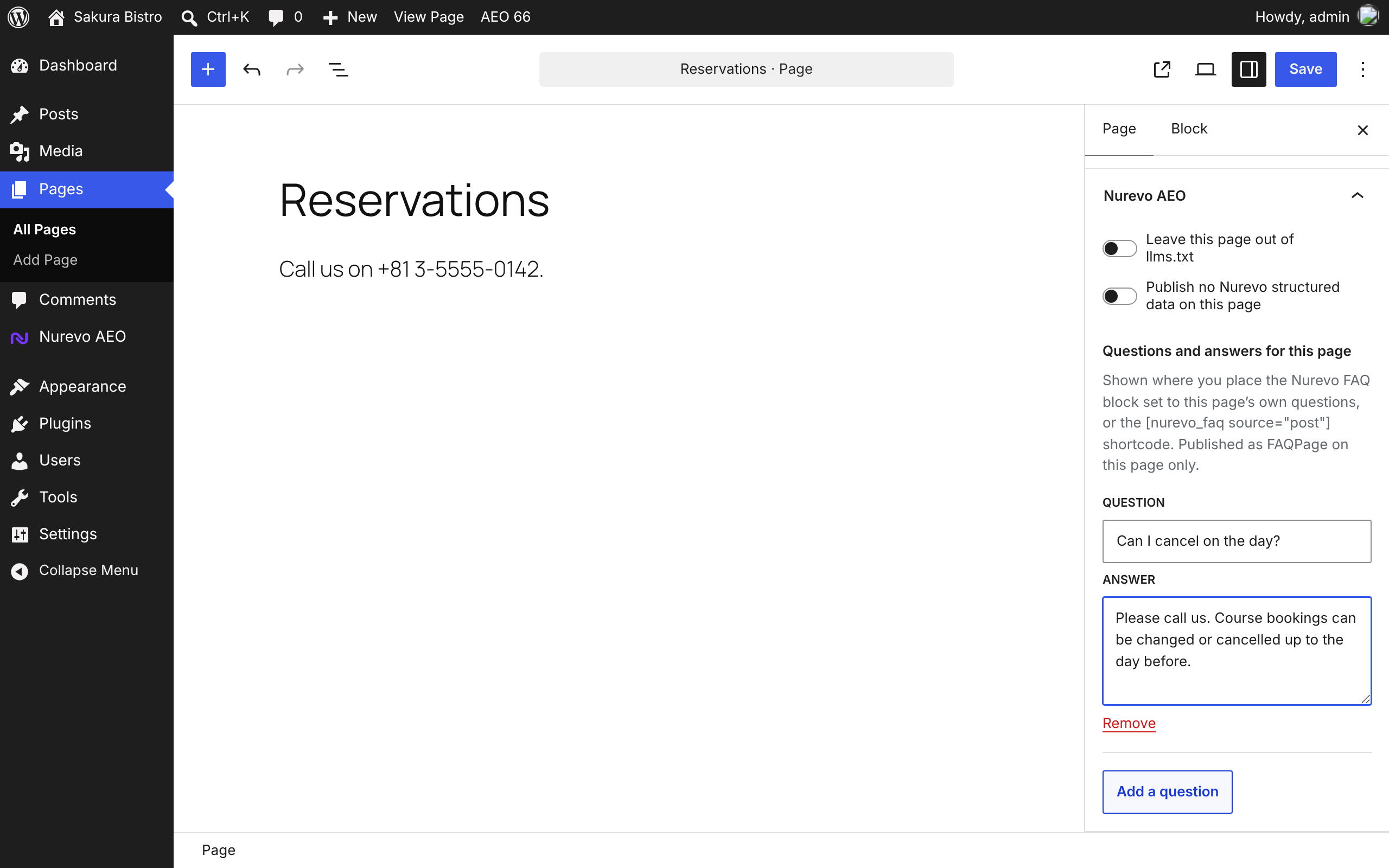
Per-page settings in the block editor's Page sidebar: leave the page out of llms.txt, publish no Nurevo structured data on it, and add questions and answers for that page only.
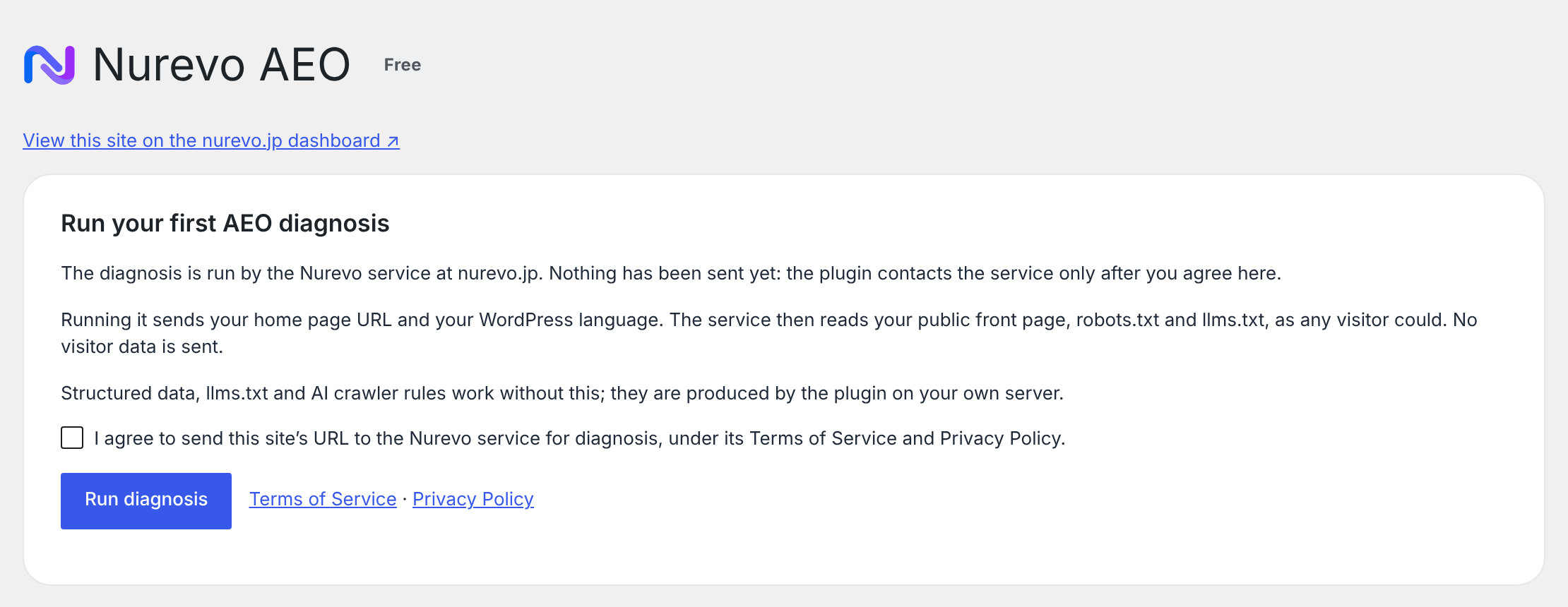
The first-run screen. Nothing is sent to the Nurevo service until you tick the consent box and press "Run diagnosis"; it explains what the diagnosis sends.