
OmniDirectory is one flexible directory engine for searchable WordPress directories: staff, members, professionals, businesses, organizations and more. Every entry has a name, a photo, relabelable directory fields, Phone, Email, Bio, Website, a Directory Category and a profile page, shown in your choice of search and profile layouts. You adapt it to your use case by relabeling fields — no code required.
Use it as a staff, employee, team, member, professional, medical, business, school, church, nonprofit, multilingual or Arabic/RTL directory. These are uses of the same engine, not separate modes with industry-specific fields.
Search
Add the [omnidirectory_search] shortcode to any page for live AJAX search as visitors type. Search matches the entry’s name and Directory Category (developers can extend it with filters). Results are cached briefly, refreshed as soon as an entry changes, capped to a configurable limit, and protected by basic rate limiting.
Arabic, multilingual and RTL
Search normalizes common Arabic letter variants (forms of Alef, ta marbuta / ha, and similar), and every layout uses the correct dir="rtl" or dir="ltr". Directory entries and categories are registered as translatable for Polylang and WPML (wpml-config.xml included).
Layouts and fields
- Eight search-result layouts: Modern Grid Cards (default), Horizontal List Row, Avatar Badge Compact, Structured Table View, Masonry Grid, Horizontal Directory List, Compact Table Matrix, Interactive Hover Flip Cards.
- Eight profile layouts: Modern Centered Card (default), Two-Column Sidebar, Hero Banner Top, Tabbed Profile View, Minimalist Clean, Split Screen Cover, Interactive Dashboard, Floating Card Overlay.
- Field labels are relabeled from Settings (e.g. Specialty / Location / Phone, or Department / Office / Phone). Relabeling does not add new fields.
- Documents (PDF, DOC, DOCX, XLS, XLSX, TXT) can be attached to profiles with custom labels; the real file type is checked on upload. A gallery field stores and renders a shortcode you provide.
- Optional Click-to-Reveal masks a profile’s phone and email until clicked (the profile markup holds them only base64-encoded). A light deterrent against simple bots, not privacy or access control: a published entry’s contact details stay public, and its JSON-LD still lists them.
- Profiles include Schema.org
PersonJSON-LD (name, URL, photo, phone, email, website, bio, job title). Theomnidirectory_structured_datafilter ($schema, $post_id) can unsettelephone/email, or return an empty array for none.
CSV import and export
Export downloads every entry as CSV (Excel-friendly, with formula-injection protection). Import replaces the whole directory with the file’s content; it doesn’t edit entries in place.
- The whole file is validated first (header, every row, at most 1,000 rows); an invalid file changes nothing. Headers are matched automatically, including variants such as “Title” or “Phone Number”; unknown columns are ignored and new categories are created.
- New entries are staged privately in the background, then swapped in only when all are ready. Previous published entries go to Trash (restorable); unpublished entries that are not in the file, and scheduled entries, are kept. If a new entry cannot be given its status, it stays private and the entry it replaces is kept unchanged, together with all of that entry’s Polylang translations; this is listed with a warning. “Resume Import” continues a stalled import.
- Draft, pending and private entries keep their status, and password-protected entries keep their protection (passwords are never exported). A row whose status or protection cannot be kept safely is not imported and is listed with the reason. Files from 4.3.32 or earlier have no Status column: their rows keep the status of the existing entry with the same name, so re-export from this version before moving a directory to another site.
- Featured images are downloaded afterwards in the background (WordPress safe HTTP, limited retries); a failed image never fails the import.
- The uploaded file is kept in
uploads/omnidirectory-imports/only until the import ends. Apache blocks it via.htaccess; on Nginx, deny that path.
Polylang: each entry is imported in the language from its Language Code column, and entries sharing a Translation Group value (last export column) are linked again as translations — only when the whole group was imported, one entry per language; otherwise a warning is shown. A file with a Language Code that is not a language of the site is refused before anything changes. Files without a Translation Group column are never linked automatically, not even by name. Translation Group values change after each import (entries are new posts).
Without Polylang (including WPML): a file with any Language Code or Translation Group value is refused before anything changes; empty columns import as before. WPML is not supported for these two columns.
Screenshots
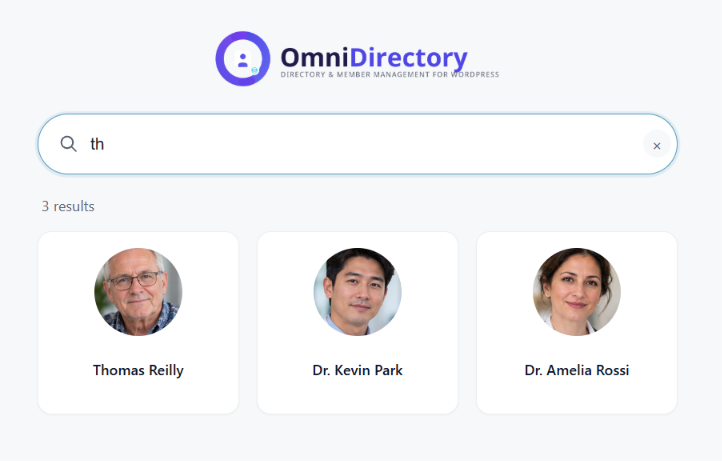
Live search results in the default Modern Grid Cards layout.
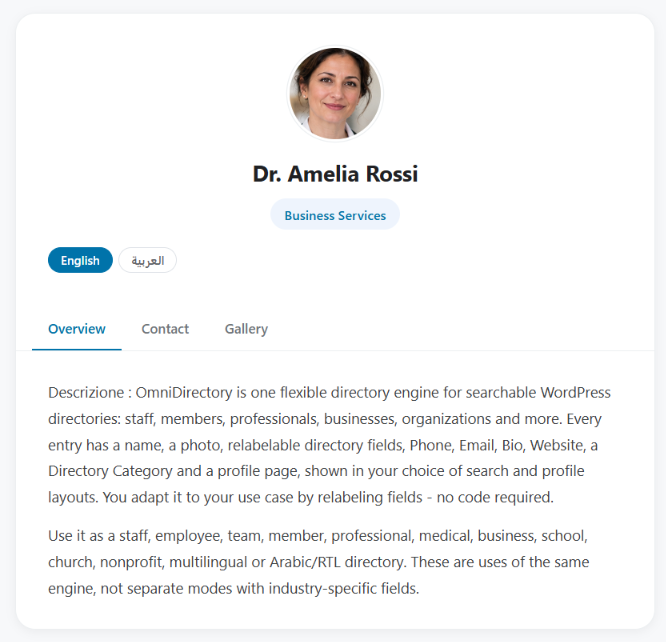
A member's profile page in the Tabbed Profile View layout.

Directory Settings: field labels, layout pickers, and color/display toggles.