
OneClick Form Lite adds a lightweight contact form to your WordPress site via shortcode:
- Shortcode: [oneclickform]
- Fields: Name, Email, Subject, Message + GDPR consent checkbox
- Anti-spam: honeypot + server-side rate limiting
- Delivery modes:
- WordPress wp_mail()
- Built-in SMTP
- File mode (writes messages to your uploads directory)
- Optional Google reCAPTCHA v3 (score-based)
- Translations: EN (default) + FR, ES, PT-BR (via included .mo files)
Important notes:
* This plugin does NOT store submitted messages in the WordPress database.
* Messages are delivered by email (wp_mail/SMTP) or written to files (File mode).
* Your host/mail provider may store emails in logs and mailboxes.
* No minified/compiled assets are shipped with this plugin. All distributed CSS/JS is human-readable.
Documentation is included in the plugin:
docs/oneclick-form-lite-user-guide.html
Source code
The plugin ships unminified, human-readable JS/CSS source files. No build process is used.
External services
1) This plugin can optionally integrate Google reCAPTCHA v3 to help prevent spam form submissions.
When enabled:
– The visitor’s browser loads Google’s reCAPTCHA script:
https://www.google.com/recaptcha/api.js?render=YOUR_SITE_KEY
– The browser communicates with Google to obtain a reCAPTCHA token.
On form submission:
– The plugin sends the reCAPTCHA token to Google for verification:
https://www.google.com/recaptcha/api/siteverify
– The verification request includes the token and the submitter’s IP address (remoteip) when available.
Service provider: Google LLC
Terms of service: https://policies.google.com/terms
Privacy policy: https://policies.google.com/privacy
2) This plugin can also send emails via an SMTP server configured by the site administrator (optional).
When SMTP is enabled and an email is sent:
– The plugin connects to the configured SMTP host and port.
– Email data is transmitted to the SMTP server in order to deliver the message.
Data sent to the SMTP server may include:
– Sender and recipient addresses, subject, message content
– Technical email headers
– Authentication data (username/password) if configured by the site administrator
Service provider: The SMTP provider selected by the site administrator (e.g., hosting provider, Google Workspace, Microsoft 365, etc.)
Terms of service: See the selected SMTP provider’s terms
Privacy policy: See the selected SMTP provider’s privacy policy
Screenshots

Settings overview (Email delivery, SMTP, File mode, reCAPTCHA, test email, documentation).

SMTP settings (built-in SMTP host, port, security, and credentials).
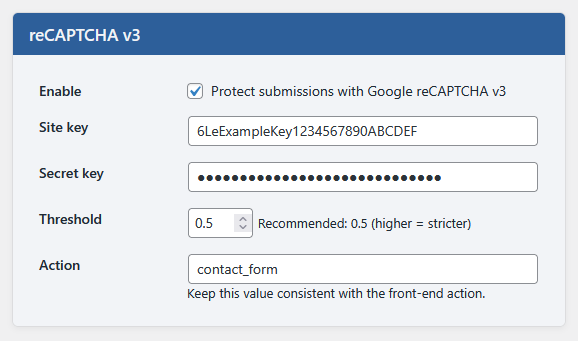
Google reCAPTCHA v3 settings (site key, secret key, action, and threshold).

Theme compatibility (light/dark previews).

Front-end translations (EN, ES, PT, FR).

Front-end confirmation message after successful submission.