
Opti-Behavior – Self-Hosted Heatmaps, Funnels, A/B Testing & Smart Insights
by OptiUser
See why visitors leave. Fix it. Prove it. On your own WordPress server.
Opti-Behavior adds click heatmaps, click tracking, conversion funnels and A/B testing to WordPress for free, and stores visitor data in your own WordPress database and files. Session recordings, scroll heatmaps and rage-click detection are in Pro.
🚀 Try the Live Demo – explore the full analytics dashboard in one click, no installation and no signup required.
Visitors rarely explain why they leave. They click, scroll, hesitate, abandon forms, hit errors or drop out of checkout. Opti-Behavior records those silent signals, and Smart Insights tells you which problem to fix first, why, and whether your fix worked.
Comparing tools? Read Google Analytics alternatives for WordPress and cookieless visitor tracking in WordPress.
🔄 How it works: one loop, not a pile of dashboards
- Collect – traffic, heatmaps and funnels in the free plugin; session recordings, errors, forms and user journeys in Pro.
- Understand – Smart Insights reads them together and writes one card per problem: what is wrong, on which page or funnel step, how many visitors it costs, and since when.
- Fix – each card gives one next action and opens the report that shows the problem: the heatmap, the funnel step, the recording.
- Prove – mark the card as fixed: Opti-Behavior compares the period before and after your change and shows the result. Test bigger changes with an A/B test.
The How it works page shows this loop with your own numbers, a first-days checklist, the latest release notes and a Setup check: are visits received, is a caching or optimization plugin blocking a tracker, are your own visits counted? Each item has a button to fix it.
✅ Free features
- Real-time traffic – visitors, sessions, pageviews, bounce rate, scroll depth, top pages, traffic sources, devices and visitor map, with visit duration, visited pages, referrers and outbound links.
- “AI Assistants” channel – visits from ChatGPT, Perplexity, Claude and Copilot are counted on their own instead of inside Organic Search.
- Click heatmaps for desktop and mobile. Point at a hot area to see how many clicks it received (“N clicks in this area”).
- Unlimited conversion funnels with multi-step drop-off analysis and device filtering. Opti-Behavior detects your site type (WooCommerce, Easy Digital Downloads, blog, lead-gen, signup, membership, LMS, booking) and proposes ready-made funnels built from your own URLs: create one in a click or edit it first. Nothing is created without you asking.
- A/B testing – page-split experiments, variant previews, conversion goals and winner application.
- Smart Insights – one card per problem, ranked by visitors lost, with a confidence level from the visits measured, the next action, a before / after result and notifications.
- Page X-Ray preview – your three most visited pages of the period, each with a health score and its first problem.
- Shop for WooCommerce – product views, adds to cart, checkouts and paid orders, and the visits each product loses (viewed, not added to cart), worst product first. The shop counters store no order number, customer name, e-mail address or coupon code.
- Site report – print or save as PDF a report of any period from Opti-Behavior > Reports: traffic, the three most costly issues and, when your site has them, shop, clicks, funnels, busiest hours and A/B tests. A “Site report” link in Traffic and Smart Insights opens it for the same period.
- Scheduled e-mail reports, daily, weekly or monthly – visits, page views, time per visit and bounce with their change, the three most costly issues, top sources, devices, most viewed pages and, on WooCommerce sites, a Shop block with up to three products that lose the most visits.
- Visitor country from a local database shipped with the plugin (DB-IP Lite): it works right after activation, and the visitor IP address is not sent to a geolocation service.
- Bot and spam filtering – visits from headless browsers and automation tools (detected by their user agent) are refused at collection, and browsers driven by an automation tool (navigator.webdriver) are marked as automated traffic. Setting “Enable automated traffic detection” in Traffic & Behavior settings, on by default.
- Settings & privacy controls – consent, storage, reports, cleanup, languages and debugging in one place.
- Multilingual admin – English, French, German, Spanish, Portuguese and Italian.
💎 Pro features
- Session recordings – watch real visits: hesitation, scrolling, navigation, rage and dead clicks. Filter by problem: JavaScript error, click friction or abandoned form.
- Scroll, move and attention heatmaps – how far visitors scroll, where the mouse moves and where attention stays. Heatmap filters by country, browser, device, visitor type and date.
- Errors & performance – JavaScript errors, network issues, broken links and Core Web Vitals problems.
- Friction detection – rage clicks and dead clicks that signal frustration (how rage and dead click detection works).
- Form analytics – field-level effort, errors, abandonment, refill behavior and completion time.
- User journeys – Sankey-style view of common paths and exits; turn high-value journeys into funnels.
- Page X-Ray – one report per page: health score, a “Where visitors click” table (rage clicks, dead clicks and JS errors per element), where visitors come from and go next, a page audit, “What changed?” against the previous period, “I fixed this” with a 14-day before / after, desktop or mobile view, and an action plan.
- Full reports – full site report (a card for each of your most visited pages, up to 10 page reports in annex) and a one-page Page X-Ray report with the click map of the page, printed or saved as PDF. On the site report: your client’s name and the sections you choose to hide.
- Shop – estimated lost sales per product (an indicative range, from your conversion rate and average order), payment errors by error type and payment method, and shop events (add to cart, checkout, payment failure) in session recordings, recorded only in Full Tracking mode after the visitor’s consent.
- Advanced A/B testing – visual edits, targeting, scheduling, WooCommerce tests and revenue attribution.
- More Smart Insights signals – errors, rage and dead clicks, slow pages, broken links and abandoned forms feed Smart Insights and Page X-Ray, with a session recording as proof when one exists.
🎁 Try Pro free for 6 months, no credit card required. See Pro plans and prices | 🚀 Live Demo
🛡️ Privacy & Performance by Design
- Self-hosted: visitor data stays on your own server. Visitor behavior data is stored in your WordPress database and files. No third-party analytics cloud: analytics data is not sold or shared with external behavior platforms.
- Privacy controls – cookie-free anonymous tracking by default, IP anonymization, retention settings and uninstall cleanup options. Full Tracking mode uses cookies only after the visitor accepts the consent banner, and the
[opti_behavior_cookie_settings]shortcode lets visitors change or withdraw their choice at any time. - Hybrid Storage – high-volume analytics events are stored in files instead of the database. Database size measured on one production site.
- Lightweight tracking – minified trackers loaded with
defer. We measured PageSpeed on a test page with the plugin on and off: see the article. - WooCommerce ready – analyze product pages, carts, checkout funnels and revenue-focused experiments while keeping customer behavior data under your control.
External Services
This plugin may connect to external services in limited circumstances:
Country database (DB-IP Lite, db-ip.com)
Purpose: The free DB-IP Lite country database from db-ip.com (https://db-ip.com) is used to find a visitor’s country on your own server. The database is included in the plugin (assets/geo/) and renewed with each plugin version: no download is needed. The plugin can also download a newer file from db-ip.com. Only the database file is downloaded; no visitor data is sent to db-ip.com. Terms and licence: https://db-ip.com/db/lite.php (CC BY 4.0). IP geolocation by DB-IP (https://db-ip.com).
When Used: Never on its own. db-ip.com is contacted only when an administrator clicks “Update now” in Settings > Traffic & Behavior, or ticks “Check for a newer database every month” there (off by default, can be turned off).
Data Sent: No visitor data. The request sends the user agent “Opti-Behavior/”, without your site address.
Privacy:
* Service: https://db-ip.com/
* Terms and licence: https://db-ip.com/db/lite.php
OpenStreetMap Tiles
Purpose: Displays the interactive visitor location map in your WordPress admin dashboard.
When Used: Only when YOU (the admin) view the real-time visitor map. Not used on the frontend.
Data Sent: Your browser makes direct requests to OpenStreetMap tile servers (standard HTTP headers only).
Privacy:
* Service: https://www.openstreetmap.org/
* Tile Policy: https://operations.osmfoundation.org/policies/tiles/
* Privacy Policy: https://wiki.osmfoundation.org/wiki/Privacy_Policy
OptiUser API (api.optiuser.com)
Purpose: Handles the optional daily status message (site URL, versions, one admin email; only after you accept it on the welcome screen), and plugin deactivation notifications. Licence validation and update checks are made by the Pro plugin itself, only after you install and activate it.
When Used:
* Install tracker: Sends a heartbeat once every 24 hours after activation, containing only: site URL, WordPress version, PHP version, plugin version, plugin type (free/pro), and one best available administrator contact email when a valid contact exists. No visitor data is sent.
* Deactivation: Notifies the API when the plugin is deactivated so installation records stay up to date.
* Announcements: Optional short news banners on the plugin’s own screens. Only after you accept the daily status message on the welcome screen, or while Pro is active, the plugin asks api.optiuser.com for current announcements at most once every 6 hours. Data sent: only the licence type (free, pro, trial or expired); no site URL, domain or email. Closing a banner is stored on your site only, nothing is sent. Terms of Service: https://optiuser.com/terms-of-service/ – Privacy Policy: https://optiuser.com/privacy-policy/
Data Sent: Site URL, WordPress admin username when applicable, and one best available administrator contact email for install tracking. The plugin selects a single valid contact email and does not send a list of administrator emails. No visitor analytics data is ever sent to the API.
Privacy:
* Service: https://api.optiuser.com/
* Website: https://optiuser.com/
* Terms of Service: https://optiuser.com/terms-of-service/
* Privacy Policy: https://optiuser.com/privacy-policy/
* The API stores installation metadata (site URL, plugin version) for license management. No visitor data is collected or stored by the API.
OptiUser Website (optiuser.com)
Purpose: Hosts the Opti-Behavior Pro trial page and sales/feature pages. Every “Upgrade to Pro” / “Try Pro” link of the plugin (welcome screen, trial notice, Pro feature pages, heatmap, Smart Insights, A/B tests, Settings) opens the same Pro trial page on optiuser.com in a new tab.
When Used: Only when an admin clicks one of these links. The plugin itself sends nothing: the browser opens the page.
Data Sent: Only your site address and the place of the link (utm parameters) travel in the link. No username, email or visitor analytics data is sent.
Privacy:
* Service: https://optiuser.com/
* Privacy Policy: https://optiuser.com/privacy-policy/
Important Note: All analytics data is stored locally on your WordPress server. The external services listed above are used only for optional geographic features (optional update of the DB-IP Lite country database, which is included in the plugin; OpenStreetMap map tiles), the optional daily status message (only after you accept it), optional announcements (only after you accept the daily status message, or with Pro active), and Pro license management (api.optiuser.com). Visitor analytics data (pages, clicks, sessions) stays on your server. The visitor’s IP address is not sent to any geolocation service: the country is looked up on your own server.
Privacy Policy
Opti-Behavior collects user interaction data to provide analytics insights. This data includes:
- Page URLs and titles
- Click coordinates and target elements
- Mouse movement patterns
- Scroll depth
- Session timestamps
- Referrer URLs
- Browser and device information
- IP addresses (can be anonymized)
- Approximate location: the country only. It comes from the Cloudflare header when present, otherwise from the visitor’s IP address, looked up on your own server in the local DB-IP Lite country database, in every privacy mode. The IP address is not sent to any third party. Without Cloudflare and without the database, no country is recorded (the screens show “Unknown”). The browser language and the time zone are never used to guess a country.
Data Storage: All analytics data is stored locally in your WordPress database or file system. No data is sent to external analytics servers.
External Services: The country of a visitor is found on your own server, from the Cloudflare header or the local DB-IP Lite country database. The visitor’s IP address is not sent to any geolocation service. The database is included in the plugin; a newer file is downloaded from db-ip.com only after an administrator asks for it. See the “External Services” section above for complete details.
Usage Tracking: With your explicit consent (granted via the first-run welcome screen), this plugin sends usage statistics to api.optiuser.com once every 24 hours. The data includes: site URL, plugin version, WordPress version, PHP version, and one best available administrator contact email when a valid contact exists. This data is used solely to understand plugin adoption, support license/trial email flows, and improve the product. Tracking only begins after you click “Accept & Continue” on the welcome page shown at first activation. You may review our full data practices at https://optiuser.com/privacy-policy/
No analytics cloud: Opti-Behavior does not sell visitor data or send it to an analytics platform. No visitor data is sent to a geolocation service: the country is looked up on your own server (see External Services). You are the data controller.
User Rights: You have full control over data retention and deletion. Users can request data deletion at any time.
When using this plugin, ensure your site’s privacy policy discloses:
* What data is being collected
* How long it is retained
* Who has access to it
* How users can request deletion
* That analytics data is stored locally on your server
* That the visitor’s IP address is used on your own server to determine the country (DB-IP Lite database), and is not sent to any third party
Third-Party Libraries
This plugin bundles the following open-source libraries:
Chart.js
- Version: 4.4.0
- License: MIT License
- Homepage: https://www.chartjs.org/
- Used for: Rendering analytics charts and graphs
Leaflet
- Version: 1.9.4
- License: BSD 2-Clause License
- Homepage: https://leafletjs.com/
- Used for: Real-time visitor map visualization
heatmap.js
- Version: 2.0.5
- License: MIT License
- Homepage: https://www.patrick-wied.at/static/heatmapjs/
- Used for: Generating visual heatmaps of user interactions
Lucide
- Version: 0.554.0
- License: ISC License
- Homepage: https://lucide.dev/
- Used for: Icon library for the admin interface
All bundled libraries use GPL-compatible licenses (MIT, BSD 2-Clause, and ISC) and are included locally within the plugin. See THIRD-PARTY-LICENSES.txt in the plugin directory for full license texts.
Credits
Developed by OptiUser
IP Geolocation by DB-IP (https://db-ip.com), CC BY 4.0. The DB-IP Lite …
Screenshots

Real-time WordPress analytics dashboard with visitors, sessions, page views, average session time, scroll depth, and bounce rate KPIs.

Live visitor activity feed with country flags, anonymized visitor identifiers, page URLs, and an interactive real-time visitor map.

Traffic overview chart comparing visitors, sessions, and page views across the selected date range.

Top engaged users and top pages report showing session frequency, average session duration, country, page views, and interaction counts.

Visitor activity heatmap showing high-traffic days and hours for behavior analytics and content timing decisions.

Audience analytics widgets for new vs returning visitors, visited directories, and logged-in visitor authentication activity.

Traffic classification dashboard with human traffic, spam traffic, bot detection, crawler breakdown, and user intent segmentation.

Acquisition and environment analytics for referrers, countries, and browser usage.

Device analytics for desktop, mobile, tablet, operating systems, and screen resolutions.

Heatmaps overview with total heatmaps, total clicks, mobile traffic, average time on page, hottest page, click-through rate, and searchable page list.

Free click heatmap for WordPress: detail view with date, country, browser, visitor type, desktop/mobile filters, page preview, and click intensity overlay.

Pro: Move heatmap detail view showing mouse movement trails and visitor movement patterns on a live page preview.

Pro: Attention heatmap detail view showing attention intensity and engagement hotspots on the selected page.

Pro: Scroll heatmap detail view showing scroll-depth intensity, loaded scroll points, and page-level engagement depth.
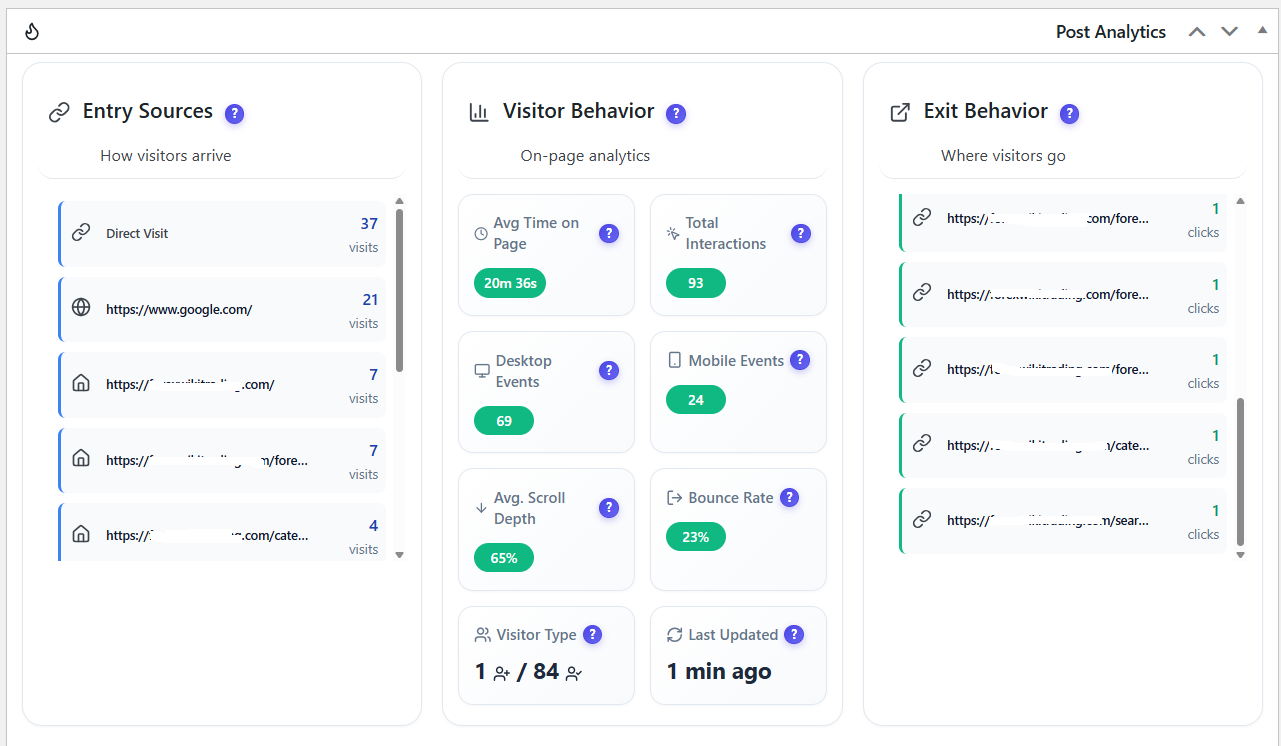
Post Analytics panel with entry sources, on-page visitor behavior, exit behavior, total interactions, scroll depth, bounce rate, and update time.

Page-level analytics with country, browser, device breakdowns, visitor trends, heatmap access, and session recording access.

Pro: Session Recordings list with watched status, duration, visitor activity, visited pages, referrer, country, browser, operating system, and device data.
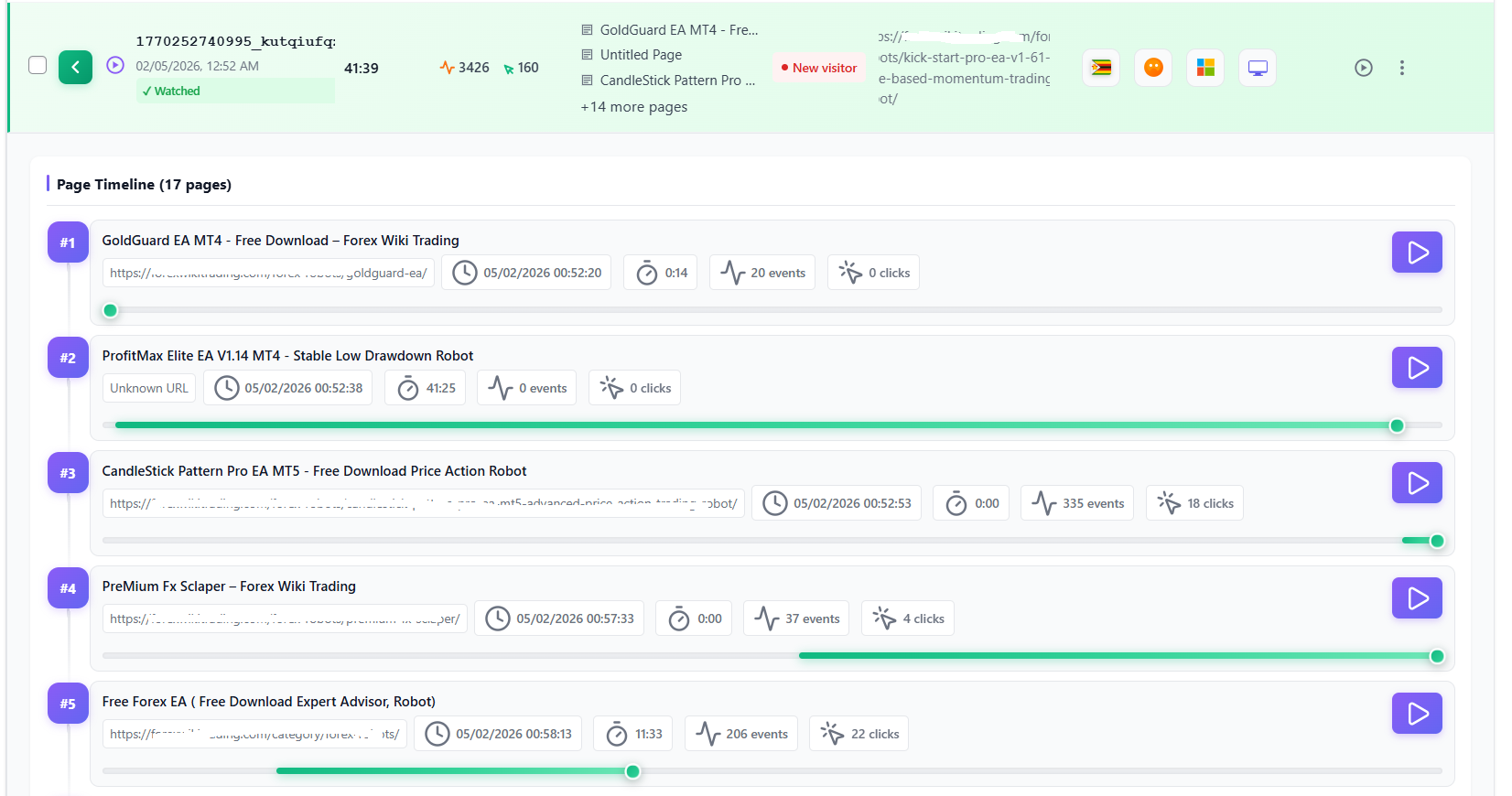
Pro: Session recording page timeline showing multi-page visitor journeys with events, clicks, durations, and replay controls.

Pro: Session replay player with visitor metadata, event timeline, playback controls, skip-inactive mode, and page-by-page session navigation.

Conversion funnels dashboard showing funnel steps, completion rate, abandonment rate, device and country filters, and funnel performance cards.

Funnel builder modal for creating or editing URL-based funnel steps with URL match rules and step ordering.

Pro: User Journey Analytics with journey flow visualization, top paths, entry and exit analysis, page groups, device, browser, country, visitor, and referrer filters.

Pro: Errors Tracking dashboard for JavaScript errors, network errors, friction events, rage clicks, slow pages, affected sessions, performance, and broken links.

Pro: Form Analytics dashboard with form views, submissions, conversion rate, completion time, abandonments, activity trends, and top forms by conversion.

Privacy and GDPR settings comparing anonymous mode and full tracking for cookies, IP storage, geolocation, consent, session accuracy, and user journey tracking.

Consent banner configuration with third-party consent plugin detection, banner position controls, colors, title, and message settings.

A/B Testing dashboard with running tests, drafts, completed tests, impressions, search, filters, conversion rate, and test results actions.

A/B Testing decision engine results with weighted goals, recommended winner, composite score by variant, per-goal breakdown, and Pro-only heatmap impact by variant.

A/B Testing click-goal results with statistical significance, confidence, goal configuration, variant conversion rates, winner status, Pro-only Bayesian analysis, and conversion trend chart.

Smart Insights: one card per problem, ranked by the visitors it costs, with confidence, evidence, the next action and a "How it works" strip showing what each module sent.

Smart Insights notification panel with new problems and the admin menu light (red, yellow, green).

How it works page: the seven collectors with your own numbers, the four-step loop, the Setup check and the first-days checklist.

Pro: Page X-Ray report with health score, behavior map, page audit, WordPress changes and action plan.

