
If you sell through Freemius, the prices on your website are a copy of the prices in your Freemius dashboard, and copies go stale. Change a price in the dashboard and you then have to remember every page, tile and sentence on your own site that quotes it, open each one in the editor, retype the figure and save. Miss one and a visitor is reading a price you no longer charge.
This plugin keeps the figure in the page bound to the price in the dashboard. Blocks in the editor, shortcodes everywhere else, both rendering the same live figure. Prices are fetched from the Freemius API on your server, stored on your site, and refetched within seconds of a dashboard change. Your pages render the stored figure, so nothing about this makes a visitor wait on an API call, and nobody has to re-save a page for a new price to appear.
A figure typed into a page is correct on the day and drifts from then on. This plugin never types one: every price on the page is read from the stored copy at render time, and the stored copy follows the dashboard.
Freemius is a trademark of Freemius, Inc. This plugin is an independent integration built by PlugUpp on the public Freemius API; it is not affiliated with, endorsed by or maintained by Freemius, and it is not the Freemius for WordPress plugin.
What it does
- A Freemius pricing card block is a whole card in one go: insert it and it arrives holding the plan’s name, its price, its description, its features list and a full-width buy button, every figure and every word of it live and every one of them still its own block. The card itself has a width, a position, a border, a radius, padding, a background and the space between the blocks inside it, all from its own panels, on every theme, including the themes where WordPress leaves those panels switched off.
- A Freemius price block renders any plan, licence tier and billing cycle, picked from dropdowns that offer only the combinations your product sells. Freemius buy button, Freemius plan text, Freemius plan features, Freemius currency toggle, Freemius billing cycle toggle, Freemius release and Freemius money-back sit beside it, all nine under Widgets in the inserter.
[pflp_card]is the same box as a shortcode, wrapping whatever you put between its tags. A row of cards side by side stays an ordinary Columns or Grid block, because WordPress is already good at that.- The plan’s own words come from Freemius too.
[pflp_plan]renders its title, its description or its free trial, and[pflp_features]renders its feature list, so nothing on a pricing card is typed twice. [pflp_price]does the same thing as a shortcode, for page builders, the classic editor, widget areas and template files. The blocks and the shortcodes are the same code, so the two can never drift apart, and an existing shortcode converts to a block in one click.[pflp_button]renders a buy button linking to the hosted checkout for that same row, built the way WordPress builds its own Button block so your theme’s button styling applies to it. It comes in two kinds, Filled and Outlined, the same two the core Buttons block offers and built the same way, and each kind has its own colours on the Settings screen.[pflp_cycle]renders a billing cycle toggle and[pflp_currency]a currency toggle, each with five styles, a size, a gap and an active colour, and each rendering nothing at all where there is only one option to offer.- The cycle toggle can carry the saving on the yearly option. It is computed from your own prices rather than typed, so a price change moves it, and it is not shown at all when there is no saving to claim.
- A price can print your own text after the figure,
/monthand/yearset once on the Settings screen and following the toggle, or your own words. It is off unless you ask for it, so nothing already published changes. - A plan that does not sell the cycle on show says so, “Yearly only”, built from the cycles it does sell. A price never falls back to a nearby figure and never prints a zero.
- Every attribute is optional.
[pflp_price]and[pflp_button]with nothing at all render your headline price and the checkout that sells it, so the shortest thing you can type is already the right one. - A webhook receiver refetches within seconds of a price or plan change in the dashboard, and registers itself: there is nothing to paste. A staleness check is the backstop, and a daily job is the backstop for that.
- Every price carries all of its currencies and all of its billing cycles, so a visitor sees theirs through a swap in their own browser. No request comes back to your site, which means a page cache or a CDN can never serve one visitor’s currency to another.
- Buy buttons stay ordinary links to the hosted checkout and gain the visitor’s currency, whether the plugin rendered them or your theme did. One setting opens the checkout in an overlay instead.
- If the Freemius API is ever unreachable, the last good prices stay on the page and an admin notice tells you. Nothing goes blank, and no figure is ever invented or shown as zero.
- A shortcode builder on each product’s screen writes any of it for you, says what it will render, and lists every price the product sells. Pick Pricing card and it writes the whole card, all six lines at once, ready for a page builder’s shortcode widget or the classic editor. A second row of dropdowns offers whatever named choices the element has: a price’s format and its suffix, a button’s style and width, a toggle’s look, the saving badge, a card’s featured state and its button style, and a features list’s descriptions.
- Card defaults set the border, radius, padding, background and shadow of every pricing card on the site at once. They start empty, so nothing changes until you fill one, and anything set on a card itself always wins.
- The version is live too. Freemius release and
[pflp_release]show the latest release Freemius holds for the product: its version, what it requires and what it is tested up to, and its release date if you ask for it. Freemius money-back and[pflp_moneyback]show the money-back guarantee set in the dashboard. Both show nothing at all where Freemius holds nothing, rather than a typed stand-in that would go stale.
Works with AI agents
Ask an AI agent such as Claude to set up your pricing, and it can. Live Pricing for Freemius gives agents their own way in, through WP-CLI and the WordPress Abilities API.
- It reads your products and every setting, and checks each product’s health.
- It saves your whole pricing set up as one file and applies a file back, so a set up moves between sites in one step.
- It previews a pricing card before anything changes.
It never sees your Freemius token. And it never overwrites a change you made in the admin with an older file.
Who it is for
Anyone selling a WordPress plugin or theme through Freemius who publishes prices on their own site: a pricing page, a comparison table, a landing page, or a price quoted in a paragraph of copy. It is most useful if you sell in more than one currency, or change prices more than once a year.
About PlugUpp
PlugUpp builds WordPress plugins for people who publish and sell on their own site. This one is free because everyone who needs it is a plugin or theme seller with a marketing site, which is exactly who PlugUpp builds for. Three more for the same site:
- PlugUpp Link & Image Health Audit finds the broken links and broken images on the site you sell from, checked on your own server with no external crawler and no quota. See it on plugupp.com
- PlugUpp Search & Social Appearance Audit shows how every page looks in Google and on social platforms, from the page as it actually ships, before a buyer sees it. See it on plugupp.com
- PlugUpp Dynamic OG Image Generator gives each page a real browser screenshot of itself as its share image, so a shared link shows the page as it is. See it on plugupp.com
External services
This plugin relies on the Freemius platform. Three separate calls are involved, and they are described here in full, followed by one call to WordPress.org on two admin screens and one optional call to PlugUpp, which is off until you turn it on.
1. Reading your prices from the Freemius API
Your server requests https://api.freemius.com/v1/products/{product ID}/pricing.json. It sends the numeric Freemius product ID in the URL and your Freemius API Bearer Authorization Token in an authorization header. Nothing else is sent, and nothing about your visitors is sent. The call happens only on your server, never during a visitor’s page view: when you press Refresh now or Test token in the admin, when a webhook arrives, when a scheduled refresh runs, and whenever you save the product. If no token is configured, the call is never made.
When a save has proved the token, your server also reads the product’s secret key from https://api.freemius.com/v1/products/{product ID}.json (it signs every webhook delivery; it is stored on your site and never shown or logged) and registers this site’s webhook with the same API: it lists the product’s webhooks at https://api.freemius.com/v1/products/{product ID}/webhooks.json, then creates one for this site or brings its own up to date, and removes its own when you delete the product. The only thing sent is this site’s webhook URL and the eleven event types it subscribes to: a price or a plan being created, updated or deleted, a version being released, deployed, updated or deleted, and a release being suspended. Webhooks pointing anywhere else are never touched.
The prices answer also carries the product’s money-back period and refund policy, and those two are kept with the prices. Whenever the prices are read, your server also reads the product’s latest released version from https://api.freemius.com/v1/products/{product ID}/tags/latest.json, with the same product ID and token and nothing else. Only the version, the WordPress and PHP versions it requires, the version it is tested up to, its release date and its tag number are kept from it; the download link the answer carries is never stored.
2. Choosing the visitor’s currency
The visitor’s browser requests https://checkout.freemius.com/geo.json. The request carries nothing beyond the request itself, which necessarily includes the visitor’s IP address as any web request does. The answer is a currency code, which the browser keeps for one hour so the call is not repeated on every page. This happens only on pages where a price or a currency toggle has been rendered, and only when the visitor has not already chosen a currency.
3. The overlay checkout
When you switch the Checkout setting to “Overlay”, the visitor’s browser loads the Freemius checkout script from https://checkout.freemius.com/js/v1/ so the checkout can open in place. With the default hosted setting, this script is never loaded and your buy buttons remain ordinary links.
4. The More from PlugUpp panel
On this plugin’s own Products and Settings screens, and nowhere else, your site asks the WordPress.org plugins API (https://api.wordpress.org/plugins/info/1.2/) for the list of plugins published by the PlugUpp account, once a day, and shows them as cards with their WordPress.org icons (served from https://ps.w.org/). The request carries the author name and nothing about your site. This is the same API WordPress itself uses for the Add New plugin screen and for update checks. If it cannot be reached, a short built-in list is shown instead.
5. PlugUpp settings usage (optional)
If you allow it, the plugin sends PlugUpp a summary of which settings you change and which plugin screens you open, with no content, addresses or names, to https://usage.plugupp.com. It helps us simplify the plugin. It is off until you turn it on, and you can turn it off at any time on the plugin’s Logs tab.
- When data is sent: only if you turned on “Share settings usage” on the plugin’s Logs tab (it is off until you do). Once a week, and once within a day of saving the plugin’s settings. Never when a visitor views your site. Turning it off stops sending and sends one request to delete what was stored for this install.
- What data is sent: the plugin’s name, version and plan (free or premium), the WordPress and PHP versions, a random install ID made on your site, which settings differ from their defaults (for a setting with a fixed set of options, the option chosen; for text and lists, only that it changed and how many items it holds), how often each settings group and tab was opened, and when the setup steps were completed, counted from when the plugin first ran.
- What is never sent: your site address, email addresses, names, page or post content, passwords or keys, or any Freemius identifier. The service does not store your IP address.
- Terms of service: https://plugupp.com/terms-of-service/
- Privacy policy: https://plugupp.com/privacy-policy/
- Legal notice: https://plugupp.com/legal-notice/
Webhooks are inbound. A webhook is a call from Freemius to your site, not from your site to Freemius. Your site never initiates it and sends nothing. Each delivery is verified twice before it is acted on: the URL carries a key this plugin generated, and the body carries a signature checked against your product’s secret key.
Freemius is operated by Freemius, Inc. Their terms of service are at https://freemius.com/terms/ and their privacy policy is at https://freemius.com/privacy/.
Credits
The nine badge icons are Tabler Icons by Pawel Kuna, used unmodified under the MIT licence. The licence text ships with them, in assets/icons/badge/LICENSE-icons.txt.
Screenshots

The Products screen: every configured product, named by Freemius, with its plans, its currencies, its last fetch, its last webhook and its status.

A product's own screen: the API Bearer Authorization Token with its Test button, the Status card showing the stored prices, the latest release and the money-back period Freemius holds, and the self-registered webhook, and the Shortcode builder, here writing a whole pricing card as the six lines a page builder's shortcode widget takes.

The Appearance tab: the toggles' style and the Card defaults every pricing card starts from, then the toggle colours, the card hover, the buttons, filled buttons and outlined buttons folded under their headings, each with a one-line summary. A folded group that holds a changed setting opens by itself. Both toggles, a live card and both buttons sit beside the fields and follow every change, with a Hold hover switch for picking a hover colour without holding the mouse still.

The Featured plan tab: the badge's position and words, then the featured card, the badge's style and its button folded under their headings, with a live card beside the fields that follows every change.

The Freemius pricing card in the block editor, with its own width, border, radius, padding and block spacing panels, on a theme that leaves WordPress's appearance tools off.

A pricing row on a page: live prices, a billing cycle toggle carrying the saving computed from those prices, and the featured plan marking itself with its badge.

A live pricing page in a visitor's own currency, three currencies on one toggle, swapped in their browser with no request back to the site.
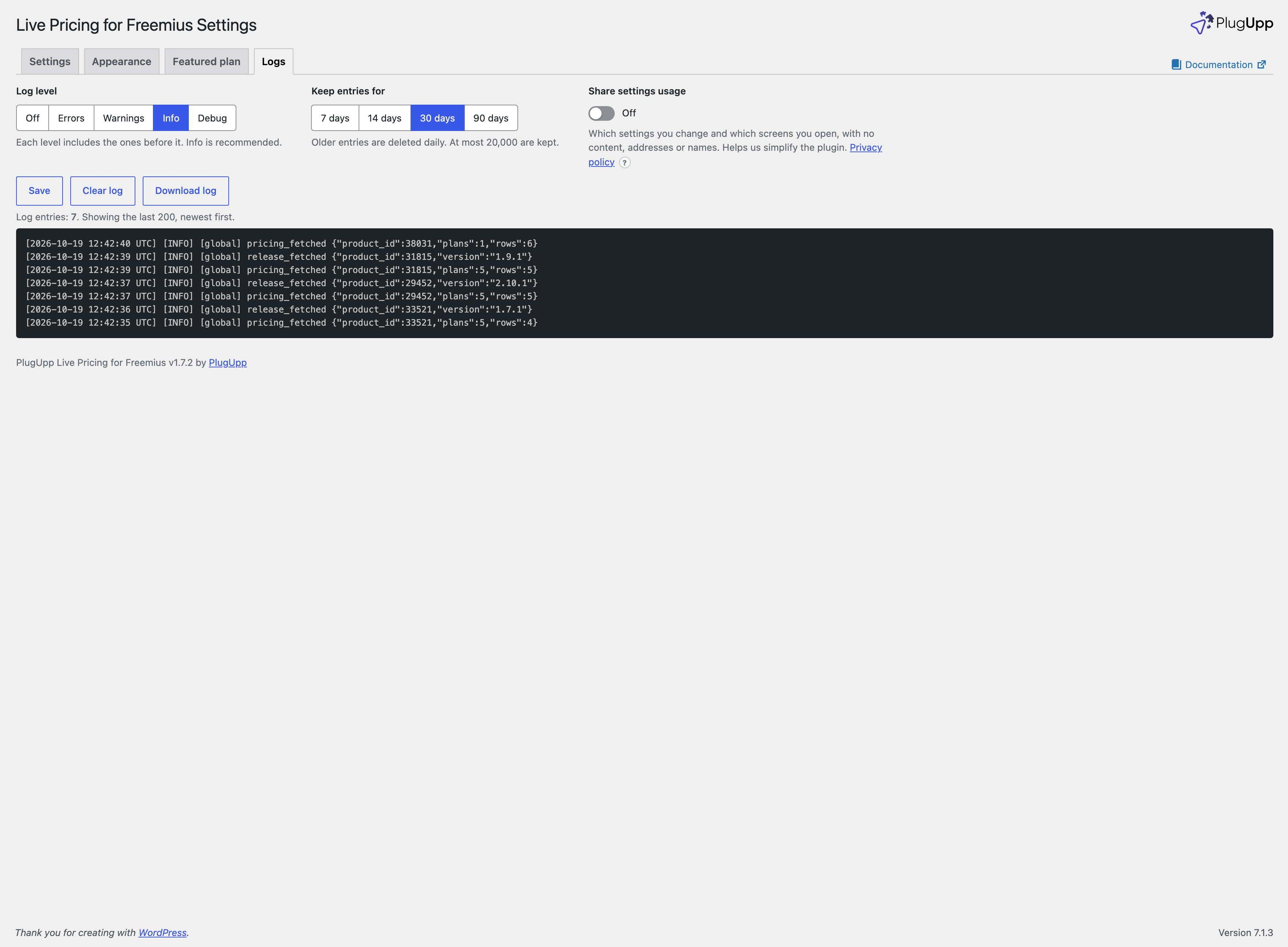
The Logs tab, showing every price fetch, webhook delivery and error, with the log level, how long entries are kept, the Share settings usage switch, Clear log and Download log.