BACK TO DIRECTORY


Features
- Provides a shortcode for embedding post-thumbnails. Authors can quickly change pictures in posts without wading through HTML. This can be awesome in several ways: if your post-thumbnails change the width or height due to a theme change, or if you have cropped them with another tool — this will always pull wordpress’ latest image).
- Includes a hook into the media library to create the above shortcode.
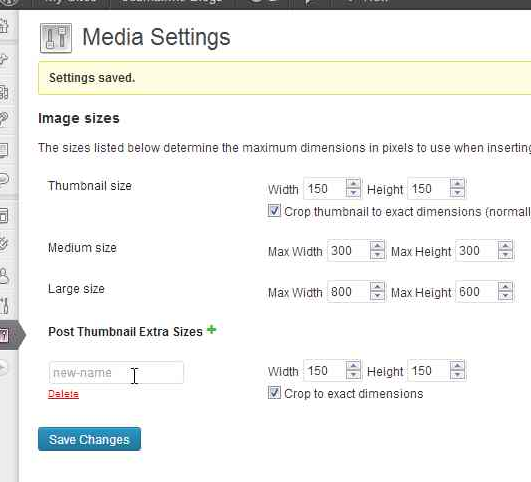
- Add new post thumbnails via WordPress Settings → Media.
Future Plans
Submit any other ideas at https://github.com/sewpafly/post-thumbnail-extras/issues.
Screenshots
In Settings → Media, click the plus sign to add a new post thumbnail.
Update the width/height and whether or not the post-thumbnail should be cropped to an exact size. (If the width or height is set to 0, that boundary constraint is not enforced). Make sure you click the "Save Changes" button so that the changes are stored in the database.
In the media editor, you can choose to insert a shortcode of a single picture with the "Insert shortcode" button.
Plugin Details
Active Installs
200Total Downloads
13,793Version
6.0Requires WP
2.5Requires PHP
—Tested Up To
Added
2013-04-09Last Updated
2014-12-16 5:34am GMTRatings
5
2
4
0
3
0
2
0
1
0