
Postly helps you turn a published WordPress article into content for your social channels, so readers can discover useful articles beyond your website. For example, use a customer advice article to prepare a LinkedIn tip and a Facebook post linking to the full guide. Open a public article in WordPress, choose its Postly social campaign action, and review the source, destinations and publishing time in Postly before activating the campaign.
The plugin adds a publishing hub, article actions and RSS feed shortcuts to WordPress. You can also use an article as a source for a blog campaign. For ongoing sharing, an RSS-to-social campaign in Postly reads your site’s feed of published articles. Each campaign requires its own setup, schedule and deliberate activation.
Open focused Social, Blog, Email, WhatsApp and Polls workspaces, manage connected channels, or find individual tools in Products. Blog and Email use a shared block editor in Postly. Choose eligible connected destinations and review the preview and publication settings before sending or publishing. Blog presets can supply defaults that you adjust for an individual article. A global Campaign is an optional way to group related work; you do not need one to create or publish an individual item. Source automation still requires its own deliberate setup and activation.
Your AI agents. Your publishing platform. If you use an AI assistant, ask it to prepare useful drafts from your public article, then review them in Postly before publishing. You can also prepare content directly in the Postly editor. External agents are optional and require Postly API access and their own setup; connecting an assistant alone does not start background publishing.
Each WordPress user can connect their own Postly profile and selected workspace using a one-use code. Your current Postly workspace permissions control drafting, approvals, connections and billing. WordPress administrator access does not grant Postly permissions. Hosted actions still enforce subscription and AI credit requirements.
Authorized users can open Manage billing on the Postly website. The plugin never collects payment details or changes subscriptions. Users without billing permission should ask their workspace owner to review the plan.
Open the hosted Postly workspace for social publishing, the article editor, posts and drafts, calendar, Auto Post, RSS feeds, ecommerce, media, templates, AI Studio, team notes, publishing analytics and connected accounts.
For ongoing blog and social publishing, configure a blog campaign in Postly and a separate RSS-to-social campaign using your published blog’s feed. Choose destinations and schedules in each campaign. This plugin does not create a dependent publish-then-share job, publish on WordPress save, or activate any campaign automatically. Provider requirements, permissions, approvals, media requirements and publishing limits apply.
Postly is a separate hosted service. An account is required. Paid publishing and AI features depend on your workspace subscription and credits. Installing the plugin does not grant paid access. All local plugin features are available without a license key.
This is the official Postly companion from Postly Technologies Inc. It works independently and does not require another companion plugin.
Publisher website: https://postly.ai. For plugin, account or publishing support, write to team@postly.ai. The Postly name identifies the hosted service this official companion connects to; this plugin does not represent WordPress.org or the WordPress Foundation.
External service and privacy
Service: https://app.postly.ai
Profile connection API: https://api.postly.ai/wordPressPlugin/
Website: https://postly.ai
Terms: https://postly.ai/legal/tos
Privacy: https://postly.ai/legal/privacy
Dashboard actions open app.postly.ai in a new browser tab. Article/feed actions send the selected public URL, source type and blog/social destination in the link only when clicked. Postly processes the public source when you request it in the wizard. Review the current workspace, destination accounts and schedule before activating a campaign.
When you explicitly connect, the plugin sends the one-use code, site home URL and a random identifier for your local user connection to api.postly.ai. It stores a limited profile token encrypted in that WordPress user’s metadata using the site’s authentication salt. On plugin screens and connected actions it requests your display name, workspace, roles, permitted actions and publishing access. It stores no Postly login password, WordPress application password, social token or payment information. Profile tokens cannot publish or authorize billing and expire after 30 days. The one-use code expires after 10 minutes.
There is no background polling or telemetry. The plugin copies no unpublished content and adds no public-site scripts. Draft, private, scheduled and password-protected articles are excluded from source actions. No profile response is persistently cached. Permissions are verified again in Postly before continuing to a hosted action.
Disconnect my Postly profile revokes the profile token. WordPress logout removes the local token; signing out of the parent Postly session invalidates it server-side. Reconnect to change the linked account or workspace. Removing the plugin does not stop hosted campaigns or revoke the separate publishing connection. Uninstall deletes this plugin’s local user metadata only.
To publish to this site, connect WordPress in Postly using the existing application-password flow for self-hosted sites or WordPress.com authorization. Enter credentials directly in Postly. Hosted publishing, AI processing, jobs and revocation are handled by Postly separately from this plugin. Removing the plugin does not stop hosted campaigns: pause them in Postly and revoke the connection separately.
Screenshots
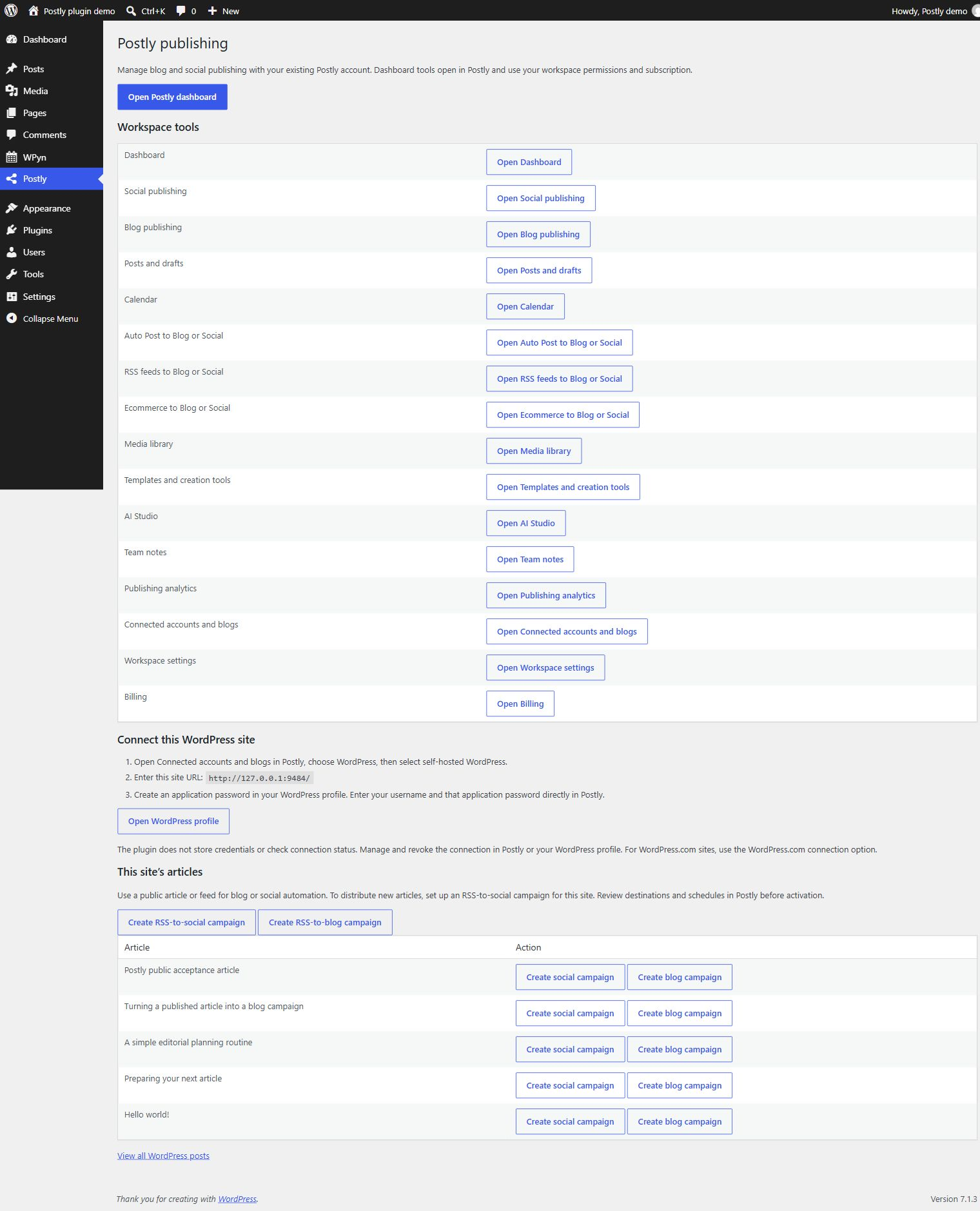
Publishing hub with article and RSS campaign shortcuts on a demo site. Captured in version 1.0; version 1.2 adds profile connections and updated workspace shortcuts.

Postly actions beside a demo article in the WordPress editor. Captured in version 1.0; the hosted Postly editor opens separately.
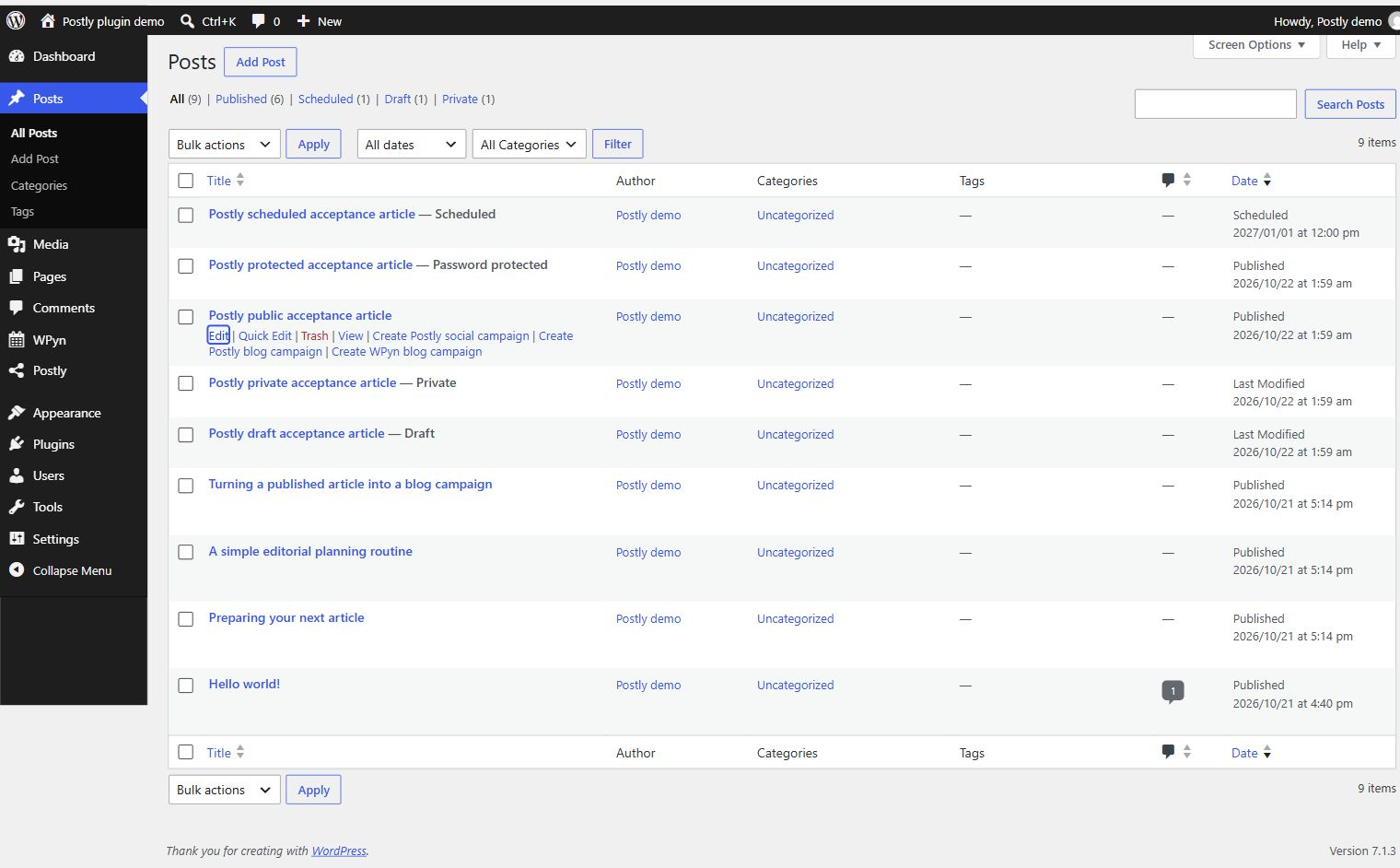
Blog and social campaign actions for public articles in the Posts list. Captured in version 1.0 with another companion also active; Postly works independently. Protected and unpublished articles have no campaign actions.