Price Matrix For WooCommerce helps to show the price of variable products become easier and more intuitive under price list.
📌 Free Features
1. Display table Price Matrix
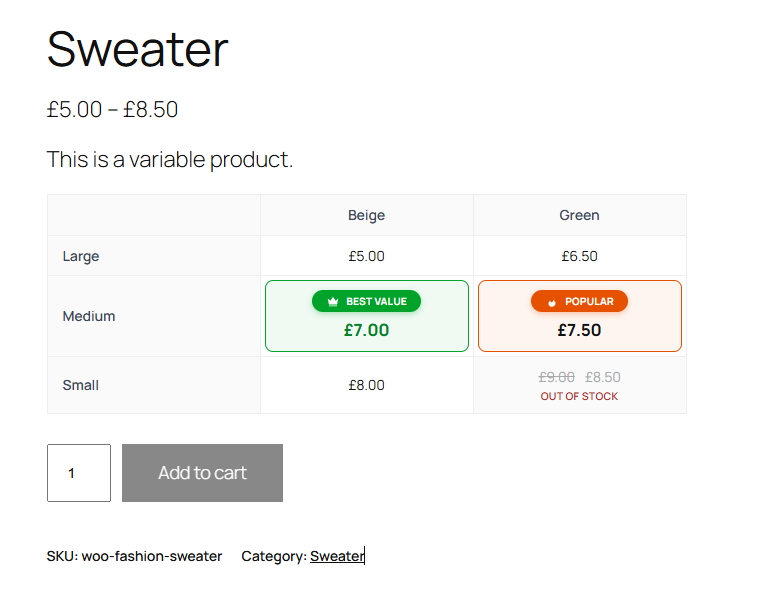
Replace frontend dropdown with a price matrix table.
2. Drag & drop order of variations
On the Edit Product page you have the ability to drag and drop the variation attributes in whatever order they need to be in.
3. Quick & Easy Enter Price
Enter regular and sale prices for every variation in one popup, with instant validation (the sale price must be lower than the regular price).
4. Badges: “Best Value” and “Popular”
Highlight a price cell with a badge. Label, text color, background color and order of each badge can be changed in the settings. Each badge can be used once per product.
5. Bulk order (buy multiple variations at once)
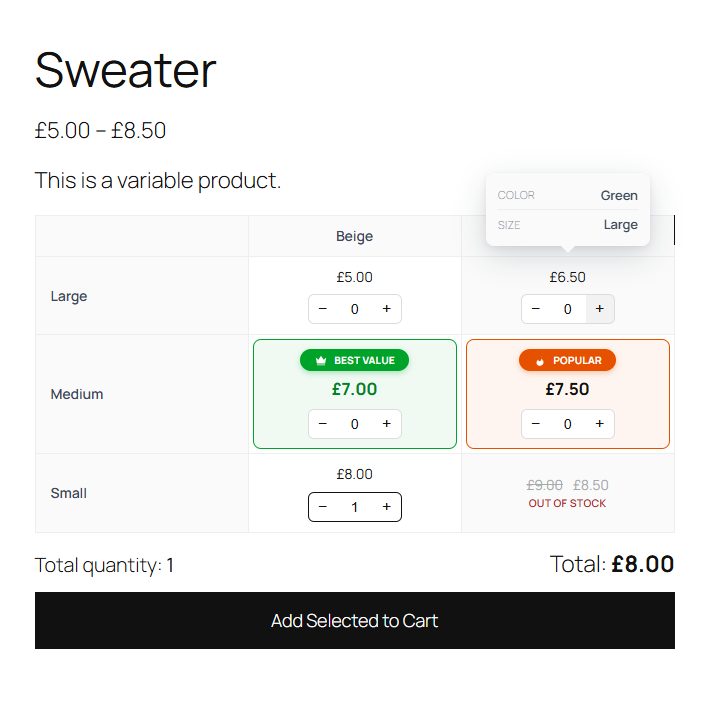
Customers choose a quantity in each cell and add several variations to the cart with one “Add Selected to Cart” button. Stock, price and quantity limits are checked by WooCommerce.
6. Add to cart behaviour
Choose how the table works: select a variation, click a price to add it to the cart, or bulk order.
7. Out of stock cells
Variations that are out of stock or not purchasable are shown as unavailable and cannot be selected.
📌 PRO Features
1. Unlimited Products
With free version, support with two attributes. But with PRO version you use unlimited.
2. Support 04 attributes
Display 4 table styles: two attributes, three attributes width direction vertical, three attributes with direction horizontal, four attributes.
3. Premium Support
Get free support and free lifetime updates at https://azmarket.net/item/price-matrix-for-woocommerce
How it works
Screenshots

This screen shot description corresponds to screenshot-1.(png|jpg|jpeg|gif).

This is the second screen shot