Requires WooCommerce. PrintPrice is a WooCommerce add-on, the WooCommerce plugin must be installed and active for PrintPrice to do anything. If WooCommerce isn’t present, PrintPrice will refuse to activate.
PrintPrice turns any WooCommerce store into a 3D-print quote shop. Customers upload an STL, OBJ, 3MF or STEP file, choose material / colour / infill, and get an instant price based on your own material costs and profit-margin tiers. The price becomes a regular WooCommerce cart item, they check out the same way they would any other product.
This plugin is a thin client to the PrintPrice Cloud service at https://wp.printprice.one. The cloud service does the heavy lifting: parsing the mesh, computing volume / mass / print time, applying your pricing rules, and storing the uploaded file so you can download it from the order detail in WordPress admin. No 3D-printing background needed: sensible defaults work out of the box, then you tune materials and margins to match your shop.
The free plan is unlocked the moment you activate the plugin: no opt-in, no signup form, no credit card. It has every feature, including STEP files, quotes and PDF quotes. Only paid orders count towards the plan (5 a month on Free), and a quote counts once the customer pays. Price checks are never counted. Paid plans (50 / 100 / 300 paid orders a month) unlock through a Freemius checkout from the admin Upgrade menu when you’re ready.
Features
- STL, OBJ, 3MF and STEP upload with an in-browser 3D preview, on any WooCommerce product page, on every plan
- Multi-color 3MF detection: recognises sliced files with multiple filaments and adds a “Multi-color” badge plus a configurable purge-waste allowance to the quote
- Print-time estimation: pulled directly from sliced 3MF gcode where available, or estimated from filament mass when not
- Material catalogue you control: name, colour, price per kg, density, currency, used directly in price calculations
- Profit-margin tiers: different multipliers for different cost bands (e.g. higher margin on small prints, lower on bulk)
- Bulk pricing: automatic per-unit discount above a quantity threshold you set
- Multi-file orders: customers upload several files in one transaction with per-file quantities
- Per-file materials: each uploaded file can have its own material and colour, priced individually and shown as a per-file breakdown on the order
- Minimum price per part (optional): set a floor so very small prints still cover your handling; off by default
- 18 languages: the storefront widget follows the WordPress site language automatically; your own custom labels always take priority
- Order admin block: every order’s admin detail page shows uploaded files (downloadable), material, infill, print status, multi-color badge, and the per-file material breakdown
- Customisable widget: colours, button labels, fonts, and uploader styling configurable from a hosted React dashboard
- Quotes and approvals: choose which orders need your approval first (by price, weight, size, quantity, material or multi-color) and which customers can buy straight away
- Counter-offers: approve a quote at a different price with a note and an optional deadline, or decline it with a reason
- PDF quotes: customers download their price as a PDF quote
- Saved quotes: customers email themselves their price, reopen it from the link, and get one reminder if they have not ordered
- Weight and print time under the price, and an optional “Ready to ship by” date
- Cheaper option: optionally show a cheaper material of the same type under the price, with one click to switch
- Gutenberg block: drag “PrintPrice Calculator” straight into any page; also works as the legacy
[print_price_widget]shortcode
External services
This plugin connects to PrintPrice Cloud (https://wp.printprice.one), operated by PrintPrice, to provide the STL / OBJ / 3MF / STEP upload, price calculation, and quote-product creation that customers see on your storefront.
Customer data is processed by this third party. This is exactly what is sent, and when.
From your customers’ browsers to PrintPrice Cloud, when a customer uses the calculator:
- The calculator script and 3D viewer are loaded from wp.printprice.one, so the customer’s browser makes ordinary web requests there (IP address and browser details)
- The STL, OBJ, 3MF or STEP file the customer uploads (sent straight from the browser; the file never touches your WordPress server)
- Material, colour and infill choices and quantity
- A small preview image of the model, made in the browser. PrintPrice adds it to the cart item on your store so the cart can show it
- The note to your shop, if the customer writes one, and the email address the customer enters when they ask you for a quote or ask to have their price emailed to them. PrintPrice uses that address only to send the quote, its reminders and your reply
- Your storefront key (a public ID that only allows these calculator requests)
From your WordPress site to PrintPrice Cloud:
- When the plugin first runs: your PrintPrice identifier and your site address, to set up your PrintPrice account
- When you save your store keys in PrintPrice Settings, and again after you confirm that your site moved to a new address: your WooCommerce REST API consumer key and secret, your site address, your site name and your WordPress admin email. PrintPrice uses the keys to create the quoted product in your catalogue, add it to the cart and register order webhooks. It uses the email to tell you when something needs your attention
- Every 6 hours, and when your plan changes: your PrintPrice identifier, the plugin version, and the Freemius install ID, install address, plan ID and licence ID (plus the licence key on a paid plan). This tells PrintPrice which plan you are on and that the plugin is still installed
- When you delete the plugin: your PrintPrice identifier and site address, so PrintPrice can forget your store keys and order webhooks
From your store to PrintPrice Cloud, through the order webhooks it registers:
- Order details whenever an order is created or updated, including the customer’s name, email, billing and shipping address and the items ordered
The PrintPrice page in wp-admin is loaded from wp.printprice.one.
Payments (paid plans only):
- Your email and chosen plan are processed by Freemius (https://freemius.com), our billing provider, to issue and validate paid licences. Freemius’s terms apply: https://freemius.com/terms/
Nothing is transmitted until the plugin is activated. Uploaded files are stored on AWS S3 in the Frankfurt region (eu-central-1), encrypted in transit (HTTPS) and at rest. Files associated with deleted orders are removed within 7 days. The full data flow and retention policy is documented in our Privacy Policy.
- Terms of Service: https://printprice.one/terms
- Privacy Policy: https://printprice.one/privacy
- Refund Policy: https://printprice.one/terms#refund
Screenshots
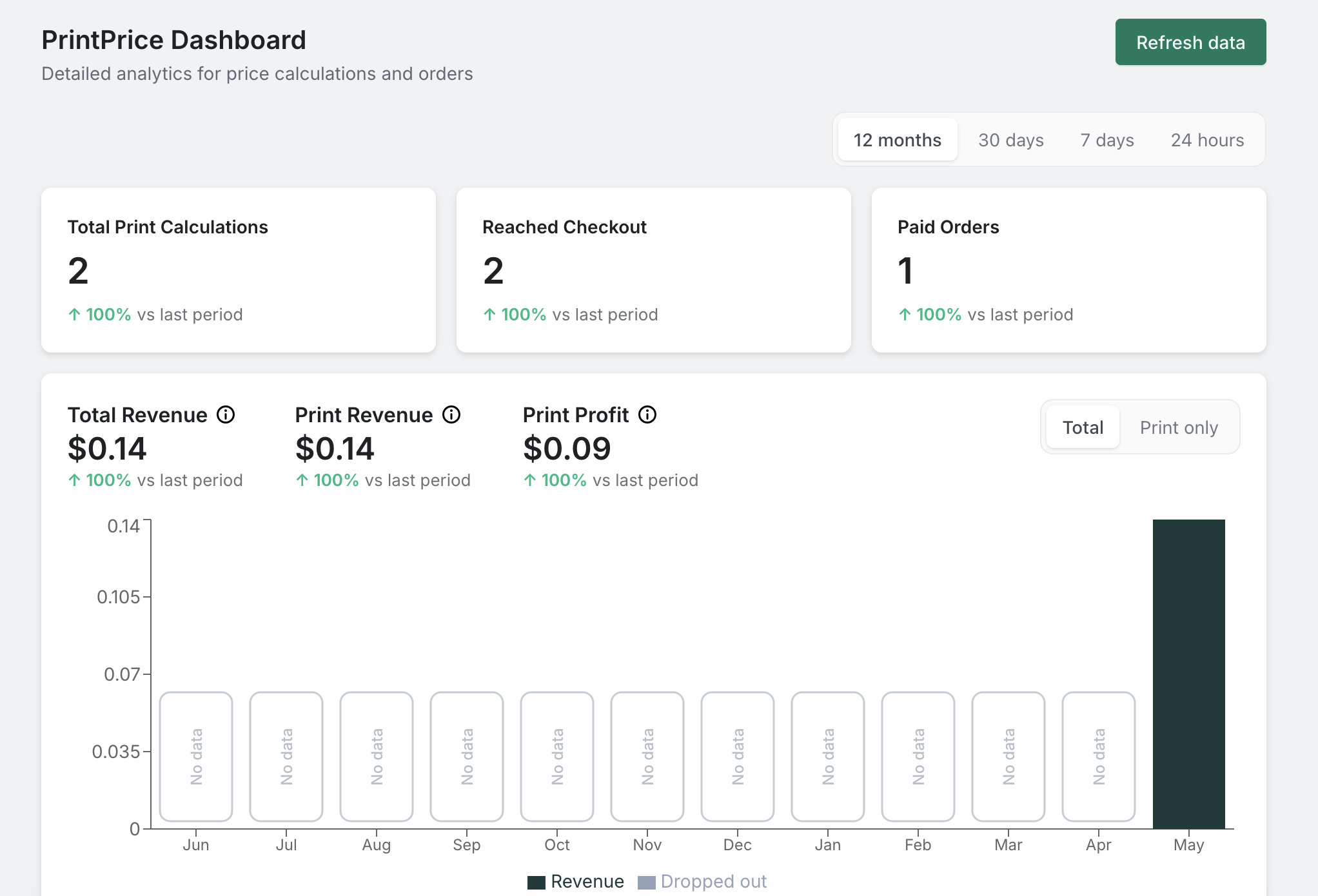
PrintPrice merchant dashboard, total print calculations, paid orders, total / print / profit revenue, with a per-period chart.
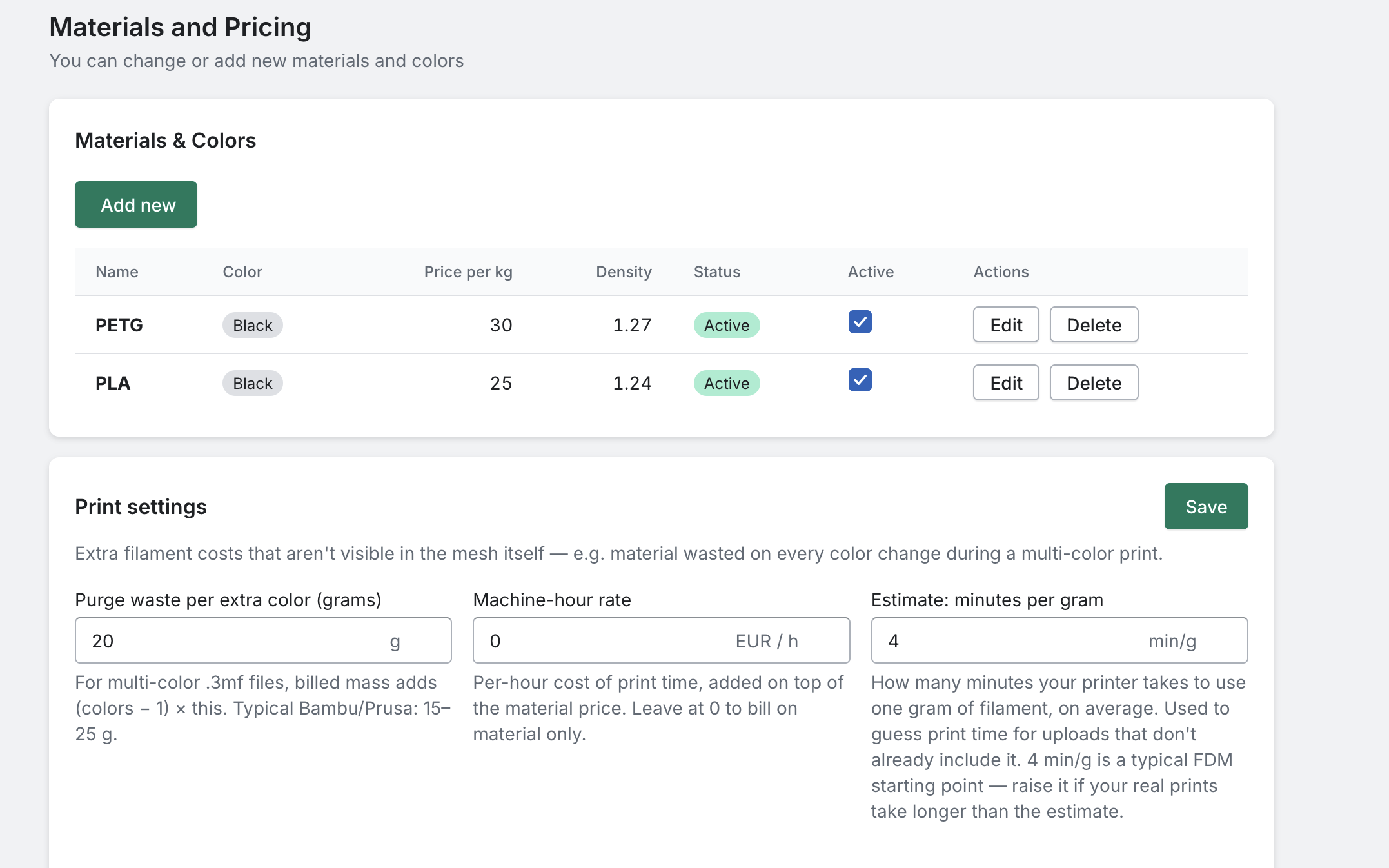
Materials and Pricing, your filament catalogue (name, colour, price per kg, density) plus per-shop print settings (purge waste, machine-hour rate, minutes per gram).
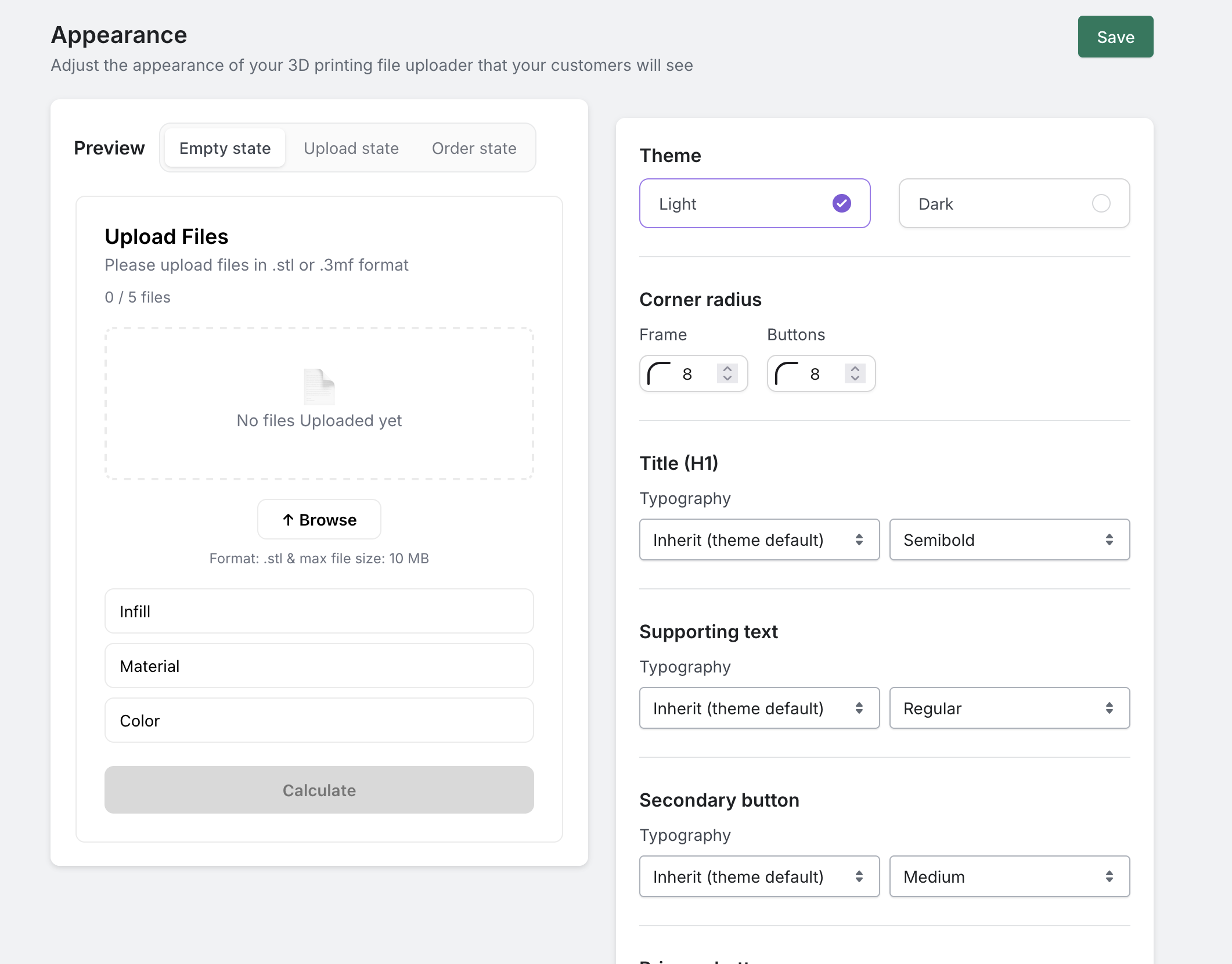
Appearance customiser, live preview of the storefront calculator on the left with theme, corner radius and typography controls on the right.
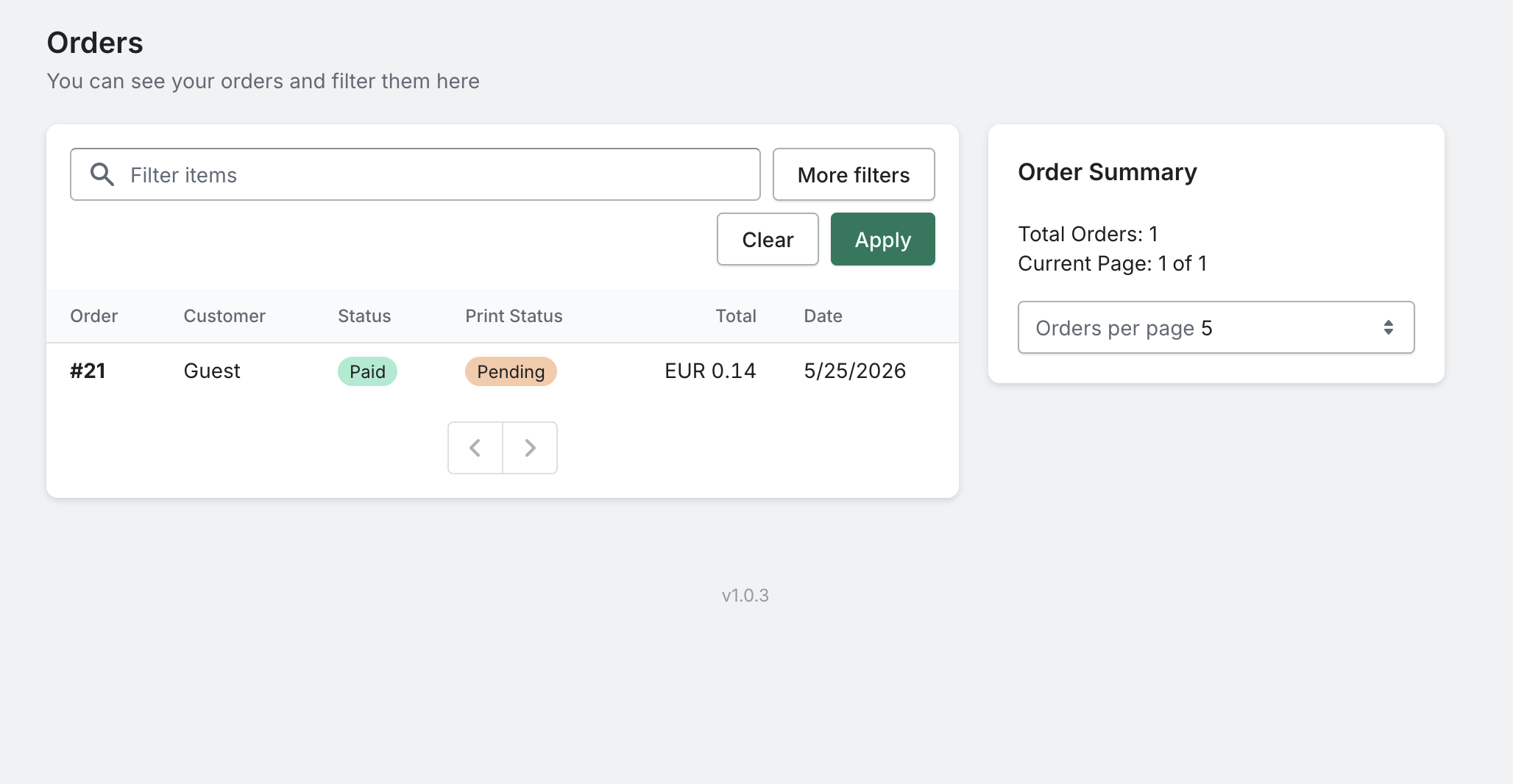
Orders list, every customer print order, filterable by status, with totals and print-status badges.
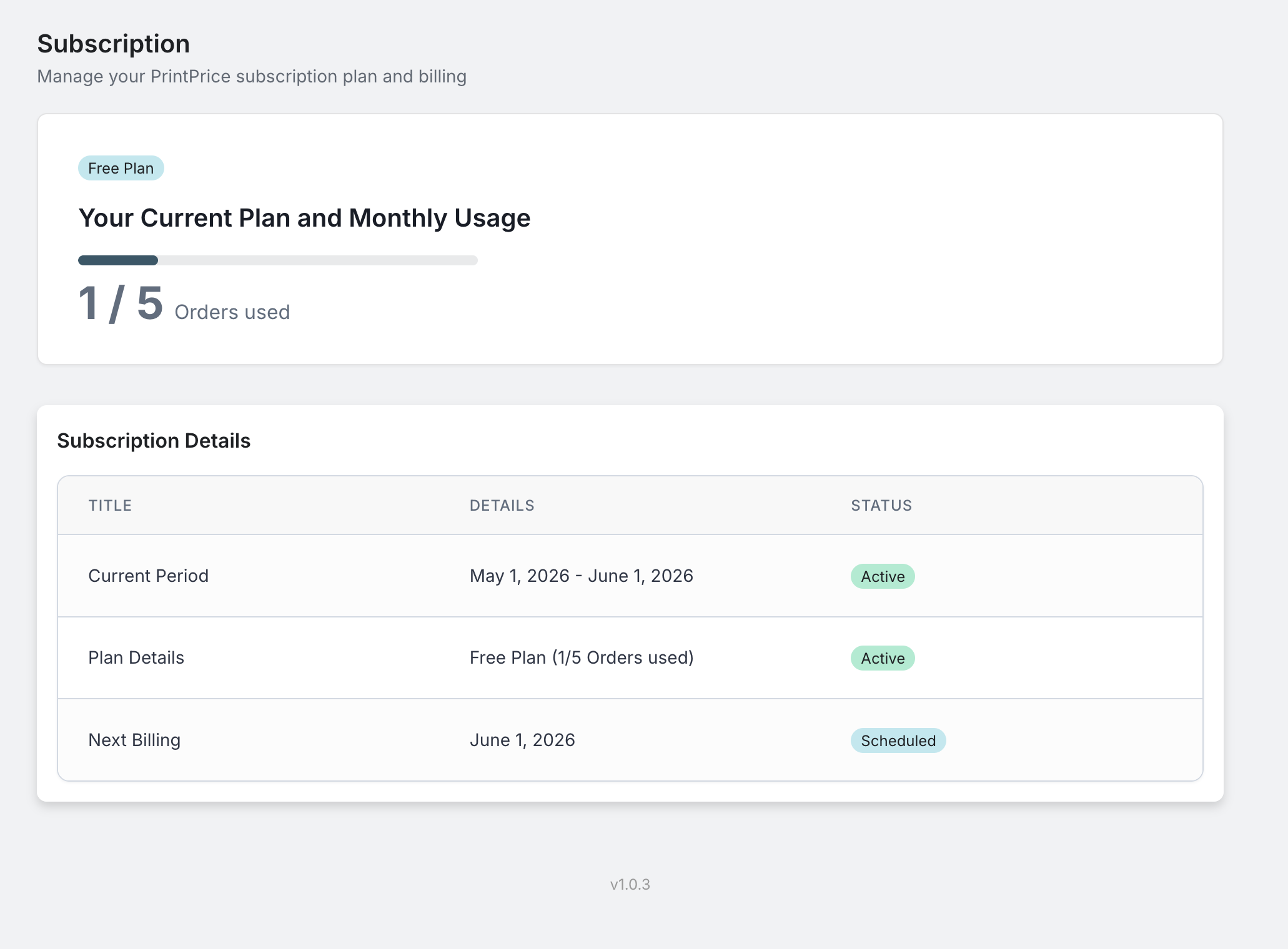
Subscription details, current plan, usage this period, and a one-click upgrade path through Freemius.
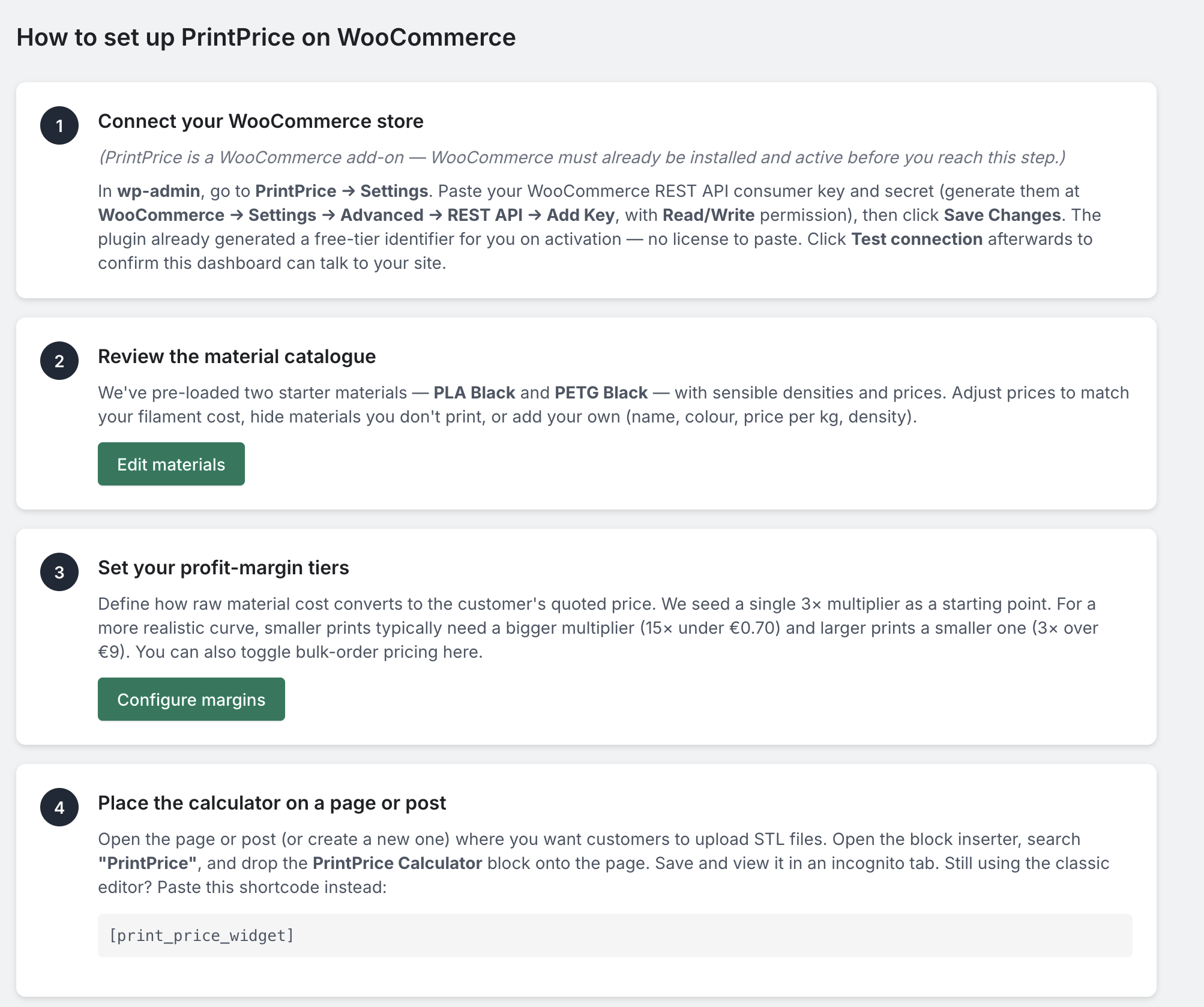
"How to Setup" walkthrough, in-admin onboarding that walks new merchants through WooCommerce REST keys, materials, profit margins, and the PrintPrice Calculator block.