
The “Recent Posts Shortcode & Widget” helps users to easily display latest posts in a page or in sidebar by just using simple shortcode [recentposts-sc]
By default it displays “latest posts” or “recent posts” which can be changed to display “random posts”, display by ‘title’ etc using ‘orderby’.
Options and Features Includes
All Parameters/Shortcodes can be seen in FAQ:
* FAQ
- Featured Image
- Auto generates and adds featured image using first image of the post if no featured image is found
- Custom excerpt length
- Limit number of posts
- Posts from specific category
- Posts from multiple categories (comma separated)
- Posts from specific author
- Post type option
- Order/Display by date, name etc.
- Display post date.
- Display specific posts using post IDS (comma separated)
- Display/filter posts by tag
- Display/filter posts by meta key and meta values
- Custom “Read more” label option.
- Display default/custom image size instead of featured image (like thumbnail, medium etc)
How to Use
- Basic: [recentposts-sc] (by default 3 latest posts)
- For sidebar also use [recentposts-sc] in text widgets (refer screenshots as well for further help)
Advanced Parameters:
-
numberofposts (Number of posts)
Limit/Specify the number of posts you want to display
Default: 3
Example: [recentposts-sc numberofposts=”6″] -
post_type (Post Type)
Specify which post type you want to use. For example posts or pages
Default type: post
Example: [recentposts-sc post_type=”page”] -
get_cat_name (Category Name)
If you want to display category name in list of posts
Default: False
Example: [recentposts-sc get_cat_name=”true”] -
excerptlength (Custom Excerpt Length)
Define custom excerpt length
Example: [recentposts-sc excerptlength=”30″] -
enable_excerpt (Show/hide Excerpt display)
Sometimes you may not want to display excerpt and only like to keep title and image. To turn off/disable excerpts use enable_excerpt=”false” (default is true)
Example: [recentposts-sc enable_excerpt=”false”] -
image_size (Display default/custom image size instead of featured image)
Select image size like thumbnail, medium etc (by default featured image is displayed)
use image_size (default is false)
Example: [recentposts-sc image_size=”thumbnail”] or [recentposts-sc image_size=”medium”]
You can also use any custom image size if present in your website. -
category (Posts from specific Category/categories)
Filter posts from single category or multiple categories
Example single category: [recentposts-sc category=”lesson”]
Example multiple categories: [recentposts-sc category=”lesson,lesson2,lesson3″] -
author (Posts from specific author)
Filter posts from specific author
Example: [recentposts-sc author=”admin”]
More Parameters/Shortcodes can be seen in FAQ:
* FAQ.
Support
Developed by rajros
Screenshots

This displays list of posts on a page

This displays list of posts in sidebar/widgets

Basic shortcode to display posts

Shortcodes with multiple options/filter like category, date, excerpt length etc
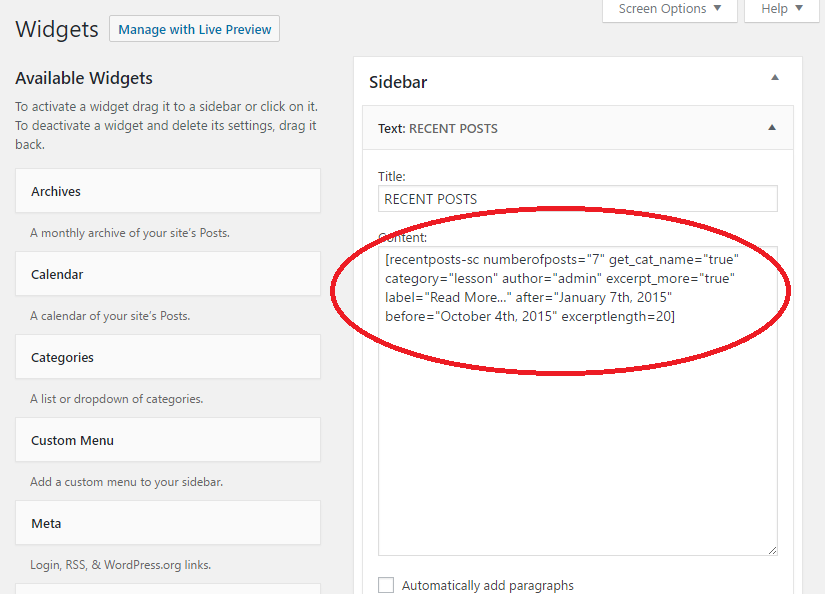
For displaying in sidebar
