BACK TO DIRECTORY
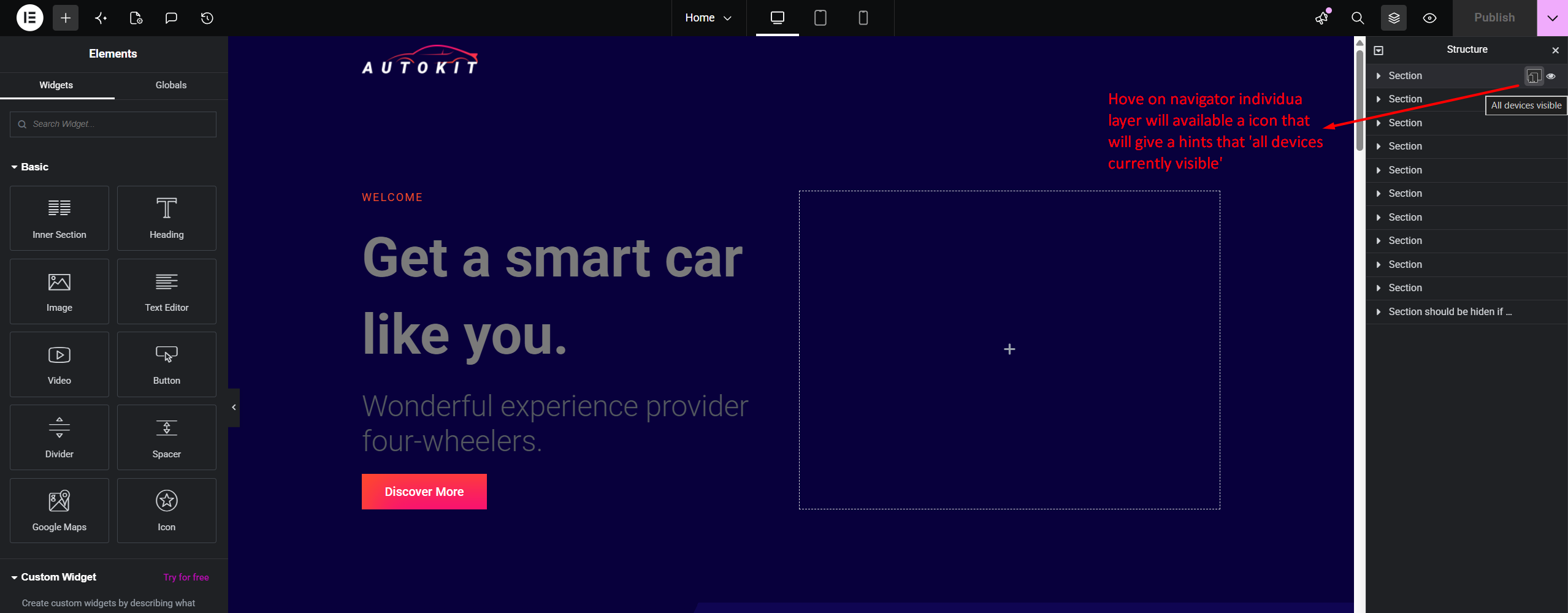


RespSync Visibility Toggle adds a fast, intuitive device visibility toggle button directly inside the Elementor Structure (Navigator) panel item rows.
With a single click, users can check and toggle element visibility across Desktop, Tablet, and Mobile devices without navigating through multiple tab controls in the Elementor settings panel.
Key Features
- Navigator Panel Integration: Instant access directly on Navigator tree items.
- Dynamic Multi-Device Status: Visual device icon indicator showing active and hidden states.
- Floating Tooltip Popup Controls: Compact floating popup with dedicated toggle controls for Mobile, Tablet, Desktop, and All devices.
- Linear Gradient Title Masking: Elegant linear-gradient fade effect on long layer titles when tooltip popup is active.
- Native Synchronization: Seamlessly updates Elementor settings model and marks document as modified for saving.
- Lightweight & Fast: Pure JavaScript integration with zero overhead on front-end performance.
Screenshots
RespSync responsive visibility toggle icon inside the Elementor Structure panel.
Plugin Details
Active Installs
0Total Downloads
242Version
1.1.0Requires WP
5.8Requires PHP
7.4Tested Up To
7.0.7Added
2026-08-11Last Updated
2026-08-16 9:05am GMTRatings
5
1
4
0
3
0
2
0
1
0