BACK TO DIRECTORY
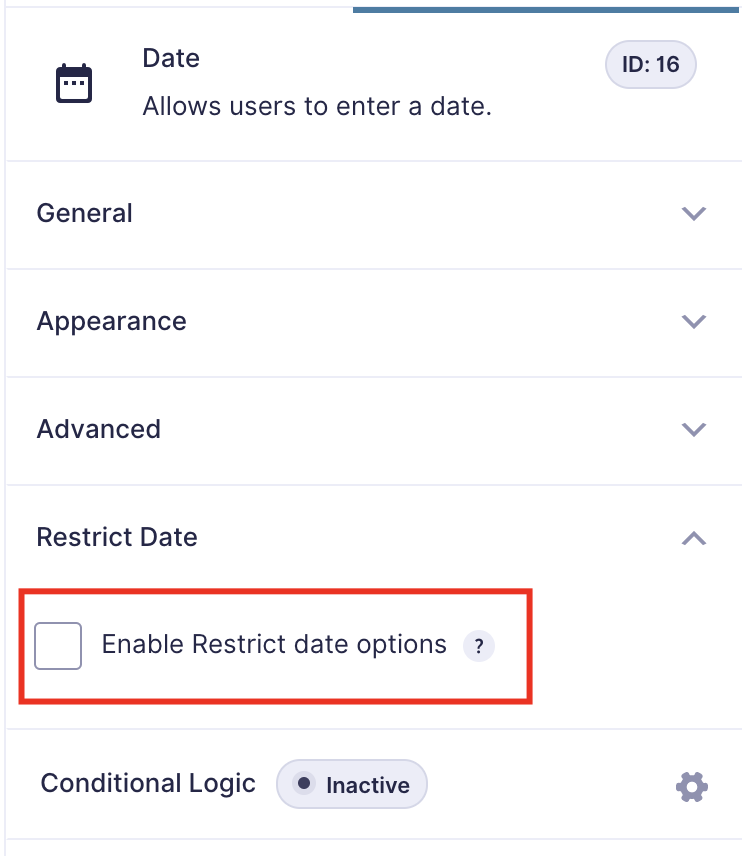


A simple and nice plugin to add date restrict dynamically in gravity forms default date picker field. If the installation is okay, go to gravity forms dashboard. Add a date field on your form. Open date field and you will see to Enable Restrict date options checkbox. Click that checkbox and configure as you want. And save form. You’re done!
View Pro Demo | Documentation | Buy Pro
Features
- Minimum date set to a current and specific date
- Maximum date set to a current and specific date
- Disable manually input (read-only option)
- Week/Off day disable
- Disable specific dates (new)
- Week start day (new)
Premium Features
- Link date fields (NEW)
- Business day mode (NEW) – Skip disable days when calculate next available date.
- Prevent submission with disabled dates
- Timezone support
- Language Support
- Custom validation text
- Date calculation
- Date modifiers
- Inline Datepicker
- and more…
Requirements
- PHP 5.6
- Gravity Forms 2.5 or 2.8 or latest
Screenshots
Click to enable restrict date
You can see all options
Set options as your requirements
Options of the Pro version
Plugin Details
Active Installs
500Total Downloads
8,464Version
1.2.5Requires WP
6.0Requires PHP
7.4Tested Up To
7.0.8Added
2021-09-01Last Updated
2026-08-10 5:48am GMTRatings
5
5
4
0
3
0
2
0
1
0