RockOn Woo Variations Table turns WooCommerce’s variation dropdowns into a compact table, so shoppers can compare and order several products from one page instead of visiting each product in turn.
For wholesale and B2B stores, the bulk order grid lists every variation on its own row. Buyers type quantities, watch a running total, and add the whole order to the basket in one click, with no dropdowns at all.
Every feature is free.
Features
- Shortcode
[rovartable]and a “Variations Table” block. - Bulk order grid for wholesale buyers: every variation on its own row with a checkbox and quantity, a running total, and one button to add the whole order to the basket.
- Instant filters above the table: a dropdown per attribute, “In stock only”, and search by name or SKU.
- Admin page under WooCommerce Variations Table: usage statistics, where every table is, a shortcode builder with live preview, store-wide settings and a reference.
- Pick products by ID, category, tag, or product attribute.
- Optional columns: image, title, SKU, attributes, price, stock, quantity, basket.
- Live price, stock, SKU and image updates as options are chosen, with no page reload.
- AJAX add to basket, including an optional “Add selected to basket” button for the whole table.
- Works without JavaScript: every row falls back to a link to the product page.
- Accessible markup: real table headers, labelled form controls, live-region status messages.
- Responsive: whenever the table is wider than the space the theme gives it, it switches to a grid of product cards, so no column is ever hidden behind a sideways scroll.
- Buttons pick up your theme’s own button style.
- Respects the visitor’s light or dark colour scheme.
- Fully translatable.
Performance
Variation data is embedded in the page so option matching happens instantly in the browser. Products with more variations than the limit (30 by default; change it under Settings or with the rwvt_ajax_variation_threshold filter) fall back to a single AJAX lookup, mirroring WooCommerce’s own behaviour. CSS and JavaScript load only on pages that show a table.
Admin page
Everything lives under WooCommerce Variations Table, for anyone who can manage WooCommerce (store managers included).
- Overview — the last 30 days at a glance (adds from tables, units added, paid orders and revenue that came from tables, each compared with the 30 days before), every page, post, template or pattern that holds a table with links to edit or view it, and a check of WooCommerce, WordPress and PHP versions.
- Shortcode builder — pick products by name, or categories and tags, choose a layout, columns, filters and options, and copy the shortcode. A live preview shows the table as you go. The shortcode only names what differs from your defaults.
- Settings — store-wide defaults that every table and block follows unless it sets its own: “basket” or “cart” wording, layout, filters, hiding out-of-stock items, linking product names, grid paging and whether grid products start closed. Also the number of variations sent with the page, usage statistics on or off, and whether deleting the plugin deletes its data.
- Help — a quick start, the full shortcode reference and the developer hooks.
Usage statistics and privacy
When statistics are on (the default), the plugin keeps daily totals for 90 days: how many add-to-basket actions came from a table, how many items and units they added, and how many paid orders and how much revenue included them. Revenue is each order line’s share that was added from a table, after discounts and before tax; refunds are not taken off. No personal data is stored: no customer, IP address or order details, only the totals. A table add is marked on the basket line, copied to the order line as hidden meta (_rwvt_qty) at checkout, and counted once when the order is paid. Statistics can be switched off or deleted under Settings.
Shortcode
Basic use:
[rovartable id="12,34,56"]
Choosing products
id— comma separated product IDs, rendered in the order given.category— comma separated product category slugs.tag— comma separated product tag slugs.attribute+terms— a product attribute slug and its term slugs, e.g.attribute="colour" terms="red,blue".exclude— product IDs to leave out.categories_exc— category slugs to leave out.limit— maximum number of products (0 = no limit).orderby—date,title,menu_order,ID,randormodified. Defaultdate.-
order—ASCorDESC. DefaultDESC.id takes priority: when it is set, the category, tag and attribute filters are ignored.
Controlling the table
columns— comma separated, in display order. Available:image,title,sku,attributes,price,stock,quantity,button. Defaulttitle,attributes,price,stock,quantity,button.thead— custom header labels, comma separated, replacing the defaults in order.caption— a visible caption above the table.class— extra CSS classes on the wrapper.link_titles—yes(default) orno.add_all—yesto show an “Add selected to basket” button. Defaultno.disabled—yesrenders a read-only table with no dropdowns, quantity fields or basket buttons. Defaultno.
Bulk order grid
[rovartable layout="grid" category="workwear" per_page="10"]
layout—table(default) shows one row per product, with a dropdown for each option.gridshows one row per variation, grouped under a header row for each product.per_page— grid only: products per page. A product’s variations always stay together on one page.0(default) lists every product on one page.collapsed— grid only:yes(default) starts each product closed, so the grid reads as a list of products; click a product’s header row to open it.nostarts them open.
In the grid, typing a quantity ticks the row, and ticking a row fills in its minimum quantity. The checkbox in the header selects every available row on the current page, and the one beside each product name selects all of that product’s variations and opens the product. A summary bar counts the selected items, units and subtotal, and stays at the bottom of the screen while anything is selected.
“Add selected to basket” adds everything in one request. If an item cannot be added, for example because there is not enough stock, its row stays ticked and shows the reason, and the rest are still added; a closed product opens to show it. Out-of-stock variations are listed but cannot be ticked. A variation that accepts any value for an attribute shows a dropdown for just that attribute.
Grid columns default to attributes,sku,price,stock,quantity, because the product name and image already appear in each header row. Add image to show each variation’s own image, or button for a basket button on every row.
Filters
[rovartable layout="grid" category="workwear" filters="all"]
filters— controls to show above the table, comma separated: attribute slugs such ascolourorsize(a dropdown each, listing only values the table’s products have),attributesfor every attribute,search(matches product name, SKU and option names) andstock(“In stock only”).allshows every one. Default: none.hide_out_of_stock—yeshides out-of-stock items when the page loads. With thestockfilter shown, its box starts ticked and shoppers can untick it. Defaultno.
Filtering is instant and needs no page reload. A count shows how many rows match, with a “Clear filters” link.
In the grid, filters work on variations: “Size: L” lists only the L variations, products without a size are hidden, and a variation that accepts any value for an attribute matches every value. Closed products open while you search or filter by an option and fold away again when the filters are cleared. “Select all” only selects rows that match, and anything already ticked stays ticked when a filter hides it.
In the dropdown table, filters work on whole products: a product is listed if it offers the chosen value. The chosen value is also filled into each listed product’s dropdown, so “Size: L” leaves every product set to L, but a dropdown the shopper has already changed is left alone.
Examples
[rovartable id="12,34" thead="Product,Colour,Size,Price,Stock,Qty,Basket"]

[rovartable category="t-shirts" limit="10" orderby="title" order="ASC" columns="image,title,sku,attributes,price,quantity,button" add_all="yes"]

[rovartable attribute="colour" terms="red" caption="Everything in red"]<h3>Hooks</h3>
Filters:
rwvt_product_ids— the resolved product ID list for a table.rwvt_table_columns— the resolved column definitions.rwvt_table_filters— the controls shown in the filter bar.rwvt_render_custom_column— render a custom column’s cell.rwvt_no_products_message— the output when a table matches nothing.rwvt_script_settings— the configuration handed to the front-end script.rwvt_ajax_variation_threshold— inline variation payload cut-off.rwvt_grid_max_rows— the most variation rows one bulk order grid renders (default 1000).rwvt_bulk_max_items— the most items one “Add selected to basket” request may add (default 200).
Upgrading from version 6
Your existing shortcodes keep working. [rovartable id="12,34"] and [rovartable id="12,34" thead="Title,Colour,Size,Basket"] render the same columns they always did.
A shortcode that supplies thead keeps the version 6 column set (title, one column per attribute, then basket), because thead labels are positional and adding the new columns would shift every label onto the wrong one. To take the new Price, Stock and Qty columns, name them explicitly:
[rovartable id="12,34" columns="title,attributes,price,stock,quantity,button" thead="Product,Colour,Cost,Availability,Amount,Basket"]
Shortcodes without thead gain the new columns automatically.
Two behaviour changes to be aware of
disabledwas accepted but never did anything in version 6. It now renders a read-only table. If you haddisabledon a shortcode, remove it unless you want that.categories_excwas also accepted and ignored. It now genuinely excludes those categories.
Custom CSS
These version 6 hooks are unchanged: .ron-woo-table-section, tbody.row-hover, tr.row-2, .even, .odd, td.value, td.column-5, select.user_vote.
These are gone, because the markup they belonged to was invalid or buggy: div.ro-loader-*, input#ron-att-name-*, select#ron-attr-*, and a#add-cart-*. The basket control is now button.rwvt-add-to-cart, and each cell carries data-column so it can be targeted reliably.
Custom PHP
ron_woo_variations_table(), `ron_woo_variable_add_to_cart()` and `ron_woo_find_matching_product_variation()` still exist as deprecated wrappers, so template customisations will not fatal. They log a deprecation notice when `WP_DEBUG` is on and will be removed in a future major release; move to `do_shortcode( '[rovartable ...]' )`.
Custom JavaScript
The check_choosed_var AJAX action and the global getVarData() function have been removed. The replacement endpoints require a nonce. If you wrote custom scripts against them, they need updating.
Requirements
Version 7 needs WordPress 6.4+, PHP 7.4+ and WooCommerce 8.0+. On older setups WordPress will not offer the update, so those sites simply stay on version 6 rather than breaking.
Screenshots
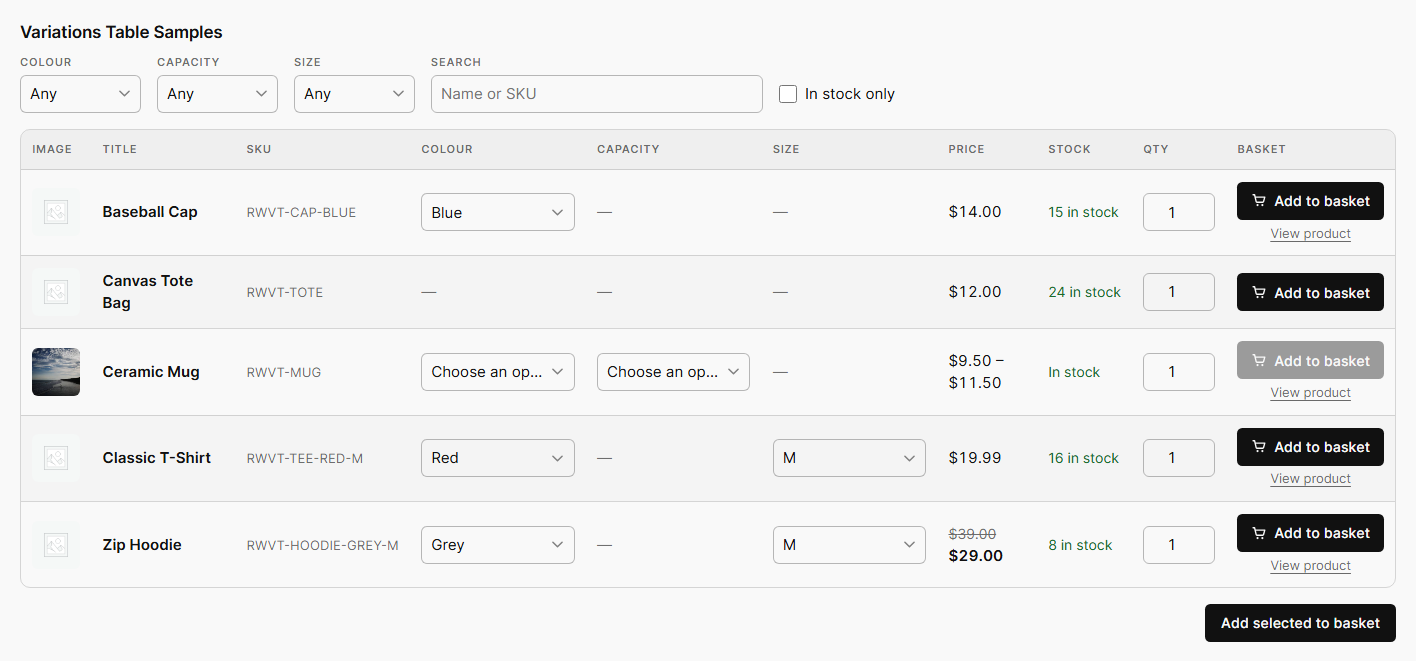
The dropdown table with instant filters: choose options and the price, stock and SKU update before adding to the basket.
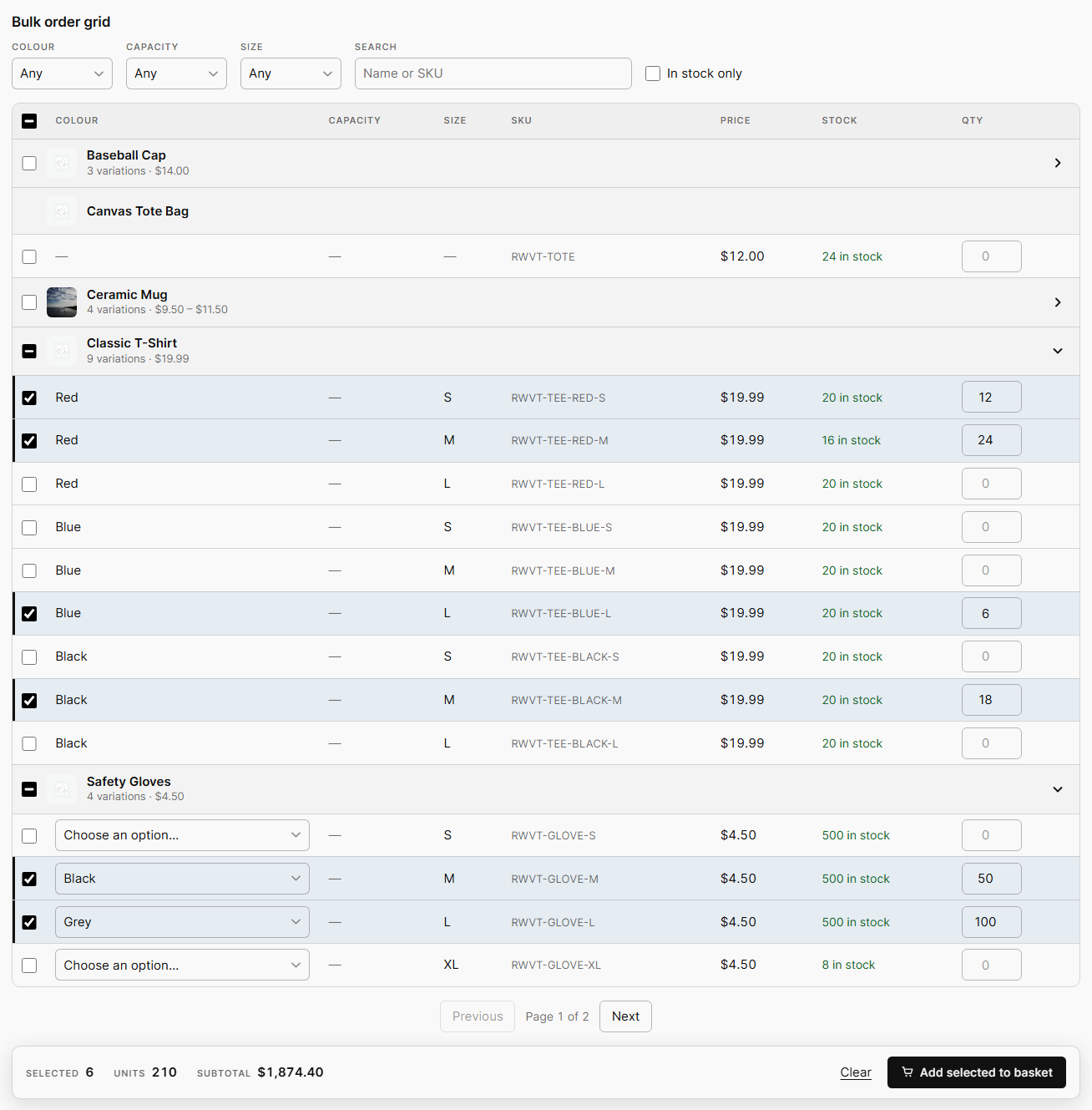
The bulk order grid for wholesale buyers: every variation on its own row, with checkboxes, quantities and a running total.
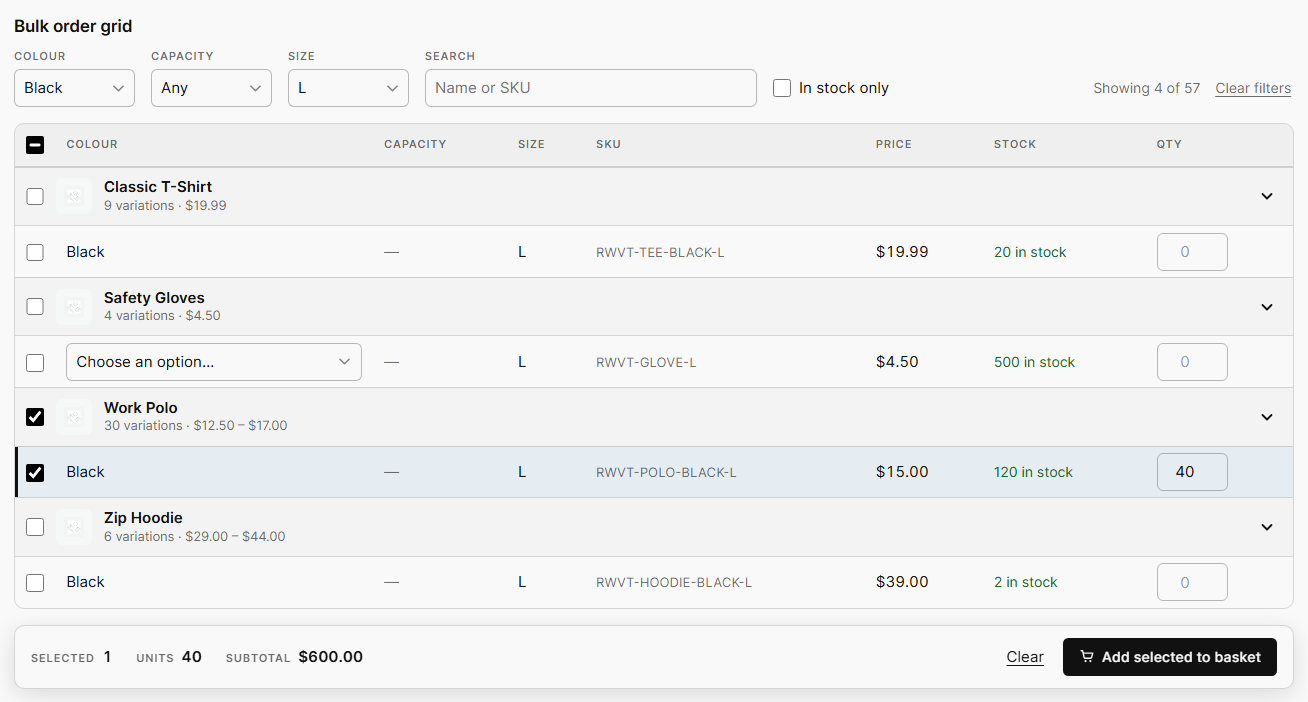
Filtering the grid by colour and size. Matching products open automatically.
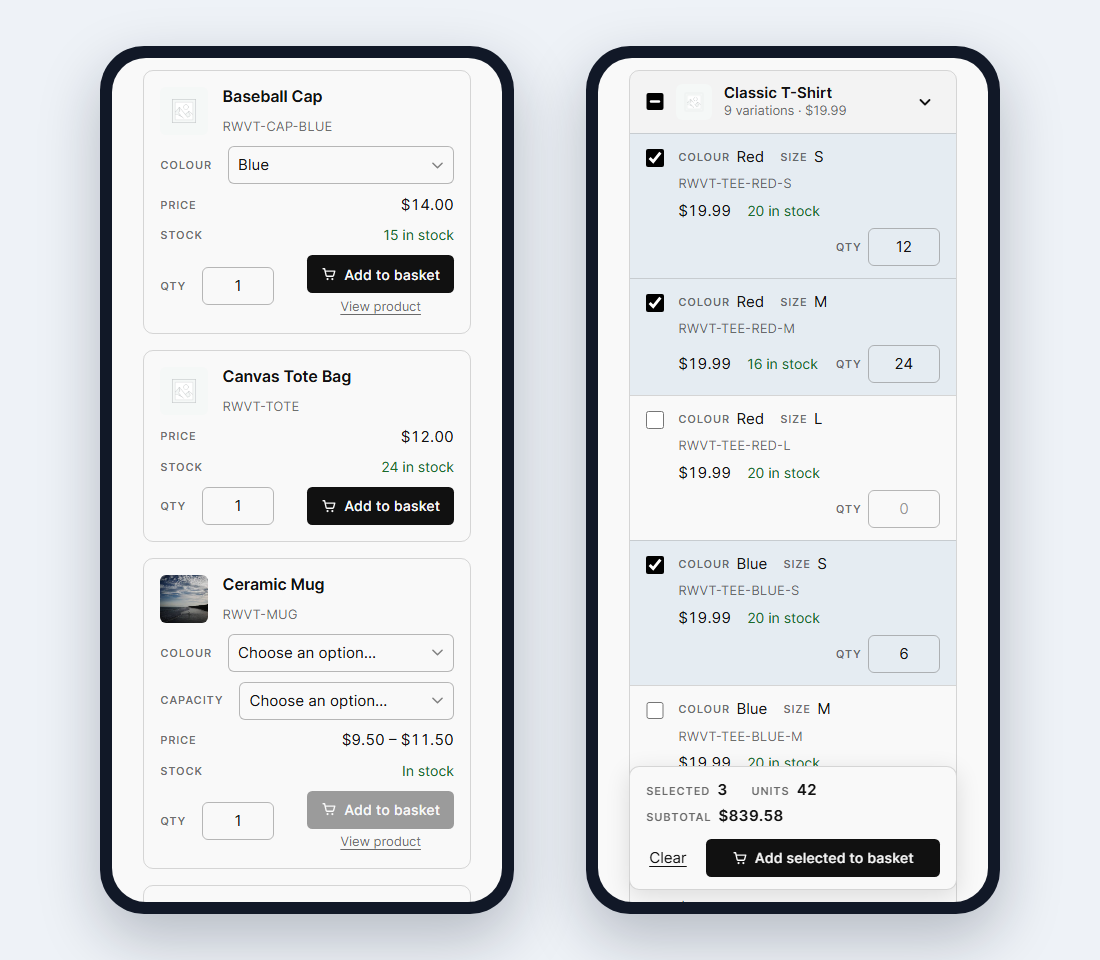
On a phone, the dropdown table becomes cards and the grid a compact list.
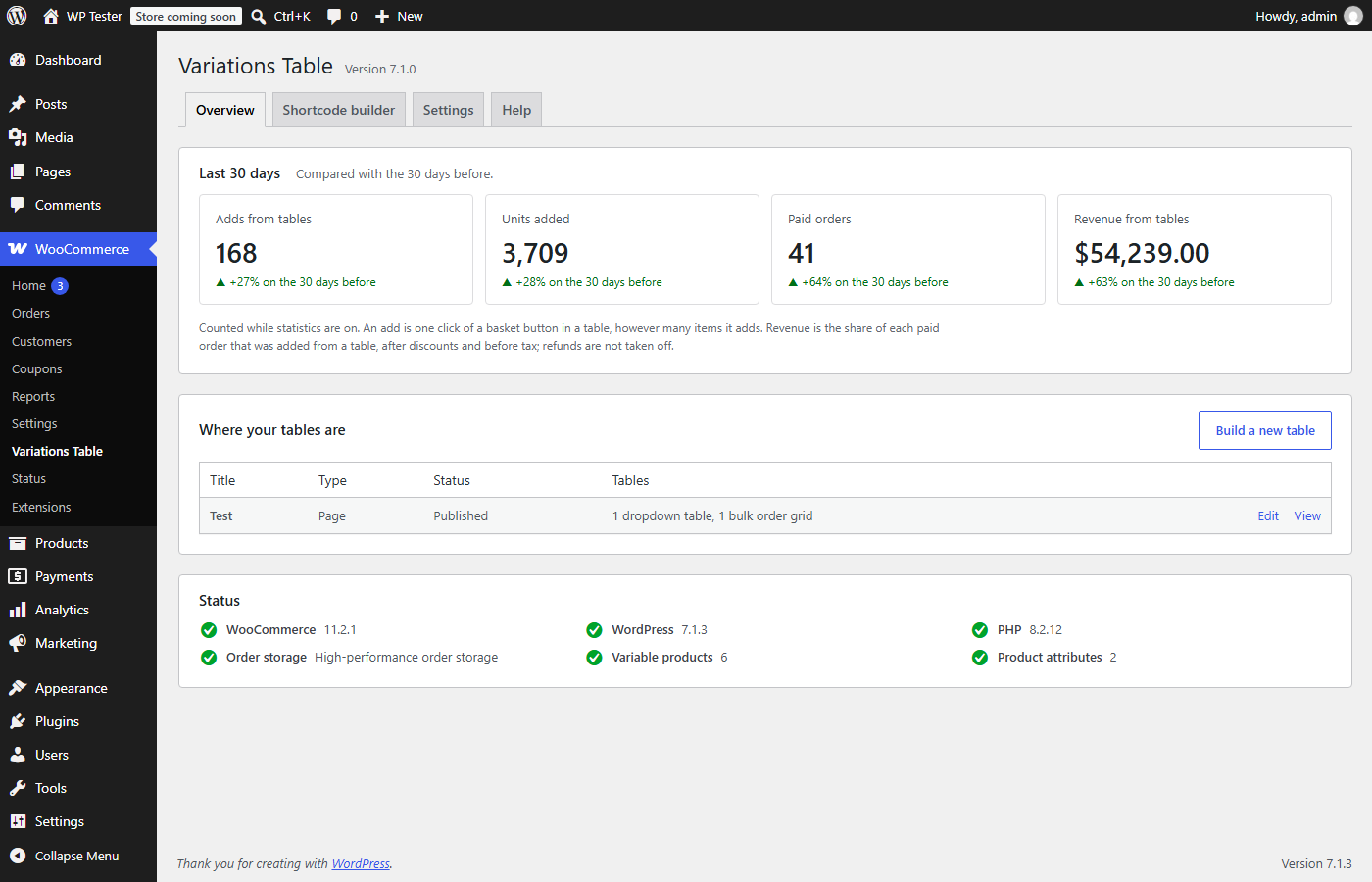
WooCommerce → Variations Table → Overview: usage statistics, every page that holds a table, and a status check.
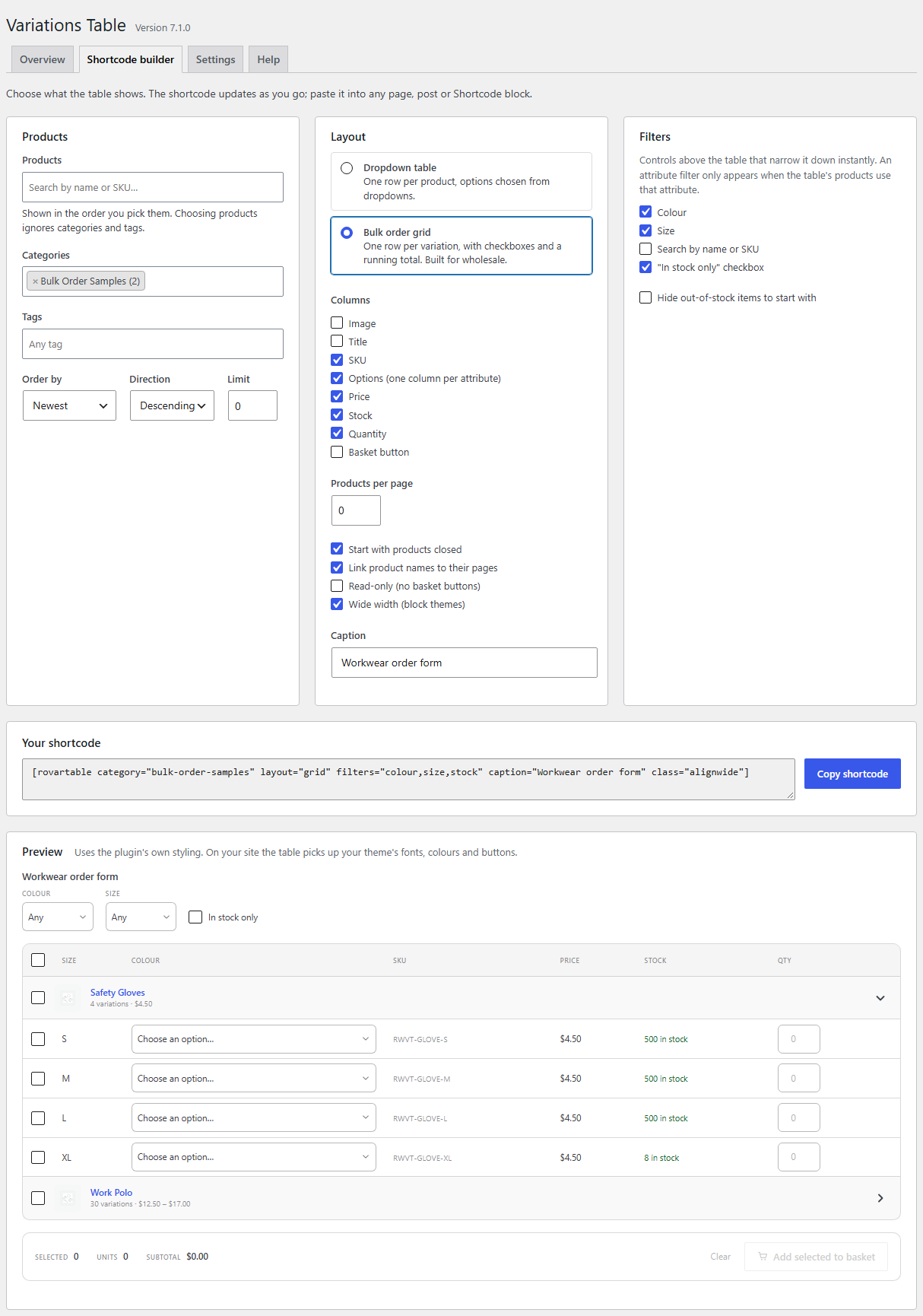
The shortcode builder with a live preview.
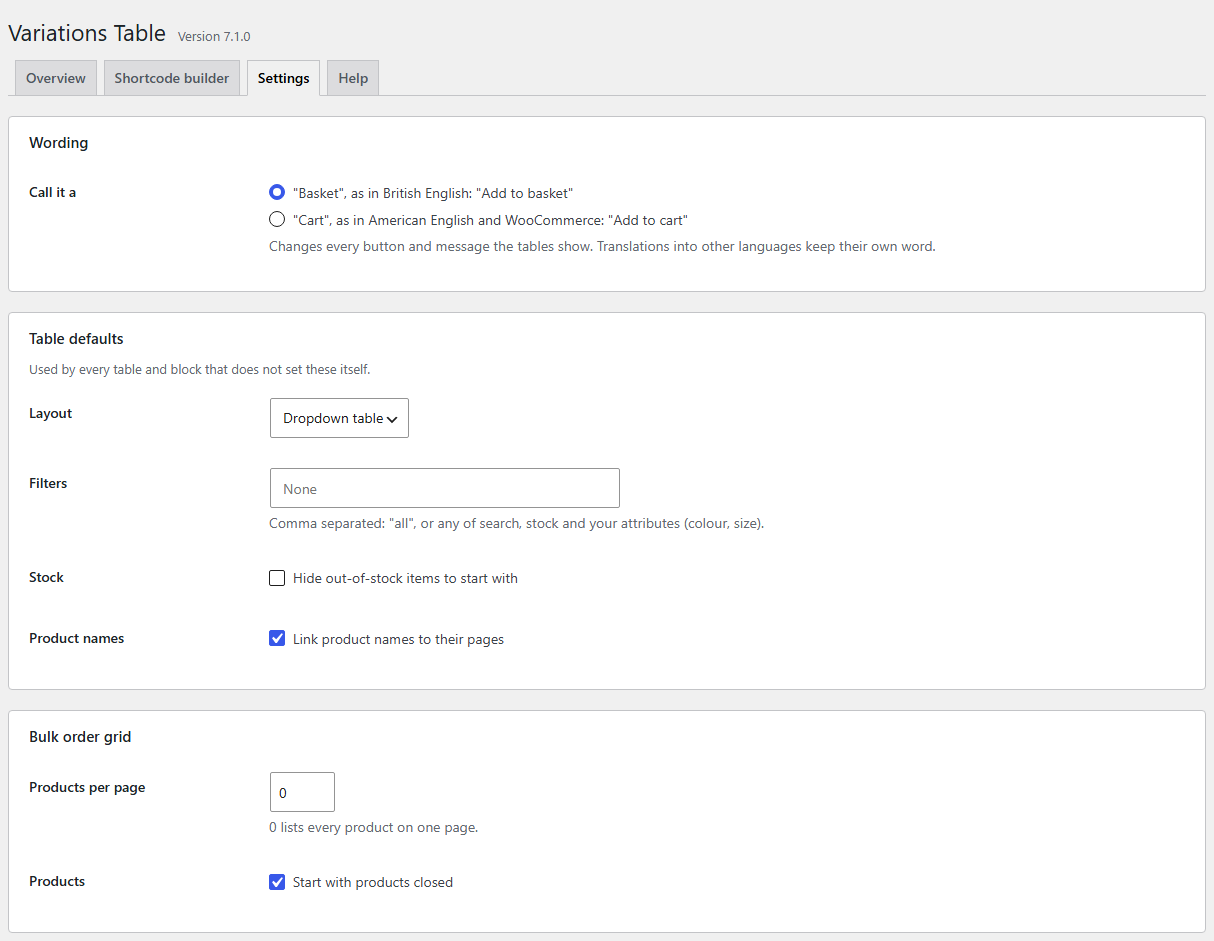
Store-wide settings, including "basket" or "cart" wording.