
SA Hosted Checkout for WooCommerce replaces the standard WooCommerce checkout form with Stripe Checkout for carts requiring payment. Customers can continue from supported cart and mini-cart buttons or visit the store’s checkout page directly, without filling in two checkout forms. They review products and apply WooCommerce coupon codes in the cart, then enter their payment details through Stripe.
Choose a Stripe-hosted payment page, Embedded Checkout on a page in your store, or Embedded Checkout in a popup. All three checkout experiences are free, together with branding controls, WooCommerce cart discounts, payment-method selection, checkout language selection and optional quantity changes for eligible products.
The plugin creates a WooCommerce order from the cart and uses its saved totals for Stripe Checkout. Payment confirmations are verified before the order is marked paid. See the FAQ for supported checkout paths, payment-method eligibility and the calculation limits that apply when customers change quantities or addresses.
Free features
- Hosted, embedded page and popup checkout: choose how customers use Stripe Checkout.
- Cart-to-Stripe checkout: bypass the standard checkout form from supported cart and mini-cart buttons and ordinary checkout-page visits, including WooCommerce Cart, Mini-Cart and Checkout blocks and the classic Checkout shortcode.
- Setup & health: find configuration issues, check your Stripe connection, review test/live webhook delivery indicators and copy a redacted support report.
- Stripe refunds from WooCommerce: request full or partial amount-only refunds for eligible plugin-paid orders and track their status from the order screen. No automatic restocking or item-level refund allocation.
- Cart and popup usability: clearer Mini-Cart error messages, keyboard navigation and right-to-left layout improvements for popup checkout.
- Branding controls: set the display name, background and button colors, font and corner shape, or inherit Stripe Dashboard branding. Custom logo overrides are available for Hosted Checkout.
- Dedicated payment page: create one automatically or select a published page containing the [sahcfwc_checkout] shortcode.
- WooCommerce coupons and discounts: include eligible discounts already applied in the cart.
- Order totals: include WooCommerce shipping, fees and taxes, with separate lines for additional charges.
- Payment-method selection: choose Cards and eligible local payment methods supported by the plugin and your Stripe account.
- Checkout language: use the customer’s browser language or choose a supported Stripe language.
- Optional quantity changes: let customers adjust eligible product quantities within configured limits. Disabled by default.
- Checkout fields: enable phone-number collection and the terms of service checkbox.
- Hosted cancellation URL: choose a return page or send customers back to the cart.
- Stripe connection: use a standard secret API key or a restricted API key with the required permissions, in test or live mode.
- WooCommerce High-Performance Order Storage (HPOS) compatibility.
Payment-method availability depends on your Stripe account, enabled methods, business and customer countries, currency and order. WooCommerce calculates discounts, shipping, fees and taxes before Stripe Checkout opens. These amounts are not recalculated in Stripe when a customer changes an address or product quantity. See the FAQ before enabling quantity changes.
Premium features
The separate premium edition adds:
- Custom text, number and dropdown fields.
- Custom terms of service text and text before or after the payment button.
- Custom text alongside shipping-address collection.
- A session-management screen for checkout sessions created by the plugin.
- Administrator-only test mode.
Compare editions on the plugin website. Hosted, embedded page and popup checkout, basic branding, cart coupons, payment-method selection, language selection and optional quantity changes do not require premium.
Setup tutorial
For current setup instructions and checkout options, see the installation guide.
Translations
The plugin includes translatable interface strings. Contribute translations through WordPress.org. The Stripe Checkout language is configured separately in the plugin’s Checkout Settings.
Support and contributions
For help, use the WordPress.org Support Forum. Before starting a new thread, check the documentation and existing support threads. Describe the issue and include your WordPress, WooCommerce and plugin versions. Do not post API keys or customer payment details.
Report reproducible bugs or contribute code through GitHub. Source files, build instructions and third-party license notices are included with the plugin.
External services
This plugin uses Stripe Checkout to process payments and requires a Stripe account. After you configure Stripe API credentials, the plugin contacts Stripe to verify the account connection and create, retrieve or expire checkout sessions and verify their payment status.
Requests include order and item references, verification metadata, product names and public image URLs when available, quantities, totals, discounts, fees, shipping, taxes, currency, store return URLs and the billing email when available. Enabled branding overrides also send the selected display name, colors, font and corner shape to Stripe; Hosted Checkout can also receive a public logo URL. Stripe retrieves the logo image; WordPress does not download it through this feature. USD bank transfers also require a Stripe customer record associated with the order.
For refunds, the plugin retrieves the original Checkout Session, PaymentIntent, Charge and refund records. A confirmed request sends the original payment reference, refund amount, fixed reason requested_by_customer, order ID and a unique refund-operation identifier to Stripe. The optional refund note remains in WooCommerce and is not sent to Stripe. Webhooks and bounded follow-up checks retrieve refund status without creating another refund.
The storefront loads Stripe.js directly from js.stripe.com when checkout is enabled or an existing payment page is opened. This connects the customer’s browser to Stripe to provide its payment interface and payment security services. Customers enter payment details directly into Stripe’s hosted page or Stripe-controlled embedded interface, not a WordPress payment-card form. Stripe may also collect their name, billing address, shipping address and phone number according to the checkout settings. The plugin receives payment status, customer details and, when quantity adjustment is enabled, final line-item quantities and amounts from Stripe to update the WooCommerce order.
See the Stripe Privacy Policy and Stripe Services Agreement.
Source code and licenses
Readable admin JavaScript and SCSS source is included in node-dev/free-app and node-dev/shared. The storefront checkout controller and styles are in node-dev/frontend/checkout. The package includes node-dev/package.json, node-dev/webpack.config.js and build instructions in README.md. From node-dev, run npm install, then npx cross-env NODE_ENV=production CREATE_ZIP=no npm run build to generate assets/backend and assets/frontend/checkout. Stripe.js is loaded directly from Stripe, not bundled or self-hosted. Third-party license notices are included in THIRD-PARTY-NOTICES.txt and the bundled libraries’ license files. The plugin is licensed under GPLv2 or later; see LICENSE.
The order-level refund panel’s readable JavaScript and CSS are in assets/refunds. These files are canonical runtime sources and are not generated by the admin build.
Screenshots

Stripe Checkout illustration for desktop and mobile.

Embedded Checkout on a payment page within your store.

Embedded Checkout in a popup over the WooCommerce cart.

Connect Stripe and configure the webhook, with credentials hidden.
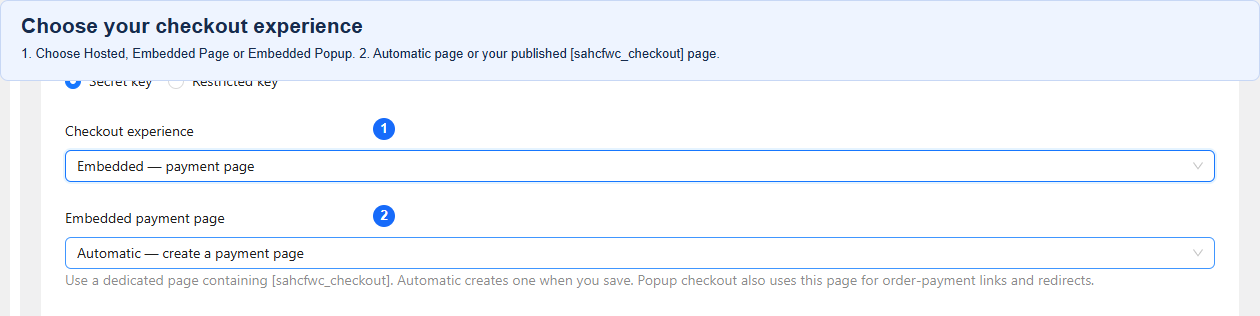
Choose Hosted Checkout, Embedded payment page or Embedded popup.
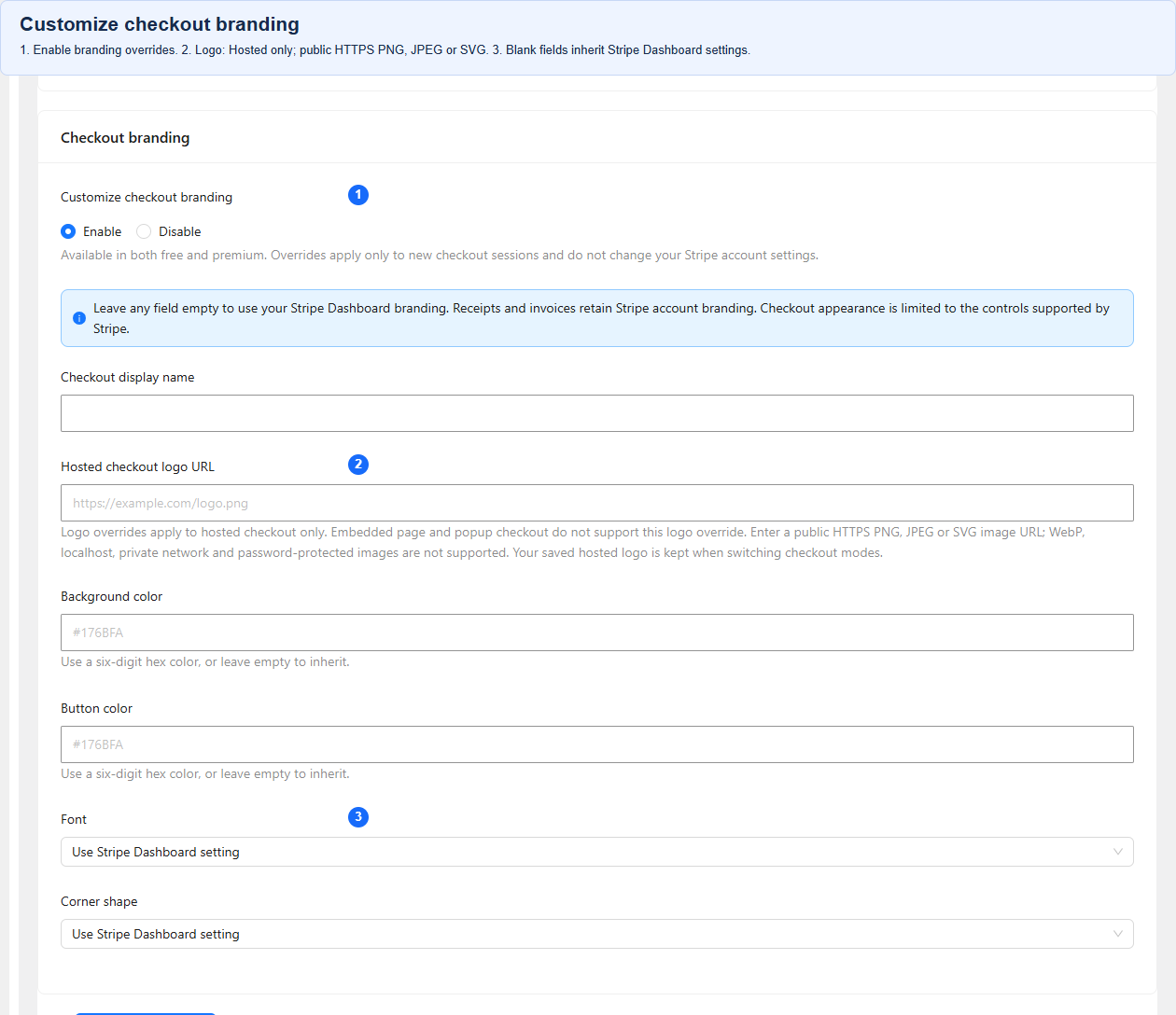
Customize checkout branding, including colors, font and corner shape.
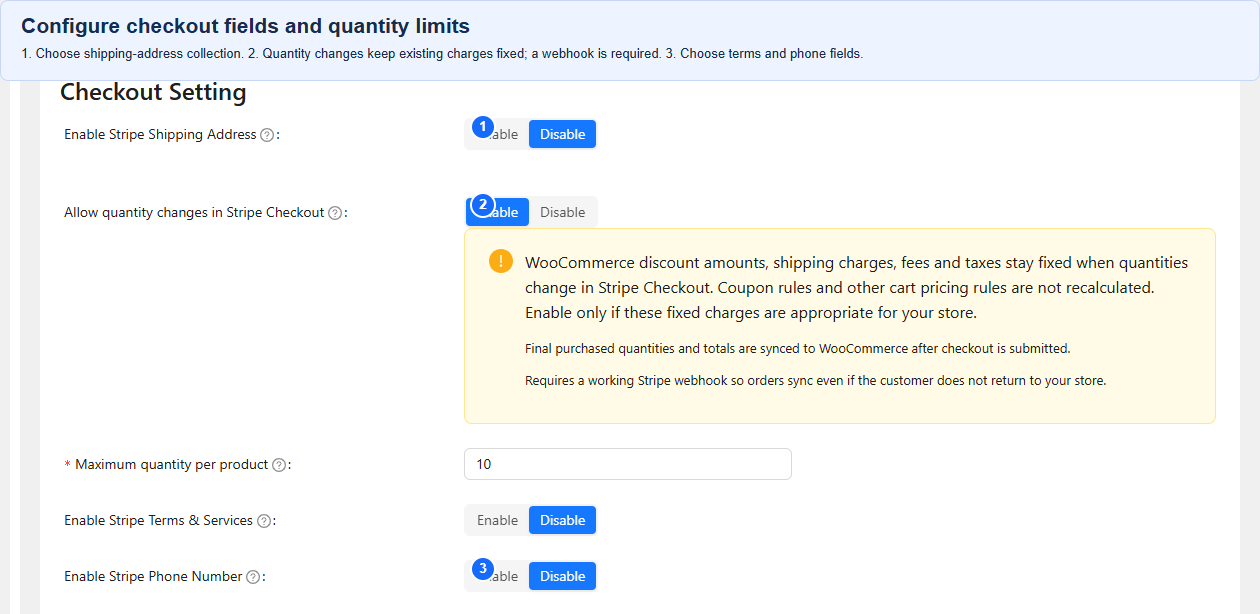
Configure checkout fields and optional product quantity limits.
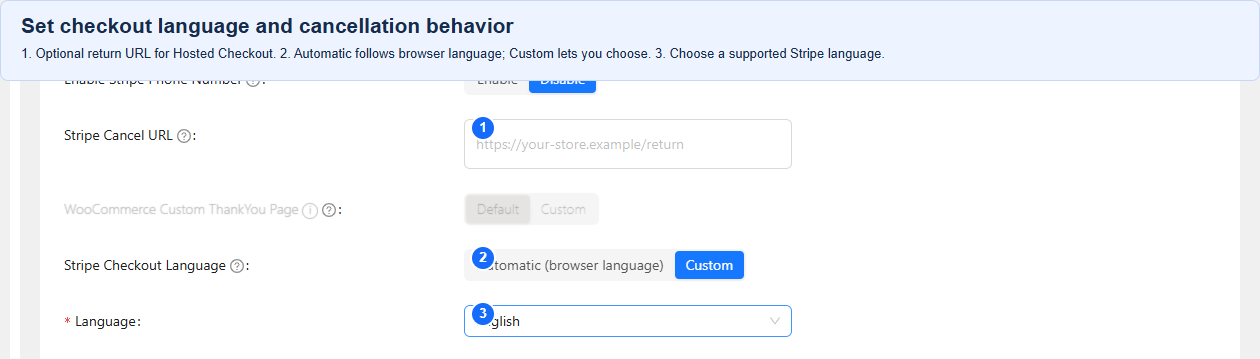
Set the checkout language and Hosted Checkout cancellation URL.
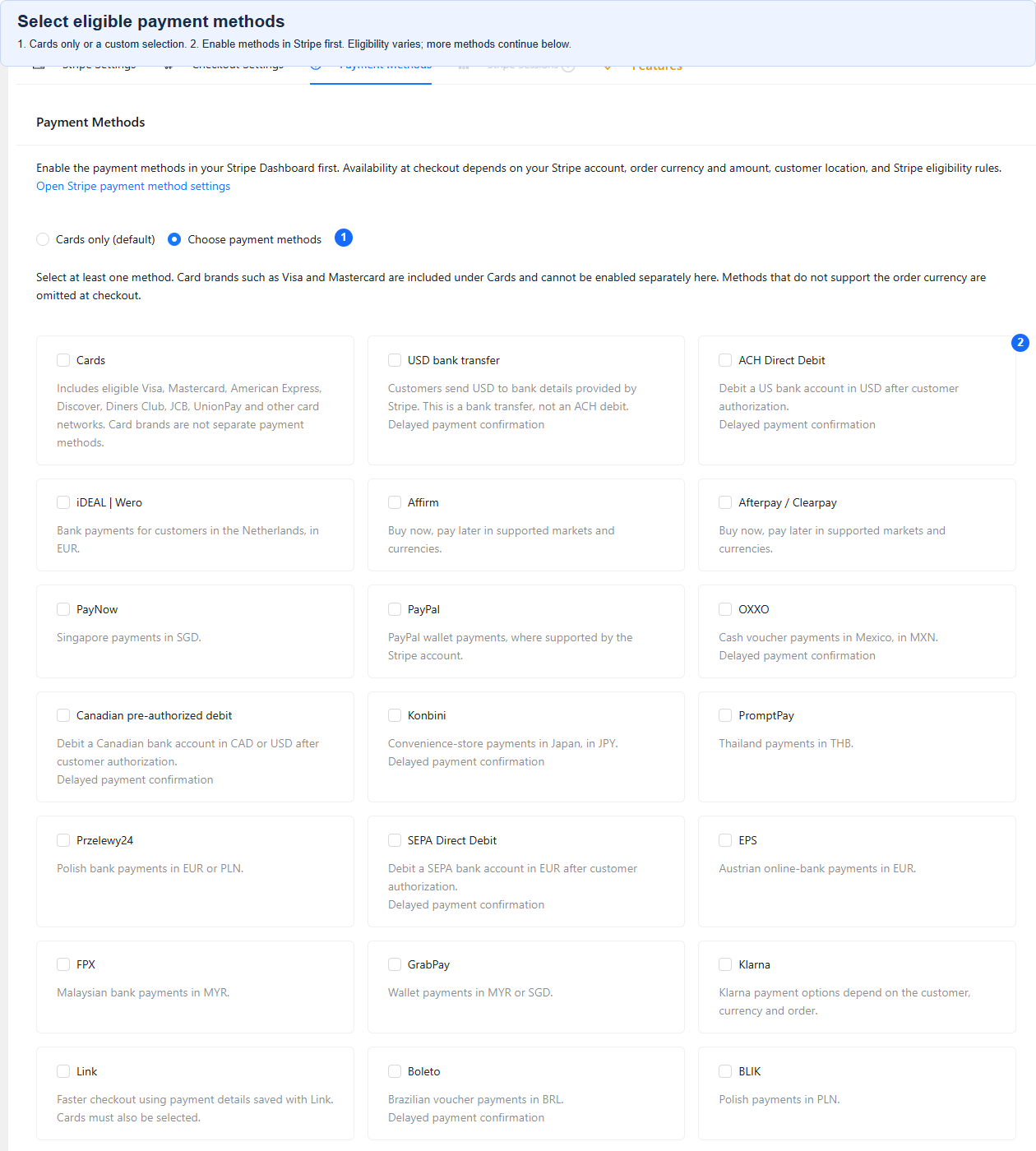
Select eligible Stripe payment methods for your store.