
Scroll Triggered Widget is not an actual widget. It defines a new widget area when activated. You can drag and drop any widget you wish like a normal widget area. The widget area gets triggered when you scroll down to the bottom of the page by default. But you can control the location where it gets triggered in the plugin options page. The plugin comes with lot of customization options.
Plugin features
– 25 unique animation effects
– Change the background color of the widget
– Change the Border color and width
– Choose where the widget should display
– Drag and drop any widget of your choice
– Controll how long the widget area should be remain hidden when closed
– Users can click the moving arrow in the bottom to revert the widget area
Screenshots
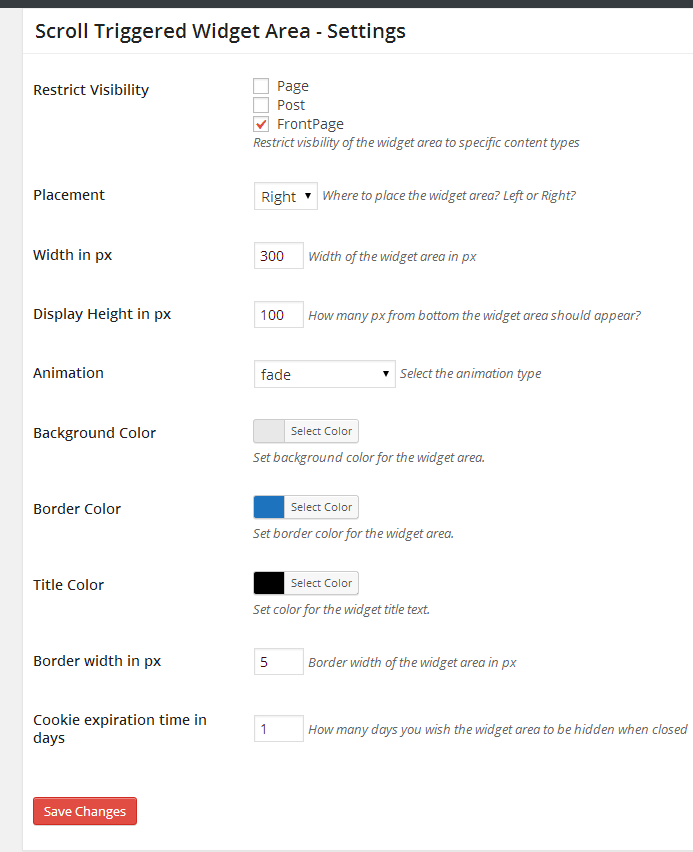
Settings page.

A Newsletter widget inside scroll-triggered-widget-area looks like this.