
Seat & Table Booking adds one product type to WooCommerce: Booking venue. One product is one floor plan. Customers pick a date, a timeslot and a table straight off a picture of your room, pay through your normal checkout, and get a QR code that staff scan at the door from a phone browser.
Everything runs on your own site. There is no booking service to sign up for, no fee per reservation, and no account with anyone else. WooCommerce handles the payment, the order and the emails – there is no second checkout and no second dashboard.
Built for restaurants, cafés, bars, cinemas, theatres, concert venues, wedding halls, co-working spaces and anyone who sells a place in a room with a layout.
Who it is for
- Restaurants, cafés and bars – tables of different sizes and prices, several sittings an evening, and a table held back for walk-ins.
- Cinemas, theatres and concert venues – seat-by-seat booking from a seating chart, with a “find N seats together” button for the customer.
- Events with a fixed layout – a wedding, a gala dinner or a conference is a timeslot rule whose first and last day are the same.
- Co-working spaces and studios – desks and rooms booked by the hour or by the day.
Draw the room
- A visual floor plan editor. Upload a photo or a drawing of the room and drag the tables onto it, with a grid, undo and rotation.
- A row tool that lays out a whole row of cinema-style seats in one go.
- Per-table price, label, capacity and an internal note only staff see.
- Recurring timeslots per weekday, with optional first and last dates.
- Blackout dates for a whole day or for a single sitting.
- More than one venue. Every Booking venue product is its own floor plan with its own timeslots, prices and settings, and one order can hold tables at several venues.
No double bookings
- A table goes on hold the moment it is added to the cart, for that exact date and sitting. Two customers racing for the last table cannot both win; the database refuses the second, and they are told the table has just gone.
- Abandoned carts free the table on their own. The hold lasts 15 minutes by default, set per site or per venue.
- Unpaid orders are released after a window you set, 60 minutes by default. Orders waiting on a bank transfer are left alone.
- Cancelled, refunded, trashed and deleted orders release their tables straight away and cancel their QR codes.
Check-in at the door
- A scanner page on your own domain, at
/table-check-in/. Full screen, no admin bar, nothing for door staff to get lost in. - No app to install. Any modern mobile browser works, with a flashlight toggle for a dark doorway and a type-in field for a desk without a camera.
- Colour-coded results you choose: checked in, not valid or already used, and invalid request.
- A check-in window, so a code only opens the door around its own sitting.
- A Scanner user role that grants check-in and nothing else in wp-admin.
- Every decision is made on your server, never on the phone, so a cancelled booking cannot be waved through.
- A REST check-in API underneath, off by default, so a third-party scanner app can use the same check-in.
Running it from wp-admin
- A Bookings screen – every table against every sitting for a day, with guests, arrivals and a needs-attention bar. Check guests in, reset or resend a code, or release a booking from the same grid.
- Staff blocks. Hold a table back for a walk-in with one click, and it disappears from the floor plan for that sitting.
- A Reservation column on the WooCommerce orders list.
- Per-venue QR design – colours, an optional logo and a caption, with a redraw for codes already issued.
- An Appearance tab with fifteen optional colour overrides, a live preview and a contrast warning. Left alone, the booking form follows your theme’s own colours.
- Shop Manager friendly. Everything is gated on
manage_woocommerce; nobody needs an Administrator account to run service.
What your customers get
- Only bookable dates and times. Closed days, full sittings and sittings inside the booking notice are never offered.
- Tables too small for the party are not offered, and booked tables are visibly unavailable.
- A picker that works with a keyboard and a screen reader.
- The table, date and time on the cart, the checkout, the order and the order emails, plus an arrival note you write per venue.
- The QR code in the confirmation email, on the thank-you page and in the order under My Account.
Customer files stay private
QR code images are not reachable at a guessable public URL. They live in an uploads folder named from a site secret, closed to direct access, and are served only through a link signed for that exact code, to shop staff, or to the customer who placed the order. Reset on the Bookings screen changes the signature too, so it revokes a leaked link. Nothing to configure.
Privacy
The plugin keeps no customer details of its own. A booking records the venue, table, date, sitting, party size and the WooCommerce order it belongs to; the guest’s name and email stay on the order, where WooCommerce’s own personal data export and erasure cover them.
External services
None. The plugin makes no outbound requests, sends no analytics or telemetry, and needs no account anywhere. QR codes are generated on your own server by the bundled library, and every script and stylesheet is served from your own site.
Nothing to maintain
A booking is free again the moment its hold expires; nothing waits for a background job. A five-minute WP-Cron event tidies expired holds away and releases unpaid orders.
Works with
- WooCommerce HPOS (High-Performance Order Storage), the Cart and Checkout blocks and the classic shortcode cart and checkout.
- Any theme. The booking form replaces the add-to-cart form on the product page and uses WooCommerce’s own notices and buttons.
- Translation ready – every string is translatable, and the plugin ships a POT file.
- No build step. All PHP, JavaScript and CSS ships readable and editable.
Requirements
- WooCommerce, installed and active. WordPress will not let the plugin activate without it.
- PHP 8.0 or newer.
- HTTPS for the scanner, because phone browsers only give camera access to secure pages.
Source Code and Third-Party Libraries
This plugin ships no compiled or obfuscated code. Every PHP, JavaScript and CSS file
written for this plugin is included in readable, editable form, and no build step
(npm, webpack, Composer, etc.) is required to run or modify it.
The following third-party libraries are bundled unmodified. Each is the upstream
distribution file, at the version listed:
- endroid/qr-code 4.8.2 – QR code generation – https://github.com/endroid/qr-code – MIT
(bundled in inc/qr/lib/qrcodegen/, installed with Composer, together with its
dependencies bacon/bacon-qr-code 2.0.8 (https://github.com/Bacon/BaconQrCode) and
dasprid/enum 1.0.7 (https://github.com/DASPRiD/Enum), both BSD-2-Clause) - Fabric.js 7.4.0 – the admin floor plan editor canvas – https://github.com/fabricjs/fabric.js – MIT
(inc/product-type/js/lib/fabric.min.js, exactly as published on npm as
fabric/dist/index.min.js; the project tags this release v740, not v7.4.0:
https://github.com/fabricjs/fabric.js/tree/v740) - jsQR 1.4.0 – QR decoding in the check-in scanner – https://github.com/cozmo/jsQR – Apache-2.0
(inc/scanner/js/jsqr.js)
The Composer-installed library can be regenerated from its composer.json with
composer install; the two JavaScript libraries are the unmodified dist files
published by their projects on npm, and their readable sources live in the linked
repositories.
Screenshots

Rows of seats as the customer sees them: pick a date, a time, then a seat.
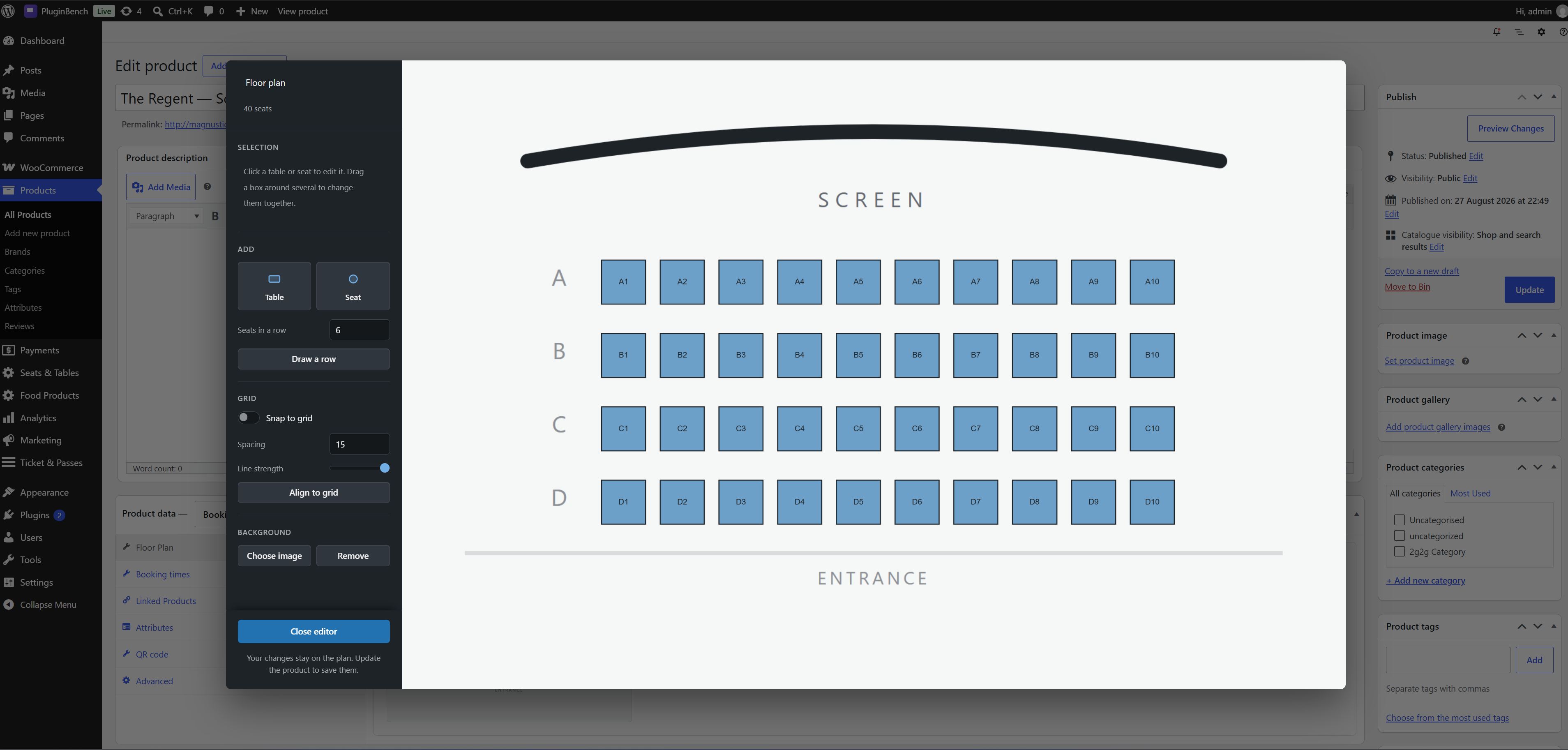
The same room in the editor: lay out rows with the row tool, for a cinema or a theatre.
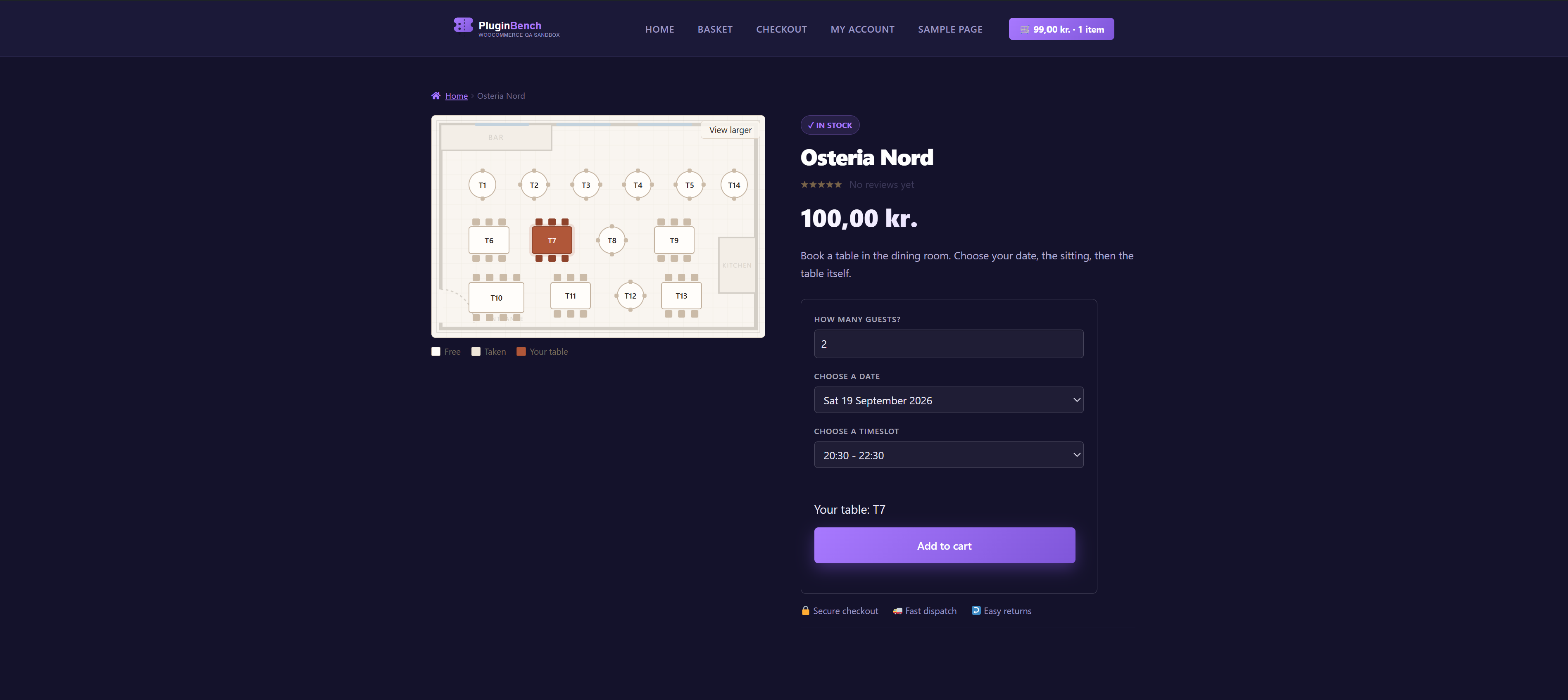
Tables on a picture of your room, and the customer picks the one they want.
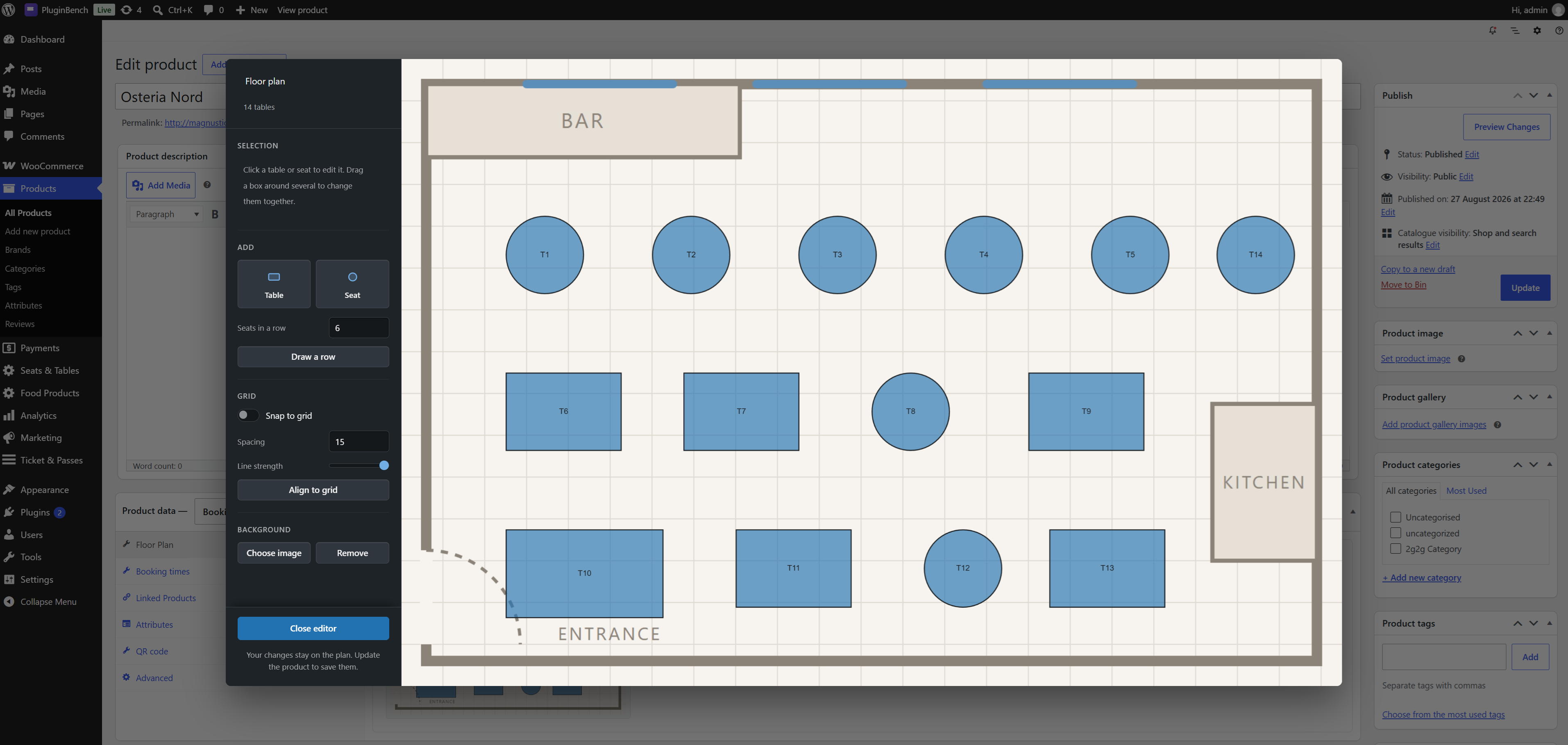
Behind the scenes: drag the tables onto the floor plan and set what each one seats.
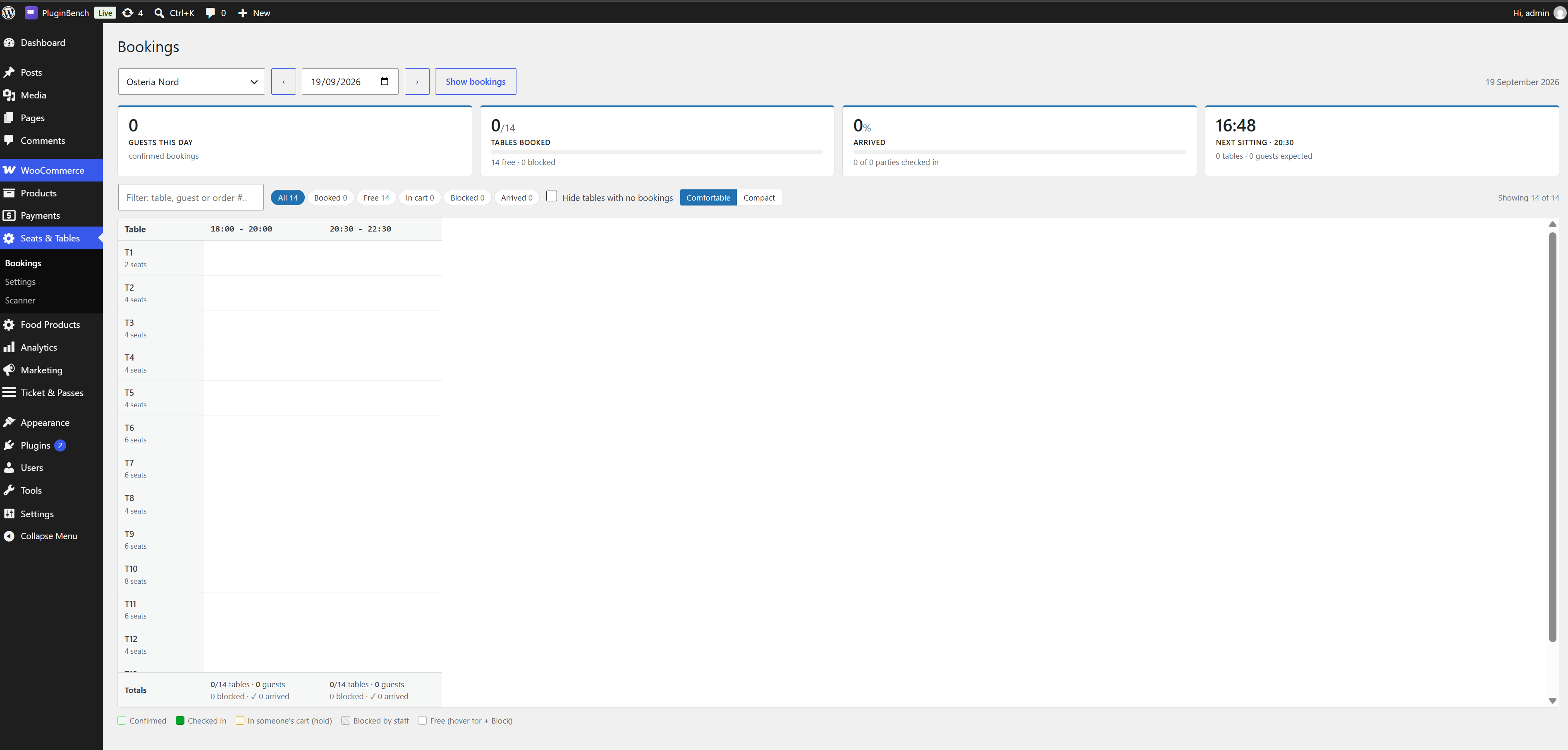
A day view of every booking, with staff blocks per sitting.
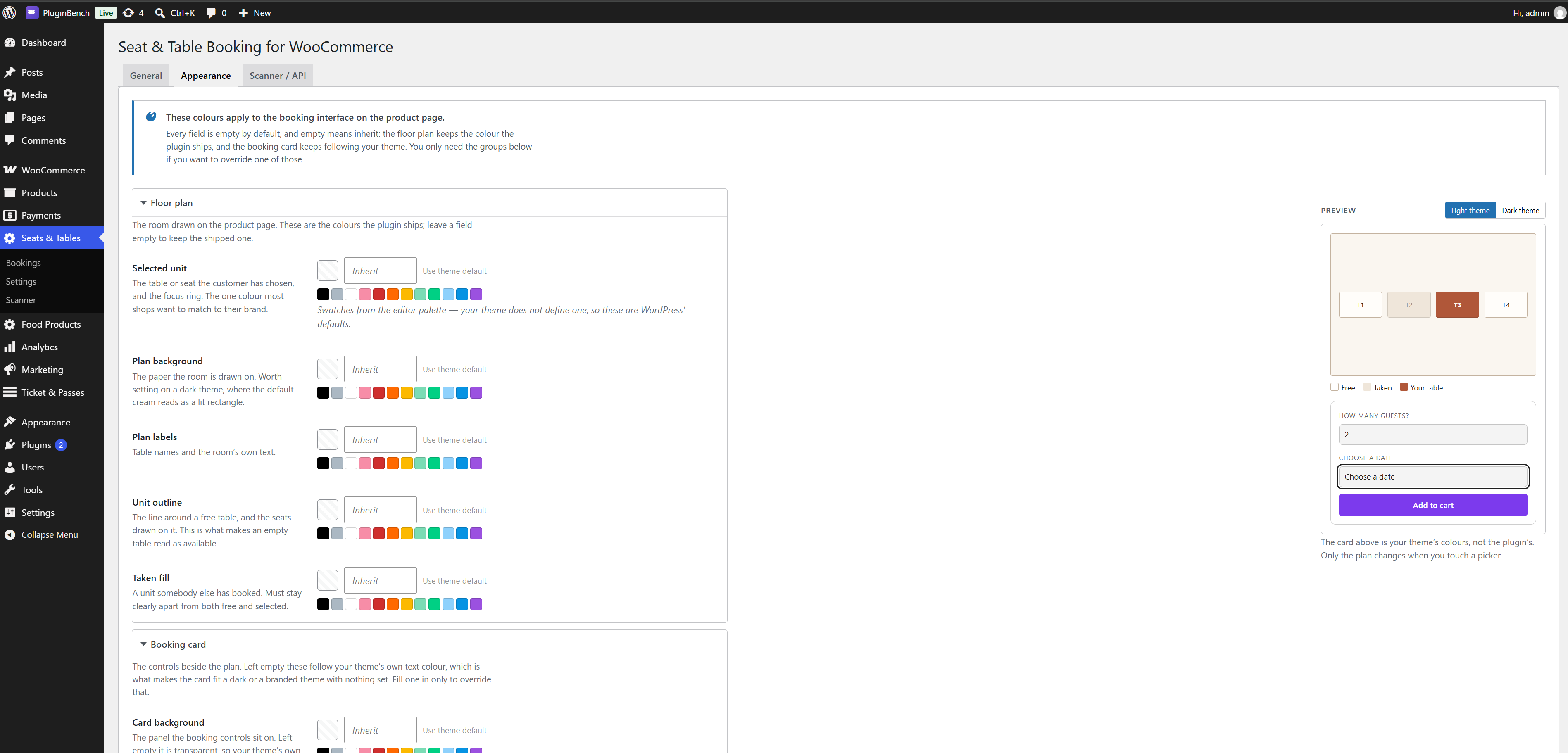
Appearance settings: colours and labels for the picker, without touching CSS.