
Expired stock costs you twice: once when you throw it away, and again when a customer receives something past its date. Sellinor Expiration Dates for WooCommerce puts a date on every product that needs one, shows you what is about to run out, and takes expired products off sale on its own.
Call it an expiration date, an expiry date, a best before or use by date — it works the same way. It is made for grocery and food shops, bakeries and fresh produce, dairy and meat, drinks, supplements, cosmetics, pharmacy and medical supplies, and anything else with a shelf life.
How it works
- Set a date. Open a product’s Expiration tab — right after Inventory — pick a date, or tap +1 week, +1 month, +6 months or +1 year. Variations can each have their own date.
- Choose what happens. When a product expires, hide it from the shop, mark it out of stock, or both — on the day itself or a few days early.
- Let it run. The plugin checks every hour. Expired items are kept out of carts and removed at checkout, and every action is written to the activity log.
Features
Dates on every product
- Expiration dates on simple and variable products, with a separate date per variation or one default date for all of them.
- Quick-set buttons in the product editor, plus quick edit and bulk edit from the product list.
- A sortable, colour-coded Expiration column and an “Expired / No date” filter in the product list.
- Optionally show the date on the product page, with your own label (“Best before”, “Use by”, …) and only when it is getting close.
Automatic protection
- Hide expired products, set them out of stock, or both — with an optional number of days before the date.
- Cart and checkout protection: expired items cannot be added to the cart and are removed at checkout.
See what is coming
- An Expirations overview with Expiring soon and Expired lists, search, sorting, a value-at-risk column and an expiration calendar.
- A dashboard widget with the products that expire next.
- An activity log of every automatic action and date change, with filters, search and CSV export.
Bulk work and developers
- CSV import and export of expiration dates for every product and variation.
- Data & cleanup tools: clear dates in bulk, or move long-expired products to the trash — both preview exactly which products match first.
- REST API: an
edfw_expiration_datefield on WooCommerce products and variations, and filters to list products expiring within a date window — for syncing with an ERP, POS or warehouse system. - WP-CLI:
wp edfw get | set | clear | listfor scripts, scheduled jobs and migrations. - Compatible with WooCommerce High-Performance Order Storage (HPOS). Translation-ready.
Pro add-on
This plugin is complete on its own. For stores that manage a lot of perishable stock, a separate Pro add-on is available from sellinor.dev:
- Batch & lot tracking (FEFO) — several batches per product, each with its own date; orders take stock from the earliest-expiring batch first, and the lot number appears on orders and emails.
- Automatic expiry discounts — tiered discounts as the date gets closer, with an optional “Expiring soon” badge.
- Clearance category — short-dated, discounted products gather in a storefront category that keeps itself up to date.
- Per-category rules & shelf life — different actions and lead times per category, and a shelf life that dates restocked products automatically.
- Waste, recovery & forecast reports — value written off vs. recovered, trends by month and category, and what expires in the next 7, 30 and 60 days.
- One-click date changes & write-offs — select products on the Overview and extend, re-date or write them off in one go.
- Email alerts & digests, event webhooks (Slack, Zapier, Make or any URL), and an Expiration date column in WooCommerce’s own product import/export.
Pro is a separate plugin; nothing in this plugin is locked or time-limited.
Documentation
Guides for every feature: sellinor.dev/docs/product-expiration-dates/.
Screenshots

The Expirations overview: what expires soon, what it is worth, and a calendar of upcoming dates.

Set a date in the product's Expiration tab, or tap a quick-set button.

A sortable, colour-coded Expiration column in the WooCommerce product list.

Optionally show the date on the product page, with your own label.

Settings: what happens when a product expires, and when it counts as expiring soon.

The activity log records every automatic action, with filters, search and CSV export.

Import and export expiration dates with a CSV file.
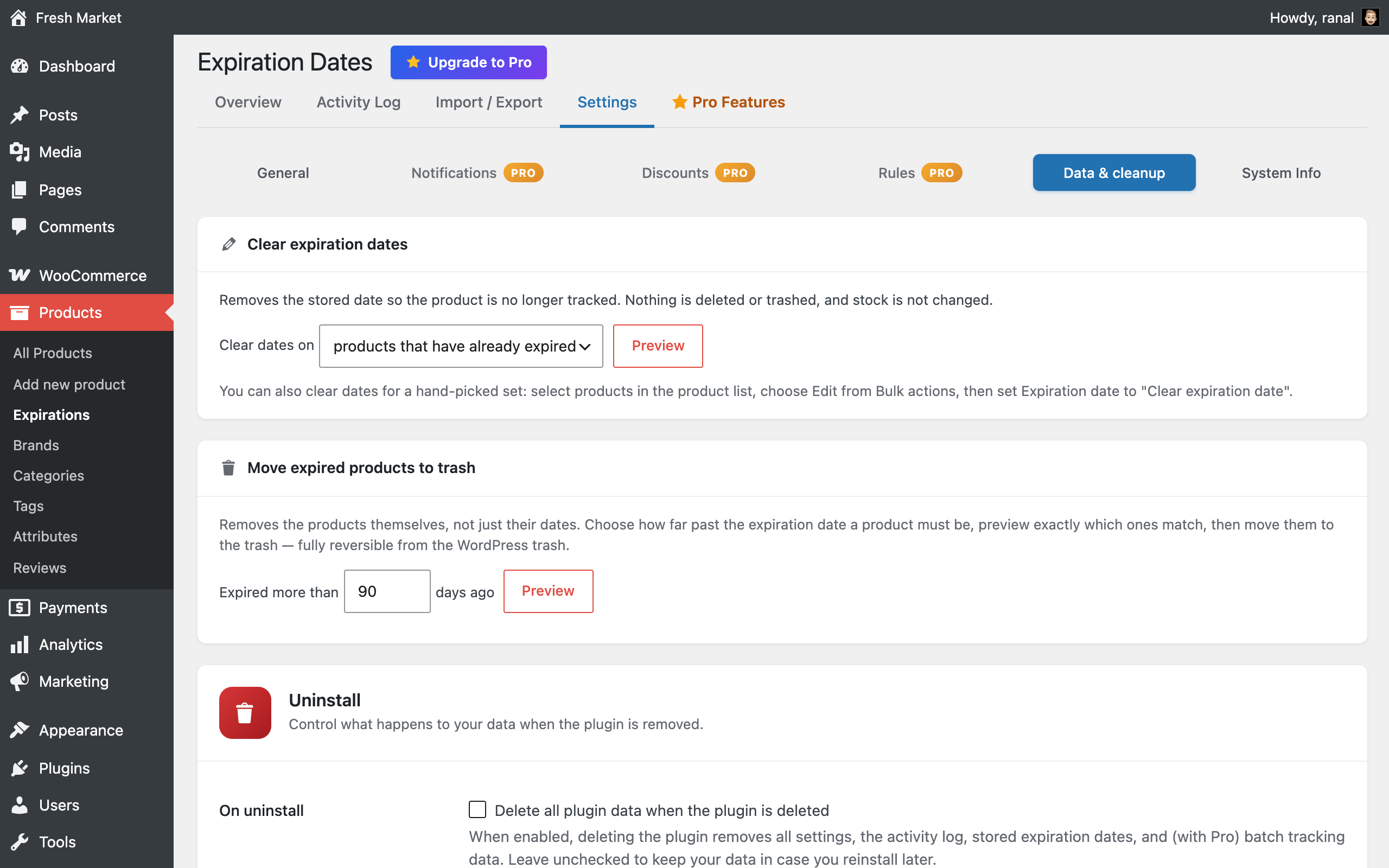
Data & cleanup: clear dates in bulk or move long-expired products to the trash, with a preview first.

A dashboard widget shows the products that expire next.

Pro add-on: batch & lot tracking — each batch has its own date and quantity, and orders take the earliest-expiring batch first (FEFO).

Pro add-on: Reports — what's about to expire, what expired stock cost you, and what discounts recovered.

Pro add-on: select products on the Overview and extend, re-date or write them off in one go.