
Seory Posts to Markdown converts your site content into clean Markdown files and bundles them into a single ZIP archive — ready to hand to AI tools, static site generators, or any Markdown-based workflow.
Runs on your server. No API keys, no accounts, and no external service of its own. With the raw content mode, conversion contacts no external service. With the rendered content mode of the ZIP export, WordPress applies the same content filters as when a post is displayed, so embeds (oEmbed), your theme, or other plugins may contact external services. See the FAQ.
Features
- Export posts, pages, and public custom post types in one click
- YAML front matter: title, date, type, status, slug, link, author, featured image, categories, tags, custom taxonomy terms, draft flag
- Two content modes: raw editor content, or fully rendered content with shortcodes and blocks expanded (
the_contentfilters applied) - Per-post-type taxonomy filters (categories, custom taxonomies) plus a global date range; optionally include drafts
- Flexible output layout: flat files (
slug.md), per-post folders (slug/index.md), date prefixes (2024-01-15-slug.md), and year / year-month folders - Optional
index.mdtable of contents — a convenient entry point when handing the archive to AI tools - GFM tables, fenced code blocks, ATX headings
- Batch processing keeps large sites within PHP time limits
- Read-only WordPress Abilities (WordPress 6.9+) so AI tools can list changed posts, fetch a post as Markdown, and list external links through your site’s own REST API
What it does not do
- Images are not downloaded; image URLs remain as Markdown references
script,style, andnoscriptelements are removed from the output
Related
A browser-based version (convert a WordPress export XML without installing anything) is available at tools.seory.co.jp/wp-to-markdown.
Screenshots
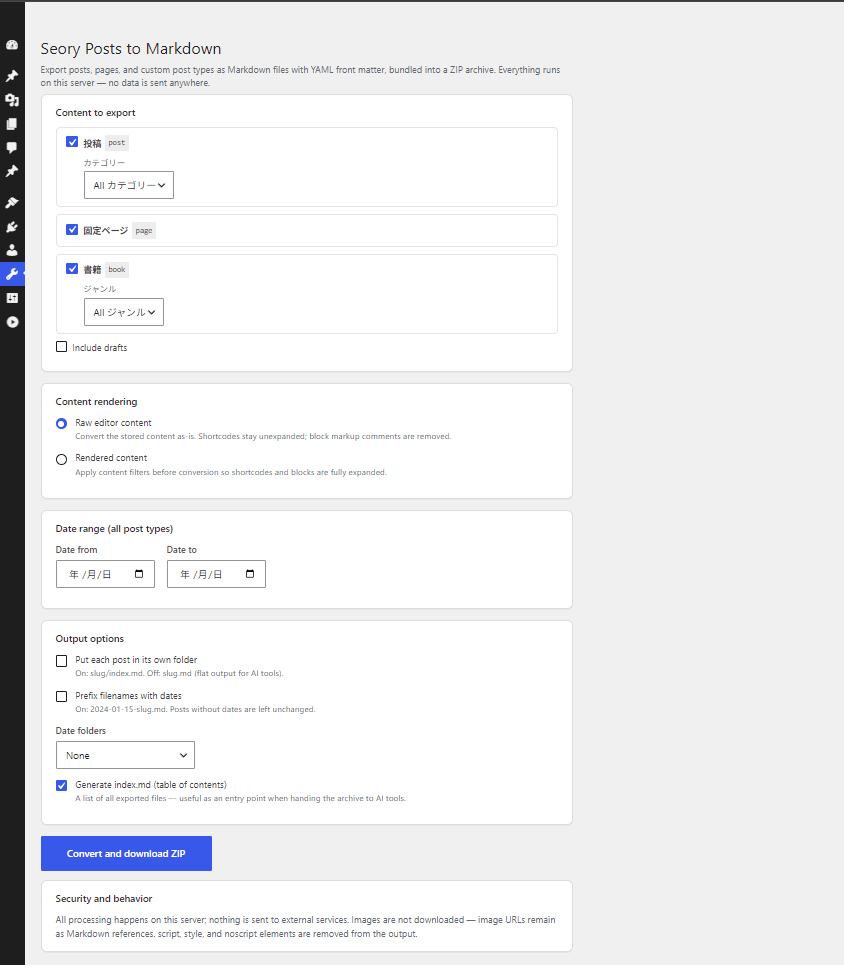
Export settings under Tools → Seory Posts to Markdown: per-post-type selection with taxonomy filters, content rendering modes, date range, and output options