SG5 InsightHub connects your WordPress or WooCommerce site to InsightHub: an AI assistant that answers your visitors in chat and on the phone, a leads inbox with forms, a helpdesk for email and WhatsApp, a booking calendar, and a smarter on-site search. You switch on what you need; every feature stays off until you do.
AI chat widget
- Answers from your own content — pages, posts and products are synced to InsightHub, so the assistant answers product, delivery and service questions from your live catalog.
- Order lookup (opt-in) — shoppers can ask about their order status.
- A person can take over — reply yourself from InsightHub at any time, the AI steps back and resumes when you are done.
- Every language — the assistant answers in the visitor’s language; messages can be translated for your team.
Leads and forms
- Form builder — build forms in InsightHub and show them on any page with the
[sg5ih_form]shortcode, the InsightHub Form block, or the element in Bricks and the widget in Elementor — inline or as a popup button. - Your existing forms — Elementor Pro and Bricks forms can send their submissions to InsightHub with one action.
- Spam protection — forms include invisible spam protection (honeypot, duplicate-submission guard, rate limits); no CAPTCHA is required.
- One leads list — every inquiry from forms, chat, WhatsApp, email and phone in one place, with tags, custom fields, assignees and campaign attribution.
Helpdesk
- Email and WhatsApp as conversations — shared inbox, notes, saved replies, tags, assignees and SLA.
- AI suggestions — a proposed reply for every conversation, in your tone.
- Translation — translate what customers write and what you reply, in one click.
Booking calendar
- Self-service booking — customers pick a free time and book themselves on your public booking page, embedded with the
[sg5ih_booking]shortcode, the InsightHub Booking block, or the element in Bricks and the widget in Elementor. - Meeting links and reminders — Zoom, Microsoft Teams or Google Meet links, confirmation and reminder emails, and a manage link for rescheduling or cancelling.
- Several booking types — different durations, locations and availability per type.
- Calendar sync — Google Calendar, Microsoft 365 (Outlook), Apple iCloud or any CalDAV calendar; connect several calendars per site, and busy times from all of them stay blocked.
Voice assistant
- Calls answered — the assistant answers your phone, answers questions from your content, takes messages and books appointments.
- Everything in InsightHub — transcript, caller and lead for every call. Needs a phone number from InsightHub.
Search
- Three refinement modes — Off (analytics only), Refine (InsightHub steps in only when WordPress search finds nothing) and Replace (InsightHub ranks every result).
- Typo correction and synonyms — a zero-result search is retried with the corrected term, with a clear “showing results for…” notice.
- Products and content together, with WooCommerce layered-nav filtering and sorting on the standard results page.
Analytics and conversions
- Search analytics — every search with its results, and the searches InsightHub rescued.
- Conversion tracking (opt-in) — visits and clicks on WhatsApp, phone, email and booking links as goals, campaign and UTM attribution for leads and orders.
WooCommerce extras (all opt-in, off by default)
- Order tracking — completed orders for search-to-purchase analytics and order lookup in chat.
- Abandoned-cart capture and recovery — capture carts with checkout consent, send recovery emails and restore the cart with one click.
- Reviews slider — your latest product reviews anywhere with
[sg5ih_reviews]; import your Google reviews and choose which ones appear. - Post-purchase banner — a survey or form on the thank-you page, prefilled from the order.
Privacy
The plugin integrates with the WordPress privacy tools: personal data collected through abandoned-cart capture is included in Tools Export Personal Data and Tools Erase Personal Data, and suggested privacy-policy text is provided. Customer identity fields are only ever sent when you enable the corresponding toggle.
For analytics — search logging and abandoned-cart capture — the anonymous visitor id is only used after statistics consent when a consent plugin is active. Two features are different, because they are functional rather than analytical: form conversions, and order attribution when order tracking is on. For those the ih_vid cookie is set for every visitor of a page carrying such a form, and on the checkout page. It holds a random first-party identifier and no profile, and exists only to link something the visitor deliberately submitted — a lead, or an order — to the visit it came from. With conversion tracking switched on and set up in InsightHub, the choice made there applies instead: without cookies (nothing is stored in the browser; InsightHub recognizes a returning visitor by IP address and browser identification), for the browser tab only (a session cookie that ends with it), or with a cookie set only after statistics consent and removed when consent is withdrawn.
External services
This plugin connects to the InsightHub service, a cloud service operated by SG5 Digital Solutions, to provide AI-powered search, search analytics, chat, reviews, lead capture and abandoned-cart recovery. The plugin cannot provide these features without it: the matching, ranking and AI responses are produced by the service, not in WordPress. An InsightHub account and API key are required.
All requests go to the InsightHub service over HTTPS. Nothing is transmitted until you enter an API key and switch on the feature that sends it — every feature below is off by default.
What is sent, and when:
- Connecting your site — your site URL, site name and administrator email address, sent once when you connect the plugin to an InsightHub account and whenever it verifies the API key.
- Search — sent on a front-end search when Search Tracking or Search Refinement is on: the search term, the number of results, a snapshot of the matching products and content, the page number, and the visitor’s IP address. An anonymous visitor id, or a logged-in customer’s id, name and email address, are included only when the corresponding settings and visitor consent allow.
- Content sync — sent when you save or delete a post, page or product while sync is on: its title, URL, content, and for products the price, stock, attributes and variations.
- Orders — sent at checkout when order tracking is on: order total, currency, line items, the order id, and the customer’s name, email address, phone number, company, billing and shipping address, and IP address. When conversion tracking is on, the customer’s browser identification (user agent) is included as well, so InsightHub can link the order to the visit it came from.
- Abandoned carts — sent when cart capture is on and the shopper has consented: cart contents and the shopper’s email address, so the service can send a recovery email. The resolve call exchanges a token from that email for the saved cart. When you erase a shopper’s personal data with the WordPress privacy tools, their email address is sent so the service deletes their saved carts too.
- Post-purchase banner — sent when a shopper answers the banner: their answer and the related order id. When the banner is shown, the survey or form embed script is loaded from the service and a shopper who opens the survey or form submits their answers to it; a form receives the order’s email address, name and order number through its personal link.
- Form leads — sent when a visitor submits a Bricks or Elementor form carrying the InsightHub action: the fields you mapped, which typically include the name, email address, phone number, website and message, plus the page and campaign the submission came from and the visitor’s IP address. When conversion tracking is on, the visitor’s browser identification (user agent) is included as well.
- Campaign visits — sent on page load for pages carrying such a form, while conversion tracking is not set up: an anonymous visitor id, the page URL, the referring URL and any UTM parameters.
- Conversion tracking — when the Conversion tracking setting is on: the plugin reads your site’s conversion settings from InsightHub (the API key only, cached for 10 minutes). If those settings count visits or link clicks, the InsightHub script is loaded on every page and sends each visit — the page URL, the referring URL and any UTM parameters — and clicks on the links you track as goals (WhatsApp, phone, email, booking, download, outbound or your own). When WhatsApp chats are linked to visits, links to your WhatsApp number add a short reference code to the message the visitor sends. How a returning visitor is recognized is chosen in InsightHub: without cookies (by IP address and browser identification), for the browser tab only (a session cookie), or with a cookie set only after statistics consent.
- Reviews — sent when the
[sg5ih_reviews]shortcode renders: your public widget id, to retrieve approved reviews for display. - Chat widget — when the widget is on, its script is loaded from the service and shopper messages are processed by it.
- Booking calendar — when the Booking calendar setting is on, on pages that use the
[sg5ih_booking]shortcode, the InsightHub booking block or the InsightHub booking element in Bricks or Elementor: the plugin asks for your site’s booking pages (the API key only, cached for 10 minutes), and the embed script is loaded from the service to show the booking page from InsightHub. A visitor who books enters their name, email address and the details the form asks for on that page, which belongs to the service. - Forms — when the Forms setting is on, on pages that use the
[sg5ih_form]shortcode, the InsightHub Form block or the InsightHub Form element in Bricks or Elementor: the plugin asks for your site’s published forms (the API key only, cached for 10 minutes), and the embed script is loaded from the service to show the form from InsightHub. A visitor who sends the form submits the details it asks for to the service, together with the address and campaign parameters of the page it sits on.
About the service, its terms and its privacy policy:
Screenshots
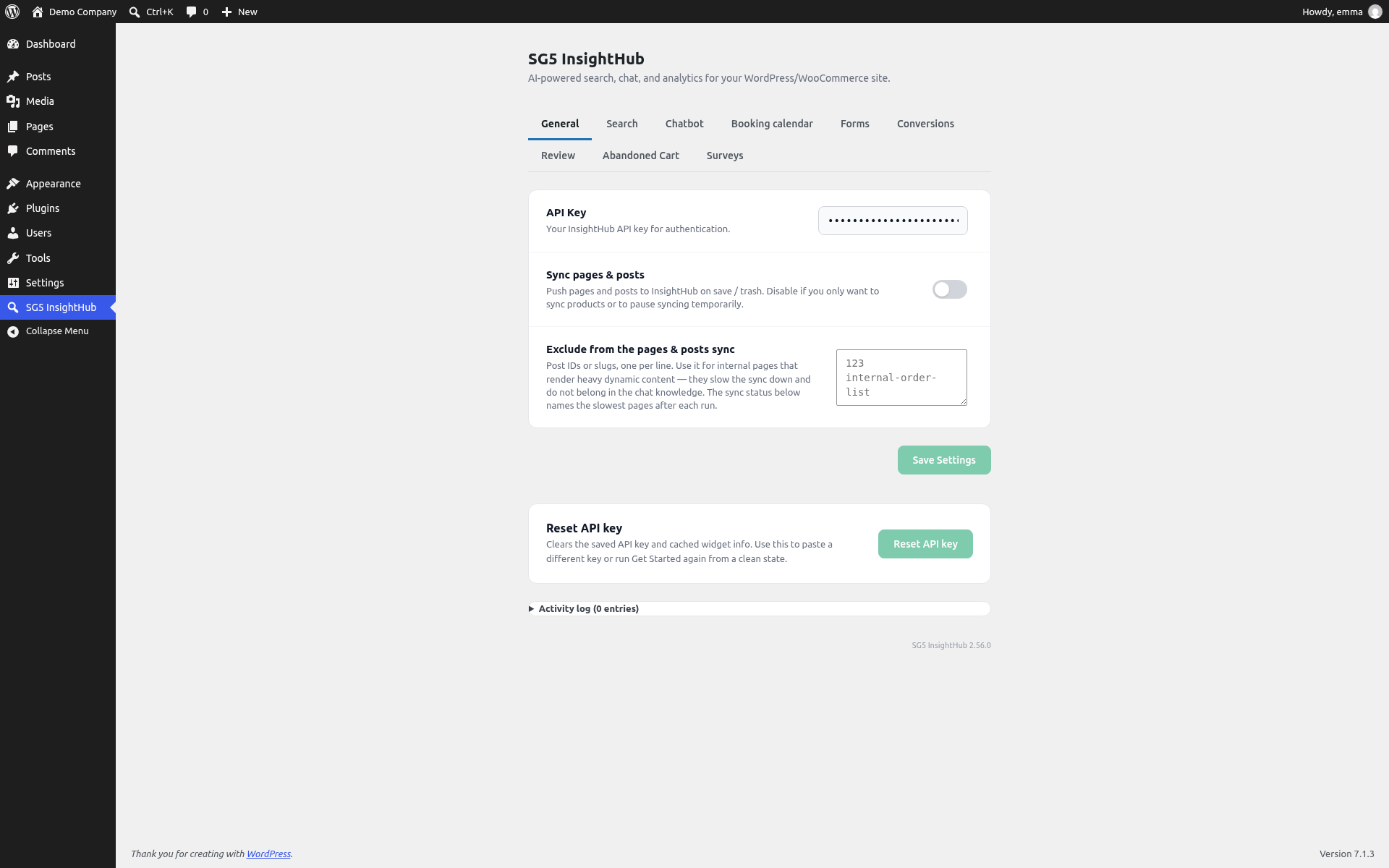
The plugin's settings page in WordPress: API key, page sync and the tabs for search, chatbot, booking calendar, forms and more.
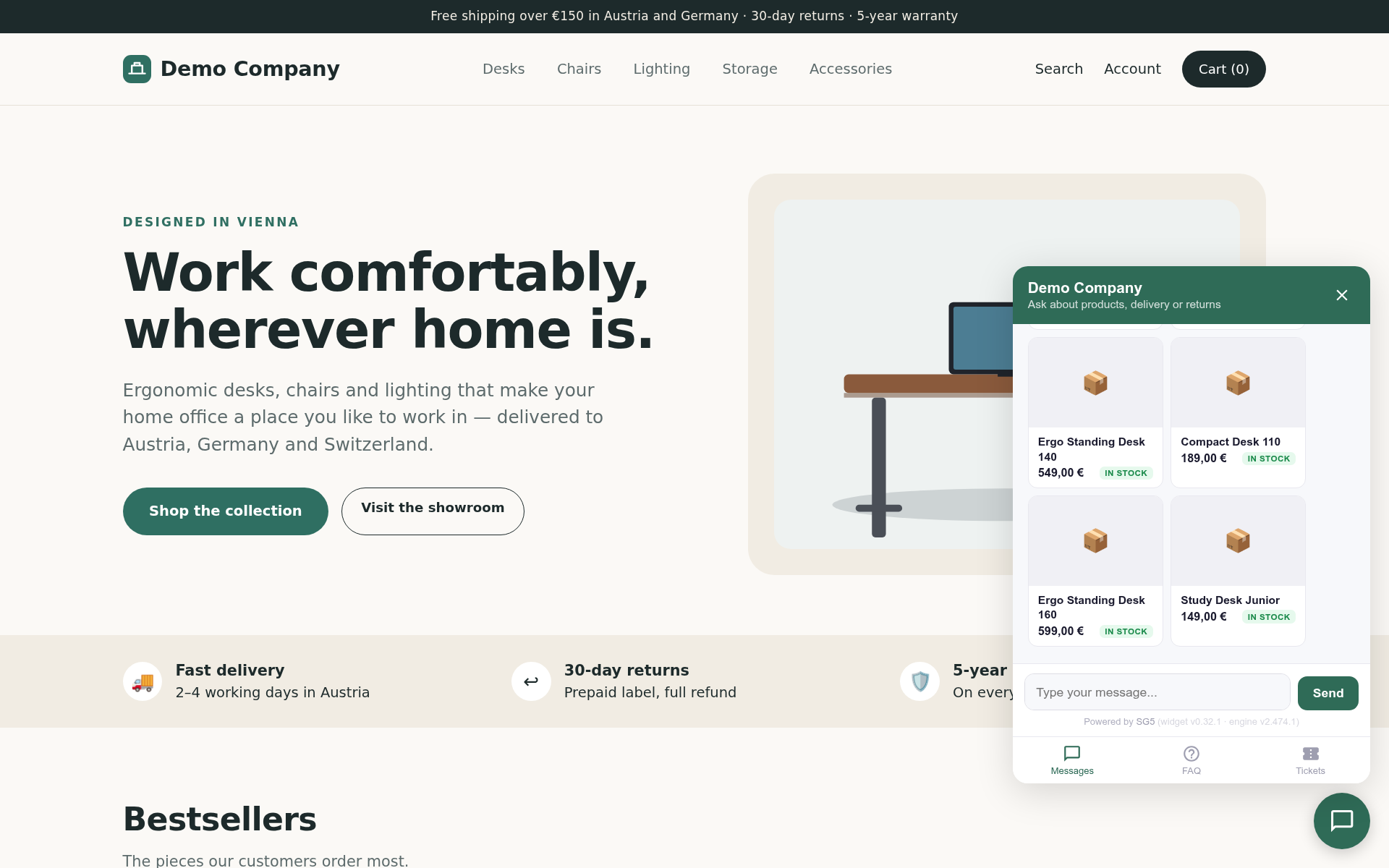
The AI chat widget on your website answers product questions from your live catalog.
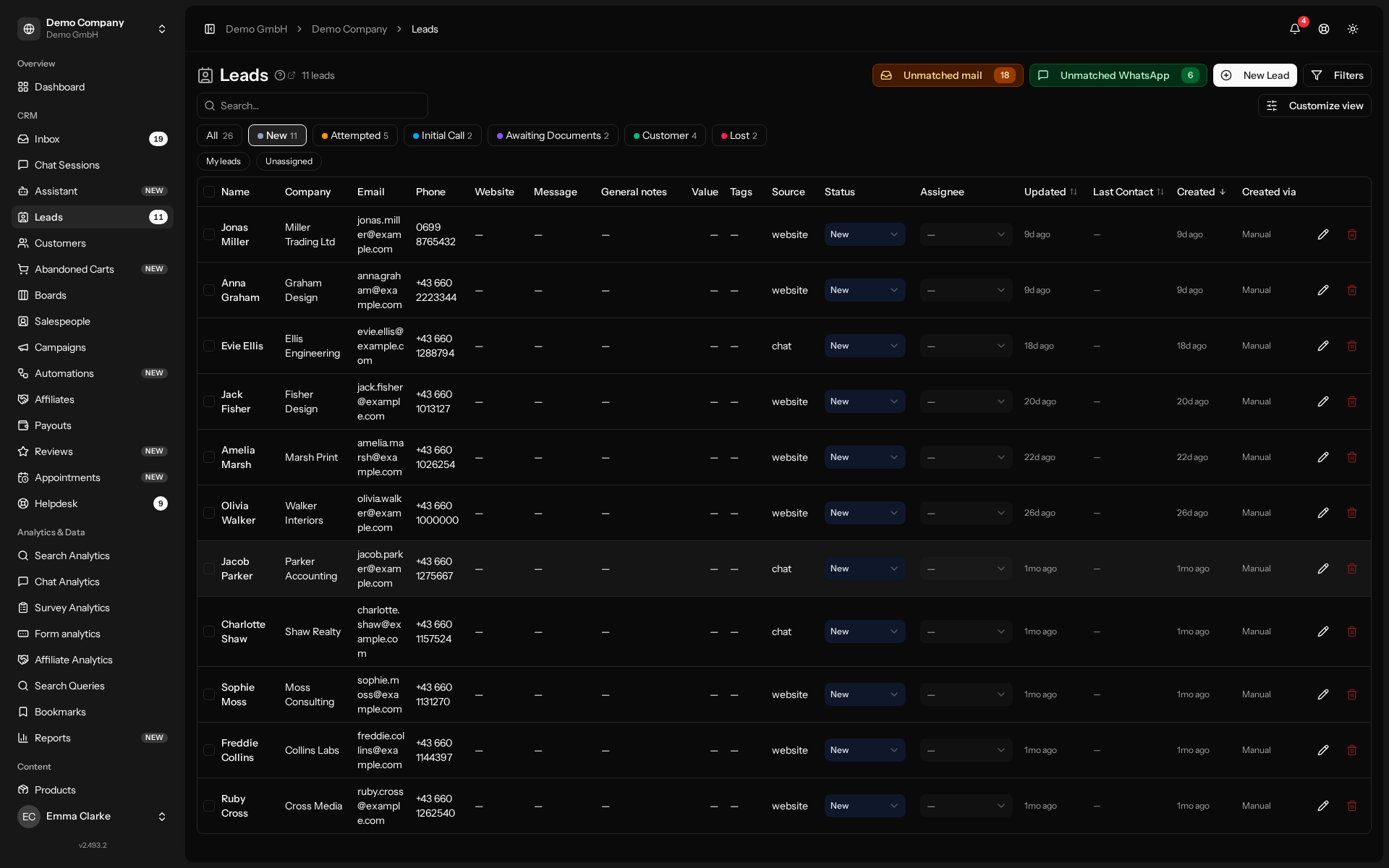
The leads list: every inquiry from forms, chat, WhatsApp and email in one place.
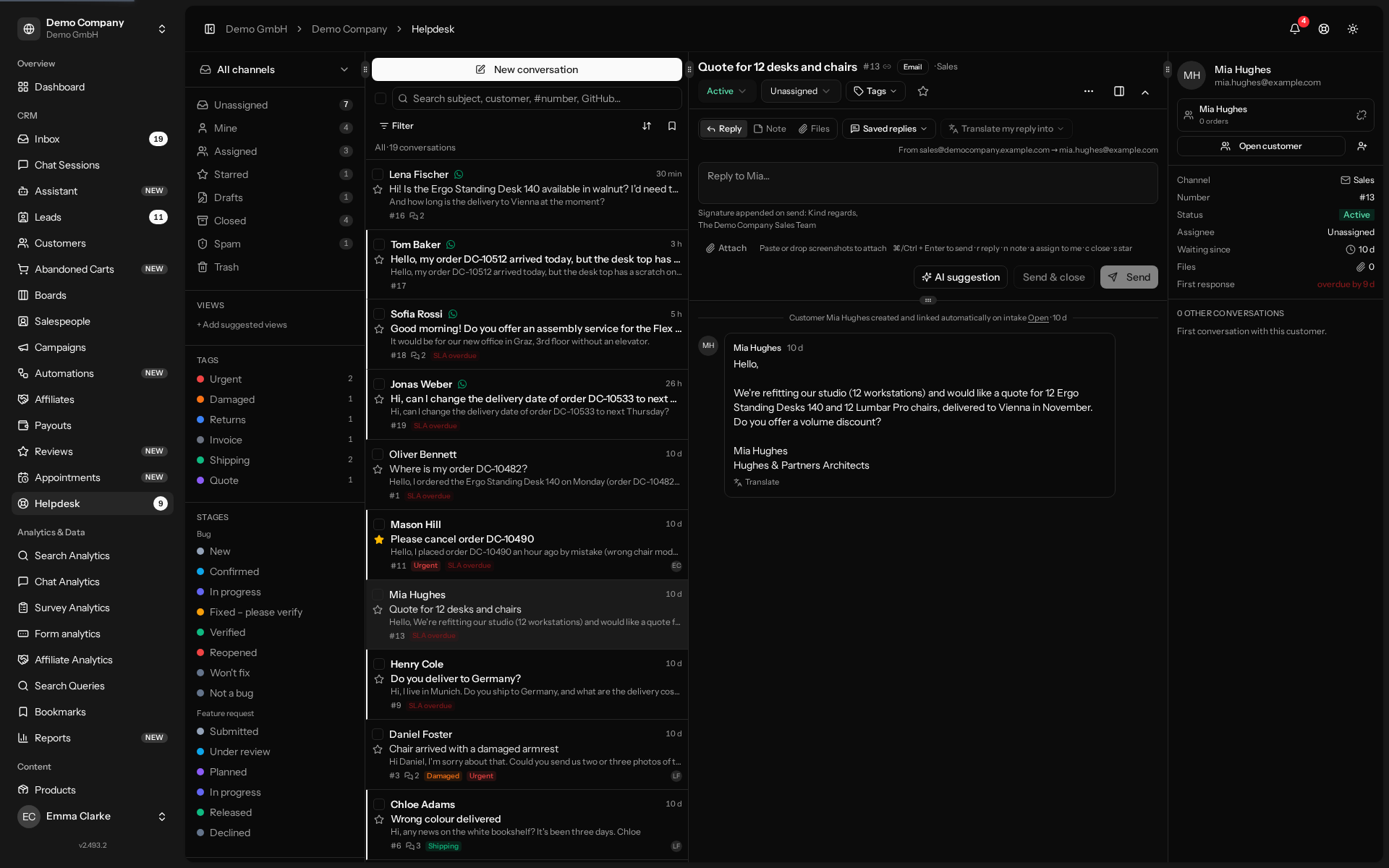
The helpdesk: customer emails as shared conversations with replies, notes and AI suggestions.
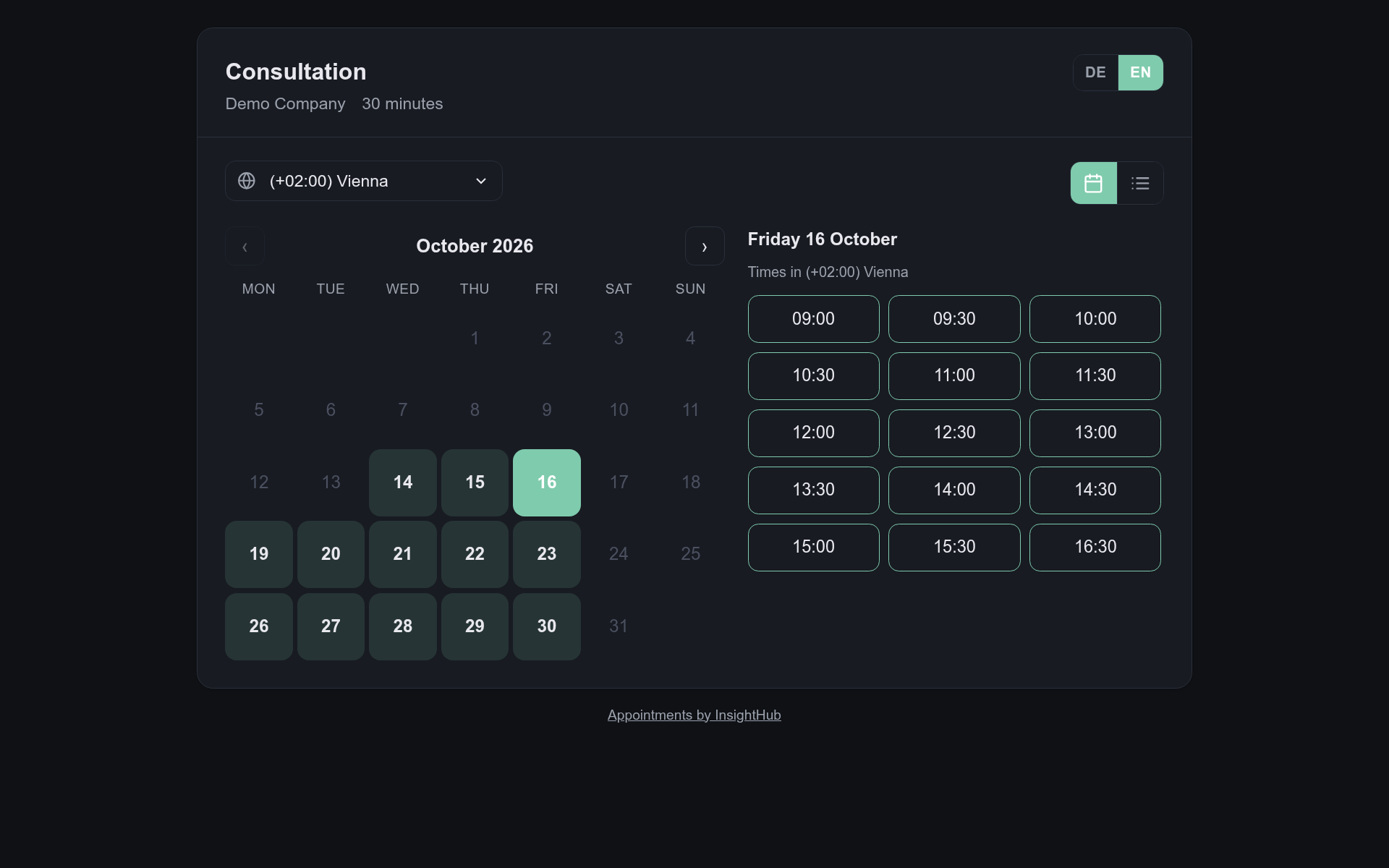
The public booking page: customers pick a free time from your calendar and book themselves.
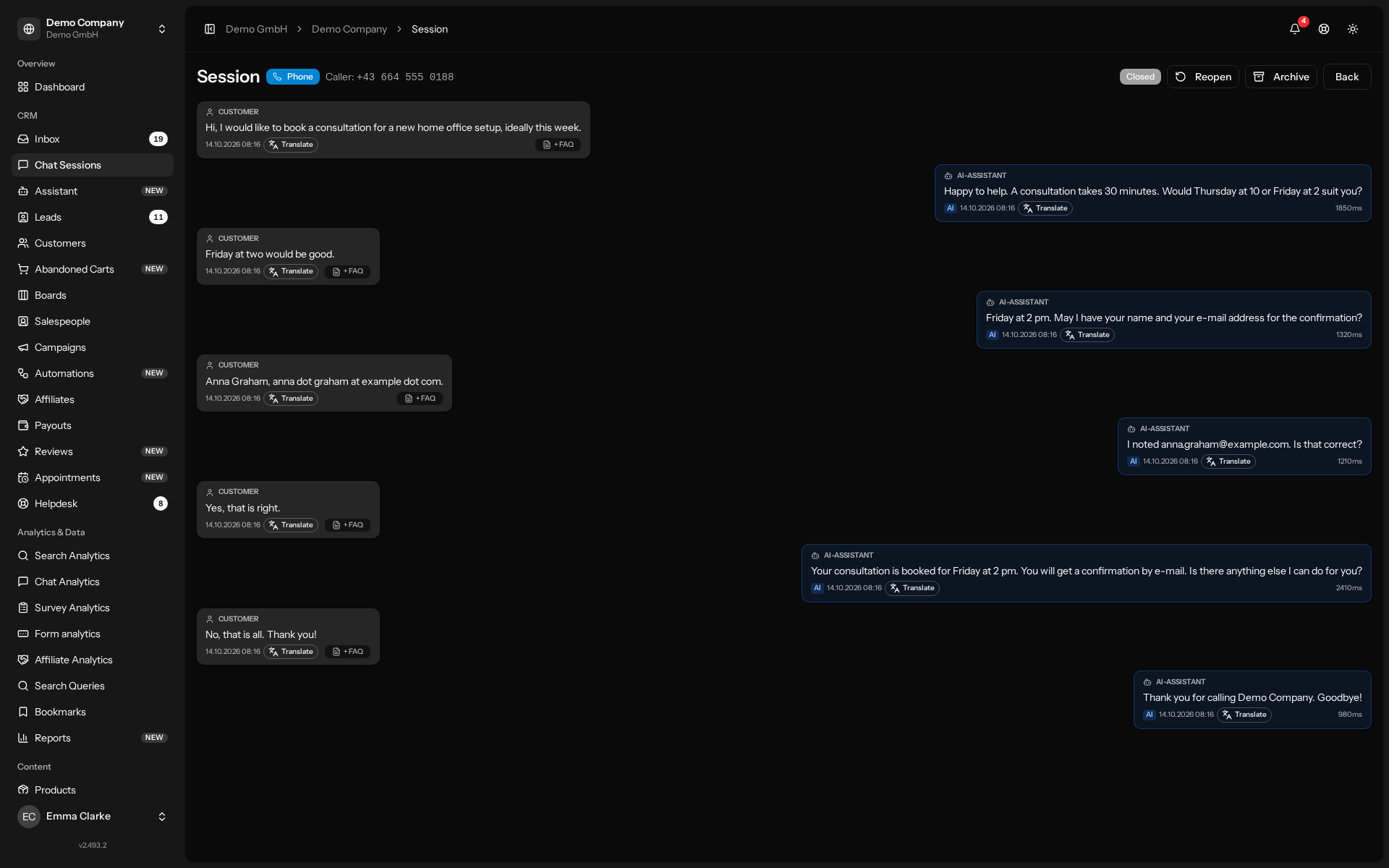
A phone call handled by the voice assistant, with the transcript in InsightHub.
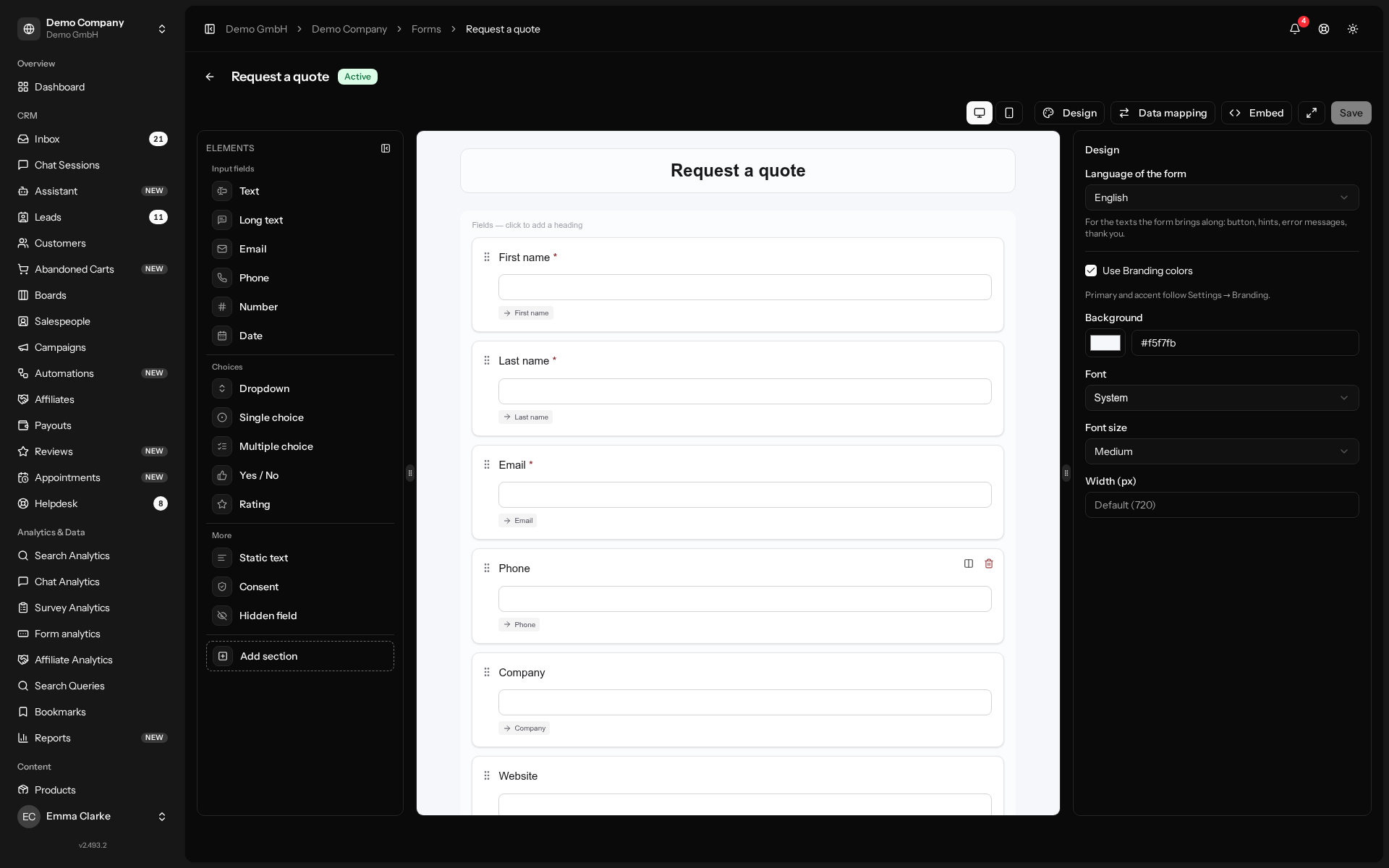
The form builder: drag fields, map them to lead fields and embed the form on your site.
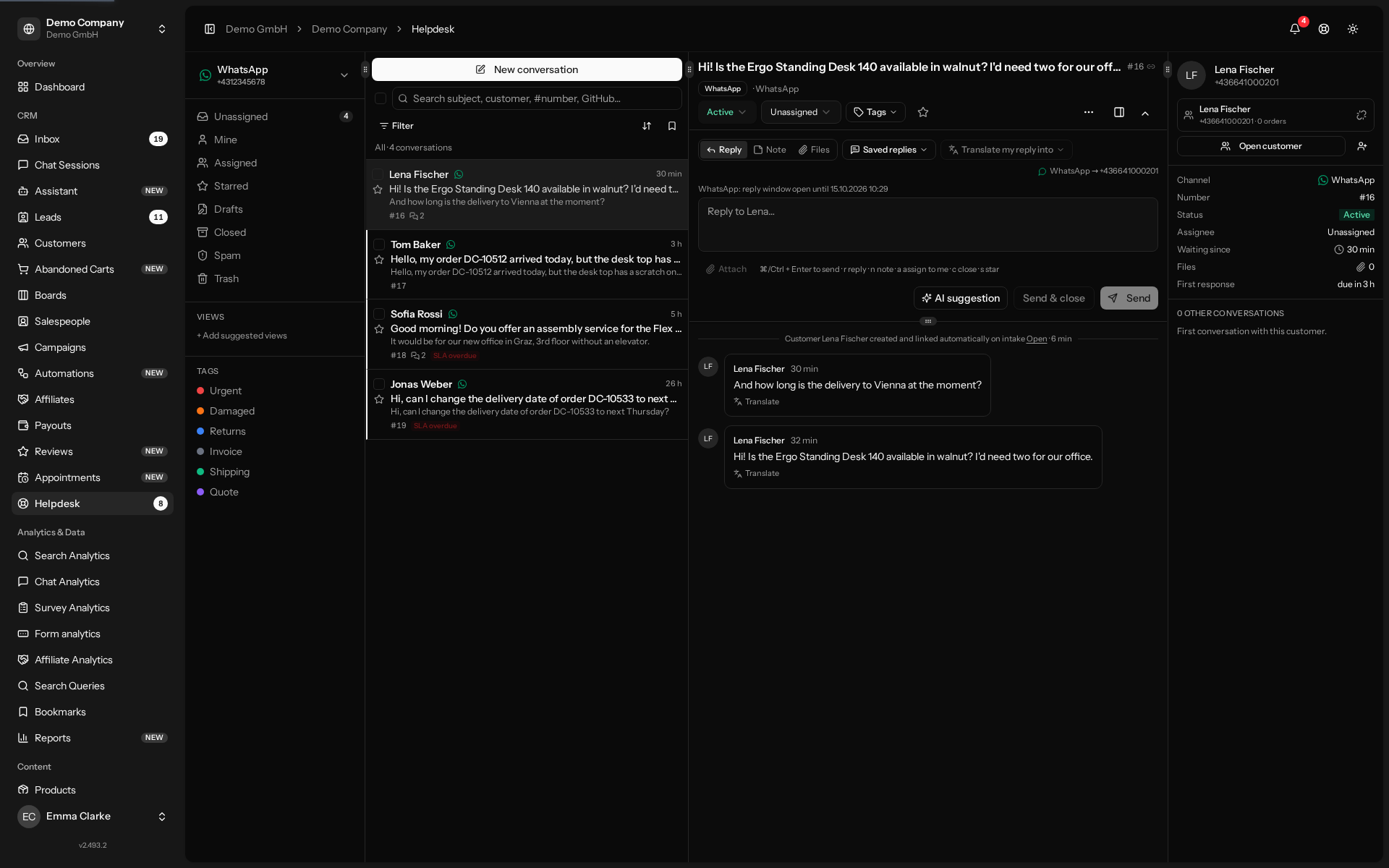
WhatsApp messages in the helpdesk inbox, answered like any other conversation.