
Shopnook is a shoppable images plugin for WooCommerce, Easy Digital Downloads (EDD) and SureCart. Add product hotspots (product tags) to any photo, build “shop the look” lookbooks, and turn galleries into shoppable Instagram-style feeds, all with the WordPress blocks you already use.
Shopnook turns the photos in your posts and pages into shoppable images. Switch on “Shoppable image” on any Image block, click the photo to drop pins, and pick a product from your store for each. Visitors tap a pin to see the product, add it to the cart without leaving the page, or open the product page.
There is no separate builder, shortcode or custom post type to learn. You tag products where the image already lives: in the block editor, or once in the Media Library so the photo is shoppable everywhere you use it. Turn the switch off and it is a normal image again.
Then the dashboard shows what each image actually does for your shop: views, pin opens, product clicks, add to carts, orders and revenue.
Works with your store
Shopnook needs one of these e-commerce plugins. Use one, or several on the same site:
- WooCommerce: physical and digital products. Simple products add to the cart right from the card; variable, grouped and external products link to their page. Sales are credited when the order is paid.
- Easy Digital Downloads (EDD): ebooks, courses, software, templates, music and other downloads. Single-price downloads add to the cart right from the card; downloads with price options link to their page. Sales are credited when the order is complete.
- SureCart: physical products, digital products and subscriptions. The card’s Buy now button opens SureCart’s instant checkout (or the product page), and sales are credited when SureCart confirms the checkout.
Refunds and cancellations are taken back out of the stats in all three. Other store plugins are planned; tell us which one you use.
👉 Try it before you install: click Live Preview at the top of this page to open a demo shop with a shoppable lookbook and three gallery layouts.
Who it is for
- Fashion and apparel stores: turn outfit photos and lookbooks into “shop the look” pages, one pin per piece.
- Home, furniture and decor shops: tag every item in a styled room, from the sofa to the vase on the shelf.
- Beauty and skincare brands: tag the products in a routine, a flat lay or a “what’s in my bag” photo.
- Food, kitchen and recipe sites: tag the cookware, ingredients and tableware in a recipe photo.
- Gift guides and seasonal campaigns: one photo per guide with every gift tagged, plus a “Shop this look” list underneath.
- Brand merch and company stores: show tees, hoodies, mugs and stickers styled together on a desk or in the wild.
- Blogs that sell: keep writing as you do now and make the photos in your posts shop for you.
- Instagram-style feeds: turn a gallery into a shoppable grid or a stories carousel that feels familiar to social shoppers.
- Creators and influencers with their own shop: tag your products in the photos you already post on your blog.
- Agencies and freelancers: give clients shoppable lookbooks and campaign pages without custom code or a page builder.
- Digital product sellers (EDD): course creators, designers, photographers, musicians and software makers who sell downloads. Tag the ebook cover, the template preview or the preset in a photo.
- SureCart stores: creators and small brands selling products and subscriptions with SureCart’s fast checkout.
Ideas: where to use shoppable images
- Lookbooks and collections: a seasonal lookbook post where every outfit or room is shoppable.
- Shop the look pages: one hero photo with a “Shop this look” list of every product under it.
- Blog posts and tutorials: “how to style”, “my morning routine” or “what I cook with” posts that sell the products in them.
- Gift guides: “gifts under $50” or holiday guides with every gift tagged.
- Product launches and campaigns: a launch photo with the new range tagged, linked from your newsletter or social posts.
- Home page and landing pages: a shoppable hero image or a stories carousel at the top of the page.
- Customer and community photos: real photos of your products in use, tagged and ready to buy.
- Digital product showcases: a desk setup with the Notion template, Lightroom presets or icon pack you sell, each one tagged.
- Course and ebook promotions: a photo of your workspace or a book mockup with the course or ebook tagged, sold through EDD or SureCart.
- A shoppable feed on your own site: upload your social photos to a gallery and show them as an Instagram grid or stories, with products tagged.
How it works
- Select an Image block in any post or page and switch on Shoppable image in the Shopnook panel.
- Click Tag products, click the photo where each product is, and search for the product by name or SKU.
- Publish. Pins appear on the photo, and the dashboard starts counting.
Prefer to tag once and reuse? Open the image in the Media Library, click Tag products, and those pins follow the image into every post where it is shoppable. If one post needs different products, click Customize for this post in the block settings.
The most specific setting wins: the block in your post, then the Media Library image, then the plugin settings.
Features
Tagging
- “Shoppable image” switch on the core Image block, and “Shoppable gallery” on the core Gallery block. No new blocks.
- Pin editor right in the block editor: click to place, drag to move, arrow keys to nudge, Delete to remove.
- Product search by name or SKU, with image, price and stock shown as you pick.
- Optional label per pin, shown on hover.
- Unlimited pins per image.
- Tag images in the Media Library and reuse the pins everywhere, or give one post its own pins.
- A “Products” column in the Media Library list shows how many products each image has.
Pins
- Seven styles: dot, pulsing dot, plus, number, shopping bag, price tag, or your own image (your logo works well).
- Three sizes, your own pin and icon colours, and pins always visible or only on hover.
- Hover labels with the product name.
How the product opens
- Tooltip card: a small card next to the pin.
- Panel below the image: the product opens under the photo, and the next pin swaps it.
- Side drawer: a panel slides in from the edge of the screen.
- “Shop this look” list: every product listed under the photo with numbered pins that highlight their product.
- On phones: a bottom sheet that is easy to use with one thumb, the desktop view, or a panel below the image.
Product cards
- Choose what the card shows: product image, name, price, sale badge, star rating, short description, Add to cart and View product.
- Your own button text and button colour.
- Add to cart in place for simple products, with your theme’s mini cart updated and a “View cart” link.
- Variable and grouped products show “Select options” and link to the product page. External products link to their own site.
- Out of stock products are labelled, and pins for deleted or unpublished products hide themselves.
Shoppable galleries
- Instagram grid: square tiles with a product count badge. A photo opens in a popup with its pins on one side and its products on the other, like an Instagram post. Arrow keys move between photos.
- Masonry: Pinterest-style columns that keep each photo’s shape, with the same popup.
- Stories carousel: tall slides visitors swipe through, with pins on every slide. Each slide crops around its pins so they stay in view.
- Set the number of columns per gallery, and the default layout, columns, spacing and product count badge for the whole site.
Look and feel per image
Every look setting (pin style, size, colours, display mode, phone behaviour, card fields, button text and colour) can be set site-wide, overridden for one image in the Media Library, and overridden again for one post in the block settings.
Analytics: see what your images sell
The Shopnook dashboard shows, for any date range and compared with the previous period:
- Revenue from shoppable images, front and centre.
- Views, pin opens, product clicks, add to carts, orders and items sold.
- A trend chart for each measure, with a table view.
- A view-to-sale funnel with the conversion rate at every step.
- Top images, top products and top posts and galleries, ranked by revenue.
- Orders that came from an image are marked on the WooCommerce and EDD order screens.
How sales are credited: when a visitor clicks a product on a shoppable image (or adds it to the cart from the card), Shopnook remembers the product and the image. If that product is bought within the credit window (7 days by default, adjustable from 1 to 90), the order line is credited to the image. The most recent click wins. Only paid orders count, and cancelled, refunded or failed orders are taken back out.
Privacy first
- Counts are anonymous daily totals. No personal data or IP addresses are stored.
- One first-party cookie,
shopnook_ref, remembers which image led to a product, for the credit window only. It holds product and image IDs and nothing else. - Works with cookie consent plugins that support the WP Consent API: nothing is counted and no cookie is set until visitors allow statistics cookies.
- Visits by logged-in editors and admins are not counted (you can change this), and neither are bots.
- Suggested text is added to your privacy policy page.
- Choose how long stats are kept: 3 months to forever.
- No third-party tracking scripts. Shoppable image stats stay in your WordPress database. The only outside services are the optional, admin-only newsletter sign-up and deactivation survey described under External services.
Fast and light
- Scripts and styles load only on pages with a shoppable image or gallery.
- The front-end script has no dependencies: no jQuery, no frameworks.
- Pins are added when the page renders, so they work with page caching.
- Stats are stored as small daily totals, so the table stays small even on busy shops.
Accessible
- Pins are real buttons with product names for screen readers.
- Full keyboard support: Tab to a pin, Enter to open, Escape to close, and focus returns to the pin.
- The drawer, bottom sheet and gallery popup trap focus while open.
- Respects “reduce motion” settings.
Built the WordPress way
- Uses the core Image and Gallery blocks. Deactivate Shopnook and you have ordinary images and galleries again; nothing in your content breaks.
- Works with block themes and classic themes.
- Compatible with WooCommerce High-Performance Order Storage (HPOS) and the Cart and Checkout blocks.
- Translation ready.
Need a custom feature?
Want Shopnook to do something it does not do yet, such as a custom layout, an integration with another plugin, or help setting it up on your store? Get in touch. I build custom WordPress and WooCommerce features, and good ideas often make it into the free plugin for everyone. Feature requests are also welcome in the support forum.
For developers
shopnook_product_cardfilter: change the data a product card shows. The card’sstorekey says which store it came from.shopnook_storesfilter: add your own store integration by extendingShopnook_Store.- Pins on an image are stored in the
_shopnook_imageattachment meta; per-post pins live in the block’sshopnookattribute. - REST routes under
shopnook/v1. - Development happens on GitHub. Bug reports and pull requests are welcome.
External services
Used only when an admin chooses to. Visitors never trigger them.
- Newsletter (Brevo): when an admin clicks Subscribe, their email, first name and the plugin name are sent to Brevo. Terms, Privacy
- Deactivation survey (Google Apps Script): when an admin clicks Send & deactivate, the reason, comment, plugin, WordPress, WooCommerce and PHP versions, admin language and, if the contact box is ticked, their name and email are sent to the author’s Google Sheet. Terms, Privacy
Support Shopnook
Shopnook is free, with no locked features and no ads. If it helps your shop:
- ☕ Buy me a coffee to support development.
- ⭐ Leave a review so other store owners can find it.
- 💬 Questions or problems: the support forum.
- 🛠 Code, bug reports and pull requests: GitHub.
About the author
Shopnook is built and maintained by Sanjay Shankar.
- Website: sanjayshankar.me
- Contact: sanjayshankar.me/contact
- LinkedIn: Sanjay Shankar
- X (Twitter): @sanjayshankarr
- GitHub: sanjuacodez
- All my WordPress plugins: profiles.wordpress.org/sanju-shankar
More plugins by Sanjay Shankar
- Likenook – Like Dislike Buttons: like and dislike buttons for posts, pages, products and comments, with “Was this helpful?” feedback and analytics.
- Anchormap – AI Internal Linking & Link Map: a visual link map, orphan page finder and one-click internal link suggestions.
- Seasonal Effects & Notice Bar: festive animations, countdown timers and notice bars for Black Friday, Christmas and every season.
- Advanced Preloader: beautiful loading animations while your site loads.
Screenshots
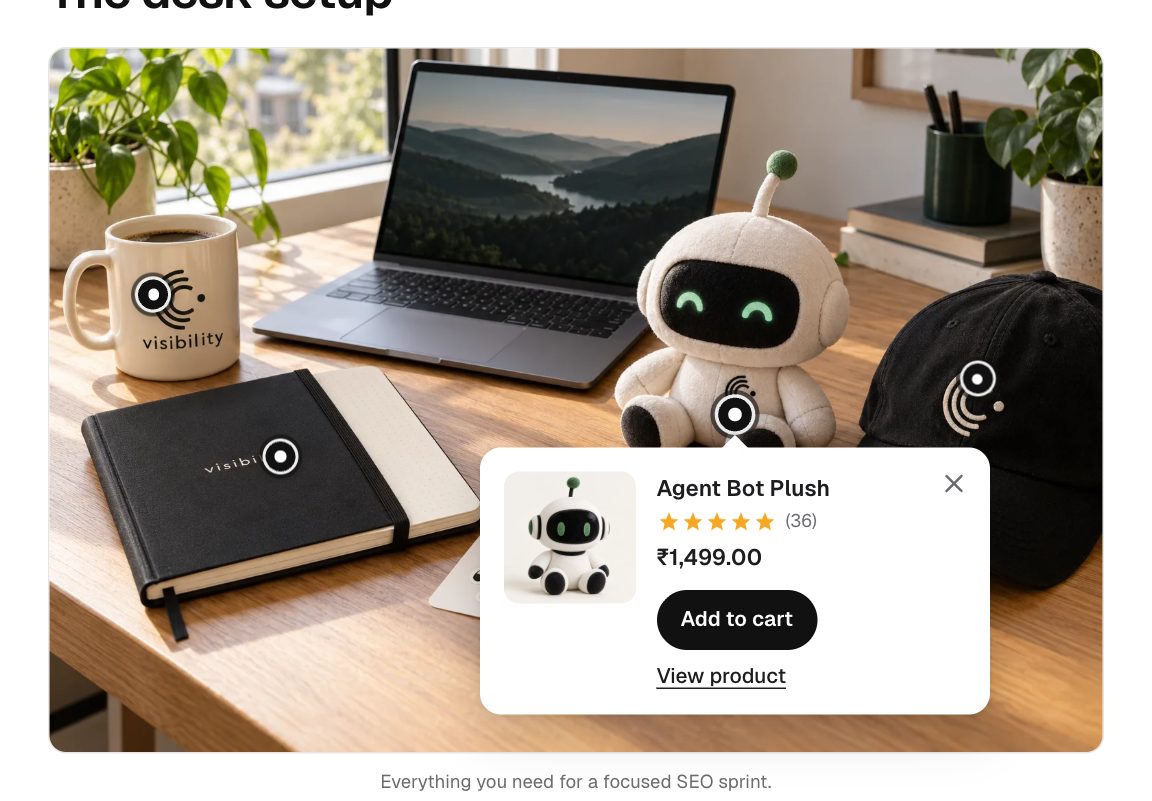
A shoppable image: tap a pin and a product card opens with the price, rating and Add to cart.
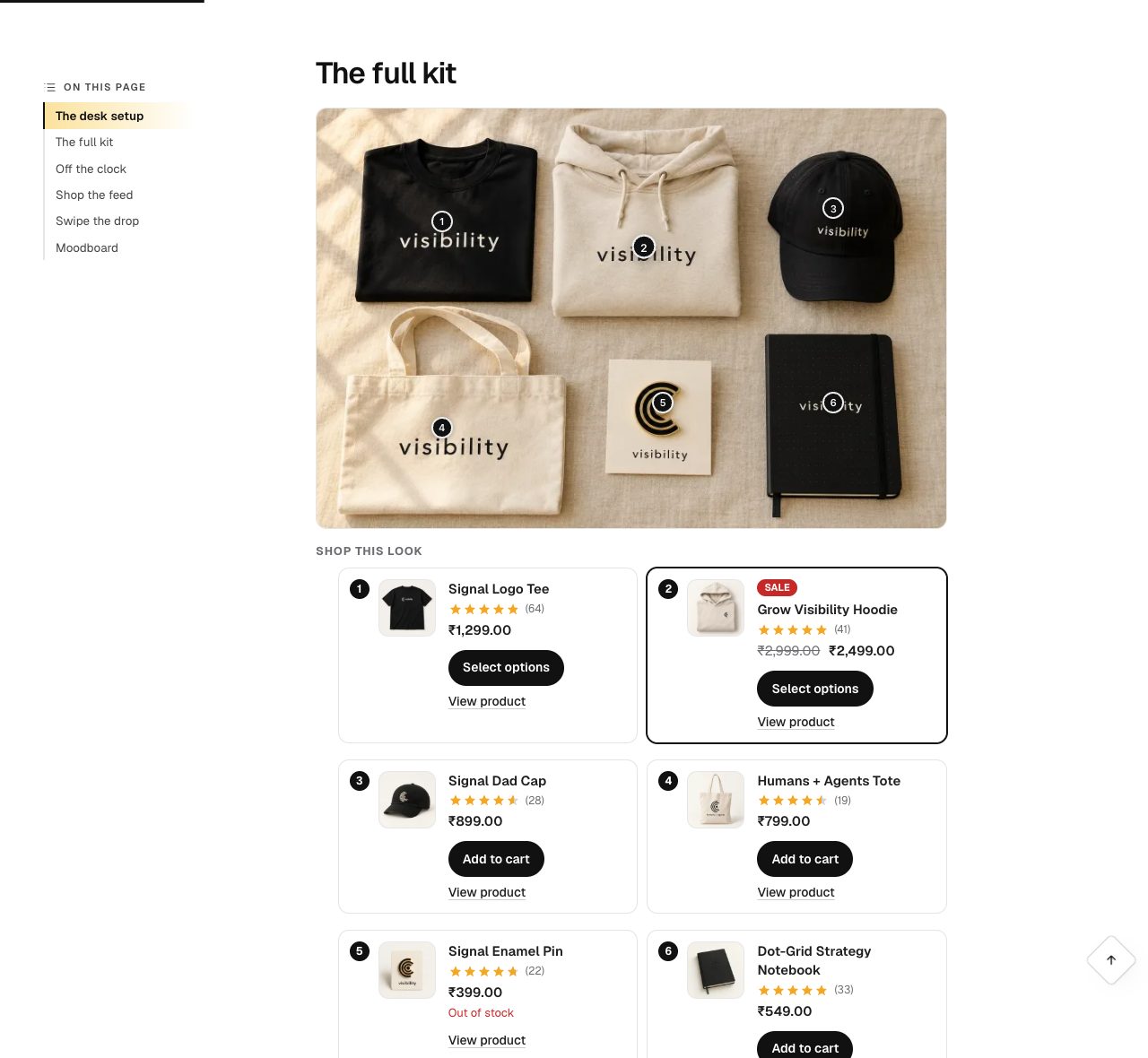
The "Shop this look" list: numbered pins and every product listed under the photo.
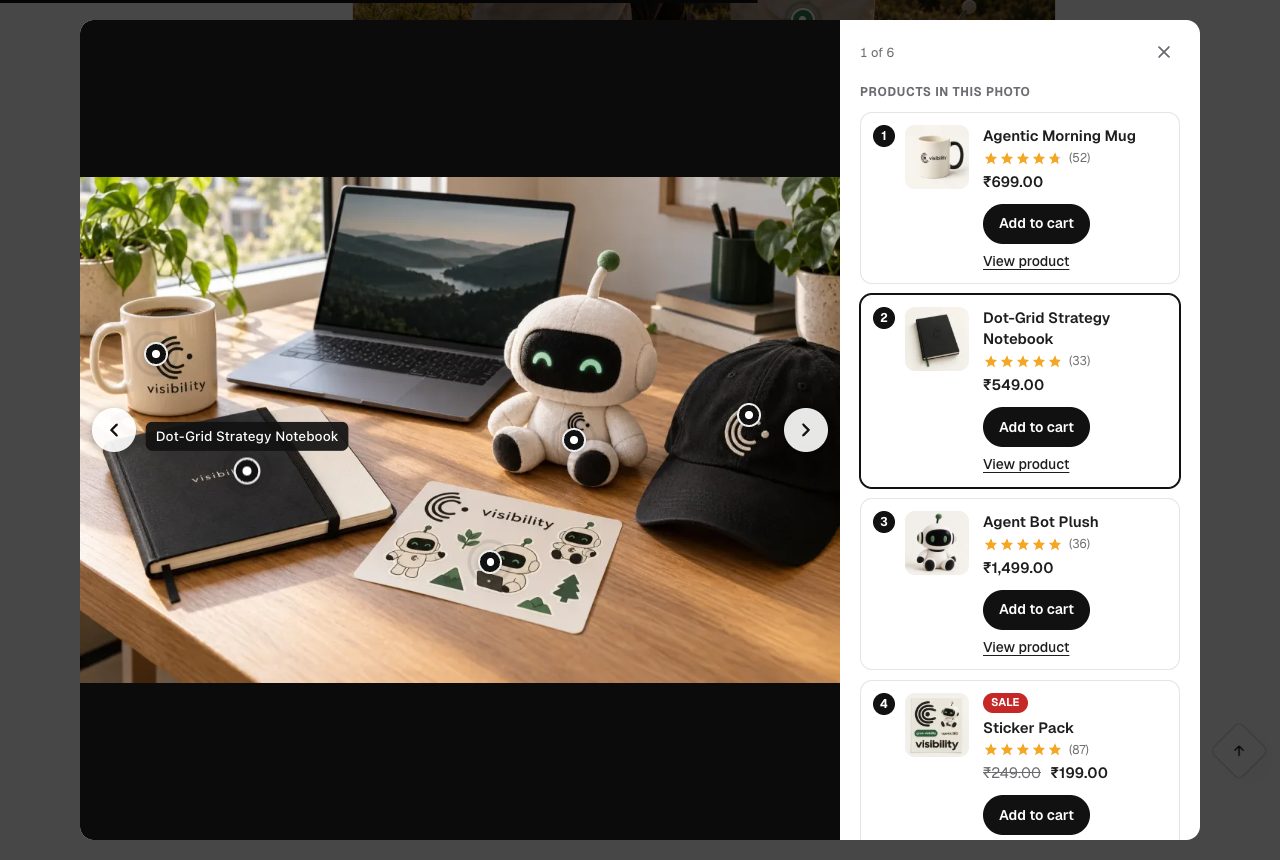
The Instagram-style gallery popup: the photo with its pins on one side and its products on the other.
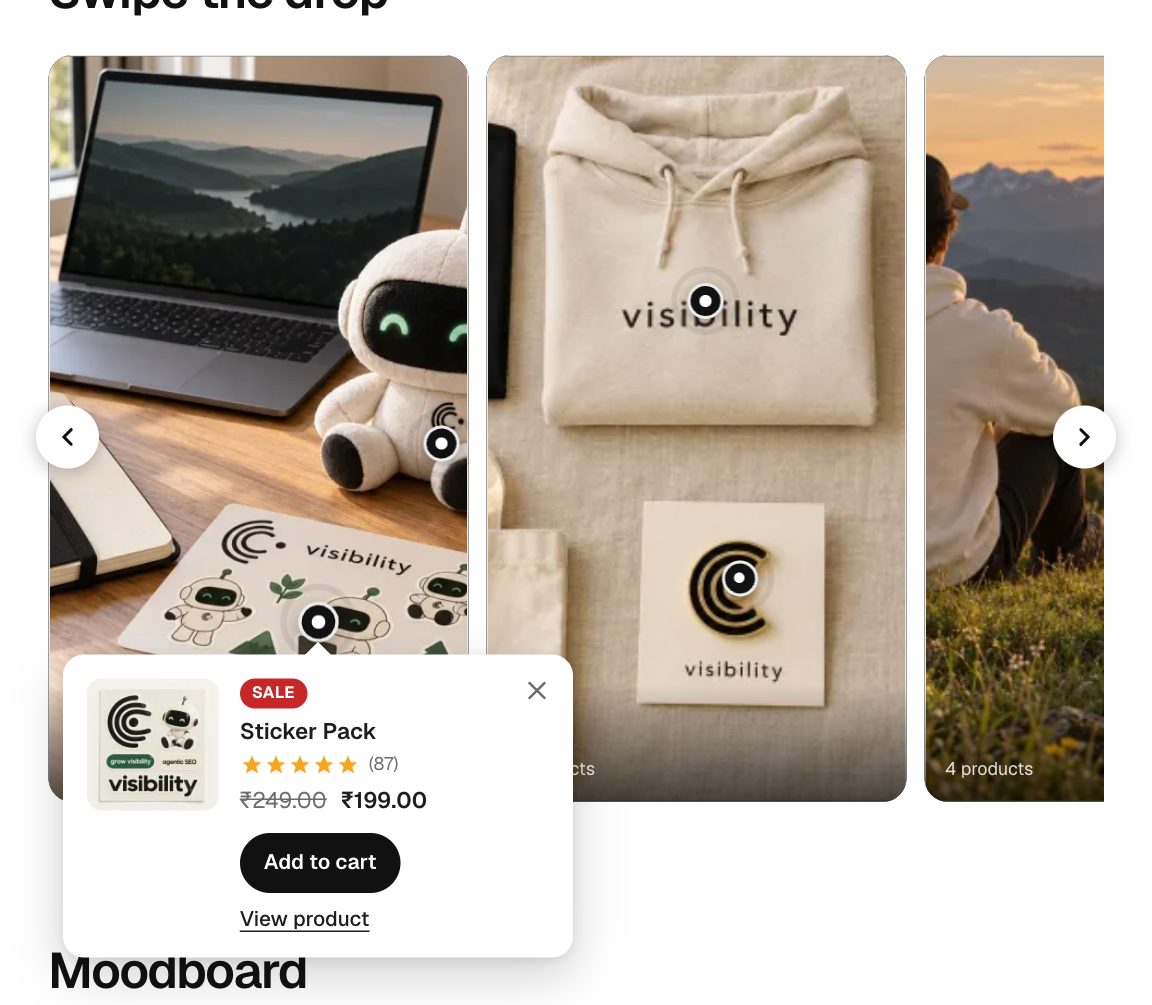
The stories carousel: tall slides with pins on every slide.
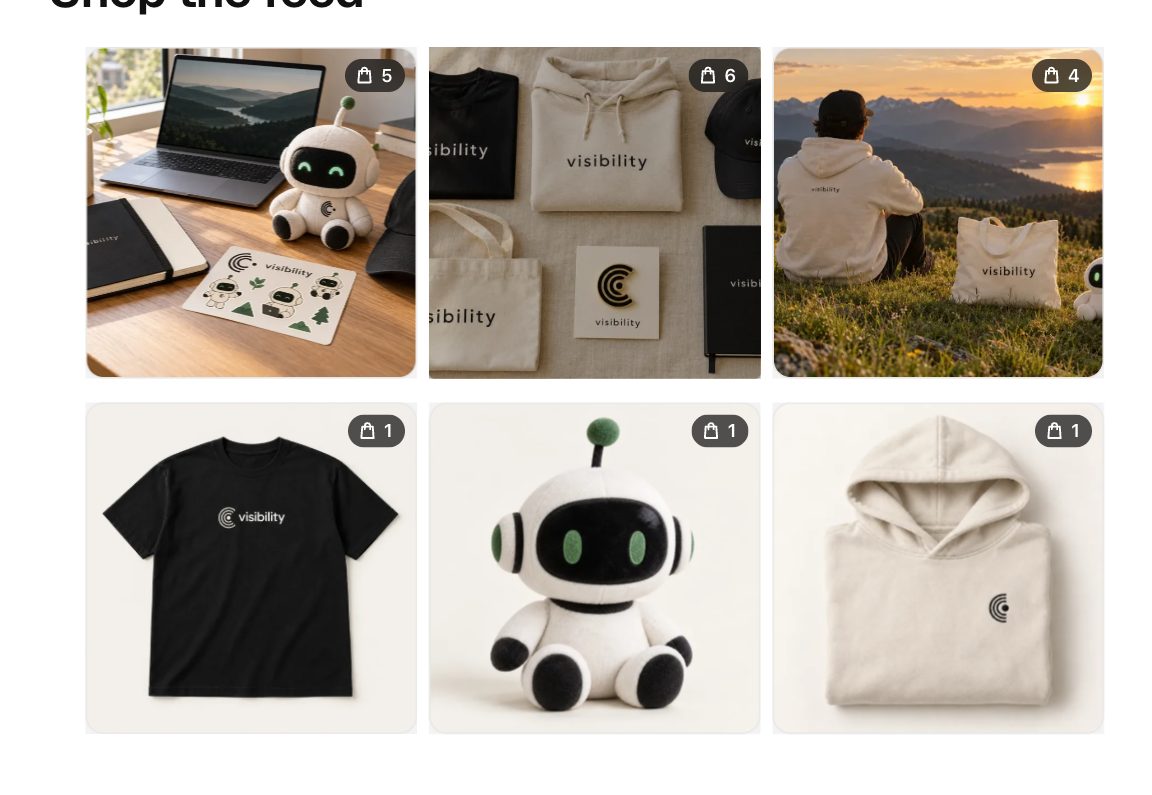
A shoppable Instagram grid with product counts on each tile.
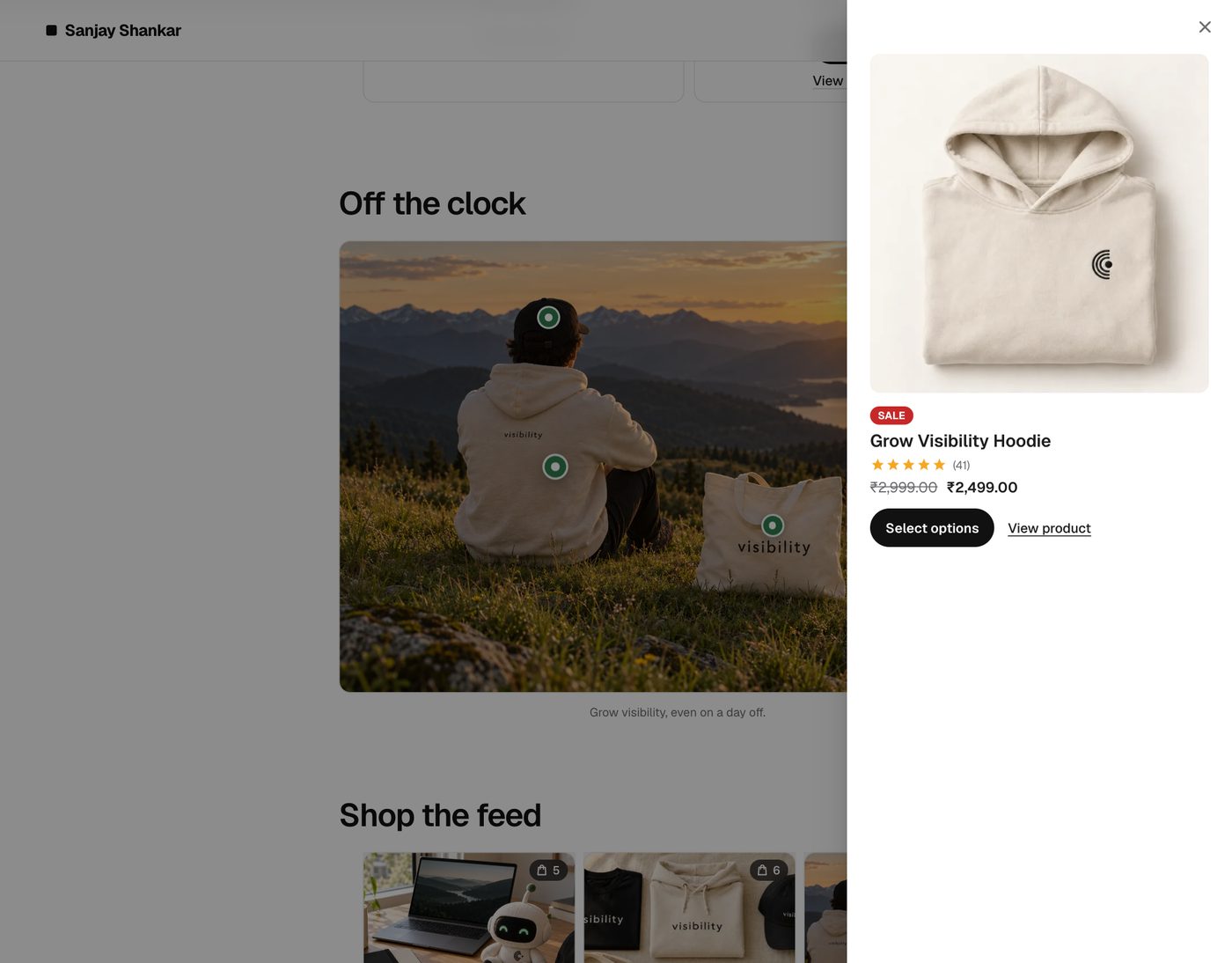
The side drawer display mode.
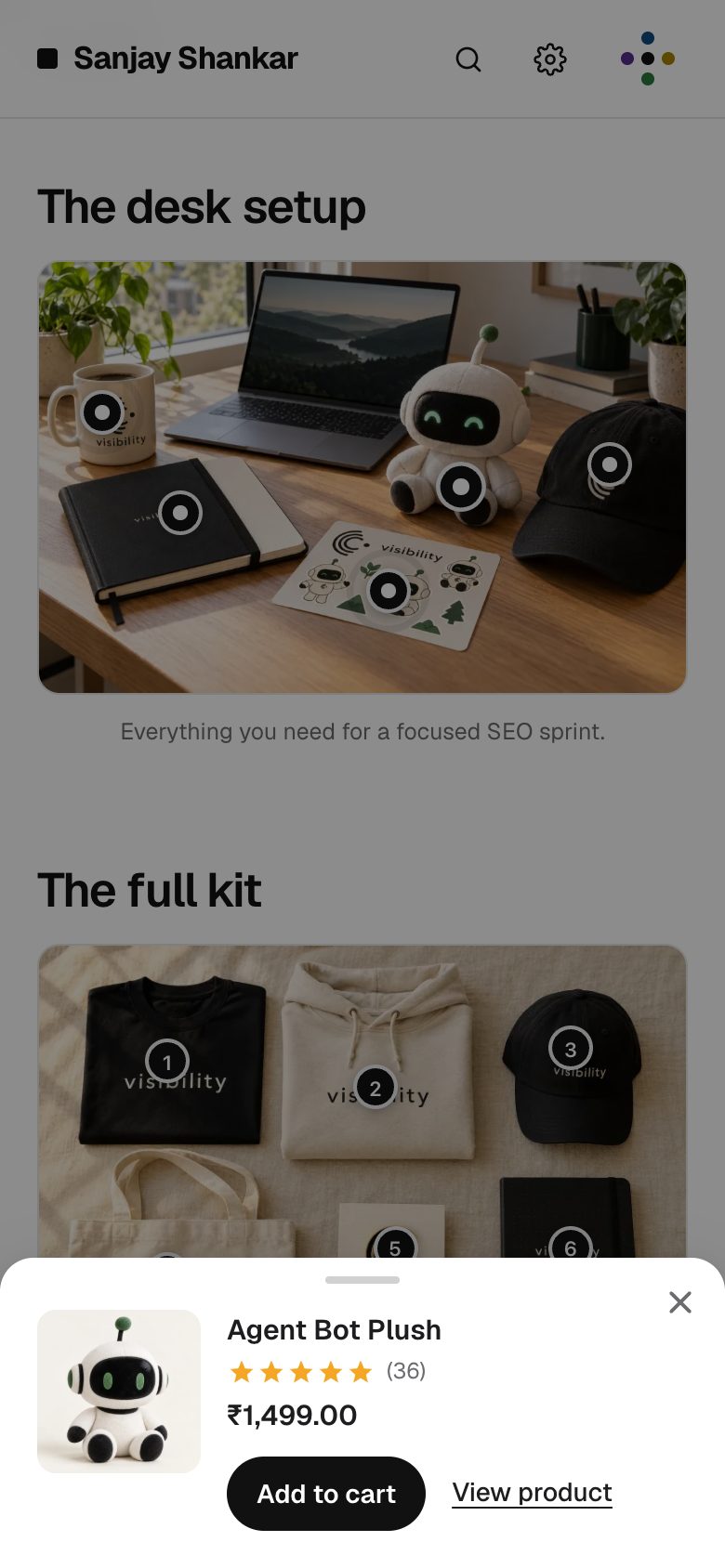
On phones, products open in a bottom sheet.
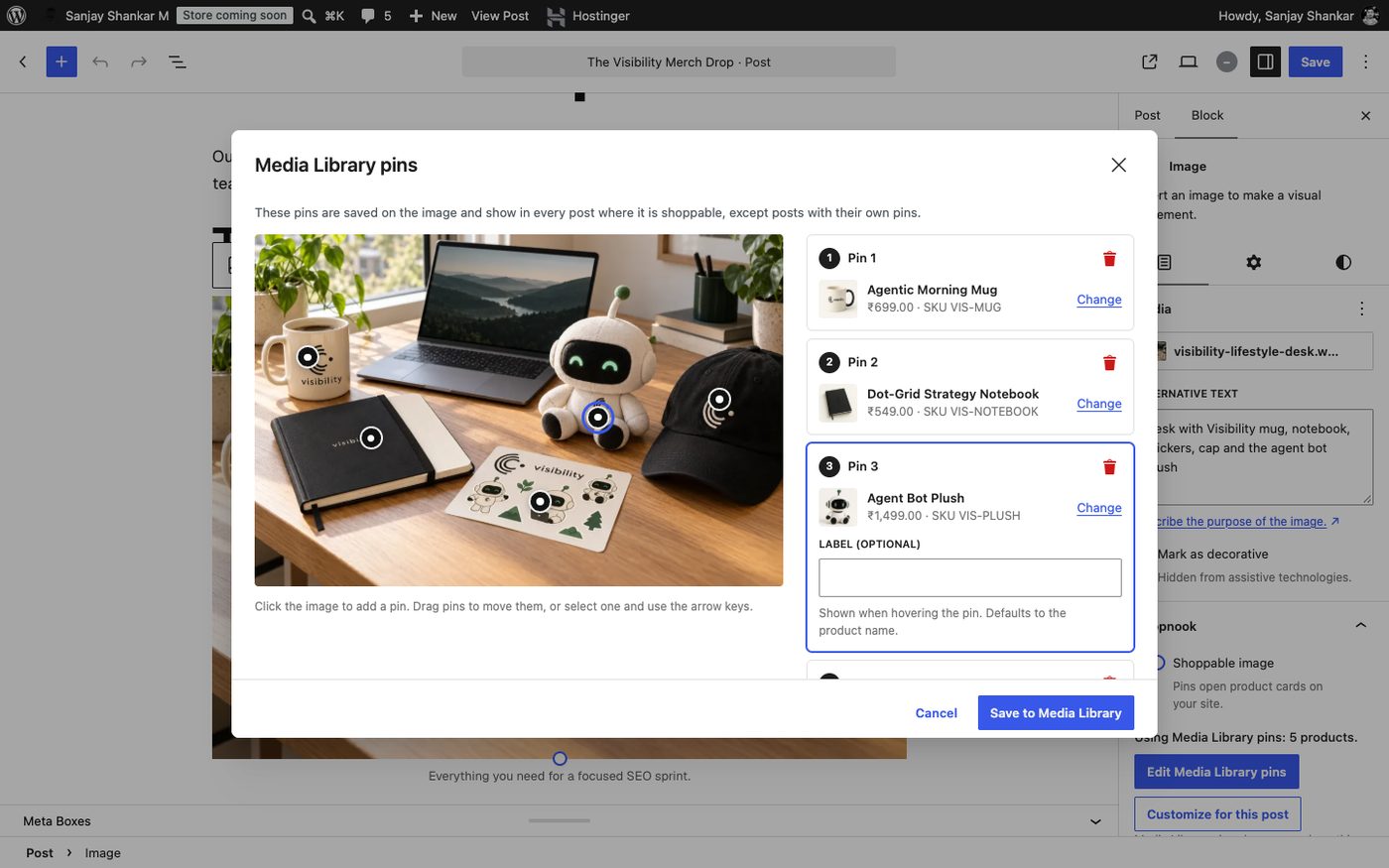
Tagging products: click the photo to drop pins and search products by name or SKU.
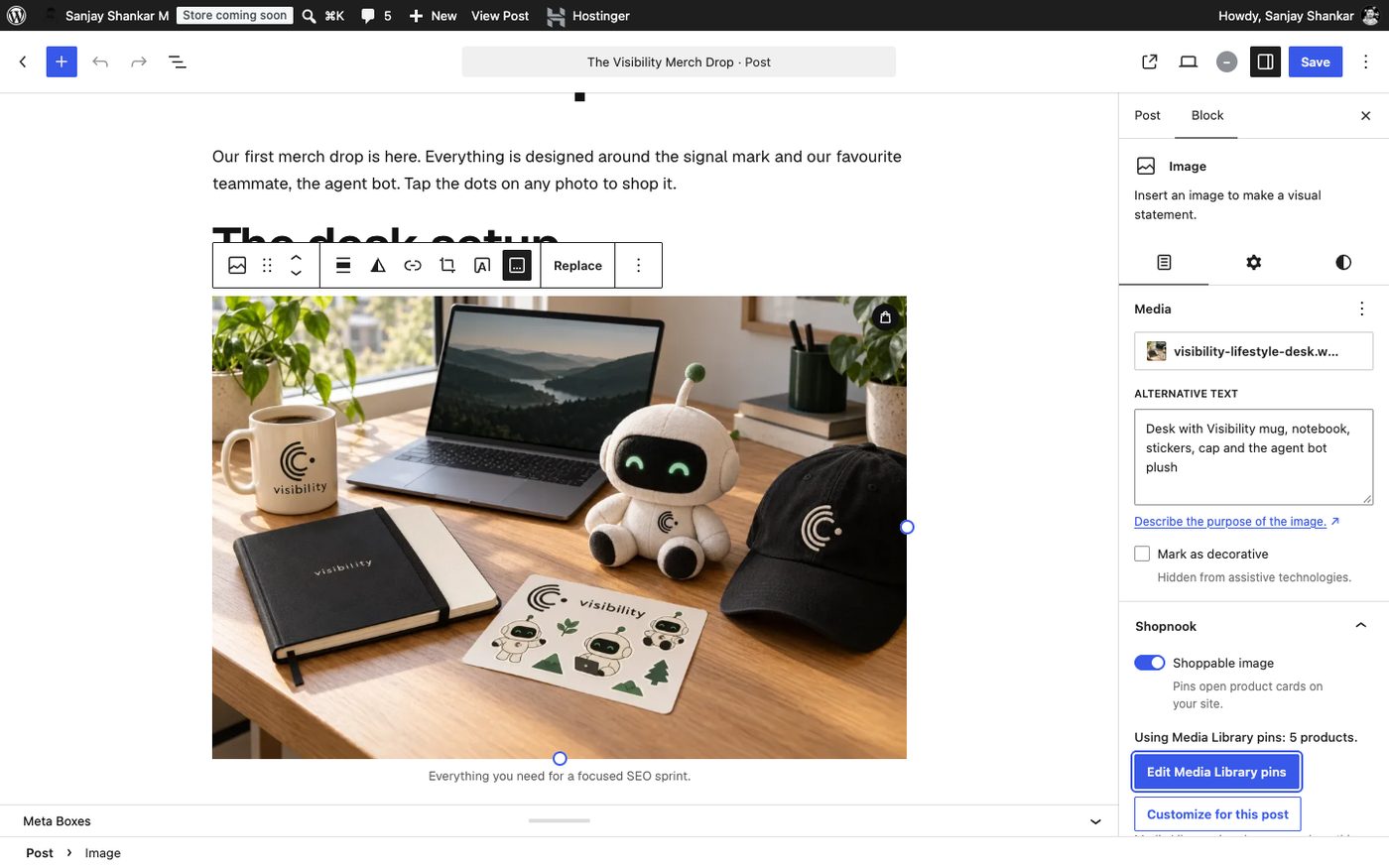
The Shopnook panel on the Image block, with Media Library pins and "Customize for this post".
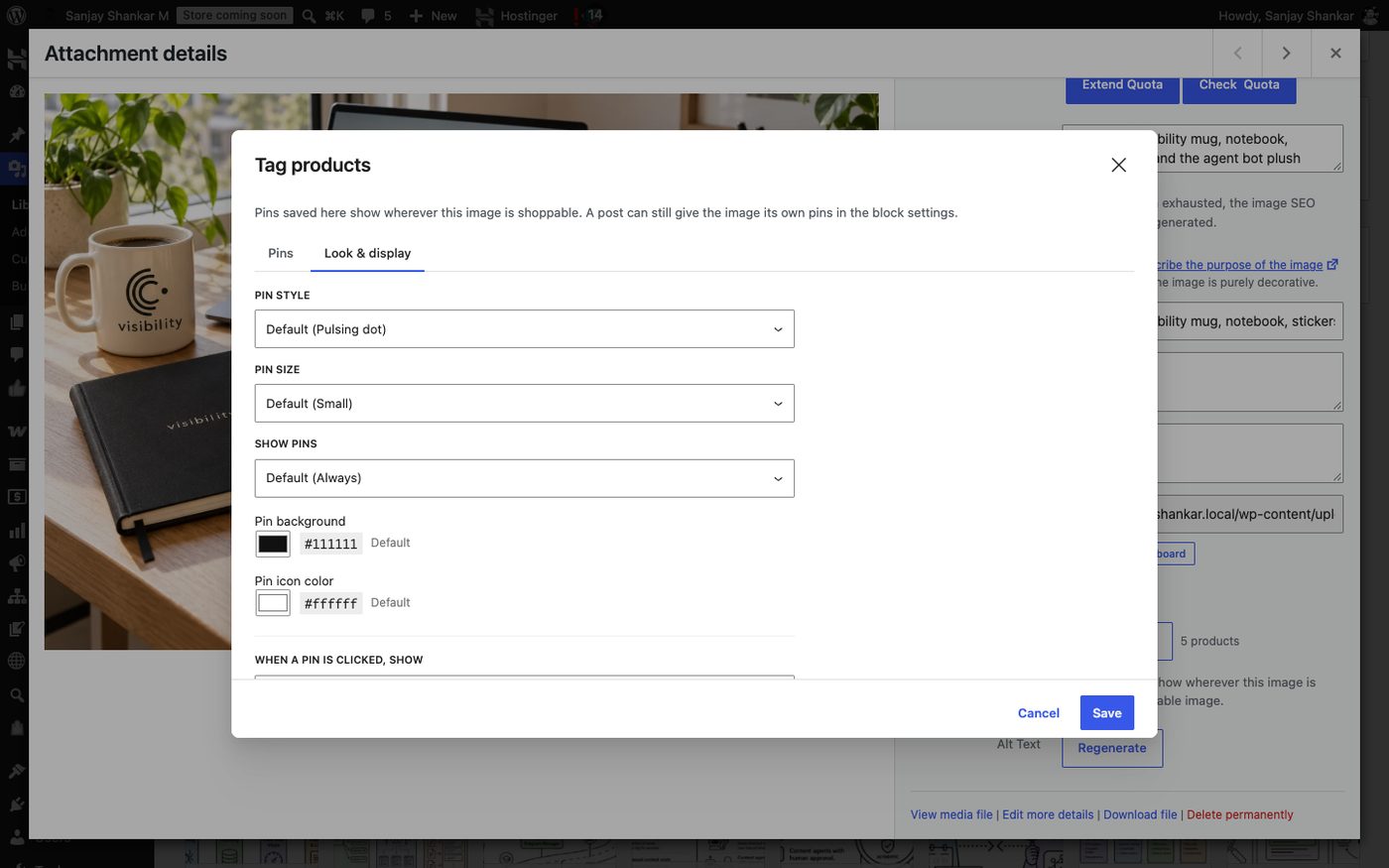
Tagging an image in the Media Library, with its own look and display settings.
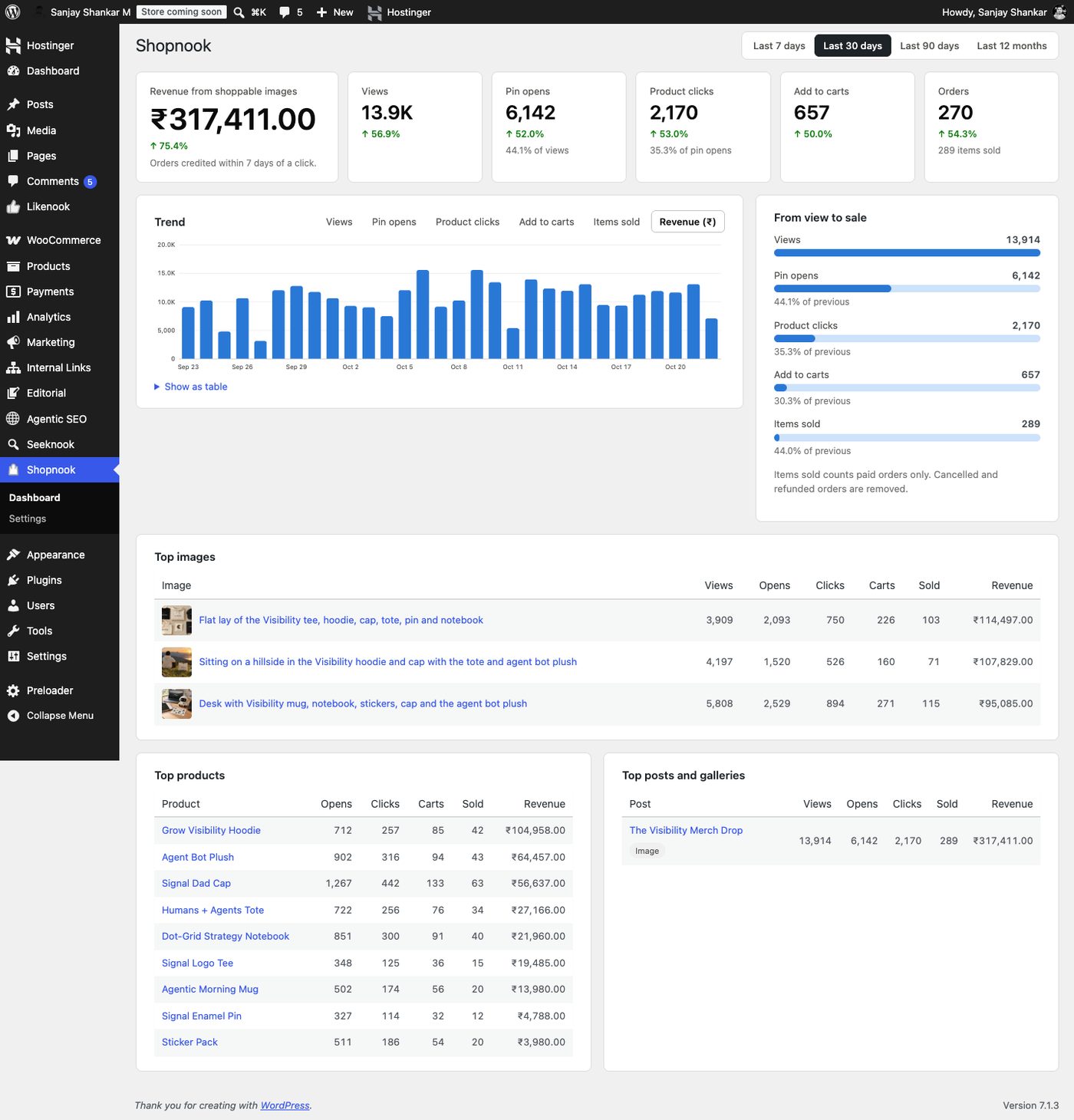
The analytics dashboard: revenue, views, clicks, the trend chart, the funnel and top images, products and posts.
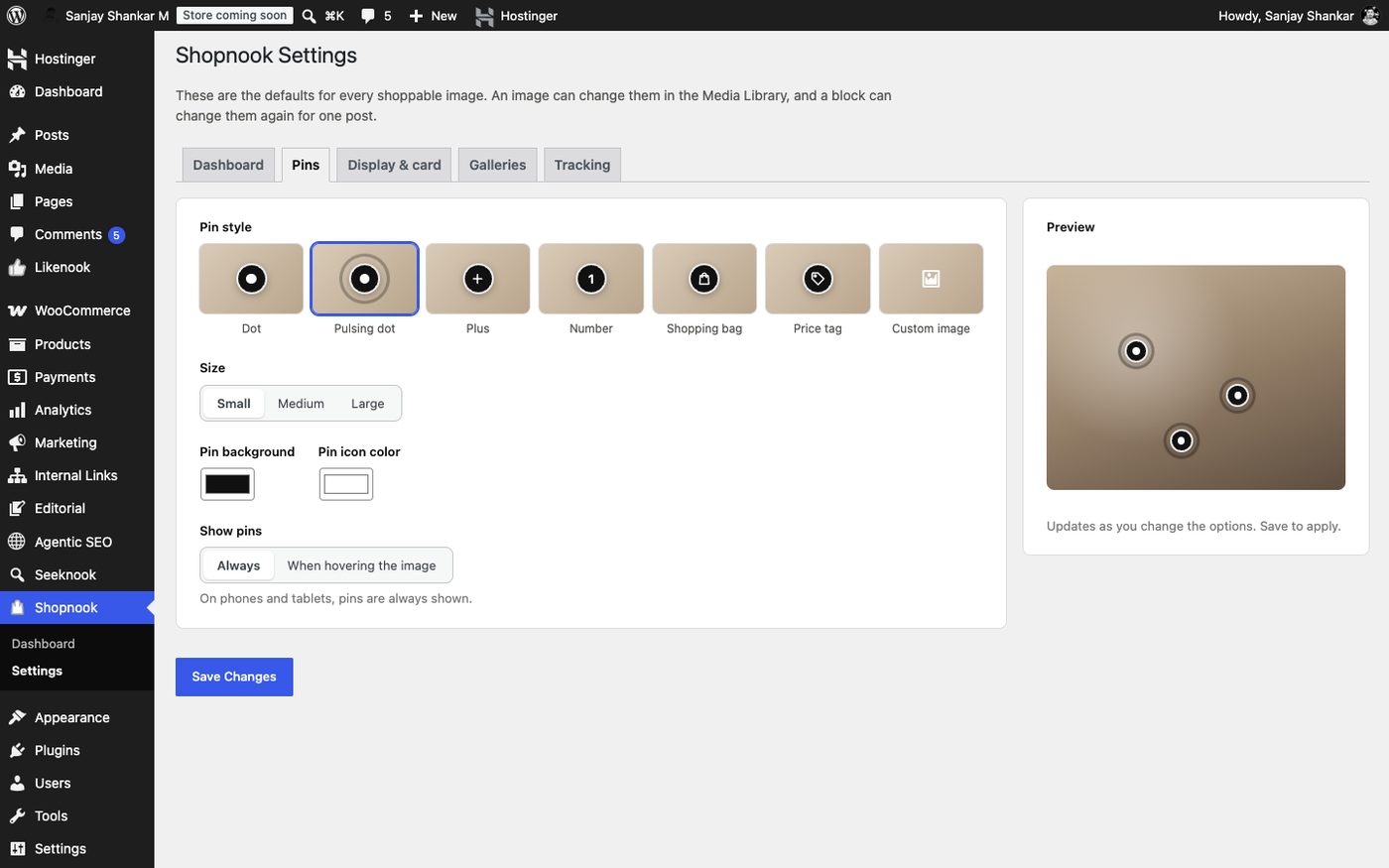
Settings: pin styles with a live preview.
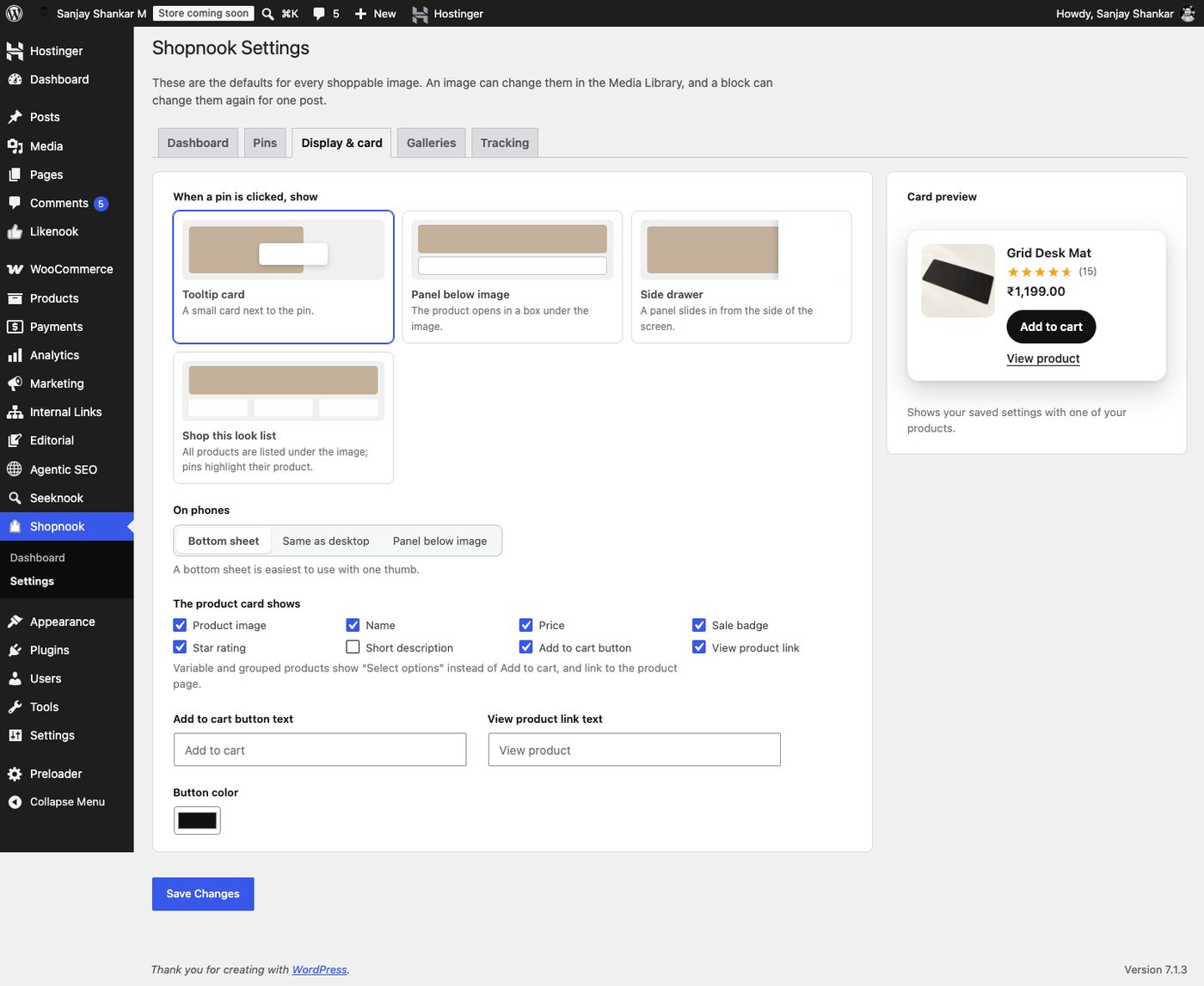
Settings: display modes, phone behaviour and product card fields.