BACK TO DIRECTORY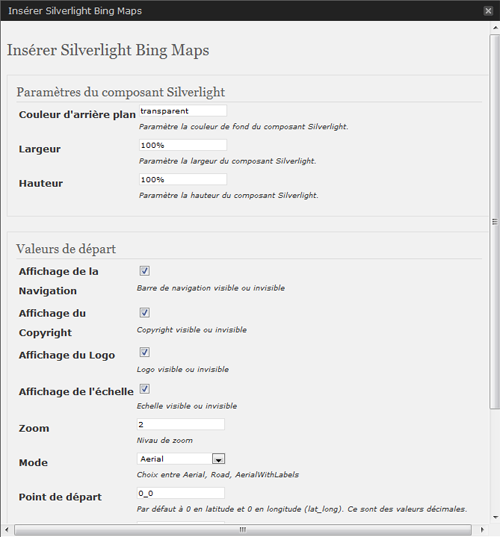


This BingMap plugin allows a smooth integration of an interactive map in your WordPress site. The administration section will offer you some parameters to customize the presentation.
Just write use the adminpanel or write a tag like :
[sl-bingmaps background=”transparent” width=”100%” height=”300″ NavigationVisibility=”1″ CopyrightVisibility=”1″ LogoVisibility=”1″ ScaleVisibility=”1″ ZoomLevel=”5″ Mode=”Aerial” StartLocation=”48.8756271_2.3493838″ Pushpin=”48.8756271_2.3493838″ Culture=”fr_FR”]
The plugin offers the following features:
* Width and Height customization - percent value are possible
   //width=400 or 100%
* Display navigation menu or not
   //NavigationVisibility="1"
* Display copyright in the map or not
   //CopyrightVisibility="1"
* Display the Bing logo or not
   //LogoVisibility="1"
* Display Scale indication
   //ScaleVisibility="1"
* Set the zoom level
   //ZoomLevel="5"
* Set the display mode
   //Mode="Aerial" //Aerialwithlabels //road
* Set camera center
   //StartLocation="48.8756271_2.3493838"
* Set point of interest
   //Pushpin="48.8756271_2.3493838"
* Set Culture
   //Culture="fr_FR"
Arbitrary section
A brief Markdown Example
<?php code(); // goes in backticks ?>
Screenshots
Settings Module
Menu available to insert Silverlight BingMap
An example of the Silverlight BingMap
Plugin Details
Active Installs
10Total Downloads
3,515Version
1.0Requires WP
—Requires PHP
—Tested Up To
9.1Added
2010-04-30Last Updated
2010-05-12 2:12pm GMTRatings
5
0
4
0
3
0
2
0
1
0