Simonov AI Site Manager turns your WordPress site into a Model Context Protocol (MCP) server: one Streamable-HTTP endpoint, served by your own site, that an AI client you connect can use to work with your content.
Stop formatting content by hand
Every post, page and product needs the same routine: paste the text, fix the headings, pick categories and tags, upload a picture and set it as the featured image, write an excerpt, fill in the custom fields, set the price, schedule it. Do that for everything you publish, and it adds up to hours every week.
Connect Claude or ChatGPT, describe the result you want in plain words, and let the assistant do the clicking:
- “Turn this text into a post: proper headings, a short intro, the Recipes category, fitting tags, this photo as the featured image. Publish on Friday at 9:00.”
- “Create products from this price list: titles, descriptions, SKUs, prices and stock. Save them as drafts so I can check them first.”
- “Put a 20% sale price on every product in the Summer category.”
- “Rewrite the excerpts of my ten latest posts so each one is under 160 characters.”
- “Make a Polish translation of yesterday’s post and link the two.” (with Polylang)
- “Go through the comments waiting for moderation, approve the genuine ones and reply to the questions.”
The work that used to take a morning of copying and pasting becomes a few sentences, and it is done on your real site, in your own WordPress, with no export and no import.
You stay in charge of what the assistant may touch. It works through a WordPress account you choose, with that account’s permissions. Ask for drafts when you want to review first, switch on read-only mode when you only need answers, and check the audit log to see every change it made.
What it can do
It can manage:
- Posts, pages and any custom post type — create, read, update, delete, meta.
- Taxonomies & terms — categories, tags, custom taxonomies, term assignment.
- Media — upload from URL or base64, edit metadata, featured images.
- Comments — moderate, reply, delete.
- WooCommerce — products and order status (auto-enabled when WooCommerce is active).
- Polylang — languages, translations, linking (auto-enabled when Polylang is active).
And look up, read-only:
- Site info and navigation menus.
It does not administer the site, and it cannot be made to. There are no tools for plugins, themes, users or site settings, and every MCP request runs without administrative capabilities: managing plugins, themes, users, options or core, editing files, posting unfiltered HTML and editing theme configuration are refused for the whole request, even when the connected account is an administrator. Administration stays in the WordPress dashboard.
Every action runs as a WordPress user you choose, so capability checks are always enforced. Read-only mode, per-tool switches, revocable connections and an audit log let you decide how much of this a client can reach.
No external service
The plugin is the server and runs entirely on your site. There is no relay, account or service operated by the plugin author: the AI client you choose connects straight to your site’s REST API, and access is granted either by you signing in to WordPress and approving the client (OAuth) or by a token you generate. Tokens are stored on your site, hashed, and can be revoked at any time from the settings page.
Requirements
WordPress 5.8 or newer and PHP 7.0 or newer. Everything works the same on old and new installs.
Security
- The token is stored hashed (never in plaintext) and compared in constant time.
- Every tool enforces WordPress capabilities against the specific object it touches — not just a generic capability — so a non-admin configured user cannot edit content it does not own.
- No tool changes plugins, themes, users or site settings.
- Media uploads validate file content against the extension and block fetches to internal/cloud-metadata addresses.
- Disable individual tools from the settings page if you want to reduce surface area.
Note: the configured user acts with its full WordPress capabilities. Use the least-privileged role that meets your needs, and treat the token as a site credential.
Roadmap
- WPML integration.
Screenshots
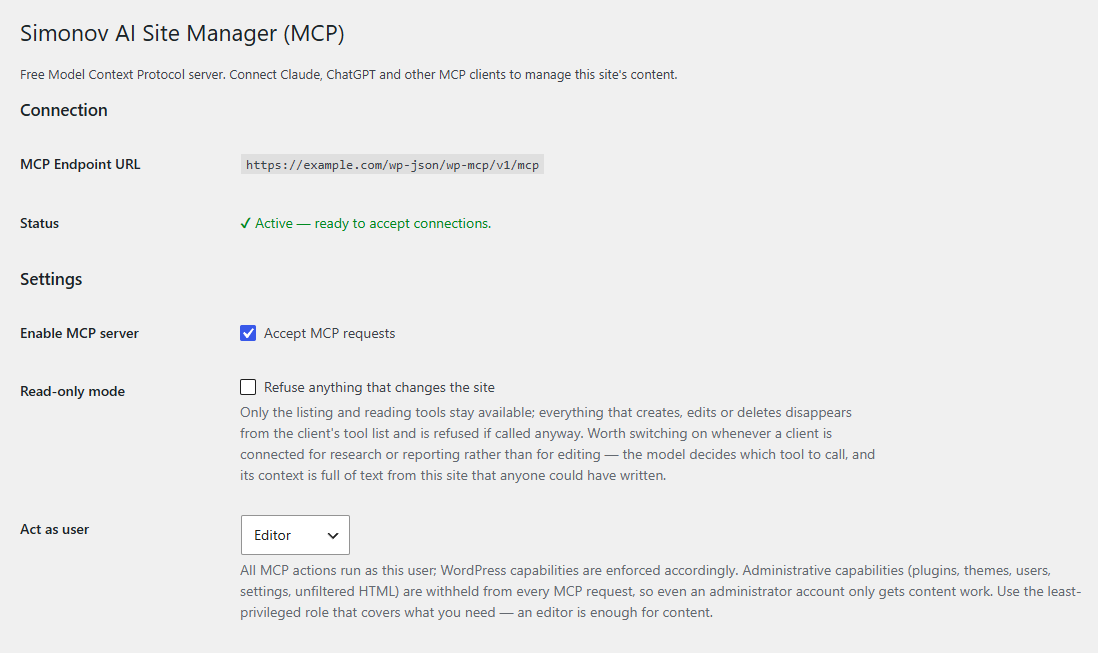
Settings: the endpoint address, the account connections act as, and read-only mode.
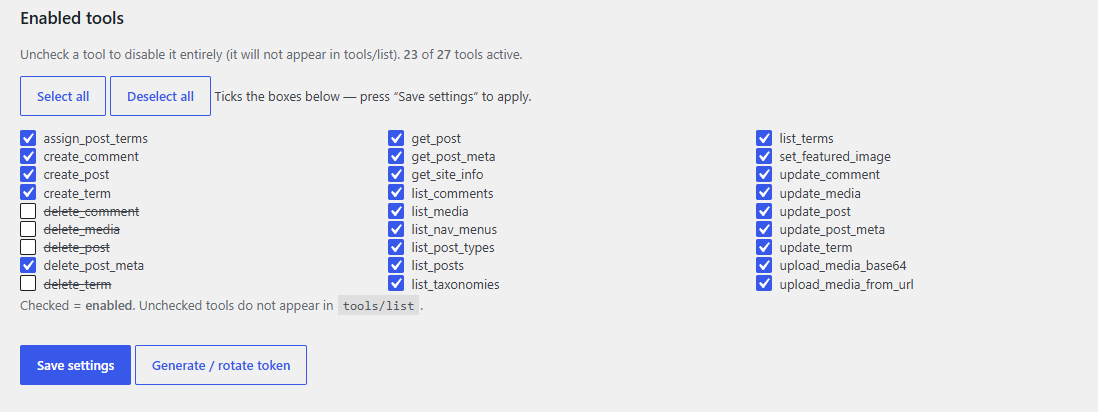
Every tool can be switched off individually; unchecked tools never appear in the client's tool list.
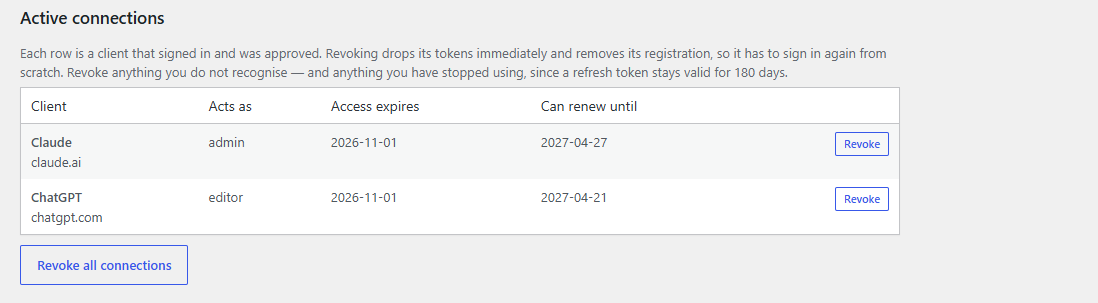
Active connections — what signed in, as whom, until when, and a Revoke button for each.
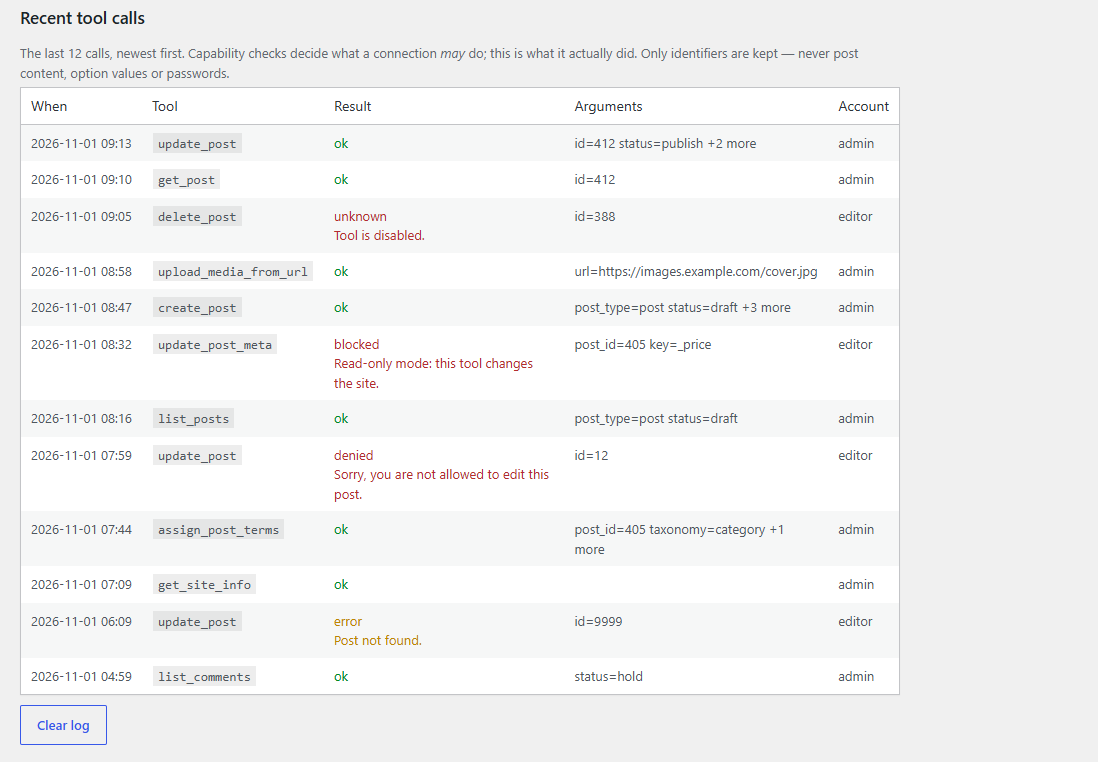
The audit log: the last hundred tool calls with their result, refusals included.

The authorization screen a client sends you to, naming the host the access will be sent to.