BACK TO DIRECTORY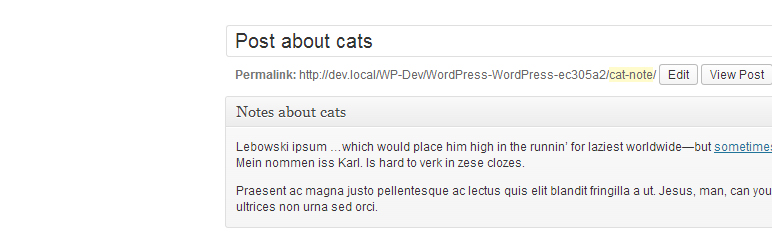


Like a built in notepad, leave notes for clients or yourself in the WordPress admin. Attach notes to above or below the editor of a post (or page or custom post type) and also has a default “Notes” section available from the admin menu which you can hide or show.
The style of the notes section has been updated with the changes in WordPress 3.8+. Please note that the UI will not look great on WordPress version lower then 3.8 and there are no plans to fix this.
Features :
- Uses WordPress’s built in custom post types
- Functions with default WYSIWYG editor
- Uses WordPress’s meta fields if set to display on post edit screens
- Shows “Notes” on one page in tab format (can be excluded)
- Will not show in front end or search
- Requires default post privileges
Notes :
- It is currently only possible to set one note per post and one location (above or below editor)
- Works with password protection in default section
Please report issues to: https://github.com/wycks/Simple-Admin-Notes
Screenshots
A screenshot of Notes in the Admin and the Notes menu.
Choose to display notes on certain posts by id.
Plugin Details
Active Installs
200Total Downloads
12,270Version
1.4.0Requires WP
3.5Requires PHP
—Tested Up To
3.7.41Added
2011-09-23Last Updated
2013-12-30 4:31pm GMTRatings
5
1
4
1
3
0
2
2
1
0