Simple Site Map Page can be used to build a HTML site map page easily and manually.
It uses WordPress native menus manager so you can customize your site map yourself, and it’s translation ready (Polylang, WPML and others).
Native WP menu manager is good to choose exactly what must be displayed or not in the site map, e.g if you want to prevent visitors to access private parts of your website.
If you use custom links with # target, ce plugin will automatically remove the link and replace it with a <span> element. It can be usefull to create unlinked virtual pages to structure your sitemap.
Credits :
- Jean-Baptiste Audras, project manager at Whodunit and WordPress developer. @audrasjb on Twitter or Github.
Add your own language pack on GlotPress or do pull requests on Github. Contributors will be credited here 🙂
Screenshots

Choose a page under Settings > Readings options.
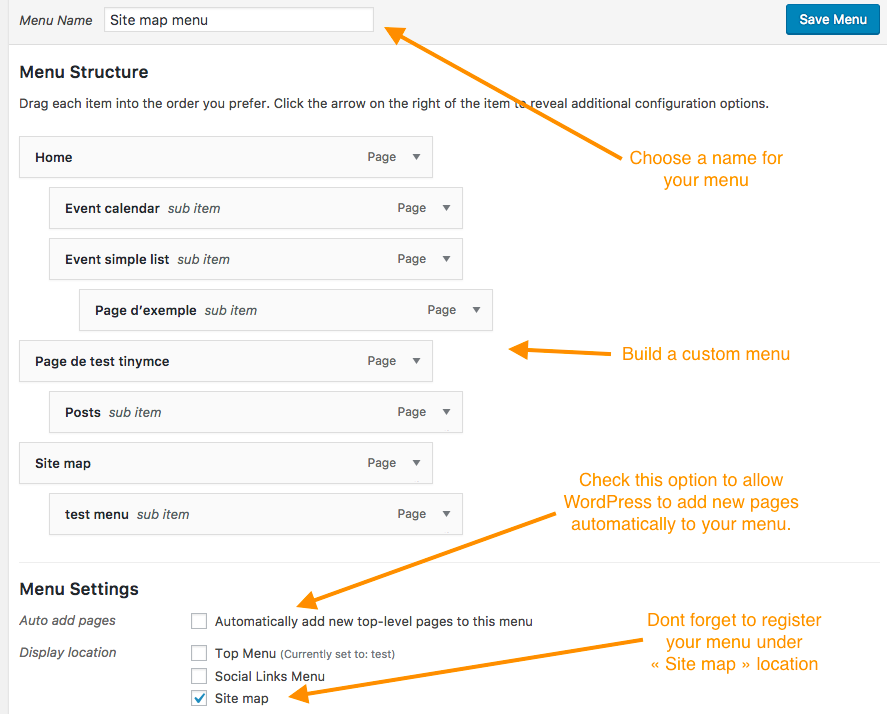
Build your site map under Appearance > Menus and register it under "Site map" location.