Squeeze – Browser-Based Image Compression & WebP Converter (No API, No Limits)
by Bogdan Bendziukov · Pluginarium
Image compression that runs in your browser: works on any hosting, better quality, no external servers, and compresses before upload.
Squeeze uses browser-side codecs (the same family as Squoosh.app)—not Imagick on your server and not a remote API. That means it works on weak shared hosting, your images never leave for third-party optimization servers (privacy- and GDPR-friendly), and files can be squeezed before they hit the Media Library. Convert to WebP, bulk-optimize existing images, and tune per-format quality—with no API keys and no monthly quotas.
Why Squeeze:
🖥️ Works on any hosting — compression runs in the browser, so you do not need Imagick, binaries, or a powerful server.
🔒 No external servers — image bytes stay on your site; nothing is uploaded to a cloud optimizer.
⬆️ Compress before upload — shrink images in Gutenberg, GenerateBlocks, Instant Images imports, and the Voxel theme before (or right after) files hit the Media Library (Elementor on-upload squeeze is available in Premium).
📝 Form uploads — compress visitor photos in Contact Form 7 file fields before submit (Gravity Forms single- and multi-file fields in Premium).
⚡ Direct WebP conversion — convert JPG/PNG to WebP and replace the original file on disk (no duplicate copies cluttering storage).
♾️ No compression quotas — squeeze your entire Media Library; the plugin does not impose a monthly image cap.
🛡️ Safer huge uploads — soft megapixel limits reduce browser OOM; very large uploads skip after-upload thumbnail re-squeeze and stay marked as client-compressed.
The result: smaller files, faster page loads, and lower hosting storage—without SaaS fees or API keys.
Squeeze official website | Plugin documentation
🌟 New in 1.8.3
- Optional anonymous usage telemetry (off by default): opt in under Settings Squeeze to share feature events such as a
settings_savedsnapshot on Save, bulk/single squeeze, and upgrade clicks — never image bytes or filenames. See the Privacy section.
Also in 1.8.2
- Resize originals (max width/height) is free for everyone — cap huge phone photos before squeeze and clean up oversized thumbnails after resize.
- Settings presets: one-click recipes on Basic settings (WebP storage, Blog, Max quality).
- HEIC/HEIF on upload: convert iPhone photos in the browser before they hit the Media Library (JPEG normally, or WebP with Direct WebP).
- Environment hints on Settings when Elementor, Gravity Forms, or WP Offload Media / CDN mapping is relevant.
Also in 1.8
- Squeeze form uploads: compress images in the visitor’s browser on front-end forms — Contact Form 7 (free) and Gravity Forms single- / multi-file fields (Premium).
- Safer huge uploads: soft megapixel limits, skip after-upload thumbnail re-squeeze on oversized files, optional full-size WebP sidecar, and clearer client-compressed markers so precompressed uploads are recognized on attach.
- Bulk savings: site total on Media Squeeze Bulk Tools (tracked since 1.8.0) and a completion summary after each run.
✨ Key Features
- Faster pages: Smaller images improve load time, Core Web Vitals, and mobile bandwidth use.
- WebP conversion & serving: Convert to WebP and serve efficiently—choose Direct WebP, HTML URL rewrite, or .htaccess delivery for supported browsers.
- Client-side squeezing: Compress in the browser; nothing is uploaded to external optimization servers.
- Upload optimization: Compress on the fly during upload so optimized files land in your Media Library.
- Gutenberg & GenerateBlocks: Squeeze images as you add them in the block editor.
- Contact Form 7: Compress visitor photos in CF7 file fields before submit (enable Squeeze form uploads).
- Voxel theme: Compress before upload on Voxel create-post and file/gallery fields.
- Bulk compression: Compress hundreds of Media Library images in one run (pause/resume supported).
- Custom directory squeeze: Pick any folder under your site root and optimize all images inside it.
- Exclusions: Skip images by URL or filename pattern (one per line).
- Fine-tuned quality: Per-format tabs for JPEG, PNG, WebP, and AVIF (MozJPEG and more).
- Resize originals to max width/height before squeeze (reduces
-scaledduplicates). - Settings presets: one-click recipes (WebP storage, Blog, Max quality).
- HEIC/HEIF on upload: convert iPhone photos in the browser before they hit the Media Library.
- Backup option: Keep a
.bakcopy to restore the original after squeezing. - Formats: JPEG, PNG, WebP, AVIF, and optional HEIC/HEIF (converted on upload).
⚜️ Premium Features
- Image comparison in the Media Library (before/after sizes).
- Bulk squeeze from a page — all images used on one post or page.
- Elementor integration — squeeze on upload while editing in Elementor.
- Gravity Forms uploads — compress visitor photos on single- and multi-file fields before they hit your server.
- CDN URL — map CDN image URLs to local files for all WebP delivery modes.
- Priority support & updates
How does Squeeze work?
Open the Media Library, run Bulk Squeeze, or upload a new image — Squeeze runs Google Chrome team–backed codecs (the same family as Squoosh.app) inside your browser via Web Workers. No account, no API key, no off-site upload queue.
Privacy
Image compression runs in your browser; Squeeze does not upload your images to a third-party optimizer.
Optional anonymous usage telemetry is off by default. If you opt in (Settings Squeeze, or the one-time notice on Squeeze admin screens only), Squeeze may send named feature events—for example settings_saved (a snapshot of options such as WebP mode, form uploads, backup, and selected formats when you save), bulk/single squeeze start or finish, upload squeeze, and upgrade UI clicks. Events go to a first-party endpoint (telemetry.pluginarium.com) and are processed with PostHog EU Cloud. They include plugin version, free/premium edition, and an anonymized site id—not image bytes, filenames, attachment IDs, or media URLs. Individual setting toggles are not sent until you save. Opting out never blocks features; you can change your choice anytime under Settings Squeeze.
Screenshots

Compressed image with Squeeze Plugin

Squeeze's Bulk Compression Page

Squeeze's Restore and Recompress Options

Direct conversion of an image into WEBP format. The original image is being replaced by the compressed image in WEBP format.

A method of replacing images URLs with the corresponding WEBP versions.
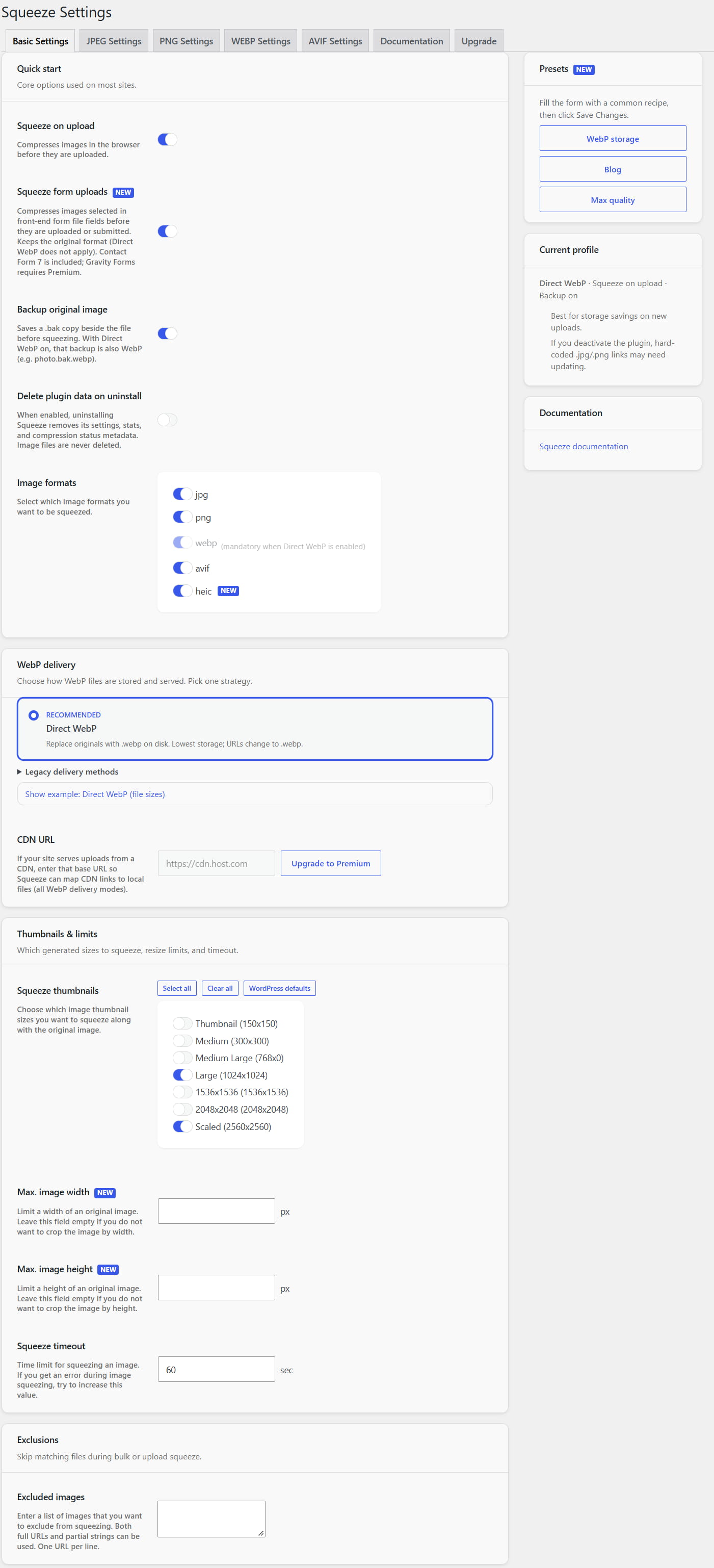
Squeeze's Basic Settings

Squeeze's JPEG compression settings

Squeeze's PNG compression settings

Squeeze's WEBP compression settings

Squeeze's AVIF compression settings

Squeeze's Bulk actions in the List view of the Media Library

Squeeze's Filter in the Grid view of the Media Library
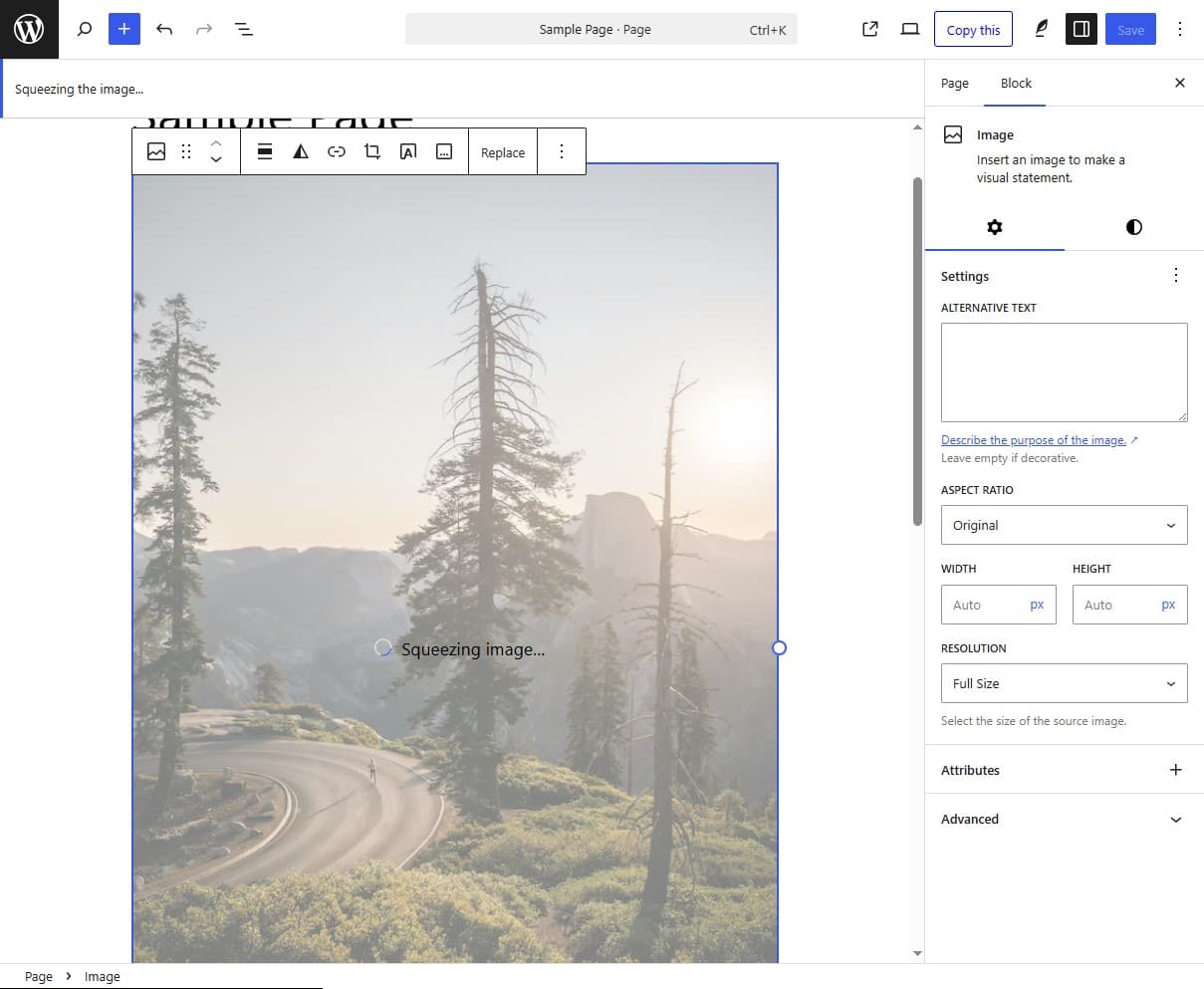
Squeeze images directly on upload in Gutenberg or GenerateBlocks builder.
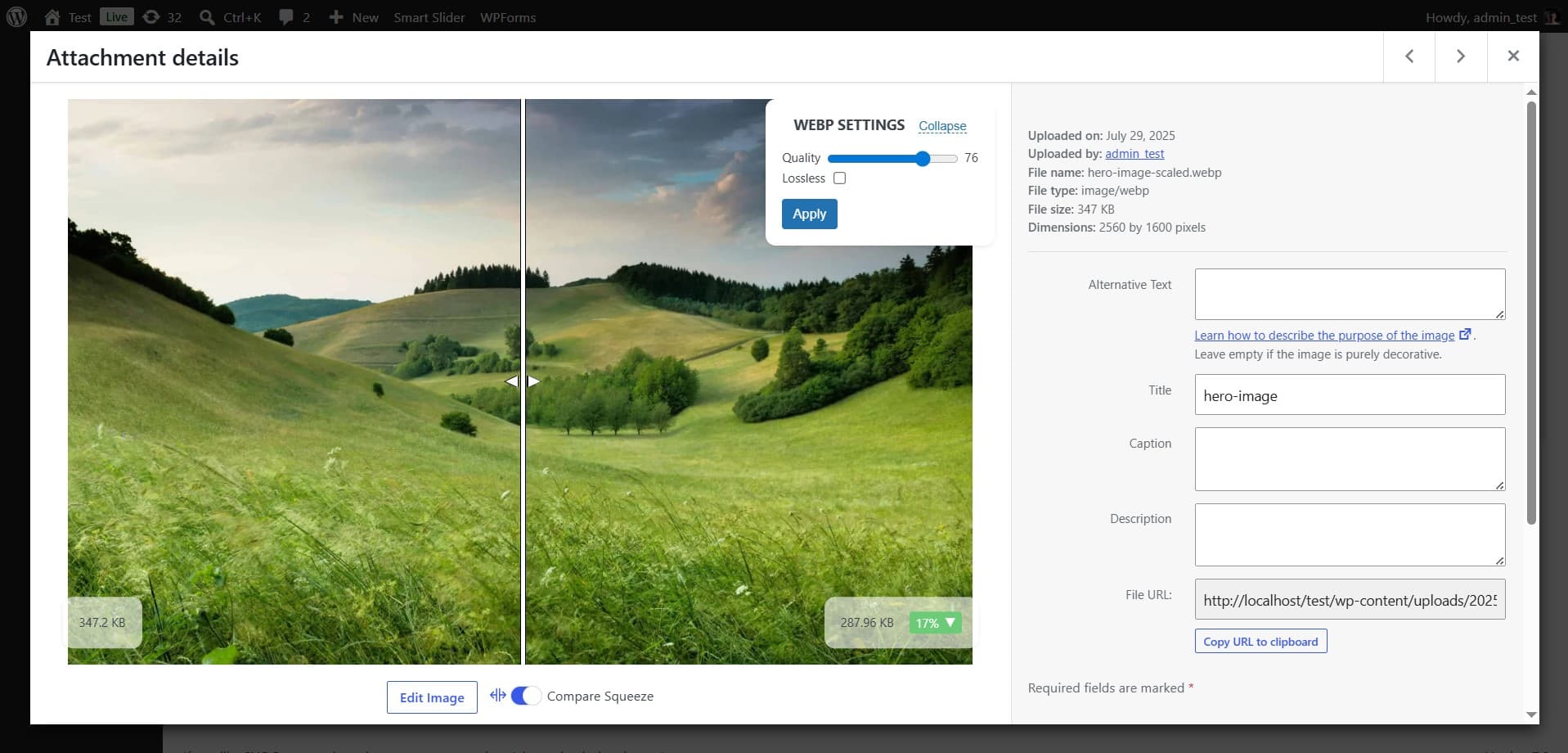
Preview image with live Squeezing options (Premium feature)

Bulk Squeeze from a page (Premium feature)