
Talkieon puts a chat button on every page of your site. Visitors ask a question, and you answer it from the Talkieon inbox in your browser, on the desktop app or on the mobile app.
This plugin connects your WordPress site to your Talkieon account. Paste your Workspace ID into the settings page and the chat appears. There is no code to edit.
What you get with Talkieon
- Live chat with a shared team inbox
- An AI agent that answers from your help articles and hands over to a person when it should
- Offline messages: visitors leave their email and get your reply there
- See who is on your site right now and which pages they viewed
- WhatsApp, Instagram, Messenger and email in the same inbox
- An Android app, with push notifications
- A free plan for up to 3 team members, with no credit card
The look of the chat (colour, position, greeting, opening hours) is set in your Talkieon dashboard. Changes apply to your site straight away, without touching WordPress.
Several websites, one account
If one Talkieon account runs chat on more than one website, add the Website ID too, so each site’s chats land under the right website.
For developers
The widget config can be changed with the talkieon_lc_widget_config filter, for example to pass a signed visitor identity so returning customers are recognised:
add_filter( 'talkieon_lc_widget_config', function ( $config ) { $config['identity'] = my_signed_identity(); return $config; } );
External services
This plugin connects your site to Talkieon, a hosted live chat service. It cannot work without it.
On every public page of your site it loads the chat widget script from https://cdn.talkieon.com/widget.js. The script then talks to https://api.talkieon.com.
- When a page loads, the widget sends your Workspace ID (and Website ID if set) to fetch your chat settings.
- While a visitor has your site open, the widget sends a small presence signal with the page URL, page title and referrer, so your team can see who is on the site. The visitor’s IP address reaches the service as part of any web request and is used to estimate their country and city.
- When a visitor chats, their messages, any name or email they type, and any images or voice messages they send are sent to Talkieon and stored so your team can reply.
Nothing is sent from the WordPress admin area, and nothing is sent until you save a Workspace ID.
The service is provided by Talkieon. Terms of service, Privacy policy.
Screenshots
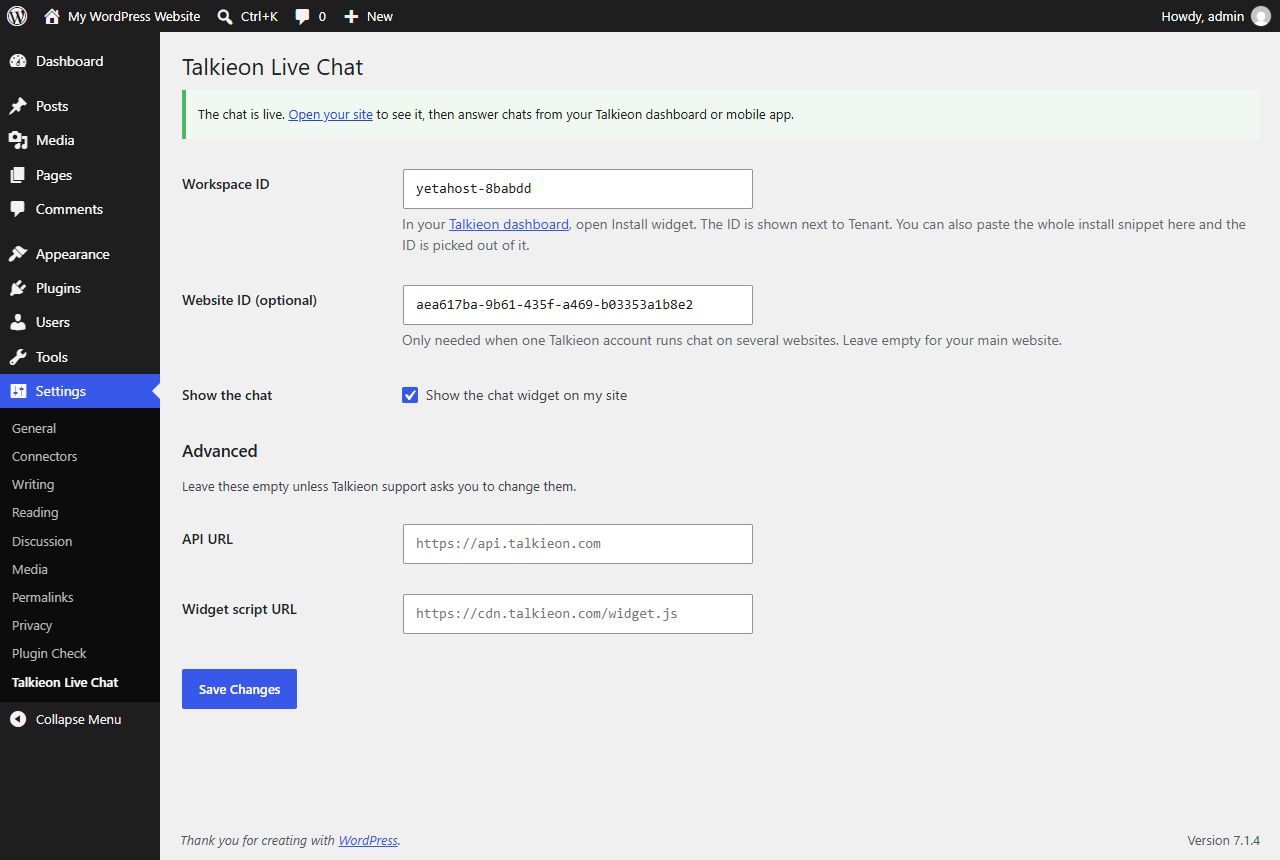
The settings page: paste your Workspace ID and save.

The chat on a WordPress site.