
WP Taxonomy Manager brings taxonomy setup, term maintenance, and CSV transfers into one WordPress admin workspace. Work with categories, tags, WooCommerce product taxonomies, and custom taxonomies that your account can manage.
Website and documentation
- Live website: wp-taxonomy-manager.com – see the features, screenshots, and latest updates.
- Documentation: Setup and feature guides for every screen, including CSV import and export.
- Pro plans: Compare plans and pricing for the Pro tools listed below.
Free features
- CSV term export – Download term names, slugs, descriptions, parent slugs, and custom links from a selected taxonomy.
- Export preview – Review the selected terms in the admin before downloading a file.
- Export filters – Narrow exports by empty state, name, parent, or term count.
- CSV term import – Create new terms from CSV and skip existing names or slugs. Parent rows are created before their children wherever they appear in the file, and equal names can be imported under different parents.
- Spreadsheet-friendly CSV – Comma, semicolon, and tab-separated files are detected automatically, and UTF-16 or Windows-1252 files saved by Excel are converted to UTF-8.
- Term paths – Describe a hierarchy in one column, such as “Clothing > Men > Shirts”; missing parent terms are created.
- Import undo – Review the last five CSV imports and undo one. Undo previews every term first and keeps terms that are now in use.
- Visual column mapping – Match source CSV columns to import fields and ignore columns you do not need.
- Custom taxonomy builder – Register hierarchical or non-hierarchical taxonomies and attach them to selected post types without code.
- Term creation – Add terms from the plugin workspace, including an AJAX form for quick creation.
- All Terms workspace – Browse, edit, and delete terms from one admin area, with bulk deletion for selected terms.
- Inline mass editor – Search and page through terms, then update names and slugs in place.
- Custom term links – Point a term to an internal or external HTTP(S) URL through the term form or a CSV column.
- Term redirects – Record same-site archive URL changes and redirect old 404 URLs to the current term URL. Merged terms also redirect to the surviving term; admins can review and remove rules. Requires path-based permalinks.
- Unused term cleanup – Preview terms with no content relationships or children, delete up to 50 selected terms after confirmation, and restore them from cleanup history with new IDs.
- Demo term generator – Create sample terms for development or content planning.
- Keyword auto tagging – Assign existing taxonomy terms to published posts when configured keywords match.
- User CSV transfer – Export users by role, then import new accounts or update existing users’ profile details. Exports include password hashes and should be stored securely.
- Dashboard and settings – View term and activity counts, recent CSV imports, and quick links, and adjust the plugin’s available options.
CSV fields
The Free term CSV needs a ‘name’ or ‘term_path’ field and supports ‘slug’, ‘description’, ‘parent_slug’, and ‘custom_link’. A parent slug can match an existing term or another row in the same file. Import accepts .csv or .txt files with CSV content.
Pro features
Pro features require an eligible license or trial.
- Advanced CSV Import – Preview row-level errors and warnings, check hierarchy, and choose create-only, update-only, or combined imports. Apply prepared rows in bounded background batches, resume paused jobs, and download row-level error reports.
- Import presets – Save per-user column mappings and choose which mapped fields may update existing terms.
- XLSX and JSON transfers – Import and export taxonomy terms in Excel and JSON formats.
- Term images – Add or replace Media Library images on term screens, import images from public URLs, include image URLs in CSV exports, and display images with a shortcode.
- Term ordering – Order siblings within each parent group, browse large groups 100 terms at a time, and save in bounded batches. Optionally apply that order to frontend term queries that use WordPress’s default sort; explicit query sorts are preserved.
- Duplicate term management – Find normalized-name duplicates and read-only similar-spelling or initials suggestions, inspect merge impact, merge with confirmation, and restore from the audit history. Successful merges can also create a redirect from the removed term’s old archive URL.
- Scheduled remote CSV sync – Import a bounded remote CSV on a schedule with optional Basic or Bearer authentication and a recent-run log; requires Action Scheduler.
- Custom term fields – Define text, color, image, select, and URL fields and display saved values with a shortcode.
- Term Meta Transfer – Preview, export, and import registered scalar metadata for existing terms. Supported ACF taxonomy fields require active ACF and the ACF Term Fields add-on.
- Term Maintenance – Preview bulk term-field changes or copy and move terms between compatible taxonomies, with bounded batches and a conflict-aware restore window.
- AI auto tagging – Suggest existing taxonomy terms through any configured WordPress AI Client text provider. Requires WordPress 7.0 or later and a provider API key; WooCommerce is not required.
- WooCommerce term visuals – Show brand logos and global attribute color or image swatches when WooCommerce is active.
Who can use it?
WP Taxonomy Manager is useful for site administrators moving term data between sites, content teams maintaining large term libraries, developers creating taxonomies, and WooCommerce stores organizing product terms.
External services
WP Taxonomy Manager connects to the services below. Nothing is sent until an administrator takes the action described.
WP Taxonomy Manager support (wp-taxonomy-manager.com)
When an administrator sends the Ask a question form, the plugin sends the name, reply email, topic, and question to https://wp-taxonomy-manager.com/wp-json/wtmp-support/v1/message so the team can reply by email. If Include site details stays checked, it also sends the site address, the WordPress, PHP, and plugin versions, the Free or Pro plan, and the site language. Privacy policy.
WP Taxonomy Manager email updates (wp-taxonomy-manager.com and SendFox)
Only after an administrator clicks Yes, subscribe me in the updates notice, the plugin sends that administrator’s email and the site address to https://wp-taxonomy-manager.com/wp-json/wtmp-updates/v1/subscribe, which adds the email to the WP Taxonomy Manager list in SendFox. Privacy policy, SendFox privacy policy.
Freemius (licensing)
License activation, Pro updates, and the optional account connection invitation use the Freemius SDK. Freemius terms, Freemius privacy policy.
AI provider (Pro AI suggestions)
Only when Pro AI suggestions are turned on, up to 6,000 characters from the post and up to 100 existing term names are sent to the text provider configured in the WordPress AI Client on your site. The provider’s own terms and privacy policy apply.
Screenshots

Dashboard with term and activity totals, quick actions, and recent CSV imports.

Preview the categories, tags, or custom taxonomy terms before downloading the export.
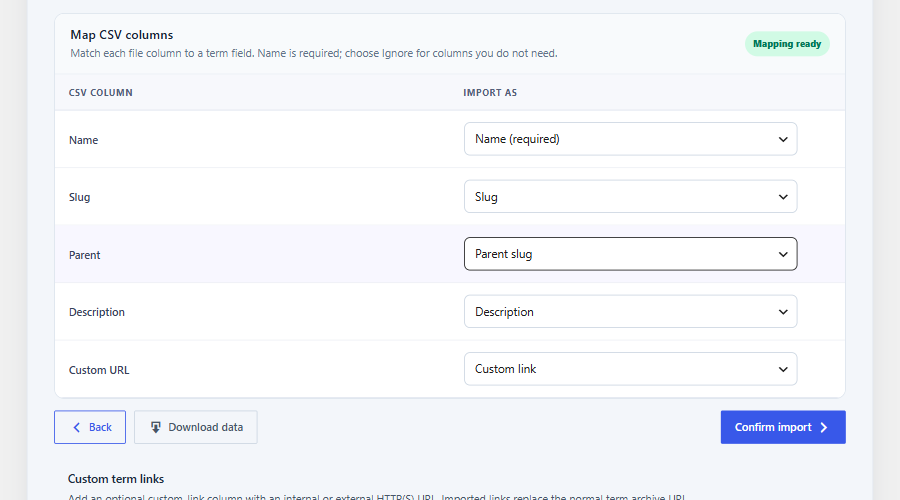
Map CSV columns to term fields; comma, semicolon, and tab files are detected automatically.
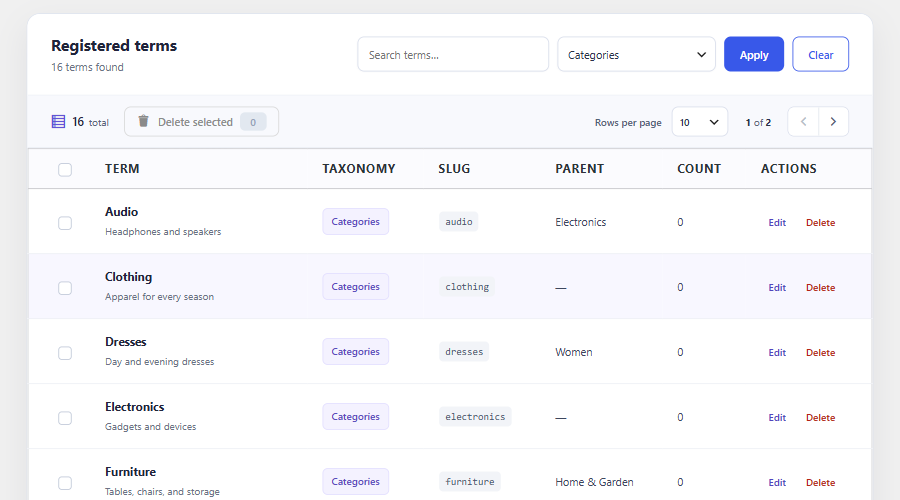
Search and manage terms from the All Terms workspace.
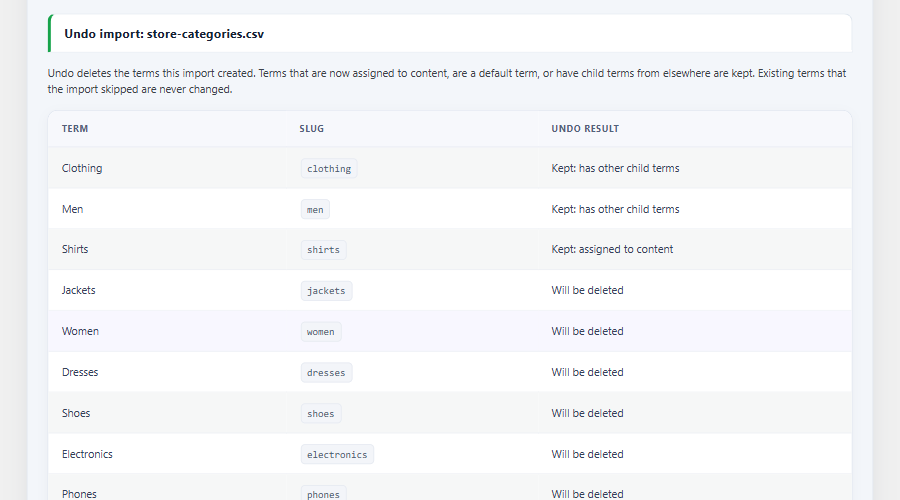
Review an import before undoing it; terms now in use are kept.