
TierStep – Early Bird Discount, Progressive Discount & Launch Pricing for WooCommerce
by CommerceWP
Early bird pricing for WooCommerce that runs itself
Want to reward your first customers, but don’t want to change prices by hand at midnight or hand out coupon codes? TierStep gives WooCommerce real early bird pricing. Set price steps by units sold – for example the first 50 at $19, the next 100 at $29, then the regular price – and the price increases automatically after each step sells out. This is sometimes called progressive pricing, a progressive discount or sales-based pricing.
It is the simplest way to run an early bird discount, launch pricing for a new product, a limited first batch or Kickstarter-style pricing in your own WooCommerce store. Shoppers see how many units are left at the current price, what the next price will be, and how long the offer runs, so they buy now instead of later. The urgency is honest: the cheaper price runs out because it actually sold.
100% free: no Pro version, nothing locked
Every feature on this page is free. There is no paid version, no upgrade prompts and no feature limits: unlimited tiers, store-wide campaigns, countdowns, checkout holds, stats and blocks are all included. Features that other plugins keep for paid versions are free here too: category, tag and attribute targeting, a deals page, pre-launch mode and the early-bird saving shown in the cart.
Popular ways to use TierStep
- Early bird discount for a product launch: the first 100 buyers pay less, then the price returns to normal.
- Increase the price after X sales: raise the price by $10 after every 50 units, with no manual edits.
- Progressive discount: 30% off the first 25 units, 20% off the next 50, 10% off the next 75, then the regular price.
- Pre-launch countdown: keep a new product off sale until launch day (a prelaunch page with a countdown and the first early-bird price), then open orders automatically.
- Limited first batch or presale: sell the first production run at a founders’ price, with presale pricing that steps up as it sells.
- Kickstarter-style reward tiers: “Super early bird”, “Early bird”, then the regular price, like crowdfunding rewards but in your own store.
- Courses and digital downloads: reward the first students or buyers of a new course, ebook or template pack.
- Merch drops: a lower price for the first units of a limited drop.
- Early bird tickets and seats: early bird tickets for events, workshop seats or course places sold as WooCommerce products: the first 30 tickets at $49, then $69.
- Launch week across the store: a storewide discount or one for a whole category, with percentage-off tiers that shrink as each product sells.
- Introductory price for a new product: an intro price for the first buyers that ends by itself when they’ve sold.
Progressive discounts for WooCommerce
A progressive discount gives the first buyers the biggest discount and makes it smaller as total sales grow. Set “Tier prices are” to “Percentage off the regular price” or “Fixed amount off the regular price” and add your steps:
- First 25 units: 30% off
- Next 50 units: 20% off
- Next 75 units: 10% off
- After that: the regular price
The discount follows the regular price if you change it, works on simple and variable products, and can run on one product or a whole category with a store-wide campaign. Shoppers see the current discount, how many units are left at it and what comes next, so the discount itself creates the urgency.
Tiered pricing based on units sold
TierStep is tiered pricing where each tier is a number of units sold. Every shopper pays the current tier’s price, and the price moves to the next tier when the current one sells out:
- Units 1-25: $39
- Units 26-75: $49
- Units 76 onwards: $79 (the regular price)
Tiers can be fixed prices, a percentage off or an amount off the regular price, on simple and variable products, for one product or a whole category. This is a different kind of tiered pricing from a bulk discount, which changes the price by how many units one customer puts in the cart. Read tiered pricing in WooCommerce: the 3 kinds to see which one your store needs.
How it works
- Edit a product, open the TierStep Pricing tab and add your price steps (units sold up to, and the price).
- Optionally add a start date, an end date and a limit per customer.
- Publish. TierStep shows the offer on your store and moves to the next price the moment the current step sells out.
Want one offer for many products? Create a store-wide campaign under Products > TierStep Campaigns and pick categories, tags, attribute terms or products.
What shoppers see
- “Only 12 left at $19, then $29.” right under the product price.
- A sold progress bar for the current price (“38 of 50 sold at this price”), real stock scarcity rather than a fake timer.
- A live countdown timer to the campaign end, and a product launch countdown (“starts in”) with the early-bird price before it opens.
- A tier table after the Add to cart button: sold out, current (with units left), upcoming, then the regular price, with a “You save” column.
- The early-bird saving in the cart: the regular price struck through and “Early-bird saving: $30.00”.
- Pre-launch mode: no Add to cart button until the start date, only the countdown and the first price.
- “12 left at $19” badges with a small progress bar on shop and category pages.
- An optional “The early-bird price has sold out” message after the last tier.
- An “Early-bird deals” page in seconds with
[tierstep_deals]or the “TierStep Early-Bird Deals” block.
Pricing and campaigns
- Unlimited price tiers, as fixed prices, a percentage off, or an amount off the regular price. Percentage and amount-off tiers make a progressive discount that shrinks as total sales grow.
- Simple and variable products. Variations share one count, and each is priced from its own regular price.
- Store-wide campaigns for all products, categories, tags, attribute terms or picked products, with excludes and priorities (Products > TierStep Campaigns). A product’s own TierStep tab can still override.
- Optional start and end dates. Pause any time without losing progress.
- Duplicate a store-wide campaign in one click; duplicated products keep their tiers and start fresh.
- Choose per campaign whether coupons may discount early-bird prices further.
Fair, safe launches: no overselling the early-bird price
The cheap units are limited, so TierStep makes sure you never oversell them.
- One order can’t take more units than the current tier has left, on the classic and block checkouts.
- Checkout holds reserve the early-bird units in a placed order while the customer pays, so two buyers can’t take the same last units. Held units count as reserved until the order is paid, fails or the hold time ends.
- Limit per customer: cap how many units one buyer gets at early-bird prices across all their orders.
- Refunds give units back to the tier they were sold at, without ever counting a unit twice.
- Shoppers whose cart price is no longer available get a clear message instead of a wrong price.
For store owners
- A “TierStep status” box on every product shows which campaign applies and why, units counted, held and given back, the current tier, what comes next, and revenue this campaign.
- Store-wide campaigns list every product with its units, tier and revenue.
- Switch each display part on or off and reword every message (WooCommerce > Settings > Products > TierStep).
- Blocks: “TierStep Early Bird” and “TierStep Early-Bird Deals”. Shortcodes:
[tierstep],[tierstep_notice],[tierstep_progress],[tierstep_countdown],[tierstep_table],[tierstep_deals]. - Works with classic and block themes, HPOS (High-Performance Order Storage) and the WooCommerce Cart and Checkout blocks.
Early bird pricing vs bulk (tiered quantity) discounts
Early bird pricing in WooCommerce is a sales-based pricing model: the first batch of units sells at a lower price, and the price rises automatically as each batch sells out. It is different from a bulk discount.
TierStep is not a bulk or wholesale discount plugin. Bulk discounts lower the price when one customer buys more units in one order. Early bird pricing changes the price for everyone as total sales grow. If you are launching something and want early buyers to get the best deal, you want early bird pricing.
Compatibility
- WooCommerce 8.0 or later, WordPress 6.7 or later, PHP 7.4 or later.
- Classic and block themes, including the WooCommerce Cart and Checkout blocks.
- HPOS (High-Performance Order Storage).
- Simple and variable products.
- Discount rules plugins: tested with Discount Rules and Dynamic Pricing for WooCommerce. While a tier is active the product page and cart show the tier price, and that plugin’s cart discounts follow the campaign’s “Allow coupons” setting.
Good to know
- Grouped and external/affiliate products aren’t supported.
- “Units sold” follows WooCommerce’s own sales counter, so cancelled orders stop counting.
Documentation and support
Step-by-step guides with screenshots for every feature: TierStep documentation. Questions are answered in the WordPress.org support forum.
Screenshots
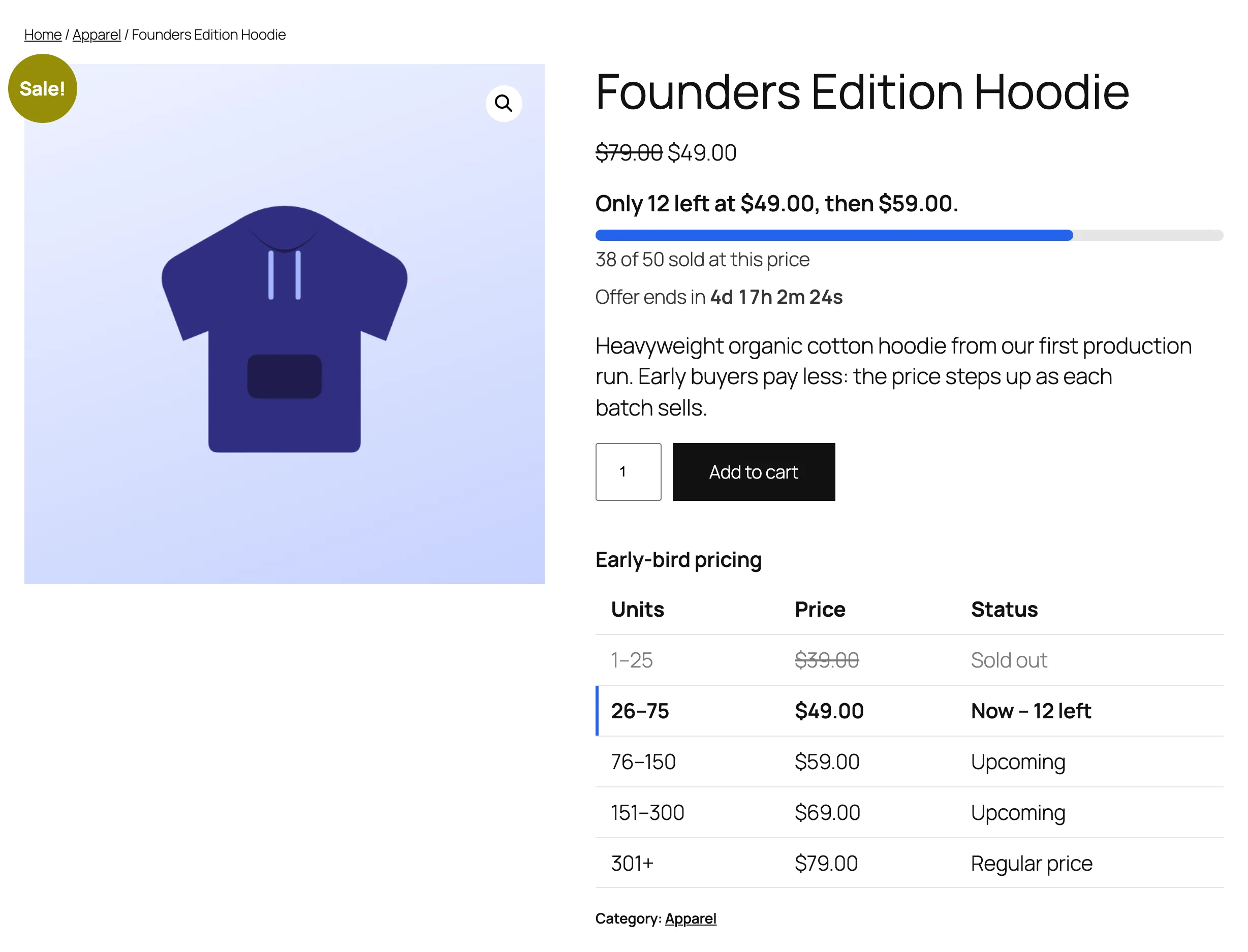
A product page during a campaign: units left at the current price, the next price, a progress bar, a countdown and the tier table.
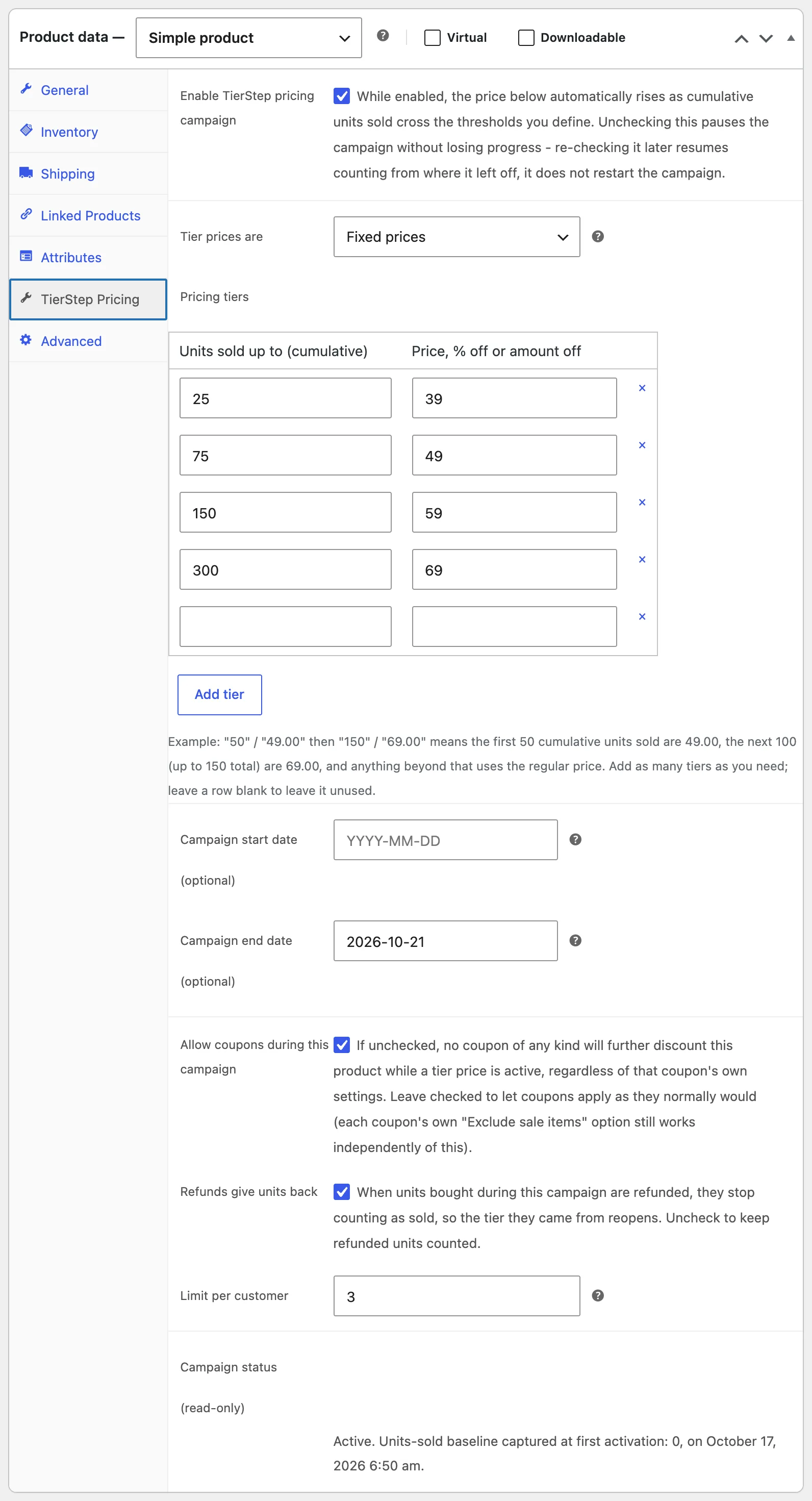
The TierStep Pricing tab on a product: tiers as fixed prices, % off or amount off, dates, coupons, refunds and a per-customer limit.
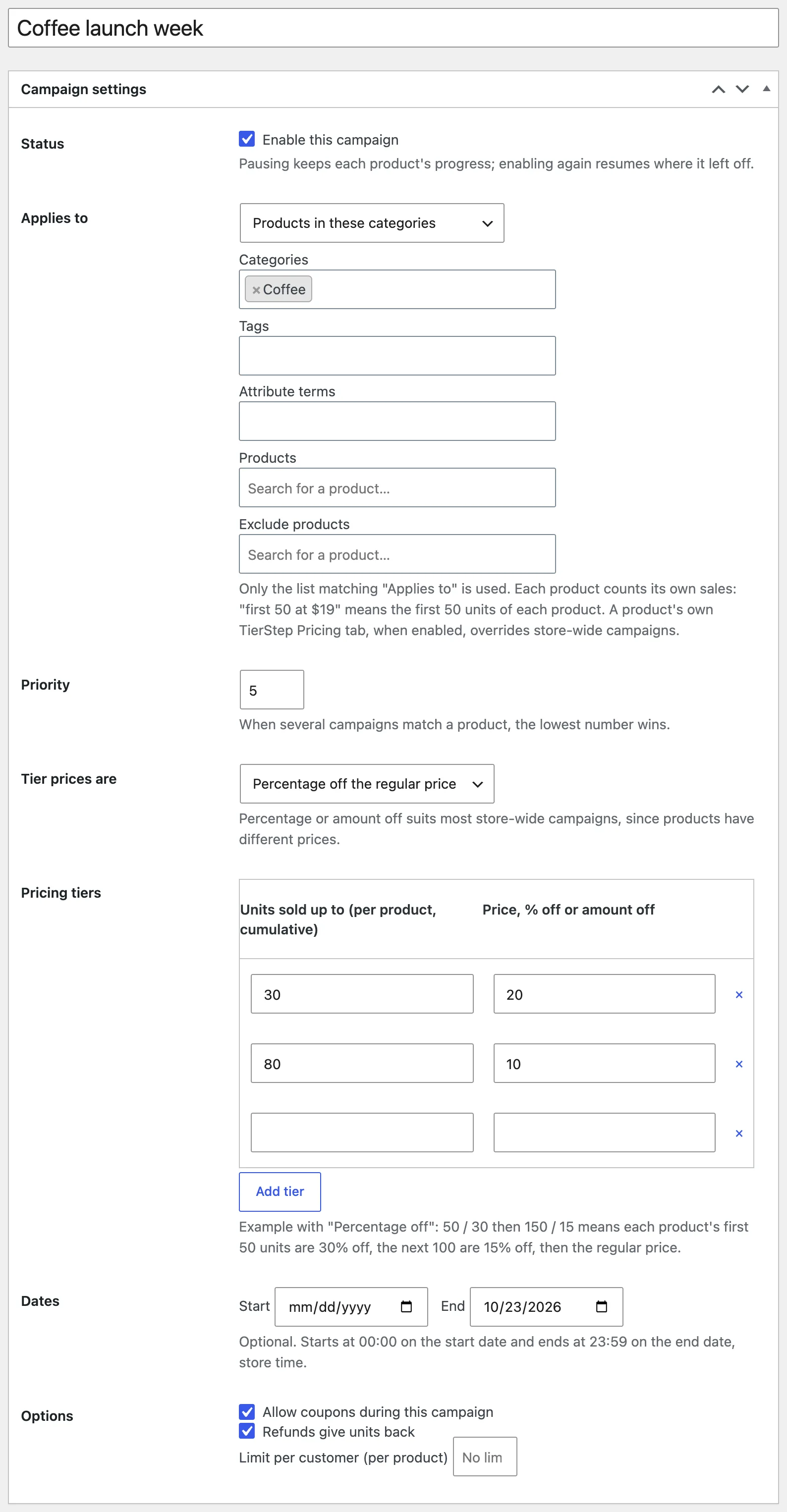
A store-wide campaign: one set of percentage-off tiers for every product in a category, with a priority and optional end date.
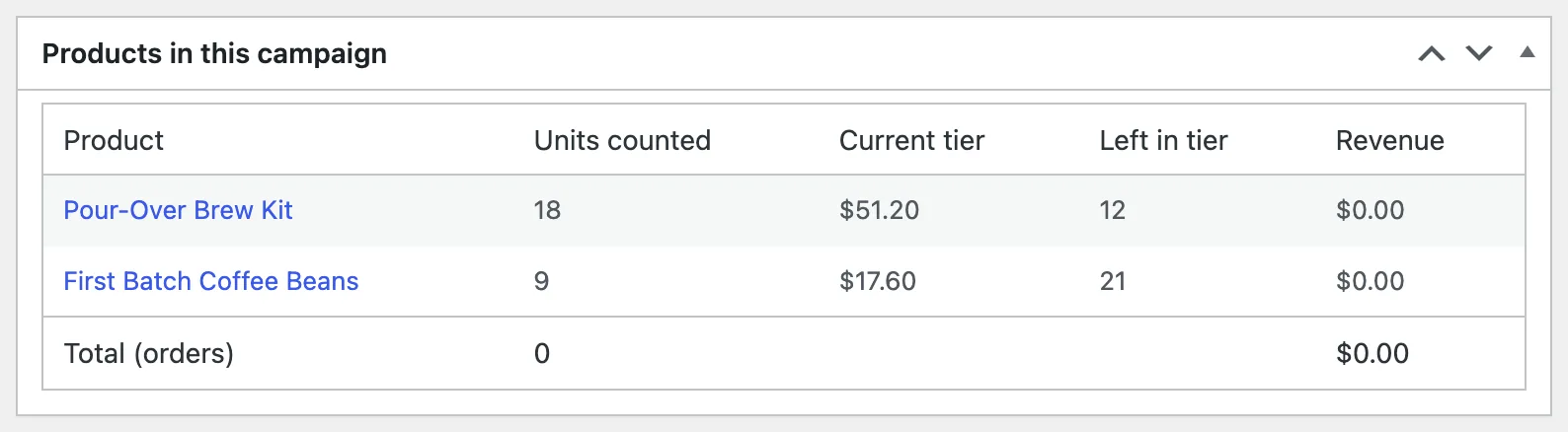
Campaign stats: every product's units sold, current tier and early-bird revenue.
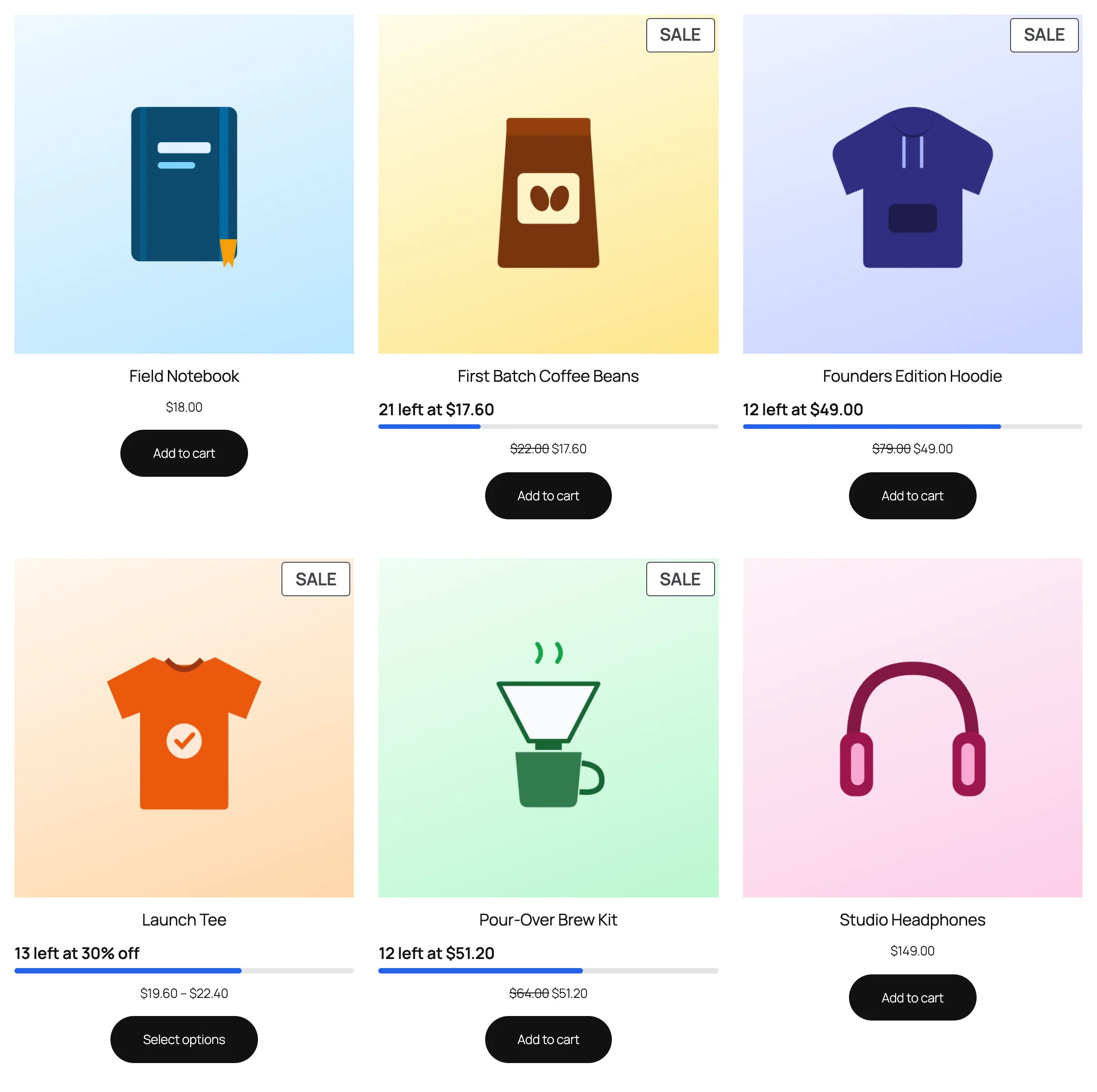
"Units left" badges and small progress bars on the shop page.
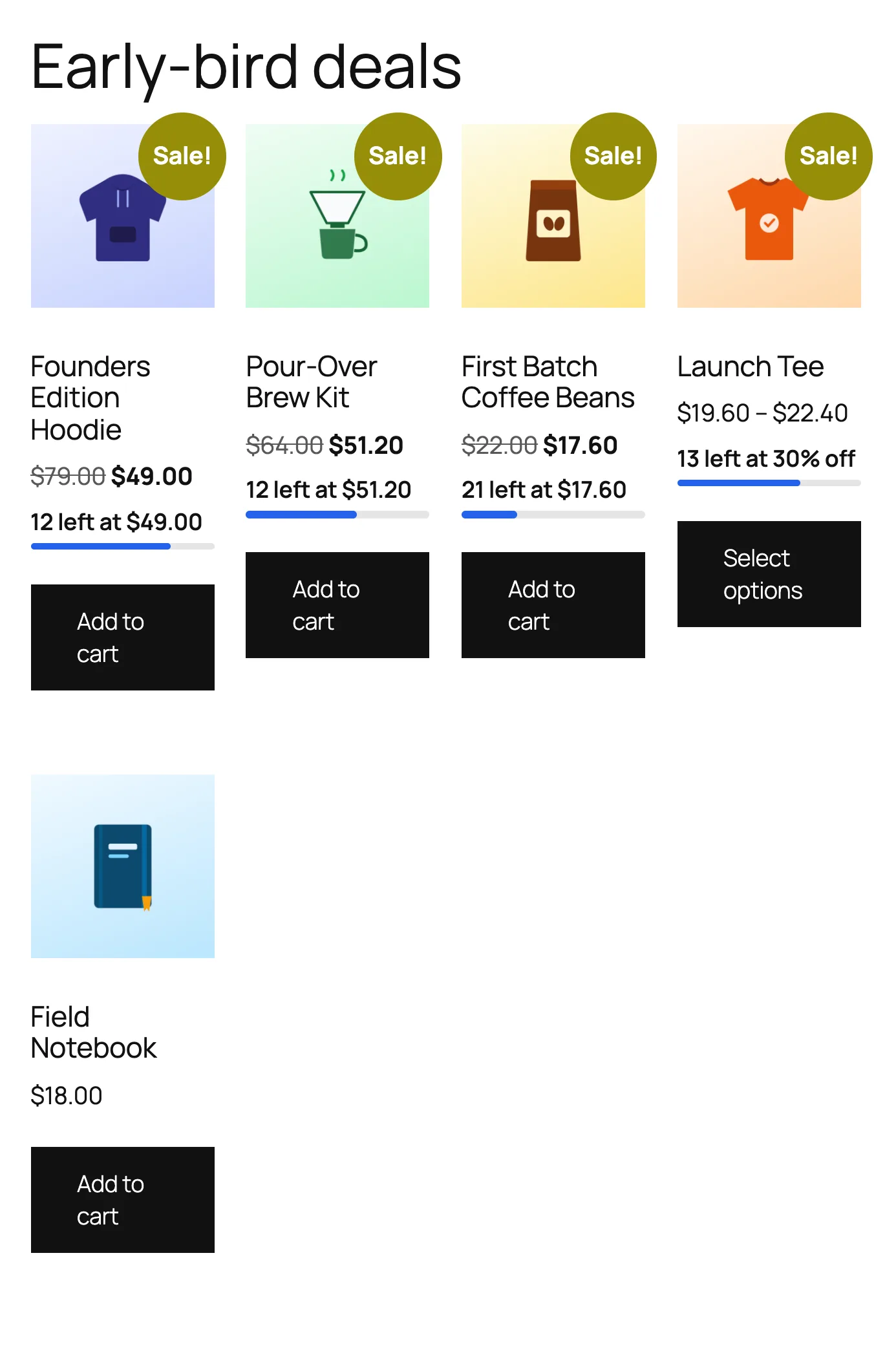
The early-bird deals page, listing every running offer with the soonest-ending first.
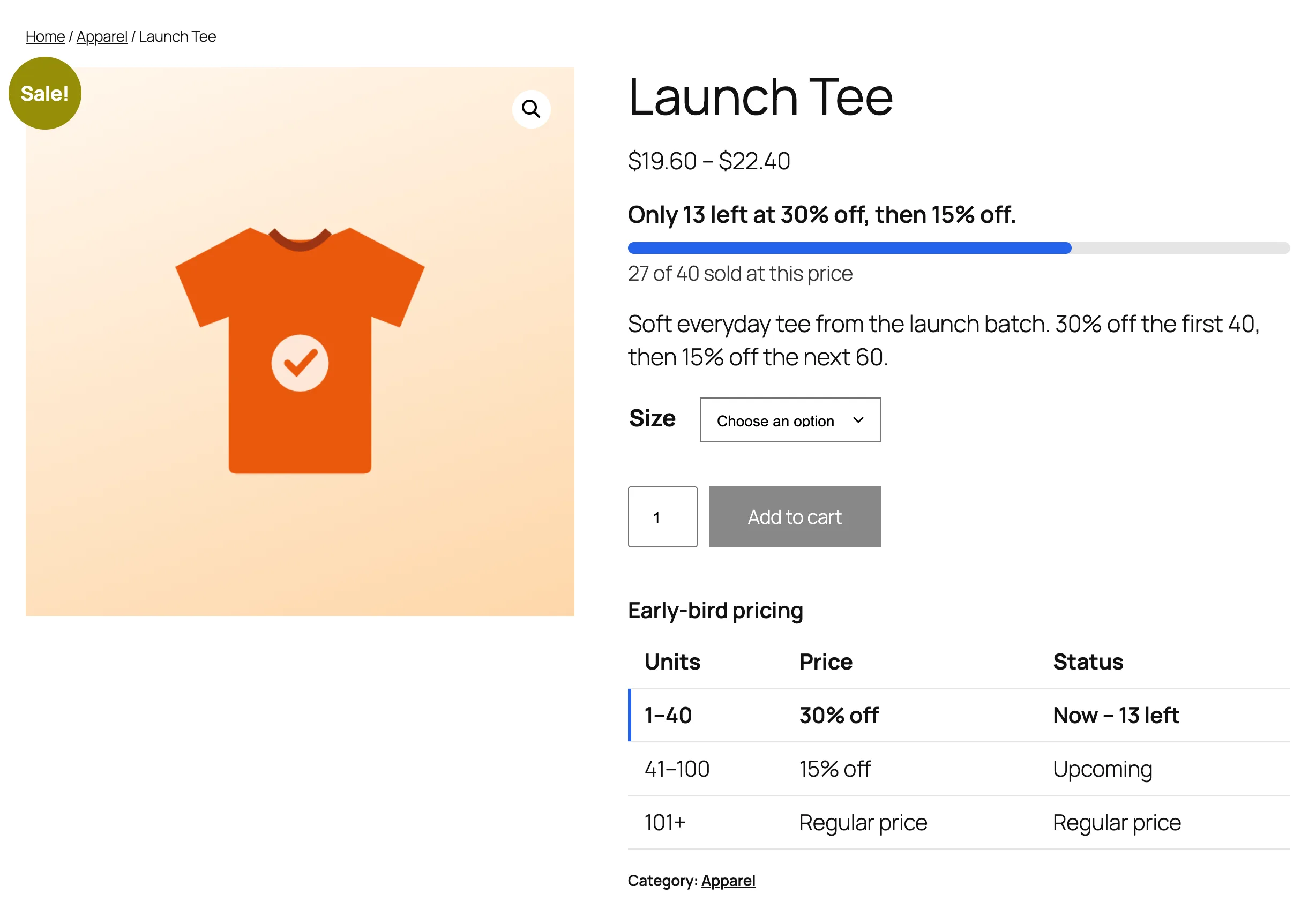
A variable product: every variation steps up from its own regular price on one shared count.

A "Starts in" countdown with the early-bird price before the campaign begins.
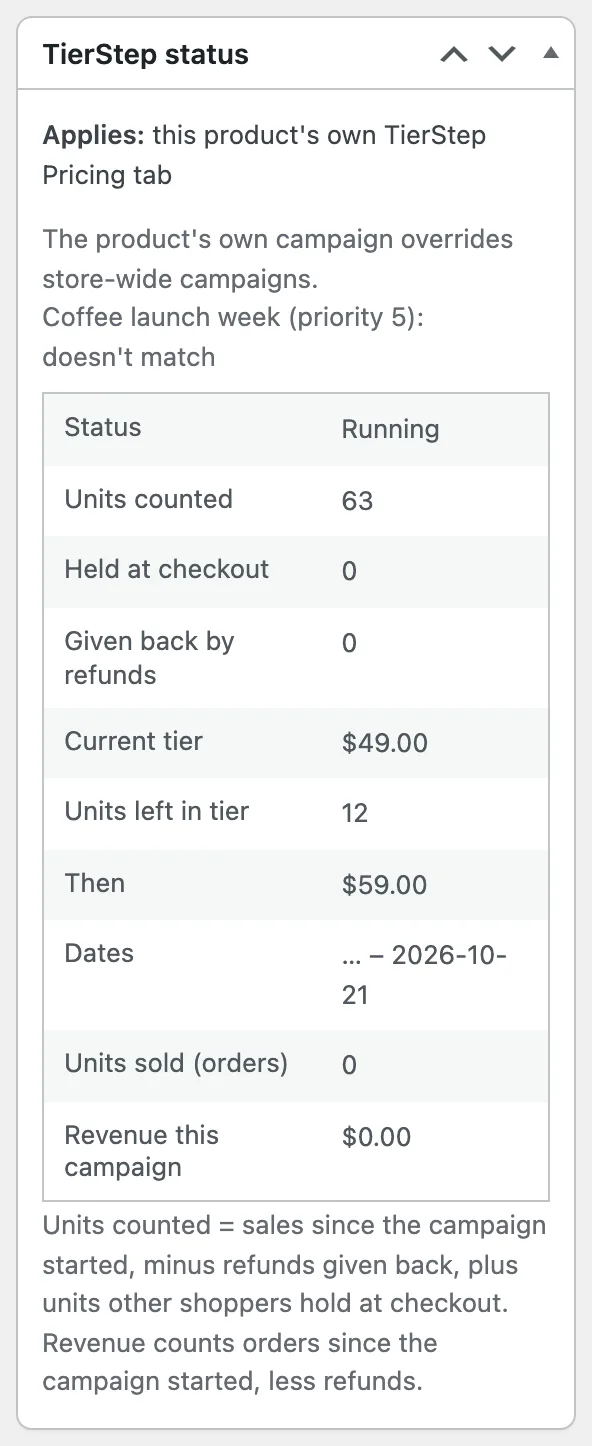
The status box on the product edit screen: which campaign applies and why, units counted, the current tier and the next price.
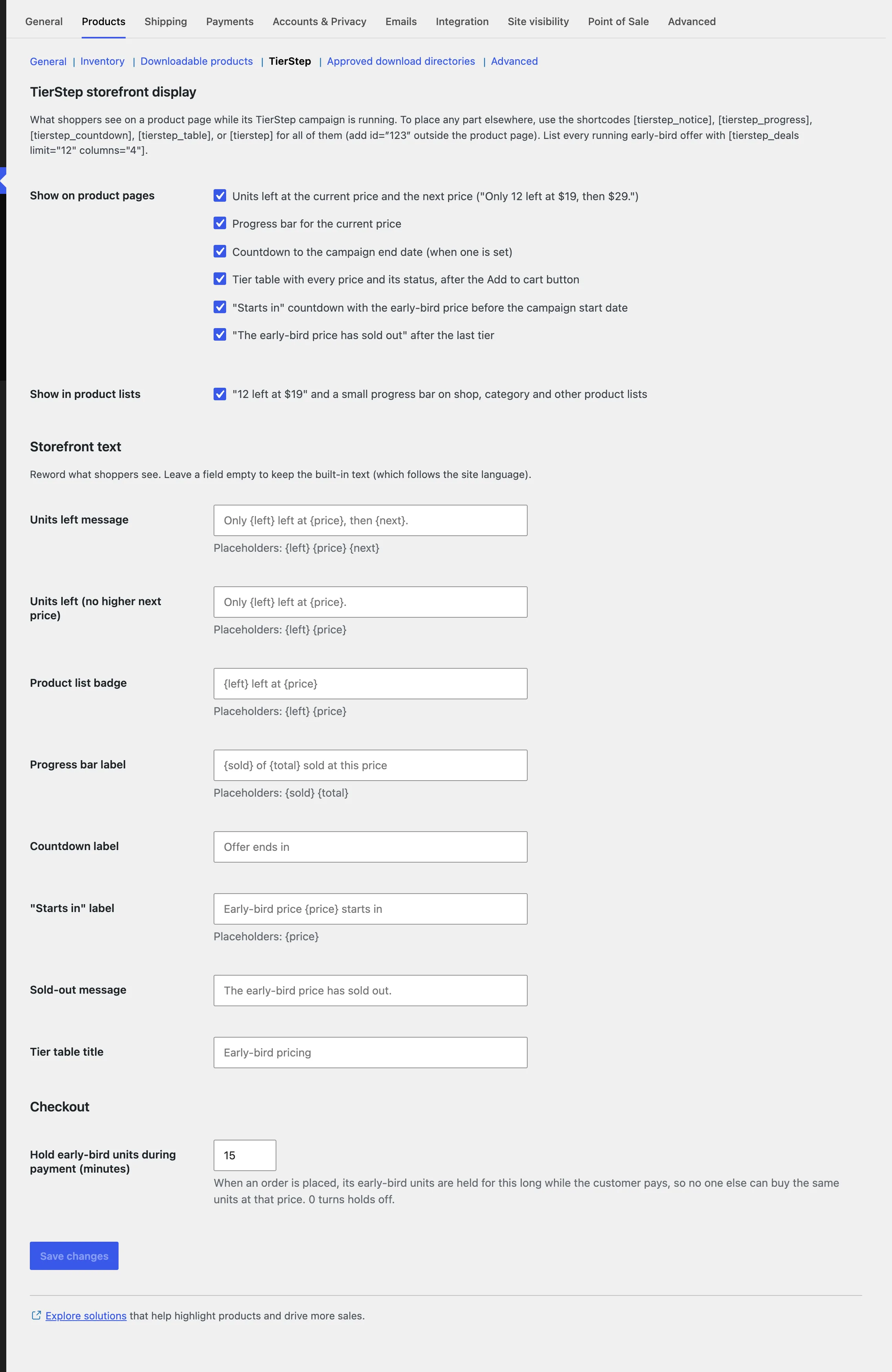
Settings: choose what shoppers see, reword every message and set checkout holds.