Vanquish Shipping Tracking – Order Tracking & Carrier Links for WooCommerce
by Vanquish
Every parcel you ship brings the same question: where is my order? Vanquish Shipping Tracking for WooCommerce answers it before it is asked. Add a carrier and a tracking number to an order, and your customer finds them in the order emails and on their order page — with the carrier’s logo and a link to the carrier’s tracking page, the tracking number already filled in whenever the carrier supports it.
HPOS compatible · 1,600+ carriers, with logos · Works with ShipStation · Shipment Tracking API compatible · No account, no API key, no data sent · WPML & Polylang ready
How it works
- Install and activate the plugin. WooCommerce is the only requirement.
- Under Shipping Tracking Shipping companies, switch on the carriers you ship with. You can skip this: until you choose, every carrier is offered.
- Open an order, pick the carrier, type the tracking number and press Update — or let ShipStation or your shipping service send it: it lands on the order by itself.
- Your customer gets the tracking — with a link straight to the carrier — in the order emails and on their order page.
Switching from WooCommerce Shipment Tracking?
Your tools keep working: shipping services, label printers and ERPs that send tracking to WooCommerce Shipment Tracking find the same API here, and ShipStation is supported out of the box. The tracking already on your orders comes across by itself, and the extension’s own data is left where it is — so trying this plugin costs you nothing.
Free, with no strings attached
Everything in the free version works without an account, an API key or a subscription, and sends no data anywhere: custom carriers, logos, the message editor and the customer tracking form included.
Premium: your customers follow the parcel without leaving your store
The free version sends your customer to the carrier’s website. Premium brings the whole journey onto your own order page:
- Live shipment status — picked up, in transit, out for delivery, delivered — shown as a timeline drawn by your store, in your theme, not a widget embedded from someone else’s site.
- Emails at the moments that matter — “out for delivery”, “available for pickup”, “delivered”, sent as real WooCommerce emails — and an alert for you when a parcel reports a problem or stops moving.
- Every parcel of an order, each with its own link and its own timeline.
It runs on your own AfterShip, TrackingMore or track123 account: you bring the API key, requests go straight from your store to the service.
No account with a tracking service? The 17TRACK widget shows the steps of the parcel on the same page with nothing to set up, in 17TRACK’s own box.
Free features
Carriers
- 1,600+ predefined carriers worldwide, most of them with their logo, each linking to its own tracking page. For about 400 of them the link opens the parcel directly, with the tracking number already filled in.
- A universal tracking page for the others — optionally, the carriers that have no direct link (or all of them) open Track123 or 17TRACK with the tracking number already filled in. These are free pages of other companies, with their own brand and ads.
- Only the carriers you use — pick them from a searchable grid showing each carrier’s logo, country and a “Direct link” mark, so the order screen offers three carriers instead of 1,600.
- A default carrier, optionally, preselected on orders that have no tracking yet.
- Your own carriers — a local courier, your own deliveries — with a tracking URL template that takes the tracking code, the postcode and the country.
What your customers see
- The tracking in the standard WooCommerce order emails and on the order details / My Account page: the carrier’s logo and name, the tracking number and link, and a “Track shipment” button in your email colours.
- Guest customers too: the tracking also appears on the order confirmation page, which needs no login, and the
[vanstr_tracking_form]shortcode lets anyone look up an order with its number and billing email. Failed attempts are rate limited. - You decide where and when: which order statuses show the tracking, whether it goes into the emails, and whether it sits before or after the order table — separately for the emails and the order page.
Messages
- Two fully editable messages, one for the order page and one for the emails, with a visual editor and a live preview beside it, in your WooCommerce email colours, with one parcel or two, at desktop or phone width.
- Placeholders you insert with a click: the carrier’s logo and name, the tracking number and link, the “Track shipment” button, the order number (
[order_id]), the order page and the dispatch date. - Three ready-made messages to start from: one click fills the editor, and from there the text is yours to change.
- A box of its own in the emails: the tracking sits in a bordered block, set apart from the order details around it.
- Multilingual ready: with WPML or Polylang active, every customer-facing message can be entered in each language, one tab per language.
Built for the way a shop ships
- Carrier, tracking number and dispatch date in the Shipping tracking box, in the side column of the order screen, with a “Track this shipment” link to check the parcel.
- The dispatch date can start on today’s date, for shops that enter the tracking on the day they ship.
- Mark the order as completed with one switch, at the bottom of the same box, on orders that are not completed yet.
- An order note every time the tracking is added or changed, timestamped by WooCommerce — a record of when each parcel was booked, kept where your customers never see it.
- A tracking column in the admin orders list: the status, carrier, tracking link and dispatch date of each shipment in one compact box, with each shipment marked Shipped or Not shipped — no extra order statuses to clutter your reports.
Works with your shipping tools
- A REST API compatible with WooCommerce Shipment Tracking — shipping services, label tools and ERPs built to send tracking to the official WooCommerce Shipment Tracking extension send it to this plugin just the same, with nothing to set up. Active whenever neither that extension nor Advanced Shipment Tracking is installed.
- ShipStation — the tracking ShipStation for WooCommerce reports when it ships an order is added automatically, and ShipStation’s own tracking note is kept private, so your customer is not told twice.
- One tracking per order in the free version — when a service sends a second one for the same order, it is kept on the order, never lost, and you are told: on the order itself, in the admin, and in a summary email at most once a day, which you can turn off.
For developers and for switching plugins
vanstr_set_tracking(), a documented function for attaching tracking from your own code when your warehouse software or carrier plugin books the parcel.- Automatic migration of your settings and each order’s tracking from the legacy “WooCommerce Shipping Tracking” (CodeCanyon) plugin.
Premium features
- In-site shipping timeline — show the live shipment status (picked up, in transit, out for delivery, delivered…) as a timeline on the order page, drawn by your own site rather than embedded from the provider. Bring your own API key from AfterShip, TrackingMore or track123; requests go straight from your site to the service you chose. Includes a one-click connection test.
- Tracking without an account — as an alternative to the timeline, the 17TRACK widget shows the steps of each parcel on the order page with no account and no API key. It is 17TRACK’s own widget, with its logo and an advertising banner that cannot be removed, and it does not feed the status emails, the alerts or the orders list.
- Multiple shipments per order — added with + Add shipment, each parcel with its own carrier, tracking number, dispatch date, note and the products it contains. Every further tracking a shipping service or ShipStation sends becomes one, and those the free version kept appear by themselves. On the order screen each parcel folds into a row you open with a click, and the box tells you when a product is in no parcel.
- Works with Vanquish Multiple Addresses — with the Premium of both plugins, an order split by destination opens here with one shipment per destination and its products already assigned: you only type the tracking numbers.
- PayPal tracking — with WooCommerce PayPal Payments, the tracking of each order paid through it is added to the PayPal transaction, whether you type it in, import it or a shipping service sends it. PayPal takes the tracking into account when releasing held payments and settling “item not received” disputes.
- Per-product tracking — when a shipment is tied to specific products, its tracking link is shown next to those products on the order page and in the emails (can be turned off).
- Shipping estimates for products — show an estimated shipping (dispatch) date on the product page, cart, checkout, order and emails, computed from rules you set per product, category or tag (shipping days, cut-off hour, processing days, holidays, optional date range), with a configurable out-of-stock text. The
[vanstr_estimated_date]shortcode places it anywhere, withproduct_idto choose the product. - Delivery estimates for shipping methods — attach a “3–5 days” style estimate to each shipping method, shown with the method in the cart and at checkout. Works in both the block and the classic checkout.
- Requested delivery date — let customers pick a preferred delivery date (and an optional merchant-defined time slot) at checkout, within the window you configure. Works in both the block and the classic checkout; editable from the admin order screen.
- CSV import — drag and drop a CSV of tracking codes (one row per shipment, separator detected on its own) and say how its dates are written, so 07/09 is never read the wrong way round. An optional scheduled import fetches a CSV from a URL you configure.
- Quick assign — fill in tracking for many orders from a single screen: set the carrier, the date and the customer email once for the whole batch, scan or type each number and press Enter for the next row, and see on every row whether it is ready, incomplete or untouched before you save. With filters and an optional status change after saving.
- “Order shipped” notification email — a real WooCommerce email, configured under WooCommerce Settings Emails like any other.
- Automatic shipment monitoring — check your tracked shipments on a schedule: tell customers when their parcel is out for delivery, available for pickup or delivered, and be alerted yourself when one reports a problem or stops moving for a number of days you choose. Each event is announced once per shipment. What the carrier reports also shows in the orders list (in transit, out for delivery, delivered, exception), with each order summed up as shipped, partially shipped or delivered.
Screenshots, plans and answers on the plugin’s page: vanquishplugins.com/plugins/shipping-tracking.
Carrier names and logos are trademarks of their respective owners, shown only to identify each carrier. The logos ship with the plugin: displaying them never contacts any external server.
External services
The free version does not send any data to external services. It only builds links, which the customer opens in their own browser: by default, links to the carriers’ own tracking pages.
If you choose so under Shipping Tracking Settings Tracking link (off by default), those links open a universal tracking page instead, with the tracking number in the address. Your site still sends nothing: the customer opens the page by clicking the link. These are free services of other companies, subject to their own terms:
- Track123 — https://www.track123.com/ (terms, privacy)
- 17TRACK — https://www.17track.net/ (privacy, copyright notice)
The premium version can connect to external services. All of them are configured and controlled entirely by you:
- Tracking providers (in-site timeline). When you enable the shipping timeline and select a provider, the plugin sends the order’s tracking number and carrier code to that provider’s API to retrieve the shipment status, using your own account’s API key. No data is sent until you enter an API key and select the provider. Supported providers:
- AfterShip — https://www.aftership.com/ (terms, privacy)
- TrackingMore, operated by CWILL — https://www.trackingmore.com/ (terms, privacy)
- track123 — https://www.track123.com/ (terms, privacy)
- 17TRACK widget. If you choose the 17TRACK widget instead of a provider, the order page and the tracking form load 17TRACK’s script in your customer’s browser, which shows each parcel in a frame served by 17TRACK. The browser sends 17TRACK the tracking number, the address of your site and, as with any embedded content, its IP address. Nothing is loaded until you select the widget. 17TRACK’s privacy policy is linked above.
- Scheduled CSV import. If you enable the scheduled bulk import, the plugin periodically downloads a CSV file from the URL that you configure (typically a feed published by your own warehouse or fulfilment service). No data is sent to that URL; the file is only fetched.
- PayPal. When WooCommerce PayPal Payments is active, the tracking number and carrier name of each order paid through it are passed to that plugin, which adds them to the order’s PayPal transaction with your own PayPal account. Nothing is sent for orders paid any other way. PayPal — https://www.paypal.com/ (terms, privacy)
More WooCommerce plugins by Vanquish
- Vanquish Upload Files for WooCommerce – let customers upload files (even large ones) on the product, cart, checkout and order pages, for custom, personalized and print-on-demand products.
- Vanquish Multiple Addresses for WooCommerce – give customers an address book: save multiple addresses, pick one at checkout, and ship each product to a different address.
- Vanquish Attach Me – Order & Product Attachments for WooCommerce – attach files to orders and products, show them to the customer and send them with the order emails.
Screenshots

Choose the carriers you ship with, each with its logo, its country and a "Direct link" mark when the link opens the parcel itself; set a default carrier for new orders.
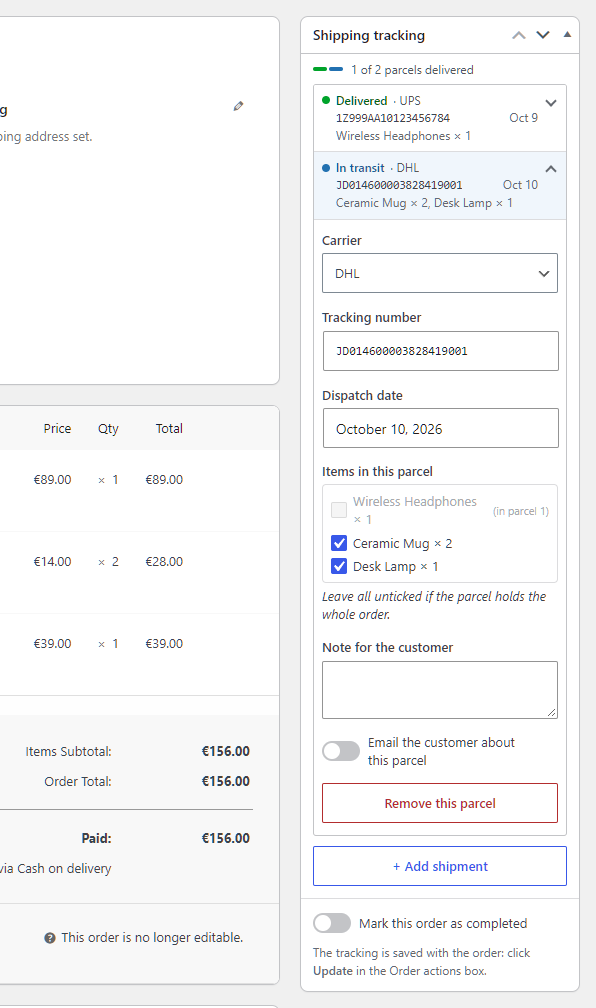
The Shipping tracking box on the order screen: carrier, tracking number and dispatch date, with a link to check the parcel. Premium adds more shipments per order, each folded into a row, with a note and the items it carries.

What your customer sees on their order page: the carrier's logo and a tracking link. Premium adds the live shipment status as a timeline.
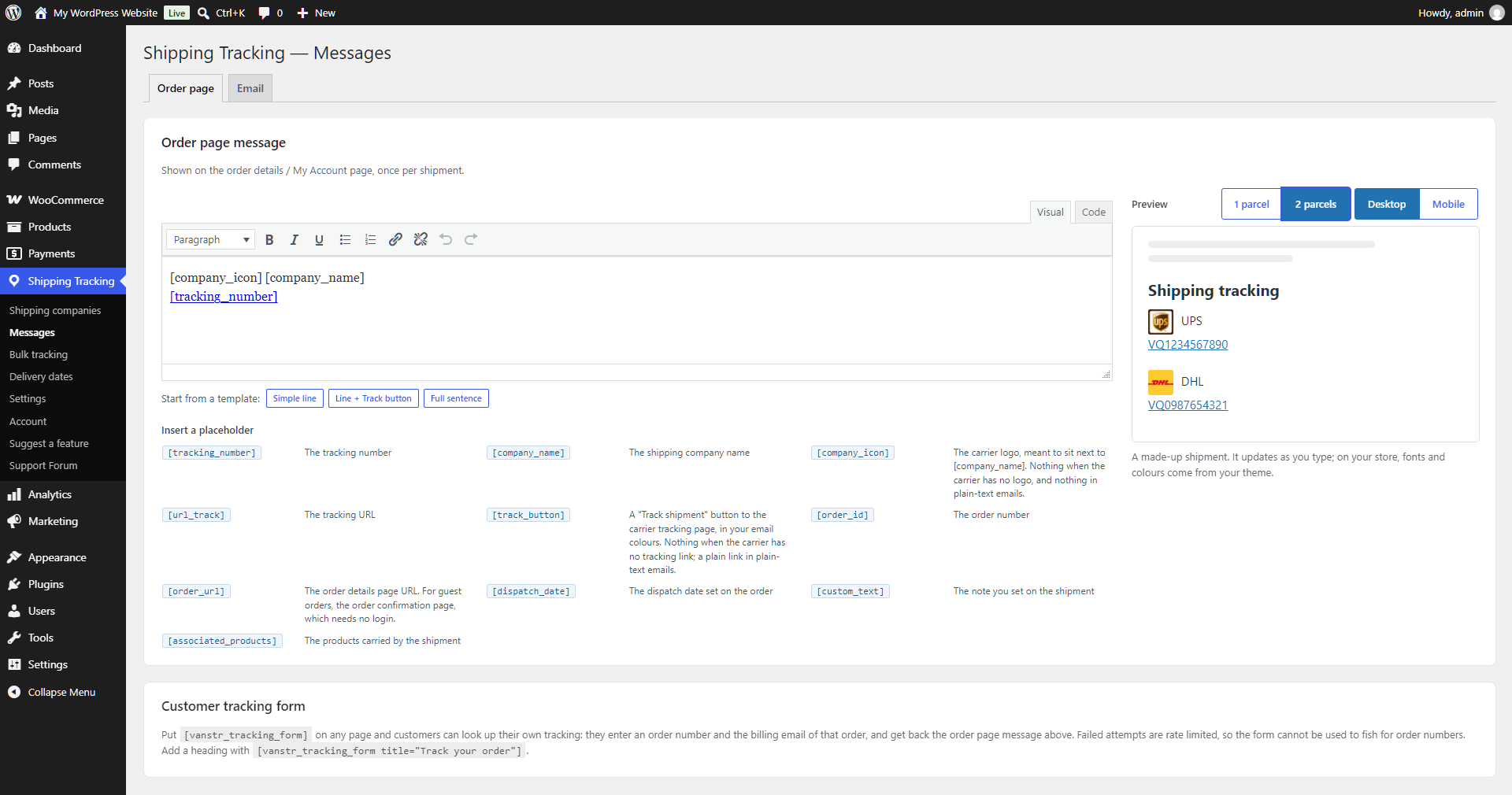
Edit the order page and email messages with a live preview beside them, insert placeholders with a click, or start from a ready-made message.

Search the catalogue of 1,600+ carriers by name, country or slug, and enable all the results at once.
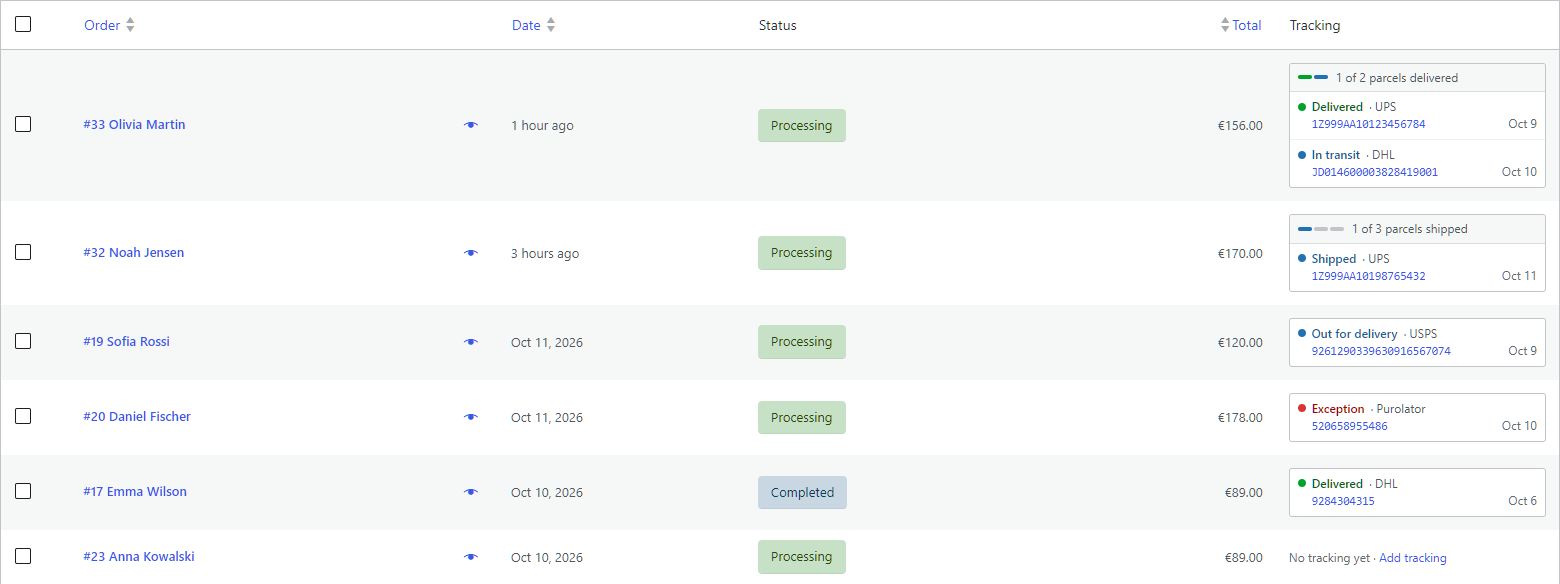
The tracking column in the WooCommerce orders list: status, carrier, tracking number and dispatch date of each shipment.

Premium: import tracking from a CSV — drag and drop the file and say how its dates are written.

Premium: set a delivery estimate for each shipping method of each shipping zone.

Premium: estimated shipping dates and per-method delivery estimates in the classic checkout.

Premium: the same estimates in the WooCommerce block checkout.
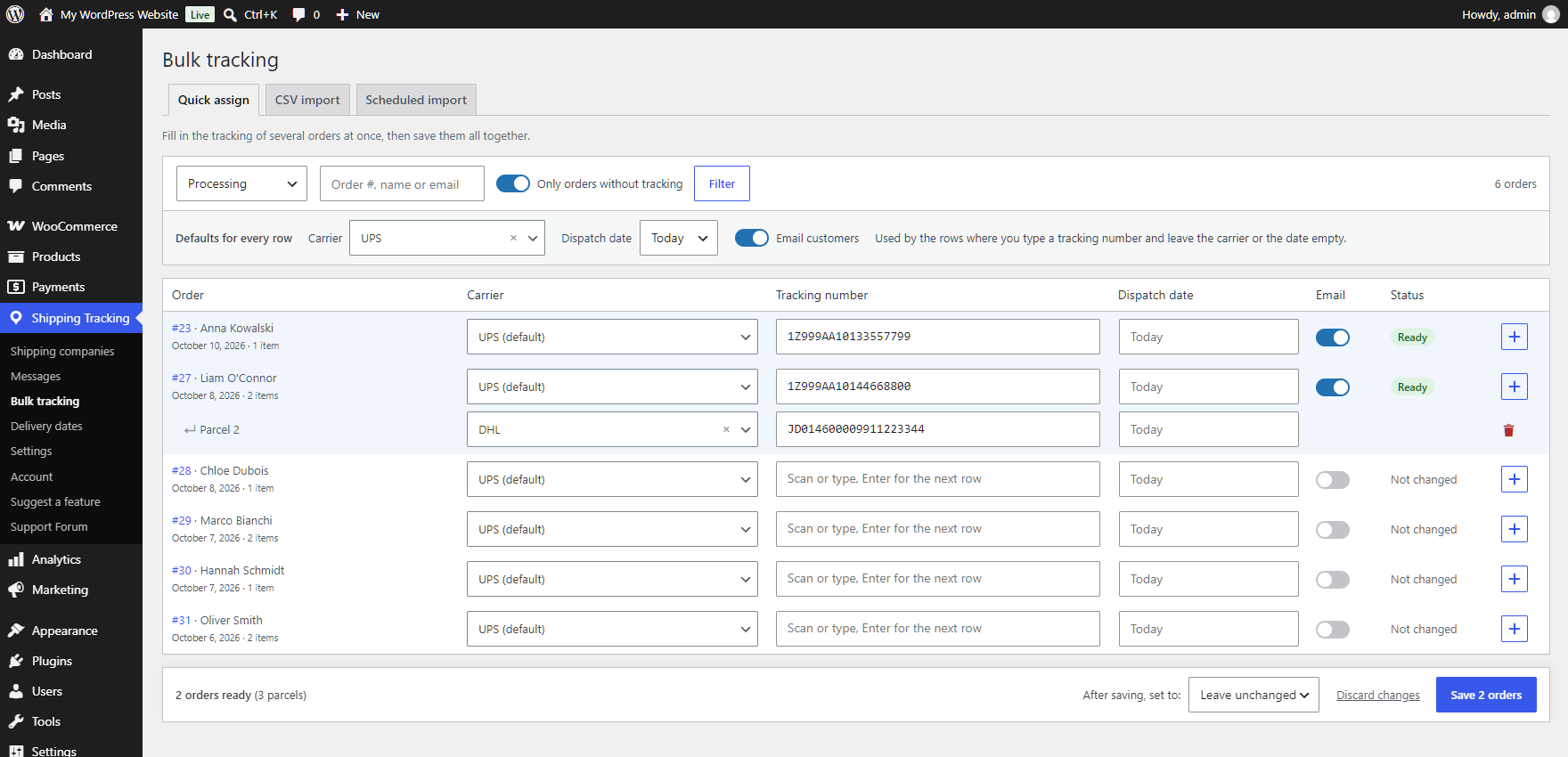
Premium: Quick assign — set the carrier, the date and the customer email once, scan or type the tracking numbers, and see which orders are ready before you save.
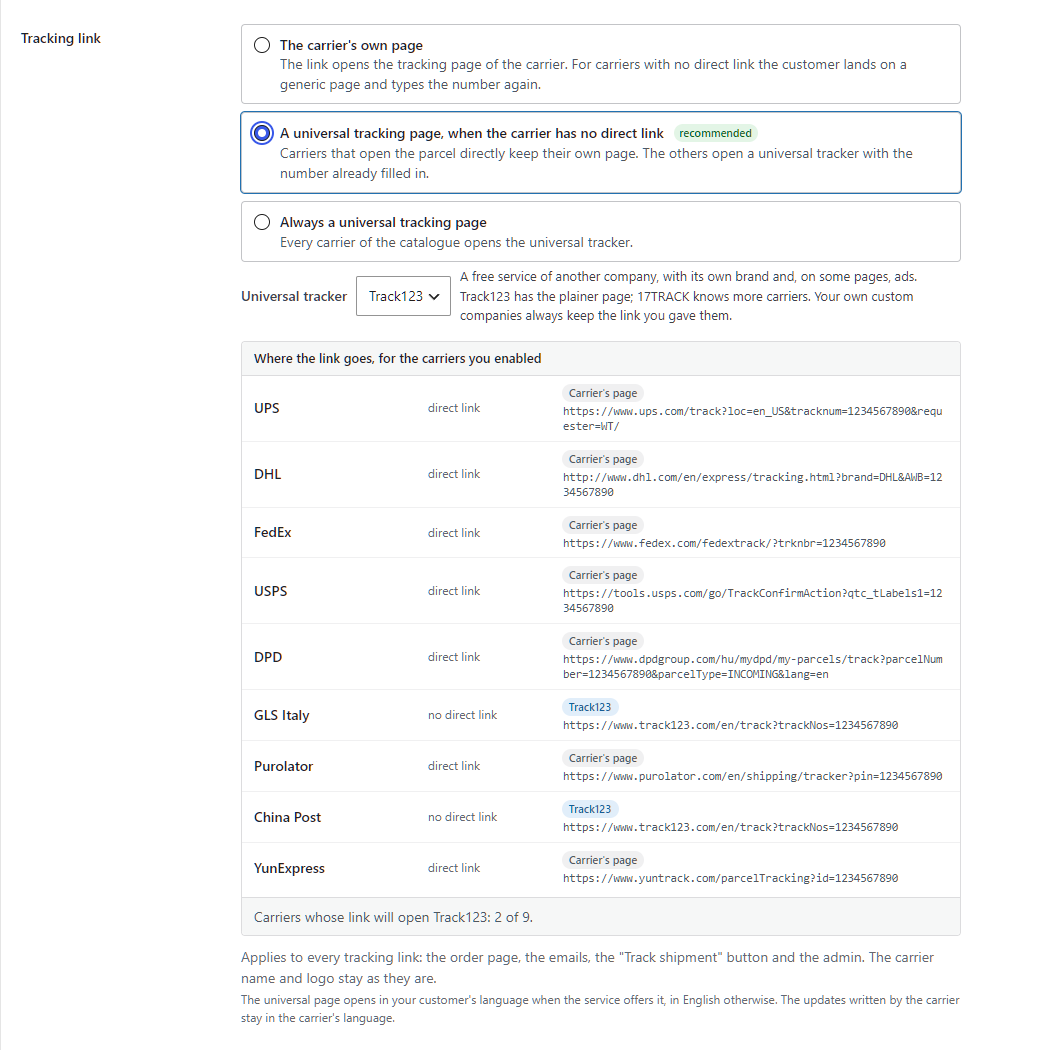
Send the tracking link to a universal tracking page — Track123 or 17TRACK — for the carriers that have no direct link, or for all of them; the table shows where the link of each of your carriers goes.
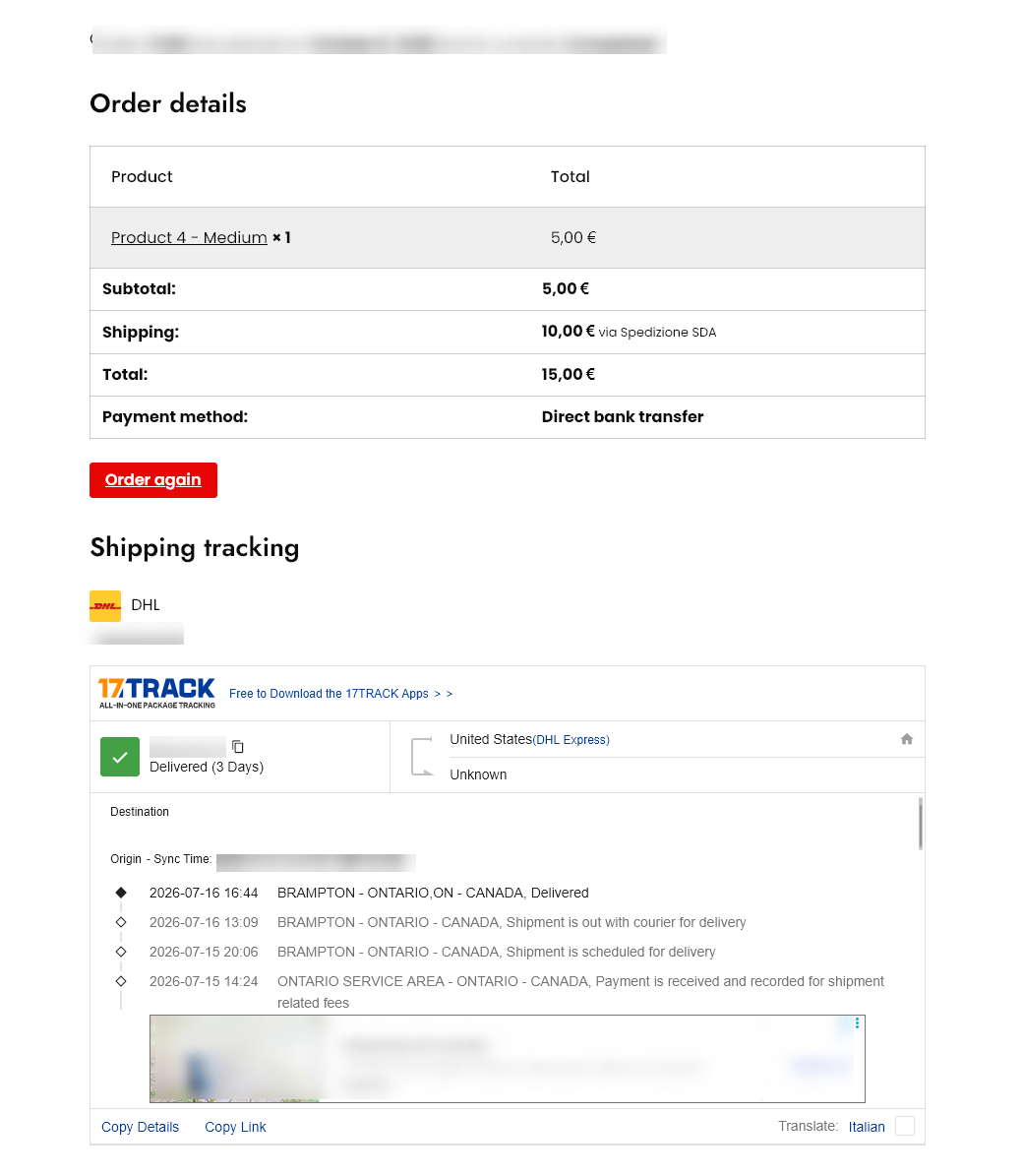
Premium: the shipment status on your customer's order page with no account, through the 17TRACK widget.