BACK TO DIRECTORY
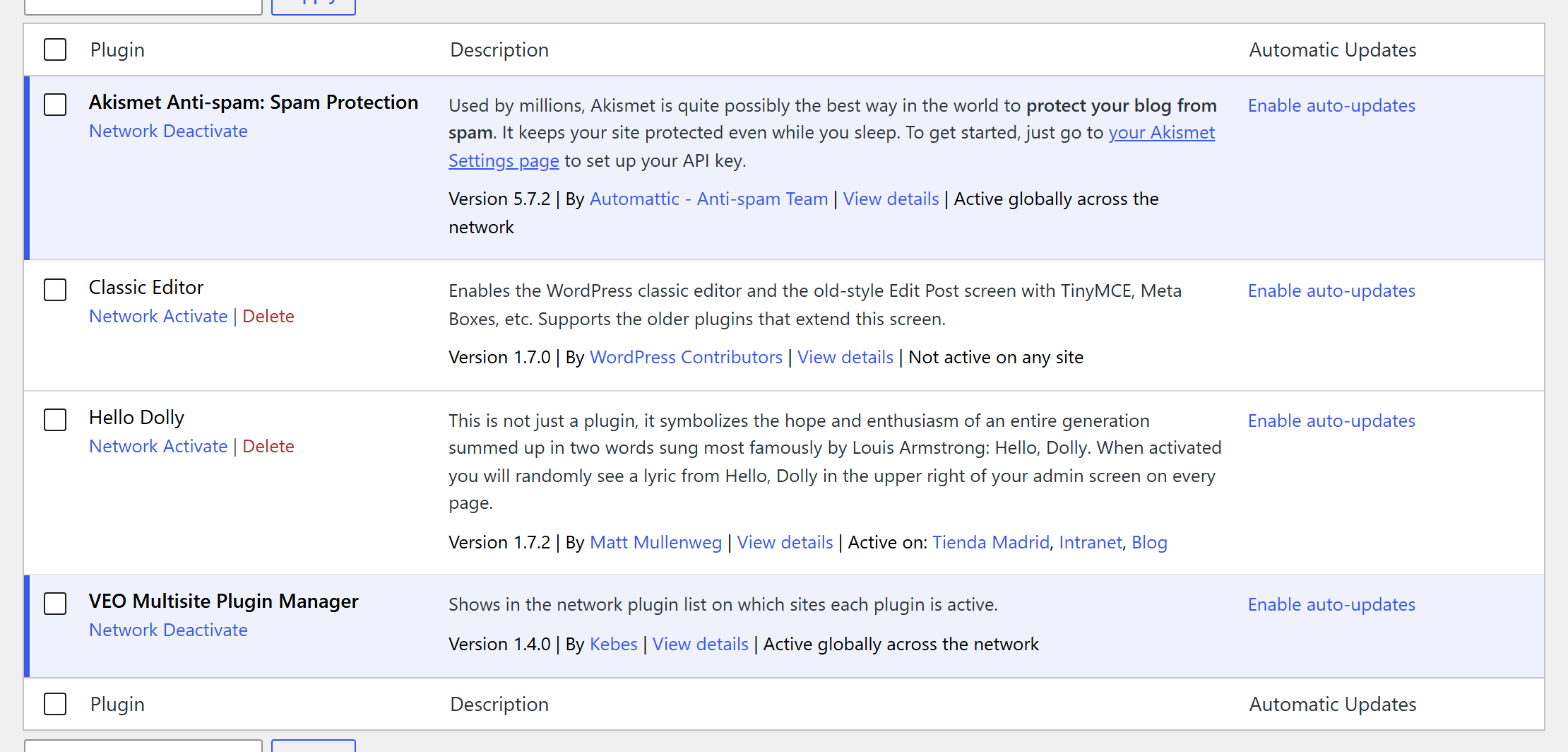
In a WordPress Multisite network, the Network Admin plugin list only tells you whether a plugin is network active. To know which sites use a plugin activated per site, you have to open every site.
VEO Multisite Plugin Manager adds that information to each row of Network Admin › Plugins:
- Active globally across the network when the plugin is network activated.
- Active on: followed by the sites where it is active, each one linking to that site’s plugin screen.
- Not active on any site when nobody uses it, so you can spot plugins that are safe to remove.
It only reads data: it never activates, deactivates or changes plugins, and it adds no settings, tables or options.
The list is shown only in the Network Admin and only to users who can manage network plugins (Super Admins). Site administrators never see which other sites exist in the network.
Screenshots
Network Admin › Plugins: each plugin shows whether it is network active, on which sites it is active, or that no site uses it.
Plugin Details
Active Installs
0Total Downloads
657Version
1.4.0Requires WP
4.6Requires PHP
7.0Tested Up To
7.1.4Added
2025-08-09Last Updated
2026-10-20 5:38pm GMTRatings
5
0
4
0
3
0
2
0
1
0