Voomo Blog to Video turns your WordPress posts into shareable videos through the Voomo.ai service. When a post is published we notify your Voomo integration, wait for the generated video URL, download it into the WordPress Media Library, and optionally embed it at the top of the post for you.
Key features
- Single settings screen to store your Organization ID and API Key
- Downloads the remote video to the Media Library using a consistent naming pattern
- Optional “Embed video automatically” toggle that inserts the saved video at the top of your post
- Automatic video generation when posts are published
- Videos are always saved to your WordPress Media Library
- Videos are also available in your Voomo account dashboard
- Optional YouTube auto-upload when you connect your channel in Voomo workspace settings
Requirements
- A WordPress website
- A Voomo account (create one at https://app.voomo.ai)
- Organization ID + API key from your Voomo dashboard
- Access to your Voomo workspace settings to adjust how videos are generated
Troubleshooting
Verification Failed
- Double-check that your Organization ID and API Key are correct
- Ensure your blog domain in Voomo matches your WordPress site URL exactly
- Make sure your WordPress site is accessible from the internet
Video Not Generating
- Verify that your post was published (not just saved as draft)
- Check that your Voomo account has sufficient credits/quota
- Review the Voomo column in your Posts list to see the generation status
Domain Mismatch Error
- Ensure the blog domain in Voomo workspace settings exactly matches your WordPress site URL
- The domain validation is case-sensitive and must include the protocol (http:// or https://)
External Services
This plugin requires the use of external services provided by Voomo.ai to function. The following external services are used:
Voomo API Service
What the service is and what it is used for:
The plugin connects to the Voomo API service (dashboard-api.voomo.ai) to request video generation for your blog posts and to verify your API credentials. This service is essential for the plugin’s core functionality of converting blog posts into videos.
What data is sent and when:
-
When a blog post is published: The plugin automatically sends the following data to Voomo’s API:
- Post ID (numeric identifier)
- Post title (text)
- Post URL (the full permalink to your published post)
- Your Organization ID (identifier for your Voomo account)
- Your API Key (authentication credential)
-
When verifying credentials in plugin settings: The plugin sends the following data to Voomo’s API:
- Your Organization ID
- Your API Key
Voomo Video Hosting Service
What the service is and what it is used for:
The plugin downloads generated video files from Voomo’s video hosting servers. After Voomo generates a video for your blog post, the plugin receives a video URL via webhook callback and downloads the video file to your WordPress Media Library.
What data is sent and when:
- When downloading videos: The plugin makes HTTP requests to download video files from URLs provided by Voomo. No additional data is sent beyond the video URL request. The video files are downloaded automatically when Voomo notifies the plugin that video generation is complete (via webhook callback).
Service provider information:
This service is provided by Voomo.ai:
* Terms of Service: https://www.voomo.ai/terms
* Privacy Policy: https://www.voomo.ai/privacy-policy
Note: All data transmission to Voomo services occurs over encrypted HTTPS connections. Your API credentials are stored securely in your WordPress database and are only transmitted when necessary for API authentication.
Screenshots
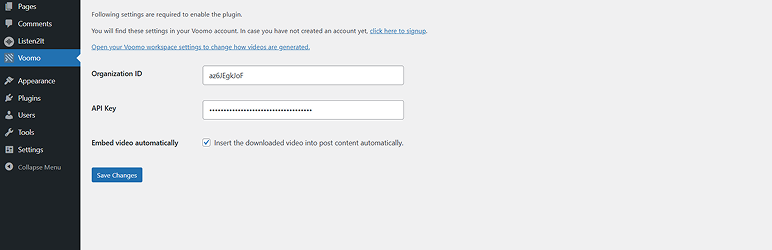
WordPress dashboard settings screen with Organization ID and API Key fields (plus auto-embed toggle).

Voomo dashboard workspace configuration showing avatar, voice, media type, and related options.

Voomo workspace settings where a YouTube account is connected so new blog posts automatically generate and upload videos to YouTube.