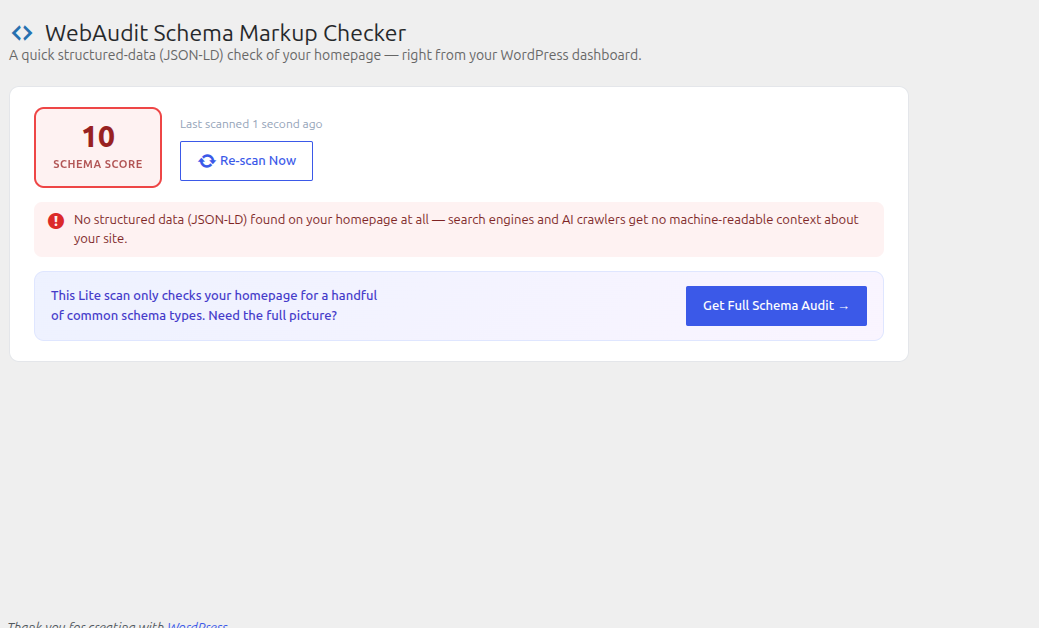
WebAudit Schema Markup Checker scans your own site’s homepage for structured data (JSON-LD schema) and shows a quick Schema Score directly in your WordPress dashboard — no external tools, no signup required for the Lite check.
- Schema Score (0–100) — calculated from how much of your JSON-LD structured data is present, valid, and complete
- Dashboard widget — see your score at a glance every time you log in
- Detects common schema types — Organization, WebSite, FAQPage, and more, plus whether Organization schema includes a logo and social profile (
sameAs) links - Catches invalid JSON — flags schema blocks that are malformed and will be silently ignored by search engines
- Re-scan on demand — results are cached (default 12 hours) but you can force a fresh scan anytime
- “Get Full Schema Audit” — a clearly-marked upgrade path to a complete structured-data audit at WebAudit AI Tool
How it works
- Install and activate the plugin
- Open Schema Checker in your WordPress admin menu, or check the dashboard widget
- The plugin fetches your own homepage and scores its structured data
- Fix what’s flagged, or click Get Full Schema Audit for the complete report
External services
This plugin fetches your own site’s homepage (via wp_remote_get() to your site’s own home_url()) to compute the Schema Score shown in your dashboard. No data from this scan is sent anywhere; the request stays between your server and itself.
The “Get Full Schema Audit” button is a plain outbound link, followed only if you click it. It opens WebAudit AI Tool (https://webauditaitool.com/audit by default, configurable under Schema Checker Settings) in a new tab, passing your homepage URL and Lite Schema Score as URL query parameters so the destination page can be pre-filled. No request is made to this service unless you click the button.
WebAudit AI Tool is operated by the plugin author. See their terms of service (https://webauditaitool.com/terms) and privacy policy (https://webauditaitool.com/privacy).
Screenshots