BACK TO DIRECTORY
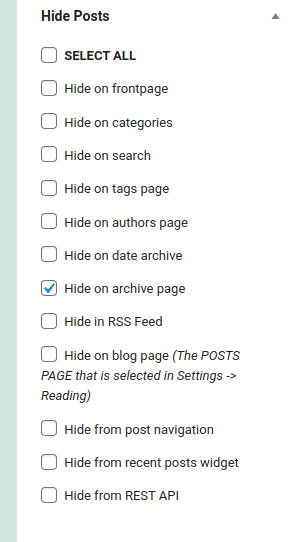

Publish it — without putting it everywhere. Hide Posts gives you a simple checklist on every post, page, or product that controls exactly where it appears: keep a post out of the homepage and archives, off the search results, out of your RSS feed and REST API, or invisible to XML sitemaps and Yoast SEO — while it stays perfectly reachable at its own URL.
Perfect for syndication-only articles, landing pages, evergreen content you don’t want cluttering the blog roll, or products that should only be found via direct link.
Choose exactly where a post is hidden:
- Site pages — homepage, blog page, category, tag, author, and date archives, search results, post navigation (previous/next), and the Recent Posts widget
- Feeds & APIs — RSS feed and the REST API
- Sitemaps & SEO — WordPress core XML sitemaps, Yoast SEO sitemap, Yoast breadcrumbs, and Yoast internal link suggestions
- WooCommerce — hide products from the shop page, product category pages, and the store REST API
Built for real editorial workflows:
- Full Block Editor support — a native sidebar panel with all hide options, plus the classic metabox
- Works with the Query Loop block and custom queries
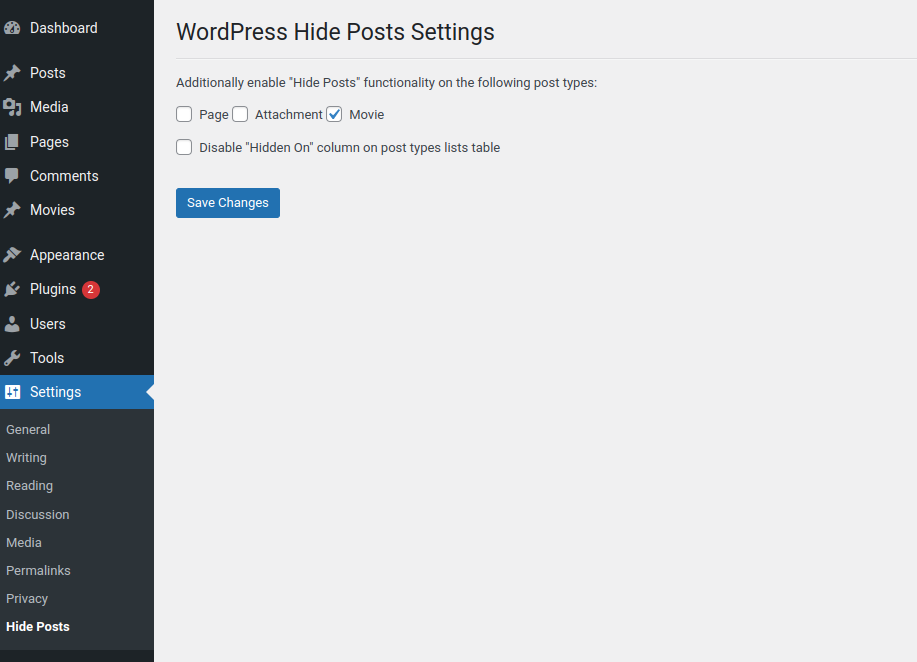
- Enable hiding for any Custom Post Type from the settings page
- Bulk Edit and Quick Edit support for managing many posts at once
- “Hidden On” column in the posts list so you always see what’s hidden where
- Custom database table and layered caching — no postmeta bloat, no slow queries on busy sites
Screenshots
The Settings screen for the plugin.
The Hide Posts options in the Add / Edit post screen.
Post Lists table 'Hidden on' column.
Plugin Details
Active Installs
20K+Total Downloads
278,091Version
2.1.2Requires WP
5.0Requires PHP
7.3Tested Up To
7.1.4Added
2017-10-11Last Updated
2026-07-30 7:39pm GMTRatings
5
20
4
0
3
0
2
1
1
1