A broken plugin update can take a whole site down — and WordPress’ built-in recovery mode only pauses the plugin for the administrator who clicks the recovery link, while every visitor keeps seeing the error.
This plugin works like an electrical circuit breaker: it counts PHP fatal errors per plugin within a configurable time window. When the same plugin keeps crashing (default: 5 fatals within 10 minutes), the breaker trips and the plugin is deactivated automatically. Your site keeps running without the broken plugin instead of staying down.
Plugins your site must not run without (shop, membership, security) can be ticked off as protected — they are never deactivated automatically. For protected plugins you only get a notification, so a human can decide.
Optionally, a webhook URL (Slack, Discord, n8n, …) can be configured. Whenever the breaker trips — or a protected plugin keeps crashing — a notification is sent there.
What the breaker does when it trips:
- Removes the broken plugin from the active plugins — without running any of its deactivation hooks (the plugin is broken; running its code would be exactly the wrong move).
- Shows a persistent admin notice with the error details until you reactivate the plugin.
- Sends a webhook notification if a webhook URL is configured.
External services
The plugin has no service of its own. It sends data only to the webhook URL you enter on its settings page — Slack, Discord, n8n or whatever you choose — and contacts nothing else. The terms and privacy policy of the service you point it at apply.
Nothing is sent until you save a URL. After that:
- The “Send test message” button sends a fixed message plus your site address.
- When the breaker trips, it sends: site address, the slug of the affected plugin, how many fatal errors occurred within which time window, the first line of the error message, and the file and line the fatal came from.
- When a protected plugin reaches the threshold, the same data is sent without the file and line, together with the note that nothing was deactivated.
No visitor data is included — no IP addresses, cookies, form contents or accounts.
Screenshots
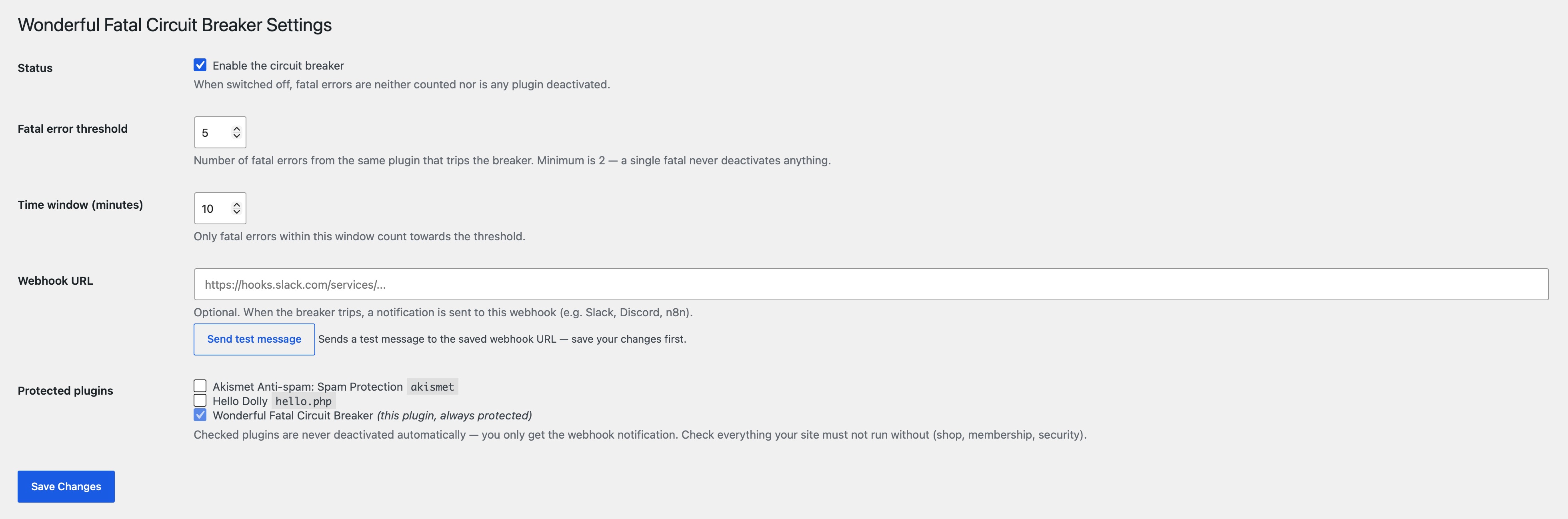
The settings page: threshold, time window, webhook URL, and the list of protected plugins.