BACK TO DIRECTORY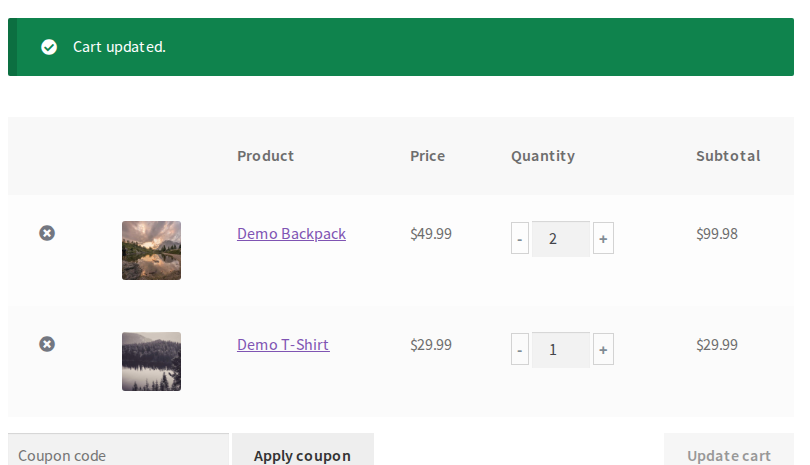
Ajax Cart for WooCommerce makes buying smoother in two ways:
- On the classic cart page (the
[woocommerce_cart]shortcode most stores and classic themes use), totals are recalculated with AJAX as soon as a quantity changes — no “Update cart” click — with -/+ buttons around the quantity. - A side cart (optional): a cart drawer that slides in from the side when a product is added, with a floating cart button — on classic and block themes alike, on every page but the cart and checkout.
On the newer Cart block (the default for stores created since WooCommerce 8.3), WooCommerce already updates quantities by itself; there the plugin adds a confirmation before an item is removed, and the side cart works the same.
No other hacks, code or theme changes are needed: the features are active as soon as the plugin is.
You can try and play with this plugin demonstration clicking here
Free version features:
- Automatically reload and recalculate the classic Cart using AJAX when quantity changes
- Show -/+ buttons around item quantity on cart page
- Show item quantity as select instead numeric field
- Show user confirmation when change item quantity to zero — and, on the Cart block, before an item is removed
- Side cart: a cart drawer that slides in when a product is added, with a floating cart button and item count
Premium version features:
- Allow to change/synchronize quantities in shop, minicart and single product pages view demo
- Make the
Add to cartbutton to perform with AJAX, without full page reload view demo - Faster AJAX reload call when change quantities in Cart page
- Option to lock quantity inputs to allow only change using plus and minus buttons
- Update price vs quantity calculation automatically on Single Product pages
- Change quantities with -/+ buttons inside the side cart
- Free shipping progress bar (“Spend $12.00 more for free shipping”) in the side cart, Mini-Cart, classic Cart and Cart block — the amount read from your free shipping method, or your own
- Undo a removed item on the Cart block
- Minimum, maximum and step for every product quantity, on the classic and the block cart
If you looking for a related plugin with more complete features maybe you can try Better Usability for WooCommerce plugin.
Screenshots
The cart page: a click on "+" or "-" updates the totals with AJAX, without clicking "Update cart".
Plugin Details
Active Installs
5K+Total Downloads
182,749Version
1.4.0Requires WP
5.0Requires PHP
—Tested Up To
7.1.3Added
2015-06-22Last Updated
2026-10-27 12:02am GMTRatings
5
32
4
0
3
1
2
1
1
5