Turns WordPress instalation into powerful pizzeria site backend with ability to add pizzas, beverages and pasta.
Attract your customer
Plugin displays pizzas in clean menu table with all your customer needs to know – menu number, title, ingrediences, price for various sizes.
But that’s not all. Your site visitor is able to filter pizzas by ingrediences and thus he/she is able to find her favorite pizza in few seconds!
Multiple pizza sizes and prices
You get an ability to manage your pizzas in clean, fast and primarily WordPress style. Via plugin’s settings page you can add multiple pizza sizes and for each size, you can set custom price.
Works in any theme
This plugin provides both template_functions and shortcodes – thus works in any theme you’d like to use.
Translations
Czech – David Biňovec – david.binda
French – Stephane CRASNIER
Do you want more functionality?
Do not hesitate to ask for it. I’m open to any suggestions. Use the plugin’s support forum!
Usage
To add content, it’s easy as adding post. In your administration, you can see another post types except default post and pages. These are called Pizzas, Beverages and Pasta.
You can add them in a way you’re used to add standard post or page. Plus, you can set extra params in custom metaboxes on your edit page.
In order to get new post types (pizza, beverage, pasta) to actually appear on your web, you’ll have to either:
- Place
<?php pizza_loop(); ?>into a copy of your archive template called archive-wp_pizzeria_pizza.php instead of default loop. - Place
<?php beverages_loop(); ?>into a copy of your archive template called archive-wp_pizzeria_beverage.php instead of default loop. - Place
<?php pasta_loop(); ?>into a copy of your archive template called archive-wp_pizzeria_pasta.php instead of default loop. - Place
<?php dessert_loop(); ?>into a copy of your archive template called archive-wp_pizzeria_dessert.php instead of default loop.
or
- Place
[pizzas]shortcode into a page where you’d like to display pizzas. - Place
[beverages]shortcode into a page where you’d like to display beverages. - Place
[pasta]shortcode into a page where you’d like to display pasta. - Place
[desserts]shortcode into a page where you’d like to display desserts.
or
- Place
[pizzas cat="term-slug"]shortcode into a page where you’d like to display pizzas only of selected term. - Place
[beverages cat="term-slug"]shortcode into a page where you’d like to display beverages only of selected term. - Place
[pasta cat="term-slug"]shortcode into a page where you’d like to display pasta only of selected term. - Place
[desserts cat="term-slug"]shortcode into a page where you’d like to display desserts only of selected term.
Screenshots
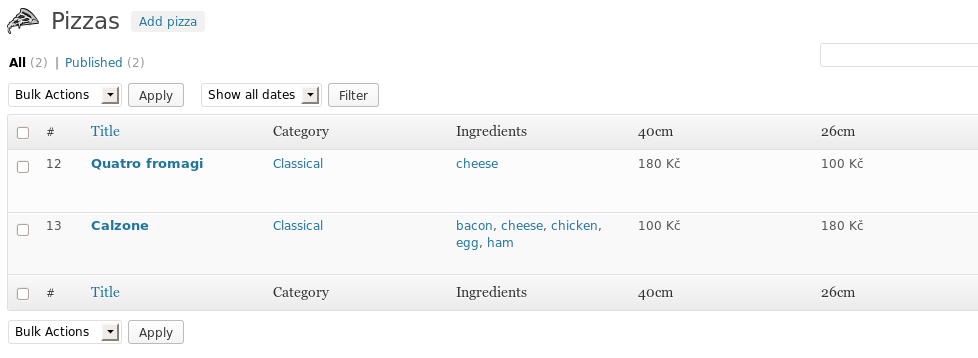
Clean and useful pizza overview for administrators

Frontend pizza filtering for easy choose

Handy extended description for your pizzas

Easy to use settins page

Simple and Quick admin menu

Edit your pizza's fast right from the overview

Ability to add ingredient image

Extended dashboard Right now widget