BACK TO DIRECTORY

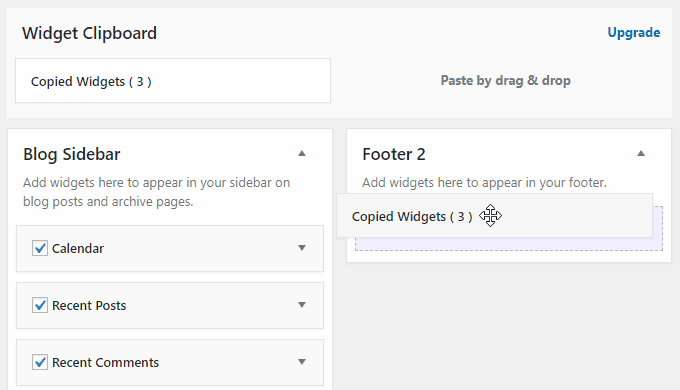
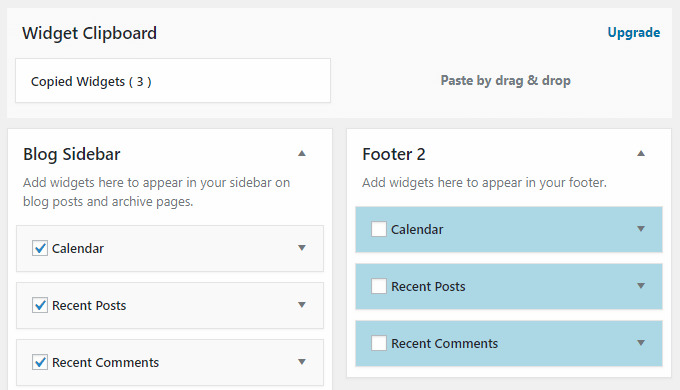
Duplicate multiple widgets by drag & drop. so you can intuitively copy and paste widgets.
It is hard to copy widgets one by one manually. Using this plugin makes duplicating widgets very easy.
Widgets duplication procedure is the following :
- Select multiple widgets you want to copy.
- Then drag and drop “Coied Widget” which in clipboard to any position.
- Selected widgets is duplicated at that location.
Or, you can duplicate widgets individually.
For more detailed usage, install this plugin and read usage manual by opening “Settings” -> “WP Widget Clipboard” from the menu.
Screenshots
Select multiple widgets you want to copy.
Then drag and drop "Coied Widget" which in clipboard to any position.
Selected widgets is duplicated at that location.
Plugin Details
Active Installs
700Total Downloads
9,950Version
1.2.15Requires WP
3.3Requires PHP
—Tested Up To
5.3.27Added
2018-09-28Last Updated
2019-11-28 4:42am GMTRatings
5
5
4
0
3
0
2
0
1
0