
SEO made easier
WWB SEO Master is a free WordPress SEO plugin that helps search engines understand
your website and helps you control how pages can appear in search results and on
social media. You do not need to be an SEO expert. The plugin explains what it
finds, why it matters and what you should work on first.
Developed and maintained by Wild Web Builder,
an independent WordPress and web-systems studio.
What can you use it for?
- See the most important SEO tasks first instead of working through a confusing checklist.
- Improve SEO titles, meta descriptions and search previews for individual pages.
- Control canonical URLs, indexing, social sharing and structured data.
- Find technical problems, broken links, missing metadata and internal-link opportunities.
- Create and manage redirects, XML sitemaps, breadcrumbs and robots rules.
- Review content quality, keyword focus, competing pages and pages that need refreshing.
- Prepare safe, reviewable AI suggestions without allowing automatic publishing.
- Measure selected SEO changes and remember what worked on your own website.
Start with the guided Overview and Next actions pages. Use the specialist tools only
when you need them. Features are grouped into clear workspaces, and modules can be
enabled separately so you stay in control of what runs on your site.
Support independent development
WWB SEO Master is built and maintained with care. If the plugin helps your site,
please consider leaving an honest review on WordPress.org. Your feedback helps
other site owners discover the plugin and supports continued improvements.
Leave a review on WordPress.org
Main features
- Write SEO titles and meta descriptions for posts, pages and public taxonomies.
- Set canonical URLs and robots metadata to control preferred URLs and indexing.
- Add Open Graph and X metadata for clearer social-media sharing.
- Generate connected JSON-LD structured data with a guided schema builder.
- Use the WordPress XML sitemap with additional sitemap and robots.txt controls.
- Run understandable content audits and technical SEO scans with prioritized actions.
- Rank work with an explainable Evidence Priority Engine based on impact, page value, confidence, ease and change safety.
- Find internal-link opportunities and pages that may need more incoming links.
- Create redirects, automatically redirect changed permalinks and monitor 404 errors.
- Add breadcrumbs and manage SEO for categories, tags and other public taxonomies.
- Control indexing and redirects for author archives, date archives and media attachment pages.
- Import supported metadata from Yoast SEO, Rank Math, SEOPress and All in One SEO.
- View optional read-only Google Search Console reports and inspect individual URLs.
- Use multilingual checks and integrations for common WordPress content workflows.
- Review a bounded SEO change history with before/after values and restore earlier versions safely.
- Assign separate access for SEO reports, content metadata, redirects, AI tools and global settings by WordPress role.
- Build reusable SEO title and description templates per public content type with live previews and safe variables.
- Recover high-value 404 URLs with local destination suggestions and reviewed one-click 301 redirects.
- Review redirect health and move redirect lists safely with preview-first CSV import and export.
- Control which public content types and taxonomies appear in the WordPress XML sitemap.
- Set validated default schema types per public content type while retaining page-level overrides.
- Review schema completeness across published content with direct repair actions.
- Find pages with meaningful organic click decline and prioritize content refreshes.
- Measure SEO metadata changes against equal Search Console periods with transparent confidence labels.
- Plan focused SEO Impact Lab experiments before changing content, then connect the change, compare equal periods and record the decision.
- Build a private, site-specific decision memory from completed experiments without sending results to WWB.
- Restore the SEO fields from before a negative experiment while preserving a new history entry.
- Follow published URLs through robots, canonical, sitemap and optional Google inspection evidence in one Index Intelligence Center.
- Follow a beginner-friendly SEO Guide with a recommended workflow, plain-language reasons and direct links to the right tools.
- Prioritize page-level relevance and helpful-content reviews in an explainable Content Quality & Relevance Center.
- Trace broken and risky links back to the exact post, page, menu, taxonomy description or author bio that contains them.
- Review taxonomy archive metadata and multilingual canonical or indexability consistency without penalizing optional opportunities.
- Share selected read-only SEO evidence with authorized WordPress Abilities API clients while retaining capability controls.
AEO, GEO and AI search tools
Search is changing, but the basics still matter. Clear metadata, crawlable pages,
useful content and accurate structured data help traditional search engines and
can also make content easier for answer engines and AI-powered search to understand.
WWB SEO Master includes answer helpers, entity-based schema, AI crawler controls
and an optional /llms.txt file. These tools support answer engine optimization
(AEO), generative engine optimization (GEO) and AI-search readiness, but they do
not guarantee rankings, citations or inclusion in AI answers. Google Search does
not currently use llms.txt.
The optional AI assistant can suggest metadata and content improvements. AI is
disabled by default, runs only after an authorized user requests it and never
publishes changes automatically. WordPress 7.0 or newer can use the built-in
WordPress AI Client. Older versions can use an administrator-configured OpenAI
fallback.
About Wild Web Builder
WWB SEO Master is created and maintained by Wild Web Builder,
an independent digital studio specializing in custom WordPress websites, plugin
development and complete web-based systems. We combine strategy, user-focused
design, development, performance and search-friendly architecture to build
solutions around real business needs.
Learn more about our websites, plugins and digital solutions at
wildwebbuilder.com.
Privacy and control
There are no advertisements, license checks or usage telemetry. Most features run
entirely on your WordPress site. Optional external services are documented below
and are contacted only when an authorized user configures and uses them.
Deactivation keeps your settings and SEO metadata. When the plugin is deleted,
permanent cleanup follows the setting under WWB SEO > Settings. Clean removal is
enabled by default for new installations; existing installations keep their saved
preference.
External Services
This plugin has no licensing, update-check, advertising, analytics or telemetry
service. The following optional services are used only when a site administrator
configures and invokes their associated features.
External link checks
Link Intelligence runs locally by default. When an authorized user explicitly
selects the external-destination option, WWB sends limited HEAD requests, with a
bounded GET fallback for servers that reject HEAD, to no more than 50 unique public
URLs found in site content. The request reveals the site server IP address and a
WWB SEO user-agent to each destination. No page content, user identity or analytics
data is sent. External checks are never scheduled or enabled automatically.
WordPress AI Client and configured AI provider
On WordPress 7.0 or newer, the plugin first calls wp_ai_client_prompt(). The
WordPress AI Client selects a compatible AI provider from connectors installed
and configured by the site owner. WWB SEO does not install a connector and does
not control which provider the owner selects.
When an authorized editor manually requests page optimization, the prompt may
contain the site name, locale, public page URL, saved page title, saved SEO/social
metadata, schema type, up to twelve matching read-only Search Console query rows
and a bounded plain-text copy of the saved page content. If the editor explicitly
selects live competitor research, the request also asks a capable provider to
use web search and can return URLs and summarized patterns for manual review. When an
administrator manually requests backlink candidates, it may contain the site
name and URL, business goal, audience, location and up to eight recent public
page titles and URLs. That second request also asks a capable provider to use web
search. No prompt is sent automatically or in the background.
Data handling, retention, billing, terms and privacy are determined by the AI
connector and provider configured by the site owner. See the
WordPress AI Client documentation
and the selected connector/provider documentation before enabling this feature.
OpenAI fallback
The optional backward-compatible fallback sends manual AI requests to
https://api.openai.com/v1/responses. It is used only when the WordPress AI
Client is unavailable or cannot support the requested capability and a site
administrator has saved an OpenAI API key.
Page-optimization and backlink-candidate requests contain the same bounded data
described above. A pseudonymous HMAC identifier derived from the current local
user ID can also be sent for abuse prevention; it is not the WordPress username,
email address or raw user ID. Requests set store: false. Backlink research and
explicitly selected metadata competitor research may enable OpenAI web search.
The encrypted API key remains on the WordPress site and
is transmitted only in the authorization header for the request. Nothing is sent
until an authorized user explicitly runs an AI action.
OpenAI API use is subject to OpenAI’s
terms and
privacy policy. API usage may be
billed to the key owner.
Google OAuth and Search Console
The optional Search Console module communicates with these Google endpoints:
https://accounts.google.com/o/oauth2/v2/authfor administrator-initiated OAuth consent.https://oauth2.googleapis.com/tokento exchange and refresh OAuth tokens.https://www.googleapis.com/webmasters/v3/for verified properties and read-only performance reports.https://searchconsole.googleapis.com/v1/urlInspection/index:inspectfor administrator-requested URL inspection.
The OAuth client ID, authorization code, encrypted client secret and encrypted
tokens are used for authentication. Selected property, date ranges, report
dimensions and administrator-entered inspection URLs are sent as needed. The
module requests the read-only webmasters.readonly scope. Performance results
are cached locally for one hour and inspection results for six hours. Disconnect
removes stored tokens and the selected property. Google use is subject to the
Google Terms of Service and
Google Privacy Policy.
Screenshots

SEO Command Center turns site-wide evidence into a clear health overview and guided improvement path.

Next actions prioritizes the most valuable SEO missions instead of presenting an overwhelming checklist.

SEO Autopilot scans published content and prepares reviewable, reversible improvements that require approval.

SEO Impact Lab measures important changes over equal periods and records what worked for the website.

The editor overview combines publishing readiness, saved-state feedback, schema status and internal-link opportunities.
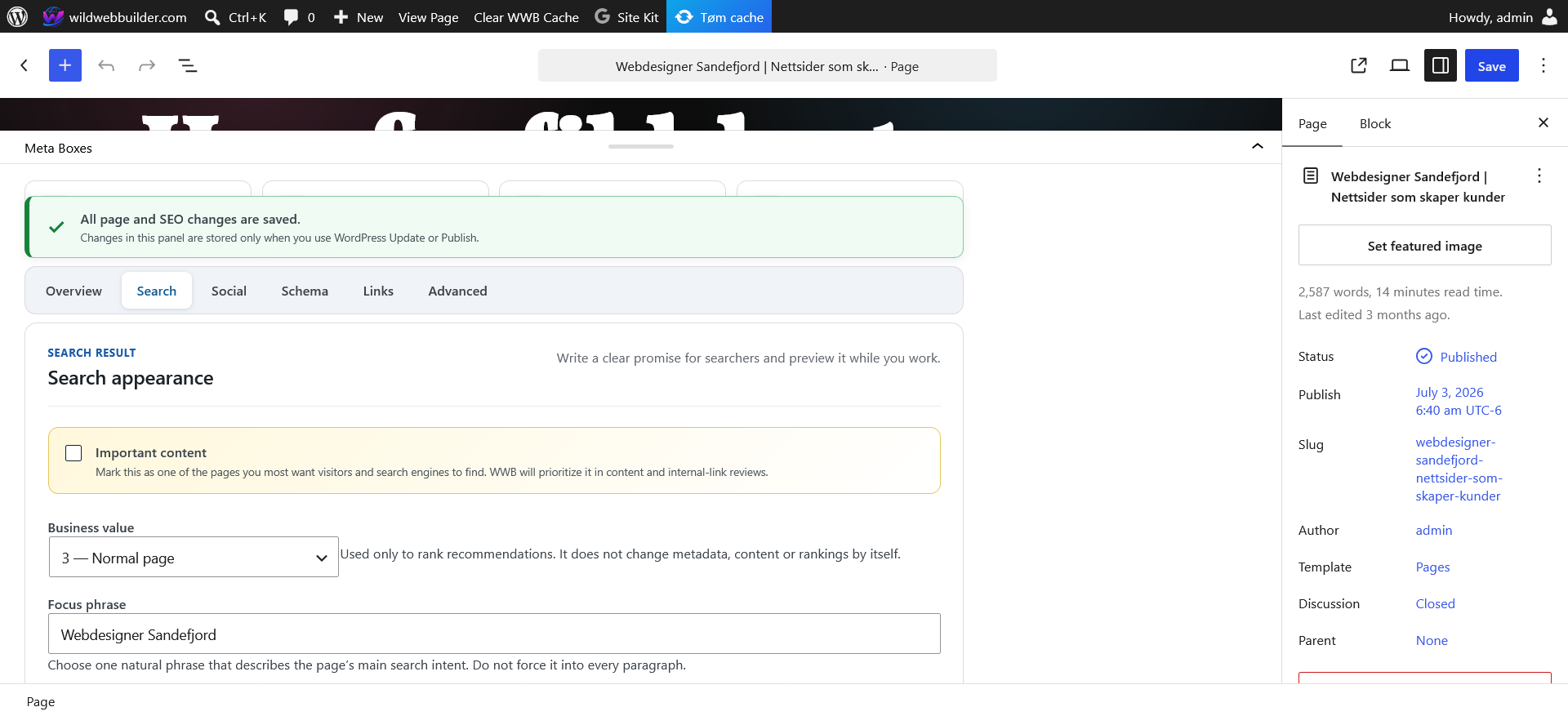
Search controls keep focus phrase, business value and search appearance decisions together in the editor.

Optional provider-aware AI prepares one reviewable SEO, AIO, GEO and AEO improvement package without automatic publishing.

Content workspace groups the portfolio, content quality, keyword mapping and related specialist tools.

Technical SEO workspace provides direct access to audits, index intelligence, schema health, sitemaps and redirects.

Search and AI workspace keeps optional Search Console evidence, AI readiness and assisted workflows together.

The practical SEO Guide explains the recommended workflow, priorities and limits in plain language.

Settings workspace organizes global behavior, templates, schema defaults, access controls and configuration transfer.